

mwlogin.net Admin Interface Login
mwlogin.net Admin Interface Login
To login to the Mercusys Network admin interface, navigate to http://192.168.1.1 or http://mwlogin.net
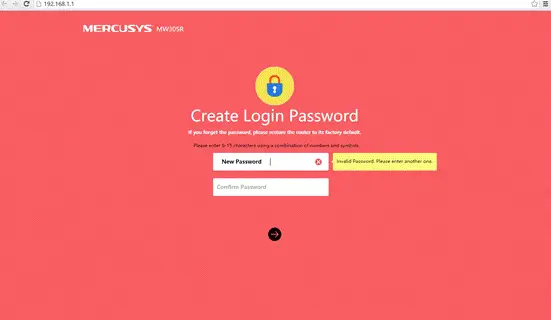
There is no default login password for MERCUSYS Wireless Router. When you login to the management page of the router for the first time, it will ask you to create a login password. If you have forgot the login password you’ve created, there is no way to find it. You need reset it to factory default and configure it as a new one.

- Directly press and hold the reset button on the rear panel with a pin for approximately 10 seconds when the device is running.

- Release the reset button and wait for the device to reboot.
Note
- Make certain that the router is powered on before it restarts completely.
- The default IP address is 192.168.1.1 (or http://mwlogin.net/).
- Ensure that the IP address of your computer is in the same subnet with the device. It means that your computer has an IP address 192.168.1.X (X is in range of 2~253), and the subnet mask is 255.255.255.0.
FAQ’S
There is no default login password for MERCUSYS Wireless Router. When you login to the management page of the router for the first time, it will ask you to create a login password. If you have forgot the login password you’ve created, there is no way to find it. You need reset it to factory default and configure it as a new one.
Directly press and hold the reset button on the rear panel with a pin for approximately 10 seconds when the device is running. Release the reset button and wait for the device to reboot.
Make certain that the router is powered on before it restarts completely. The default IP address is 192.168.1.1 (or http://mwlogin.net/). Ensure that the IP address of your computer is in the same subnet with the device. It means that your computer has an IP address 192.168.1.X (X is in range of 2~253), and the subnet mask is 255.255.255.0..
Please refer to our website http://www.mercusys-wireless-router-support
number-1-800-903-1322/mercusys-wireless-router-tutorials/ or contact our technical support team at 1 800 903 1322
To access the configuration page of the wireless router, open a Web browser such as Internet Explorer (IE) and enter (IP address of the wireless router) in the address bar.
Enter admin in the Username field and leave the password blank by default.
Open a web browser.
Then type your router’s IP address into the search bar and press the Enter key.
Next, enter your router’s username and password and click Sign In.
Then click Wireless.
Next, change your new WiFi name and password.
Finally, click Apply or Save.
Open a web browser, type your router’s IP address in the address bar, then press Enter. Enter your router’s user name and password. You’ll then be logged into the router’s admin page. From here, you can view and change your network settings.
If you cannot reach the login page, it may be due to:
A hardwired connection configuration issue (such as a bad Ethernet cable) Entering the IP address incorrectly. An IP address issue on the computer.
Open a web browser such as Internet Explorer.
Go to the Address bar and enter the IP Address of your router then press Enter. For example, 192.168. …
A new window prompts for a User name and Password. Type admin for User name and Password, since admin is the default user name password, and then click OK.
Most Mercusys routers use 192.168. 0.1/192.168. 1.1 as their default LAN IP address, which may conflict with the IP range of your existing ADSL modem/router.
Choose your connection type (Wired or Wireless)
Open a web browser (i.e Safari, Google Chrome or Internet Explorer).
Make a new password on the login page.
Click on the arrow to login, you can then login to the WEB based management page.
Mercusys offers robust routers, range extenders, adapters, and switches that are super easy to set up to provide a reliable network for home.
VIDEO
www://mercusys.com/
References
- User Manualmanual.tools
Why can’t I log in? what’s the problem I bought the product and can’t connect.
ทำไมเข้าระบบไม่ได้ เกิดปัญหาอะไรขึ้น ซื้อสินค้ามาไม่สามารถเชื่อมต่อได้
ทำไมเข้าระบบไม่ได้ เกิดปัญหาอะไรขึ้น ซื้อสินค้ามาไม่สามารถเชื่อมต่อได้
Why can't I log in to the mwlogin.net admin interface and why is it not connecting?
If you are unable to access the login page or connect to your Mercusys router, please follow these troubleshooting steps:
http://mwlogin.netor192.168.1.1directly into the address bar (not a search engine).Read the full Q&A page
Accessing the website does not help improve it. Can’t buy stuff
เข้าเว็ปไซร์ไม่ได้ช่วยปรับปรุงให้ด้วย ซื้อของมาใช้ไม่ได้
เข้าเว็ปไซร์ไม่ได้ช่วยปรับปรุงให้ด้วย ซื้อของมาใช้ไม่ได้
How do I access the mwlogin.net admin interface if the website is not loading?
If you are unable to access the
http://mwlogin.netadmin interface to set up your Mercusys router, please try the following troubleshooting steps:192.168.1.1or192.168.0.1directly into your web browser's address bar.Read the full Q&A page
how do I change my password because I don’t remember it
como faço para mudar minha senha porque não lembro dela
como faço para mudar minha senha porque não lembro dela
How do I change my admin password if I have forgotten it?
If you have forgotten the login password you created for your Mercusys router, there is no way to recover it. You must reset the router to its factory default settings and then create a new password.
To reset your router:
Once the router has restarted, navigate to
http://mwlogin.netor192.168.1.1in your web browser. You will be prompted to create a new login password for the management page. Note that resetting the router will also erase your previous Wi-Fi settings and internet configurations.Read the full Q&A page
Hello I want to log in
Hola quiero iniciar sesión
Hola quiero iniciar sesión
How do I log in to the Mercusys admin interface?
To log in to your Mercusys router's admin interface, follow these steps:
http://mwlogin.netorhttp://192.168.1.1into the address bar.Troubleshooting:
Read the full Q&A page
Your interface links are not working.
No están funcionando sus ligas de la interfaz.
No están funcionando sus ligas de la interfaz.
Why are the mwlogin.net and 192.168.1.1 admin interface links not working?
If the links
http://mwlogin.netorhttp://192.168.1.1are not working, it is usually because your device is not correctly connected to the router's network or there is an IP conflict. Please try the following steps:192.168.1.2to192.168.1.253.192.168.1.1does not work, your router's IP might have changed to192.168.0.1to avoid conflicts with your modem.Read the full Q&A page
Create a password
Crear contraseña
Crear contraseña
How do I create a login password for the Mercusys admin interface?
To create a password for your Mercusys router, follow these steps:
http://mwlogin.netorhttp://192.168.1.1.Note: If you have already created a password and forgotten it, you must reset the router to factory defaults. To do this, press and hold the Reset button on the rear panel with a pin for approximately 10 seconds while the device is powered on. After the reboot, you will be able to create a new password.
Read the full Q&A page
I’m can’t seem to log into
Mwlogin or 192.168.1.1 server cannot be found
Mwlogin or 192.168.1.1 server cannot be found
Why can't I access mwlogin.net or 192.168.1.1 to log into my Mercusys router?
If you are receiving a "server cannot be found" error when trying to access http://mwlogin.net or 192.168.1.1, please try the following troubleshooting steps:
Read the full Q&A page
Was there a solution to this, as I’m getting “Hmmm… can’t reach this page”
Same problem I can’t log in and find these Mwlogin or 192.168.1.1 pages. I have used different browsers and sites.
Taki sam problem nie mogę się zalogować i odszukać tych stron Mwlogin lub 192.168.1.1. Korzystałem z różnych przeglądarek i stron.
Is there any way to change the password?
Có cách nào để thay đổi mật khẩu không ạ
Có cách nào để thay đổi mật khẩu không ạ
How can I change the login password for the mwlogin.net admin interface?
There are two scenarios for changing your password on a Mercusys router:
http://mwlogin.netor192.168.1.1. Navigate to the Advanced or System Tools section (depending on your model) to find the option to modify the login password.To change your Wi-Fi password (rather than the admin login), log in to the interface and navigate to the Wireless settings section to update your SSID and security key.
Read the full Q&A page
Login
How do I login to the mwlogin.net admin interface?
To log in to the Mercusys admin interface, follow these steps:
http://mwlogin.netorhttp://192.168.1.1in the address bar.Troubleshooting: If you have already set a password and forgotten it, you must reset the router to factory defaults. To do this, press and hold the Reset button on the rear panel with a pin for approximately 10 seconds while the device is powered on.
Read the full Q&A page
What’s up, I can’t open this site either
Co jest grane ja też nie mogę otworzyć tej witryny
Co jest grane ja też nie mogę otworzyć tej witryny
Why can't I open the mwlogin.net admin interface page?
If you are unable to open the
mwlogin.netorhttp://192.168.1.1login page, please try the following troubleshooting steps:mwlogin.net, try enteringhttp://192.168.1.1orhttp://192.168.0.1directly into your browser's address bar.Read the full Q&A page
I can not log in
Mwlogin or 192.168.1.1 server not found
Read more: https://hu.manuals.plus/mercusys/mwlogin-net-admin-interface-login#ixzz7YFcBYetE
Nem tudok bejelentkezni
Mwlogin vagy 192.168.1.1 szerver nem található
Read more: https://hu.manuals.plus/mercusys/mwlogin-net-admin-interface-login#ixzz7YFcBYetE
Mwlogin or 192.168.1.1 server not found
Read more: https://hu.manuals.plus/mercusys/mwlogin-net-admin-interface-login#ixzz7YFcBYetE<e/em>
Nem tudok bejelentkezni
Mwlogin vagy 192.168.1.1 szerver nem található
Read more: https://hu.manuals.plus/mercusys/mwlogin-net-admin-interface-login#ixzz7YFcBYetE
Why can't I access the mwlogin.net or 192.168.1.1 admin interface?
If you are receiving a "server not found" error when trying to access mwlogin.net or 192.168.1.1, please try the following troubleshooting steps:
192.168.1.2to192.168.1.253with a subnet mask of255.255.255.0.192.168.0.1instead of192.168.1.1. Try entering that into your browser's address bar.http://mwlogin.netagain.Read the full Q&A page
I can’t log in to either of the websites, server can’t be found
Why can't I access mwlogin.net or the router's IP address, and how do I fix the 'server not found' error?
If you are receiving a "server not found" error when trying to access mwlogin.net or 192.168.1.1, please try the following troubleshooting steps:
http://mwlogin.netagain.Read the full Q&A page
range extender mw300re model
How do I log in to the admin interface for the Mercusys MW300RE range extender?
To access the admin interface for your Mercusys MW300RE range extender, follow these steps:
Ensure your computer's IP address is in the same subnet as the device (e.g., 192.168.1.X) to ensure a successful connection.
Read the full Q&A page
I want
اريد ا
اريد ا
How do I access and log in to the mwlogin.net admin interface?
To access the admin interface for your Mercusys device, please follow these steps:
http://mwlogin.netorhttp://192.168.1.1.If you are unable to reach the login page, check your Ethernet cable connection or try a different web browser.
Read the full Q&A page
I can’t log in either
non riesco ad accedere neanche io
non riesco ad accedere neanche io
I cannot access the mwlogin.net admin interface. How can I log in?
If you are unable to access the mwlogin.net admin interface, please try the following troubleshooting steps:
http://192.168.1.1orhttp://192.168.0.1into your browser's address bar.Read the full Q&A page
mercusis connects but without internet
mercusis se conecteazadar fara internet
mercusis se conecteazadar fara internet
Why does my Mercusys router connect to devices but show no internet access?
If your Mercusys router is connected but there is no internet access, follow these troubleshooting steps to identify the issue:
If these steps do not work, you may need to reset the router by holding the reset button for 10 seconds while it is powered on, then re-configuring it from scratch.
Read the full Q&A page
exactly, there is no way to access mwlogin.net, it seems non-existent
esatto, non c’è modo e maniera di accedere al mwlogin.net, sembra inesistente
esatto, non c'è modo e maniera di accedere al mwlogin.net, sembra inesistente
Why can't I access mwlogin.net and how do I fix it?
If you are unable to access
http://mwlogin.net, it is usually because your device is not correctly communicating with the Mercusys router. Try the following steps to resolve the issue:http://192.168.1.1directly into your browser's address bar.192.168.1.x).Read the full Q&A page
true, impossible! it doesn’t seem to exist and I can’t configure the mercusys ME30 wireless repeater
vero, impossibile! sembra non esistere e non riesco a configurare il ripetitore wireless mercusys ME30
vero, impossibile! sembra non esistere e non riesco a configurare il ripetitore wireless mercusys ME30
How do I access the admin interface to configure the Mercusys ME30 wireless repeater?
To configure your Mercusys ME30 wireless repeater, you must first ensure your device is correctly connected to the repeater's network. If
http://mwlogin.netis not loading, please try the following steps:192.168.1.1or192.168.0.1directly into your browser's address bar.mwlogin.netagain.Note: When logging in for the first time, you will be prompted to create a new login password; there is no default password for these devices.
Read the full Q&A page