1. Produkts beidziesview
The GMKtec M3 Mini PC is a compact and powerful desktop computer designed for various applications, from daily office tasks to multimedia consumption and light gaming. It features an Intel Core i5-12450H processor, 16GB DDR4 RAM, and a 1TB M.2 NVMe SSD, offering efficient performance in a small form factor.

Figure 1: GMKtec M3 Mini PC, showcasing its compact design and front USB ports.
Galvenās funkcijas:
- Procesors: Intel Core i5-12450H (up to 4.4 GHz, 8 cores, 12 threads, 12MB cache).
- Atmiņa: 16GB DDR4 dual-channel RAM (expandable).
- Uzglabāšana: 1TB M.2 2280 NVMe SSD (PCIe3.0), with an additional M.2 2242 SATA slot for expansion up to 2TB.
- Grafika: Intel Iris Xe Graphics G7 96EU GPU, supporting 4K UHD triple display output.
- Savienojamība: Dual-band WiFi 6 (2.4G+5G), Bluetooth 5.2, and 2.5Gbps RJ45 Ethernet.
- Porti: Multiple USB 3.2, USB 2.0, HDMI, and Type-C (DP/DATA) ports.
1. video: oversview of the GMKtec M3 Mini PC, highlighting its compact size, processor, and connectivity options.
2. Iestatīšanas rokasgrāmata
2.1. Iepakojuma saturs
Pirms sākat darbu, pārliecinieties, vai iepakojumā ir visi nepieciešamie priekšmeti:
- 1 x GMKtec Nucbox M3 Intel Core i5-12450H Mini PC Computer
- 1x strāvas adapteris
- 1 x VESA stiprinājums ar skrūvēm
- 1x HDMI kabelis
- 1 x Lietotāja rokasgrāmata

Figure 2: All components included in the GMKtec M3 Mini PC package.
2.2 Sākotnējais savienojums
- Savienot displeju: Use the provided HDMI cable to connect the Mini PC to your monitor or TV. The Mini PC supports up to three displays simultaneously via 2x HDMI and 1x Type-C port.
- Pievienojiet perifērijas ierīces: Pievienojiet USB tastatūru un peli pieejamajām USB pieslēgvietām.
- Pievienojiet strāvu: Connect the power adapter to the DC IN port on the Mini PC, then plug the adapter into a power outlet.
- Ieslēgšana: Nospiediet ieslēgšanas/izslēgšanas pogu, kas atrodas Mini PC priekšpusē.
2.3 VESA stiprinājuma uzstādīšana
The included VESA mount allows you to attach the Mini PC to the back of a compatible monitor or under a desk for a clutter-free setup. Follow the instructions provided with the VESA mount for secure installation.
3. Lietošanas instrukcijas
3.1 Windows 11 Pro iestatīšana
Upon first boot, the Mini PC will guide you through the Windows 11 Pro initial setup process. Follow the on-screen prompts to configure your region, language, network, and user account settings.
3.2 Pārslēgtsview
The GMKtec M3 Mini PC offers a variety of ports for versatile connectivity:

Figure 3: Front and rear port layout of the GMKtec M3 Mini PC.
- Priekšējie porti: 2x USB 3.2, Power Button.
- Aizmugurējie porti: DC IN (20V 5A), 3.5mm CTIA Audio Jack, 2x HDMI (4K@60Hz), 1x RJ45 (2.5GbE), 1x USB 3.2, 1x USB 2.0, 1x Type-C (DP/DATA).
3.3 Triple Display Support
The Mini PC supports connecting up to three independent 4K displays simultaneously. Use the two HDMI ports and the USB Type-C port (which supports DisplayPort Alt Mode) to extend your desktop across multiple screens.

4. attēls: Piemample of a triple display setup with the GMKtec M3 Mini PC.
3.4 Tīkla savienojamība
- Wi-Fi 6: Izveidojiet savienojumu ar bezvadu tīkliem, lai nodrošinātu ātrdarbīgu piekļuvi internetam.
- 2.5Gbps Ethernet: For stable and fast wired network connections, plug an Ethernet cable into the RJ45 port.
- Bluetooth 5.2: Pair with Bluetooth-enabled devices such as headphones, keyboards, or mice.
3.5 BIOS iestatīšana
The BIOS (Basic Input/Output System) allows for advanced configuration of the Mini PC's hardware. To access the BIOS, press the designated key (usually DEL or F2) repeatedly during startup. Within the BIOS, you can adjust power limits, boot order, and other system settings. Exercise caution when changing BIOS settings, as incorrect configurations can affect system stability.
Video 2: A guide to navigating the BIOS setup utility for the GMKtec M3 Mini PC, including power limit adjustments.
4. Apkope un jauninājumi
4.1 Komponents beidziesview and Upgrades
The GMKtec M3 Mini PC is designed for easy maintenance and upgrades. You can expand its memory and storage capacity:
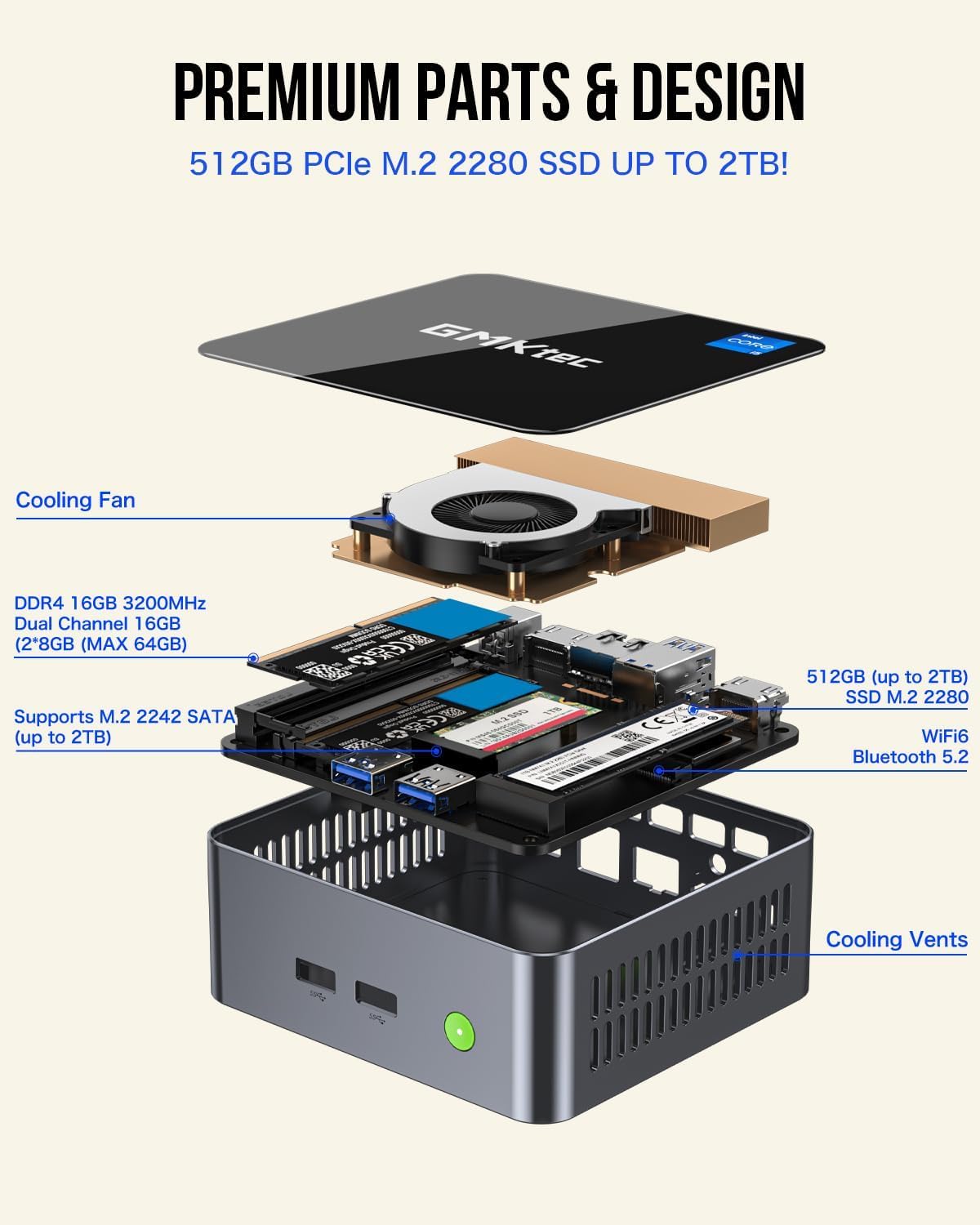
Figure 5: Internal layout of the GMKtec M3 Mini PC, highlighting upgradeable components.
- RAM: The device comes with 16GB dual-channel DDR4 RAM. It supports further upgrades, typically up to 64GB (2x 32GB SO-DIMM).
- SSD: It includes a 1TB M.2 2280 NVMe SSD. An additional M.2 2242 SATA slot is available for expanding storage up to 2TB.
To access internal components for upgrades, carefully remove the bottom cover of the Mini PC. Refer to the detailed instructions in the included user manual for specific steps.
Video 3: A demonstration of the internal components and potential upgrade paths for the GMKtec M3 Mini PC.
4.2 Dzesēšanas sistēma
The Mini PC features a smart cooling fan with dual copper heat pipes to ensure efficient heat dissipation and stable performance during operation. Keep the air intake and exhaust vents clear of obstructions to maintain optimal airflow.
5. Traucējummeklēšana
If you encounter issues with your GMKtec M3 Mini PC, consider the following basic troubleshooting steps:
- Nav jaudas: Ensure the power adapter is securely connected to both the Mini PC and a working power outlet. Check if the power button lights up when pressed.
- Nav displeja: Verify that the HDMI or Type-C cable is firmly connected to both the Mini PC and the monitor. Try a different cable or monitor if possible. Ensure the monitor is set to the correct input source.
- Perifērijas problēmas: If your keyboard or mouse is not responding, try connecting them to different USB ports. For wireless peripherals, check battery levels and ensure they are properly paired.
- Tīkla savienojamības problēmas: For Wi-Fi, ensure the Wi-Fi adapter is enabled in Windows settings and you are connected to the correct network. For wired Ethernet, check the cable connection and router status.
- Sistēmas palēnināšanās: Close unnecessary applications. Check for background processes consuming high CPU or RAM usage in Task Manager. Ensure adequate ventilation for the Mini PC.
For persistent issues or advanced troubleshooting, please refer to the support section or contact GMKtec customer service.
6. Tehniskās specifikācijas
| Funkcija | Specifikācija |
|---|---|
| Procesors | Intel Core i5-12450H (4.4 GHz, 8 Cores, 12 Threads) |
| RAM | 16 GB DDR4 SDRAM (3200 MHz) |
| Uzglabāšana | 1 TB M.2 NVMe SSD (PCIe 3.0), expandable with M.2 2242 SATA |
| Grafikas kopprocesors | Intel Iris Xe Graphics G7 96EU grafiskā karte |
| Maksimālā ekrāna izšķirtspēja | 5120 x 2880 pikseļi |
| Operētājsistēma | Windows 11 Pro |
| Bezvadu tips | WiFi 6 (802.11ax), Bluetooth 5.2 |
| Ethernet | 2.5 Gb/s RJ45 |
| USB porti | 3x USB 3.0, 1x USB 2.0, 1x USB Type-C (DP/DATA) |
| Preces svars | 3.3 mārciņas |
| Krāsa | Melns |
7. Garantija un atbalsts
7.1 Informācija par garantiju
GMKtec offers a 1 gads ierobežota garantija for each Mini PC, effective from the date of purchase. This warranty covers defects due to design and workmanship. Please retain your proof of purchase for warranty claims.
7.2 Klientu atbalsts
For any questions, technical assistance, or warranty inquiries, please contact GMKtec's professional after-sales team. Contact details are typically found in the included user manual or on the official GMKtec webvietne.


