1. Produkts beidziesview
The Philips SRP5016/10 is a modern and elegant 6-in-1 universal remote control designed to simplify your home entertainment experience. It allows you to control up to six different devices, such as televisions, DTVs, DVRs, home theater systems, soundbars, and streaming devices. This remote features a learning function, enabling it to receive and store infrared codes from your original remote controls, providing comprehensive control over various brands and models.
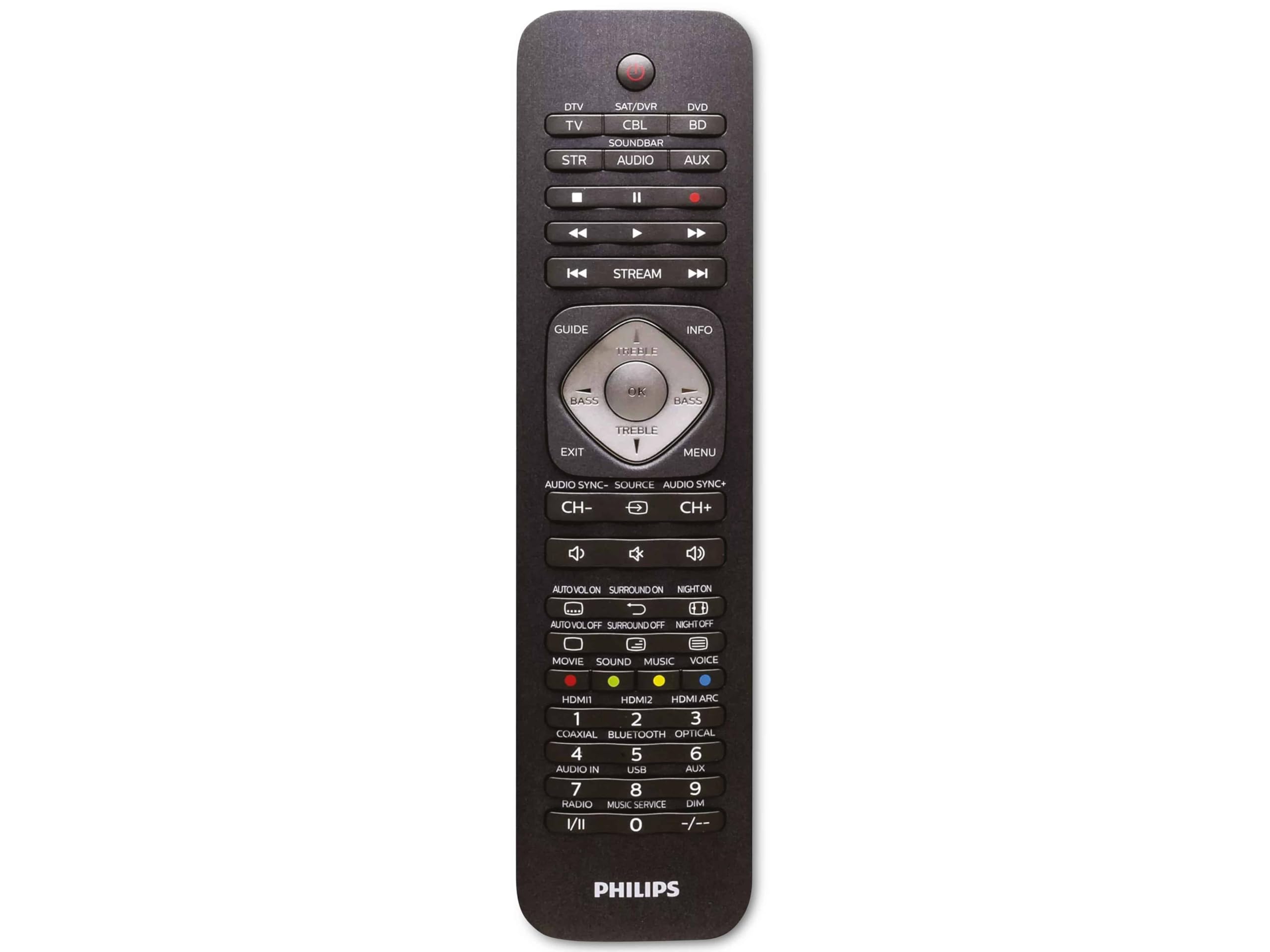
Image 1.1: Philips SRP5016/10 6-in-1 Universal Remote Control. This image displays the front view of the black universal remote control, highlighting its ergonomic design and button layout.
2. Iestatīšana
2.1. Akumulatora uzstādīšana
- Atveriet bateriju nodalījuma vāciņu, kas atrodas tālvadības pults aizmugurē.
- Ievietojiet divas AAA baterijas, nodrošinot pareizo polaritāti (+ un -), kā norādīts nodalījuma iekšpusē.
- Droši aizveriet akumulatora nodalījuma vāku.
Piezīme: Baterijas nav iekļautas komplektā un ir jāiegādājas atsevišķi.
2.2. Programmēšanas ierīces
The Philips SRP5016/10 can be programmed using either direct code entry or the learning function.
2.2.1. Direct Code Entry (Recommended for common brands)
- Ieslēdziet ierīci, kuru vēlaties vadīt (piemēram, televizoru, DVD atskaņotāju).
- Press and hold the desired device button on the universal remote (e.g., TV, DVD) for approximately 3 seconds until the device button lights up.
- Enter the 4-digit code for your device's brand (refer to the code list provided with your remote, if available, or search online for Philips universal remote codes).
- If the device turns off or responds, the code is correct. Press the device button again to save the code. If not, try the next code for your brand.
2.2.2. Learning Function (For devices not in the code list or advanced functions)
- Place the universal remote and your original remote control head-to-head, approximately 1-3 cm apart.
- Press and hold the desired device button on the universal remote (e.g., TV) for approximately 3 seconds until the device button lights up.
- Nospiediet un turiet MĀCĪTIES button on the universal remote until the device button starts blinking.
- On your original remote, press the button you wish to teach (e.g., SPĒKS). The device button on the universal remote will blink rapidly and then stay solid, indicating successful learning.
- Repeat step 4 for all other buttons you wish to learn.
- Nospiediet pogu MĀCĪTIES button again to exit learning mode.
3. Lietošanas instrukcijas
3.1. Selecting a Device
Lai vadītu konkrētu ierīci, nospiediet atbilstošo ierīces pogu (piemēram, TV, DVD, SAT, AUX, Skaņas josla, STRUMS) once. The selected device button will light up briefly to confirm your selection. You can then use the remote's buttons to control that device.
3.2. Pamatfunkcijas
- JAUDA: Ieslēdz vai izslēdz atlasīto ierīci.
- SKAĻUMS +/-: Pielāgo atlasītās audioierīces skaļumu.
- KANĀLS +/-: Changes channels on the selected TV or DTV device.
- Izslēgt skaņu Izslēdz audio.
- Skaitļu pogas (0–9): Tiešai kanāla ievadīšanai vai citām skaitliskām ievadēm.
- NAVIGATION (Arrow buttons, OK): Izvēlnes navigācijai un atlasei.
4. Apkope
4.1. Akumulatora nomaiņa
When the remote control's range decreases or buttons become unresponsive, it is time to replace the batteries. Follow the battery installation steps in Section 2.1. Always replace both AAA batteries simultaneously with new ones.
4.2. Tīrīšana
Lai tīrītu tālvadības pulti, izmantojiet mīkstu, sausu drānu. Spēcīgu netīrumu gadījumā viegli noslaukietampen the cloth with water or a mild cleaning solution. Avoid using abrasive cleaners, solvents, or alcohol, as these can damage the remote's surface or internal components.
5. Traucējummeklēšana
- Tālvadība nedarbojas:
- Pārbaudiet, vai baterijas ir ievietotas pareizi un nav izlādējušās. Nomainiet tās, ja nepieciešams.
- Pārliecinieties, vai starp tālvadības pulti un ierīci nav šķēršļu.
- Verify that the correct device button (e.g., TV, DVD) is selected.
- Ierīce nereaģē uz komandām:
- The device code may be incorrect. Try reprogramming the device using a different code from the code list or use the learning function.
- Ensure the remote's infrared emitter is pointed directly at the device's infrared receiver.
- Mācīšanās funkcija nedarbojas:
- Ensure the original remote's batteries are fresh and it is functioning correctly.
- Make sure the remotes are positioned correctly (head-to-head, 1-3 cm apart) during the learning process.
- Try learning the button again. Some original remotes have weaker IR signals that require multiple attempts.
6. Specifikācijas
| Funkcija | Specifikācija |
|---|---|
| Zīmols | Philips |
| Modeļa nosaukums | 6-in-1 |
| Modeļa numurs | SRP5016/10 |
| Saderīgas ierīces | Home Theater, DVD/Blu-ray Player, SoundBar, Television, Streaming Device |
| Īpaša iezīme | Universāla, mācību funkcija |
| Savienojamības tehnoloģija | Infrasarkanais |
| Maksimālais atbalstīto ierīču skaits | 6 |
| Kontrollera tips | Pogu vadība |
| Pogu skaits | Not specified (typical universal remote layout) |
| Maksimālais diapazons | 10 metri |
| Barošanas avots | 2 x AAA baterijas (nav iekļautas) |
| Materiāla veids | Plastmasa |
| Produkta izmēri | 21.4 x 5.3 x 2.2 cm |
| Produkta svars | 130 g |
7. Garantija un atbalsts
For warranty information, please refer to the documentation provided at the time of purchase or contact your retailer. Philips offers customer support for their products. If you encounter issues that cannot be resolved using this manual, please visit the official Philips support webvietni vai sazinieties ar klientu apkalpošanas dienestu, lai saņemtu palīdzību.
Lūdzu, saglabājiet pirkuma apliecinājumu garantijas prasībām.