1. Ievads un beigasview
This manual provides comprehensive instructions for the Diswoe Wireless Controller, model SW-01. This controller is designed to enhance your gaming experience across multiple platforms.
Galvenās funkcijas ietver:
- Universal compatibility with Switch, Switch Lite, Switch OLED, Switch 2, Windows PC, and Android phones.
- Upgraded Hall Effect joysticks for precise, drift-free control.
- Dual vibration motors for immersive feedback.
- 6-axis gyro sensor for motion-sensing games.
- High-performance 550mAh rechargeable battery providing up to 8 hours of playtime.
- Ergonomic design with non-slip grips for comfortable extended play.
- Stable wireless Bluetooth connection with strong anti-interference technology.
Svarīga piezīme: This controller supports USB CABLE CONNECTION with PC but DOES NOT SUPPORT WIRELESS BLUETOOTH CONNECTION TO PC. It is NOT compatible with Apple TV, Fire Stick TV, Tesla, Xbox, or Playstation consoles. It also DOES NOT SUPPORT WAKE-UP SWITCH 2 and AUDIO FUNCTIONS, and lacks NFC functionality.
2. Iestatīšana un savienojums
2.1 Kontrollera uzlāde
Before first use, ensure the controller is fully charged. Connect the included USB-C cable to the controller's charging port and the other end to a standard USB-A wall charger or a compatible USB port on your device. The controller has a charging prompt and low voltage warning. A full charge typically takes approximately 2 hours and provides 8-10 hours of playtime.
2.2 Pairing Methods for Nintendo Switch
The controller provides a stable and reliable signal without delay or drop-off within eight meters.

Attēls: Priekšpuse un augšpuse view of the Diswoe Wireless Controller with button labels and pairing instructions.
- Pirmā savienojuma reize:
- On your Switch console, navigate to the "Controllers" menu.
- Atlasiet "Mainīt satvērienu/secību".
- Nospiediet un turiet MĀJAS button on the Diswoe controller for 5 seconds.
- The four LED indicators on the controller will blink fast, indicating it is in pairing mode.
- Once successfully paired, the corresponding player LED(s) will light up solid.
- Turpmākie savienojumi:
- From any page on your Switch console, simply press the MĀJAS pogu uz kontrollera.
- The four LED indicators will blink fast and then light up solid upon successful connection.
2.3 Connecting to PC (Wired Only)
The Diswoe Wireless Controller supports connection to Windows PC ONLY via the included USB-C cable. Wireless Bluetooth connection to PC is not supported.
- Connect the USB-C end of the cable to the controller and the USB-A end to an available USB port on your PC.
- Datoram vajadzētu automātiski noteikt un instalēt nepieciešamos draiverus.
- The controller will be recognized as a standard gamepad.
2.4 Savienojuma izveide ar Android tālruni
The controller is compatible with Android phones via Bluetooth. Refer to your phone's Bluetooth pairing instructions to connect the controller.
3. Lietošanas instrukcijas
3.1 Pogu izkārtojums un funkcijas
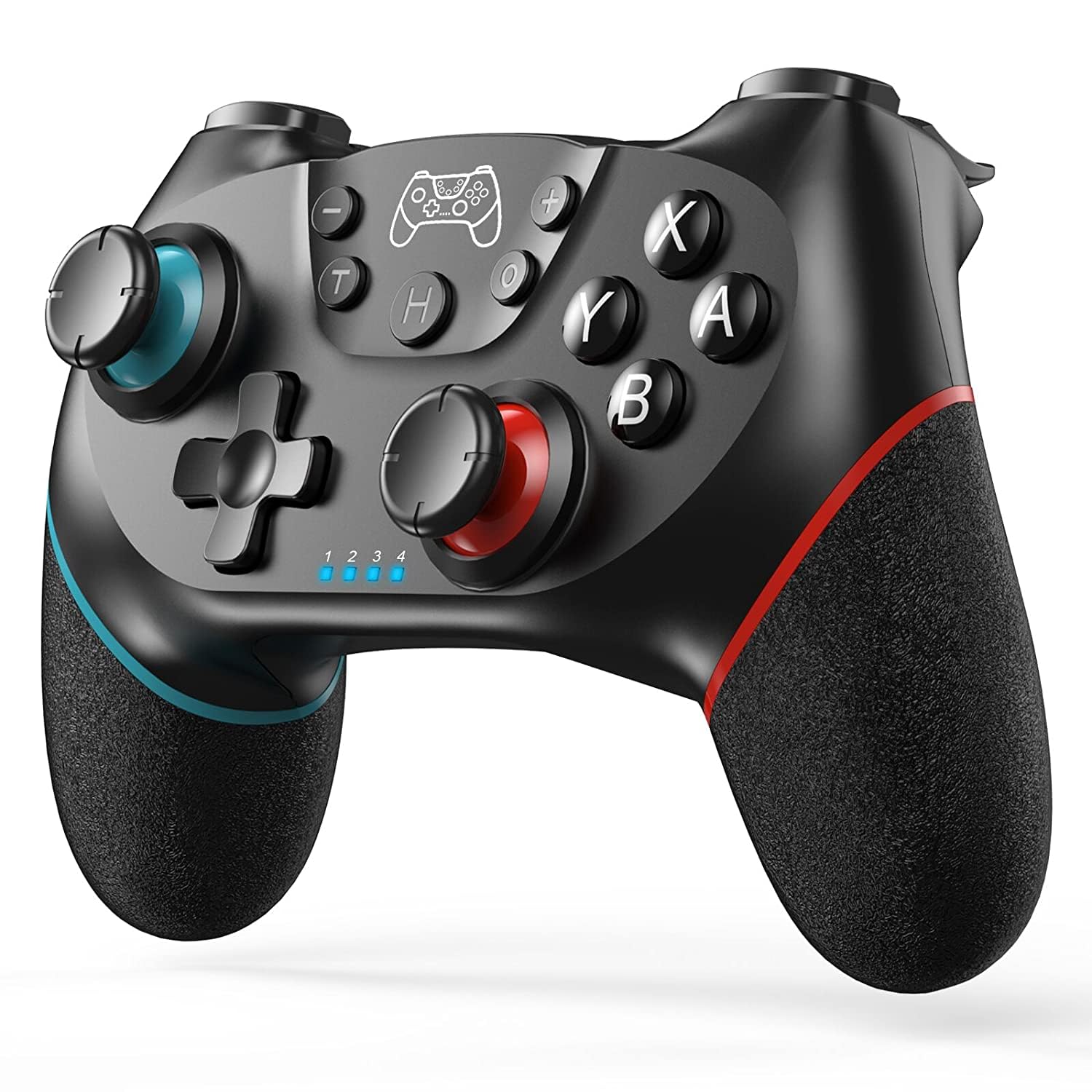
Attēls: priekšpuse view of the Diswoe Wireless Controller, highlighting its ergonomic design and button placement.
| Poga | Funkcija |
|---|---|
| MĀJAS poga | Powers on the controller, returns to the home screen, and initiates pairing. |
| L/R Sticks | Analog joysticks for movement and camera control. Feature Hall Effect technology for precision and durability. |
| A/B/X/Y pogas | Standarta darbību pogas. |
| D-pad | Virziena paliktnis precīzai virziena ievadei. |
| L/R/ZL/ZR Buttons | Plecu un sprūda pogas. |
| Ekrānuzņēmuma poga | Captures screenshots during gameplay. |
| Turbo poga | Aktivizē turbo funkciju ātrai pogu nospiešanai. |
| +/- Pogas | Menu selection buttons. |
3.2 Īpašas funkcijas
- Divkārša vibrācija: The controller features dual vibration motors that provide excellent haptic feedback, enhancing game immersion.
- 6 asu žiroskopiskais sensors: The built-in 6-axis gyro sensor detects the inclination of the controller, allowing for quick responses in motion-sensing games.
- Turbo funkcija: The Turbo button allows for rapid, continuous pressing of assigned buttons. Consult the full user manual for specific button assignment instructions.
- Ekrānuzņēmuma funkcija: Press the dedicated screenshot button to capture in-game moments.

Image: Illustration of the controller highlighting the dual motor vibration feature.

Image: Diagram showing key features like wear-resistant anti-slip joysticks, engraved ABXY buttons, excellent non-slip grip, and high precision D-pad.

Image: Summary of controller features including Bluetooth connectivity, long playtime, vibration, screenshot, precise joysticks, adjustable triggers, and compatibility with Switch/Lite/OLED/Windows, and wake-up function (note: wake-up Switch 2 is not supported).
4. Apkope
Proper maintenance ensures the longevity and optimal performance of your Diswoe Wireless Controller.
- Tīrīšana: Kontroliera tīrīšanai izmantojiet mīkstu, sausu drānu. Noturīgu netīrumu gadījumā nedaudz noslaukietampen the cloth with water. Avoid using harsh chemicals, solvents, or abrasive cleaners, as these can damage the surface and internal components.
- Uzglabāšana: Uzglabājiet kontrolieri vēsā, sausā vietā, pasargājot to no tiešiem saules stariem un ekstremālām temperatūrām.
- Akumulatora kopšana: To preserve battery life, avoid fully discharging the controller frequently. If storing for an extended period, charge the battery to approximately 50% before storage and recharge every few months.
- Apstrāde: Avoid dropping the controller or subjecting it to strong impacts, which can damage internal circuitry and external components.
5. Traucējummeklēšana
If you encounter issues with your Diswoe Wireless Controller, please refer to the following common solutions:
| Problēma | Iespējamais risinājums |
|---|---|
| Controller does not connect/pair. |
|
| Kursorsviras nobīde vai neprecīza ievade. |
|
| Vibrācija nedarbojas. |
|
| Controller does not wake up Switch 2. | This controller does not support the "Wake-up Switch 2" function. You must manually wake up the console. |
| No audio through controller. | This controller does not support audio functions. |
If problems persist, please contact Diswoe customer support for further assistance.
6. Specifikācijas
| Funkcija | Detaļas |
|---|---|
| Modeļa numurs | SW-01 |
| Zīmols | Diswoe |
| Saderība | Switch, Switch Lite, Switch OLED, Switch 2, Windows PC (wired), Android Phone (Bluetooth) |
| Savienojamība | Wireless Bluetooth (Switch, Android), Wired USB-C (PC) |
| Akumulatora tips | Litija polimērs |
| Akumulatora ietilpība | 550 mAh |
| Playtime (approx.) | 8–10 stundas (pēc pilnas uzlādes) |
| Uzlādes laiks (aptuveni) | 2 stundas |
| Wireless Range | Līdz 8 metriem (26 pēdām) |
| Īpašas funkcijas | Hall Effect Joysticks, Dual Vibration, 6-Axis Gyro, Turbo Function, Screenshot Function |
| Svars | 9.9 unces |
| Ražotājs | Diswoe |
| Izcelsmes valsts | Ķīna |
7. Garantija un atbalsts
For warranty information and customer support, please refer to the documentation included with your product or visit the official Diswoe webSaglabājiet pirkuma čeku kā pirkuma apliecinājumu jebkādu garantijas prasību gadījumā.
Ražotājs: Diswoe
Webvietne: Diswoe Store on Amazon
8. Produktu video
The following videos provide additional information and demonstrations of the Diswoe Wireless Controller:
Video: "Wireless Controller for Switch" - An official product video from Diswoe Direct demonstrating the controller's features and usage.


