1. Ievads
Paldies par pirkumuasing the Infocus 24-inch 720p LED TV, model IM24ED800. This manual provides essential information for setting up, operating, and maintaining your television. Please read this manual thoroughly before using the product and retain it for future reference.
Drošības informācija
- Nepakļaujiet televizoru lietus vai mitruma iedarbībai.
- Nebloķējiet ventilācijas atveres.
- Nodrošiniet pareizu strāvas padevi voltage.
- Sargājiet strāvas vadu no uzkāpšanas vai saspiešanas.
- Visus apkopes darbus nododiet kvalificētam servisa personālam.
- Sargājiet televizoru no tiešiem saules stariem, siltuma avotiem un spēcīgiem magnētiskajiem laukiem.
2. Iepakojuma saturs
Lūdzu, atzīmējiet izvēles rūtiņu pie šādiem vienumiem:
- Infocus 24-inch 720p LED TV (IM24ED800)
- Remote Control (with batteries, if included)
- Strāvas vads
- TV statīvs (2 gab.)
- TV statīva skrūves
- Lietotāja rokasgrāmata (šis dokuments)
3. Iestatīšana
3.1 TV statīva piestiprināšana
To attach the stand to your Infocus TV:
- Uzmanīgi novietojiet televizoru ar ekrānu uz leju uz mīkstas, tīras virsmas, lai novērstu skrāpējumus.
- Novietojiet katru statīva daļu ar atbilstošajām spraugām televizora apakšpusē.
- Nostipriniet katru statīva daļu, izmantojot komplektā iekļautās skrūves. Pārliecinieties, vai tās ir cieši pievilktas.
- Uzmanīgi paceliet televizoru un novietojiet to uz stabilas, līdzenas virsmas.
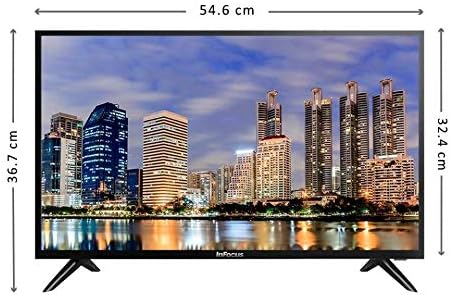
Attēls: priekšpuse view of the Infocus 24-inch LED TV with dimensions indicated. The TV measures approximately 54.6 cm in width and 36.7 cm in height with the stand.
3.2. Ierīču pievienošana
Your Infocus TV features multiple input ports for connecting external devices.

Attēls: Aizmugure view of the Infocus 24-inch LED TV, highlighting the location of various input ports including HDMI and USB.
- HDMI savienojumi: Connect Blu-ray players, game consoles, or cable/satellite boxes to the HDMI ports. The TV has 2 HDMI inputs.
- USB savienojumi: Connect USB flash drives for media playback to the USB ports. The TV has 2 USB inputs.
- Antena/kabelis: Connect an antenna or cable TV signal to the RF input (if available, not explicitly listed but standard for TVs).
- Jauda: Pievienojiet strāvas vadu televizora strāvas ieejai un pēc tam sienas kontaktligzdai.
3.3. Sākotnējā ieslēgšana
Pēc visu nepieciešamo kabeļu pievienošanas:
- Ensure the power cord is securely plugged into both the TV and a power outlet.
- Nospiediet ieslēgšanas/izslēgšanas pogu uz tālvadības pults vai uz paša televizora.
- Follow the on-screen instructions for initial setup, which may include language selection, time zone, and channel scanning.
4. Televizora lietošana
4.1 Tālvadības pults Overview
The remote control allows you to access all TV functions. While specific button layouts may vary, common functions include:
- Jauda: Ieslēdz vai izslēdz televizoru.
- Ievade/avots: Izvēlas ievades avotu (HDMI 1, HDMI 2, USB, TV).
- Skaļuma palielināšana/ samazināšana: Regulē skaņas līmeni.
- Kanāls uz augšu/uz leju: Pārslēdz TV kanālus.
- Izslēgt skaņu: Izslēdz televizora skaņu.
- Izvēlne: Opens the main menu for settings adjustments.
- Navigācijas pogas (augšup/lejup/pa kreisi/pa labi/labi): Izmanto, lai pārvietotos pa izvēlnēm un apstiprinātu izvēles.
- Izeja/Atpakaļ: Atgriežas iepriekšējā ekrānā vai iziet no izvēlnes.
4.2 Pamatfunkcijas
- Ievades avota maiņa: Nospiediet pogu Ievade or Avots button on your remote control. Use the navigation buttons to select the desired input (e.g., HDMI 1, USB) and press OK.
- Skaļuma regulēšana: Izmantojiet Skaļuma palielināšana (+) or Skaļums uz leju (-) pogas.
- Kanālu maiņa: Izmantojiet Channel Up (CH+) or Channel Down (CH-) pogas.
4.3 USB multivides atskaņošana
Lai atskaņotu multividi files from a USB flash drive:
- Insert a USB flash drive into one of the TV's USB ports.
- Nospiediet pogu Ievade or Avots pogu uz tālvadības pults un atlasiet USB.
- The TV's media browser should appear. Navigate through your files (photos, music, videos) using the remote control.
- Izvēlieties a file un nospiediet OK lai to atskaņotu.
5. Apkope
5.1 Sieta tīrīšana
- Turn off the TV and unplug the power cord before cleaning.
- Izmantojiet mīkstu, nepūkojošu drānu (piemēram, mikrošķiedras drānu), lai maigi noslaucītu ekrānu.
- Noturīgiem traipiem viegli uzslaucītampNoslaukiet drānu ar ūdeni vai specializētu ekrāna tīrīšanas līdzekli. Nekad nesmidziniet tīrīšanas līdzekli tieši uz ekrāna.
- Izvairieties no abrazīvu tīrīšanas līdzekļu, spirta, benzola vai šķīdinātāju lietošanas, jo tie var sabojāt ekrānu.
5.2 Vispārēja aprūpe
- Novietojiet televizoru labi vēdināmā vietā.
- Nenovietojiet uz televizora smagus priekšmetus.
- Atvienojiet televizoru no strāvas zibens laikā vai tad, ja tas ilgstoši netiks lietots.
6. Traucējummeklēšana
Ja rodas problēmas ar televizoru, skatiet tālāk norādītās bieži sastopamās problēmas un risinājumus.
| Problēma | Iespējamais cēlonis | Risinājums |
|---|---|---|
| Nav jaudas | Power cord not connected; power outlet issue | Pārliecinieties, vai strāvas vads ir droši pievienots. Pārbaudiet kontaktligzdu ar citu ierīci. |
| Nav attēla, bet ir skaņa | Incorrect input source selected; loose video cable | Nospiediet pogu Ievade/avots button to select the correct input. Check video cable connections. |
| Nav skaņas, bet attēls ir | Volume muted or too low; audio cable issue | Nospiediet pogu Izslēgt skaņu button or increase volume. Check audio cable connections. |
| Tālvadības pults nedarbojas | Batteries depleted; obstruction; remote sensor blocked | Replace batteries. Remove any obstructions between the remote and TV. Ensure the TV's remote sensor is clear. |
| Ziņojums "Nav signāla" | Incorrect input source; device not powered on; cable issue | Verify the correct input source is selected. Ensure the connected device is powered on. Check all cable connections. |
7. Specifikācijas
The following are the technical specifications for the Infocus 24-inch 720p LED TV model IM24ED800:
| Funkcija | Detaļas |
|---|---|
| Modeļa numurs | IM24ED800 |
| Ekrāna izmērs | 24 collas (61 cm) |
| Displeja tehnoloģija | LED |
| Izšķirtspēja | 1366 x 768 (720p HD) |
| Atsvaidzināšanas biežums | 60 Hz |
| HDMI ieejas | 2 |
| USB ieejas | 2 |
| Savienojamība | HDMI, USB |
| Montāžas veids | Galda statīvs |
| Iepakojuma izmēri | 60.8 x 37.8 x 12 cm |
| Iepakojuma svars | 5 kg |
8. Garantija un atbalsts
This Infocus TV is sold as a renewed product, which typically comes with a limited warranty provided by the seller or refurbisher. Please refer to your purchase documentation or contact your retailer for specific warranty terms and conditions.
For technical support or service inquiries, please contact the customer support channel provided by your retailer or the Infocus support webvietne.


