Ievads
The Behringer NEKKST K8 is an ultra-linear 150-Watt reference-class studio monitor designed for accurate sound reproduction. It features an 8-inch woofer and a 1-inch silk dome tweeter, utilizing advanced waveguide technology for optimal acoustic dispersion and a wide 'sweet zone'. This monitor operates in a true bi-amping mode with two separate amplifiers for enhanced sound clarity.

Attēls: priekšpuse view of the Behringer NEKKST K8 Studio Monitor, showcasing the 8-inch woofer and 1-inch tweeter.
Svarīgi drošības norādījumi
Please read and follow all safety instructions before operating the Behringer NEKKST K8 studio monitor. Retain these instructions for future reference.
- Elektrošoka risks: Do not open the device. Refer all servicing to qualified service personnel.
- Nepakļaujiet šo ierīci lietus vai mitruma iedarbībai.
- Neizmantojiet šo ierīci ūdens tuvumā.
- Tīriet tikai ar sausu drānu.
- Neaizbloķējiet ventilācijas atveres. Uzstādiet saskaņā ar ražotāja norādījumiem.
- Neuzstādiet tuvu siltuma avotiem, piemēram, radiatoriem, siltuma reģistriem, krāsnīm vai citām ierīcēm (tostarp amppacēlāji), kas ražo siltumu.
- Aizsargājiet strāvas vadu no uzkāpšanas vai saspiešanas, jo īpaši pie kontaktdakšām, kontaktligzdām un vietā, kur tie iziet no ierīces.
- Izmantojiet tikai ražotāja norādītos piederumus/piederumus.
- Atvienojiet šo ierīci zibens negaisa laikā vai tad, ja tā netiek lietota ilgu laiku.

Image: Safety and regulatory labels found on the Behringer NEKKST K8, indicating electrical warnings and compliance information.
Iestatīšana
Izpakošana
Carefully unpack your NEKKST K8 monitor. Inspect the unit for any signs of damage that may have occurred during transit. Retain the original packaging for future transport or storage.
Savienojumi
The NEKKST K8 offers both balanced XLR and unbalanced RCA input options. Connect your audio source (e.g., audio interface, mixer) to the appropriate input on the rear panel of the monitor.
- XLR ieeja: For balanced audio signals, providing optimal noise rejection.
- RCA ieeja: For unbalanced audio signals, commonly used with consumer audio equipment.
Ensure the monitor is powered off before making any connections.
Placement and Room Compensation
Proper placement of your studio monitors is crucial for accurate sound reproduction. The NEKKST K8 features 'ROOM COMPENSATION' switches on the rear panel to help optimize its performance for your specific acoustic environment.
- Free Field: Use this setting when the monitor is placed away from walls and corners.
- Siena: Select this setting if the monitor is placed close to a wall.
- Stūris: Choose this setting if the monitor is placed in a corner, which typically results in increased bass response.
Experiment with these settings to achieve the most balanced sound in your listening space.
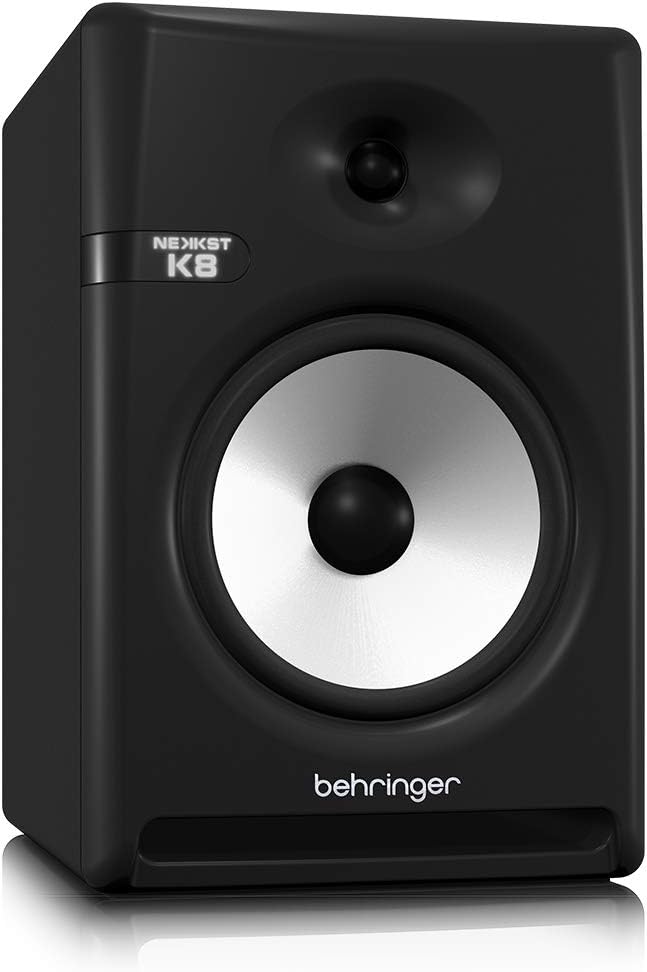
Image: Rear panel of the Behringer NEKKST K8, displaying XLR and RCA inputs, along with various control switches for room compensation and frequency adjustments.

Attēls: Detalizēts view of the NEKKST K8's rear control panel, highlighting the input trim, frequency adjustments, and room compensation switches.
Strāvas pieslēgums
Connect the provided power cord to the AC IN socket on the rear panel and then to a suitable power outlet. Ensure the power switch is in the OFF position before connecting to power.
Darbība
Ieslēgšana/izslēgšana
After all connections are made, switch the power button on the rear panel to the ON position. It is recommended to power on your monitors last and power them off first to prevent any pops or clicks through your speakers.
Input Trim Adjustment
The 'INPUT TRIM' knob on the rear panel allows you to adjust the input sensitivity of the monitor. Start with the knob at a lower setting and gradually increase it to achieve a comfortable listening level without distortion. This control helps match the output level of your audio source to the monitor's input.
Frequency Adjustments
The NEKKST K8 provides 'HIGH FREQUENCY' and 'LOW FREQUENCY' switches for fine-tuning the monitor's response to your listening environment and personal preference. These switches allow you to cut or boost specific frequency ranges.
- AUGSTA FREKVENCIJA: Adjusts the treble response. Options typically include flat, -2 dB, +2 dB.
- LOW FREQUENCY: Adjusts the bass response. Options typically include flat, -2 dB, -4 dB, -6 dB. This can be useful for compensating for room acoustics or when using a subwoofer.
Refer to the markings on the rear panel for specific dB adjustments.
Apkope
Tīrīšana
To clean the exterior of your NEKKST K8 monitor, use a soft, dry cloth. Do not use liquid cleaners, abrasive cleaners, or solvents, as these can damage the finish or internal components. Ensure the monitor is unplugged before cleaning.
Uzglabāšana
If storing the monitor for an extended period, it is recommended to use the original packaging to protect it from dust and physical damage. Store in a cool, dry place away from direct sunlight and extreme temperatures.
Problēmu novēršana
| Problēma | Iespējamais cēlonis | Risinājums |
|---|---|---|
| Nav skaņas |
|
|
| Izkropļota skaņa |
|
|
| Dūņa vai troksnis |
|
|
Ja problēma joprojām pastāv pēc šo risinājumu izmēģināšanas, lūdzu, sazinieties ar Behringer klientu atbalsta dienestu.
Specifikācijas
| Modeļa nosaukums | K8 |
| Skaļruņa tips | Monitors |
| Zemfrekvences skaļruņa diametrs | 8 collas |
| Tweeter diametrs | 1 collas |
| Skaļruņa maksimālā izejas jauda | 150 vati |
| Wattage | 150 vati |
| Frekvences reakcija | 20000 Hz (Upper limit; full range typically wider) |
| Savienojamības tehnoloģija | RCA, XLR |
| Audio izvades režīms | Stereo |
| Barošanas avots | Elektrība ar vadu |
| Produkta izmēri | 13.4"D x 13.4"W x 18.8"H |
| Preces svars | 19.18 mārciņas |
| Materiāls | Plastmasa, metāls, audums |
| Ražotājs | Mūzikas cilts ASV |
| UPC | 748252139344 |
Garantijas informācija
The Behringer NEKKST K8 Studio Monitor comes with a Limited Warranty. For detailed information regarding warranty terms, conditions, and registration, please refer to the official Behringer webvietnē vai garantijas kartē, kas iekļauta jūsu produkta komplektācijā.
Atbalsts
For further assistance, technical support, or to download the latest drivers and software, please visit the official Behringer webvietnē vai sazinieties ar klientu apkalpošanas nodaļu.
Varat arī apmeklēt Behringer veikals vietnē Amazon lai iegūtu informāciju par produktu un piederumiem.


