Įvadas
This manual provides essential information for the proper setup, operation, and maintenance of your VEVOR Weighted Digital Piano. Please read it thoroughly before using the product to ensure safe and efficient operation.
The VEVOR Weighted Digital Piano features a full-size 88-key fully weighted keyboard with hammer action and 3-level touch sensitivity, designed to simulate the feel of an acoustic piano. It is equipped with a French DREAM sound engine and a dual speaker system for high-fidelity audio. The piano supports wireless connectivity and various apps, offering 600 rhythms, 680 tones, and 200 demo songs. Its dual keyboard design facilitates learning and teaching, and its modern, minimalist aesthetic complements any home decor.
Sąranka
Išpakavimas ir surinkimas
Carefully unpack all components from the packaging. Ensure all parts listed in the packing list are present and undamaged. Assembly typically involves attaching the main keyboard unit to the furniture stand and connecting the triple pedal unit.

This image illustrates the realistic touch and feel of the 88 fully weighted keys with hammer action and 3-level touch sensitivity, providing an authentic piano playing experience.
Jungtys
Connect the power adapter to the DC input port on the piano and then to a power outlet. Connect the triple pedal unit to the designated pedal socket. For private practice, plug headphones into the dual headphone jacks. Additional connectivity options include USB for MIDI transmission and audio output.
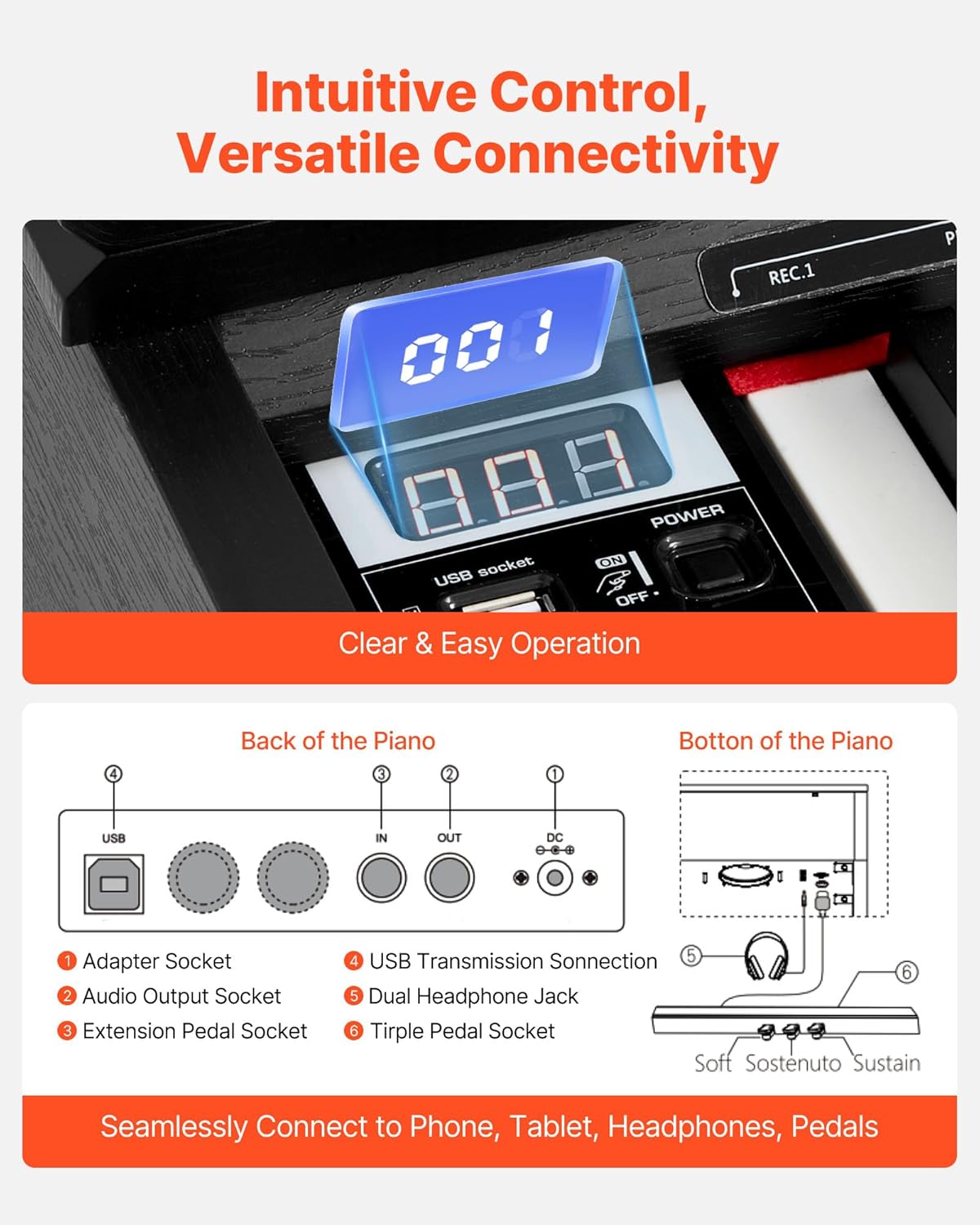
The control panel provides clear and easy operation. Connectivity options include USB, audio output, extension pedal socket, USB transmission, dual headphone jack, and triple pedal socket for seamless connection to phones, tablets, headphones, and pedals.
Naudojimo instrukcijos
Įjungimas / išjungimas ir garso reguliavimas
Locate the power button on the control panel and press it to turn the piano on or off. Adjust the master volume using the dedicated volume knob to your desired level.
Tonų ir ritmų pasirinkimas
The piano offers 680 tones and 600 rhythms. Use the 'Tone' and 'Rhythm' selection buttons on the control panel to browse and select different instrument sounds and accompaniment patterns. The integrated dual speaker system ensures rich, high-fidelity sound reproduction.

The digital piano features a dual speaker system and a French DREAM sound engine, delivering rich, clear, and full-bodied audio that accurately reproduces grand piano tones.
Demo Songs and Learning Features
Access 200 built-in demo songs for inspiration and practice. The piano supports wireless connectivity, allowing integration with various learning apps and devices for an enhanced smart learning experience. The dual keyboard design enables teachers to guide students effectively.

Two individuals playing the VEVOR digital piano in dual keyboard mode, highlighting the 600 rhythms, 680 tones, and 200 demo songs available for learning and practice.
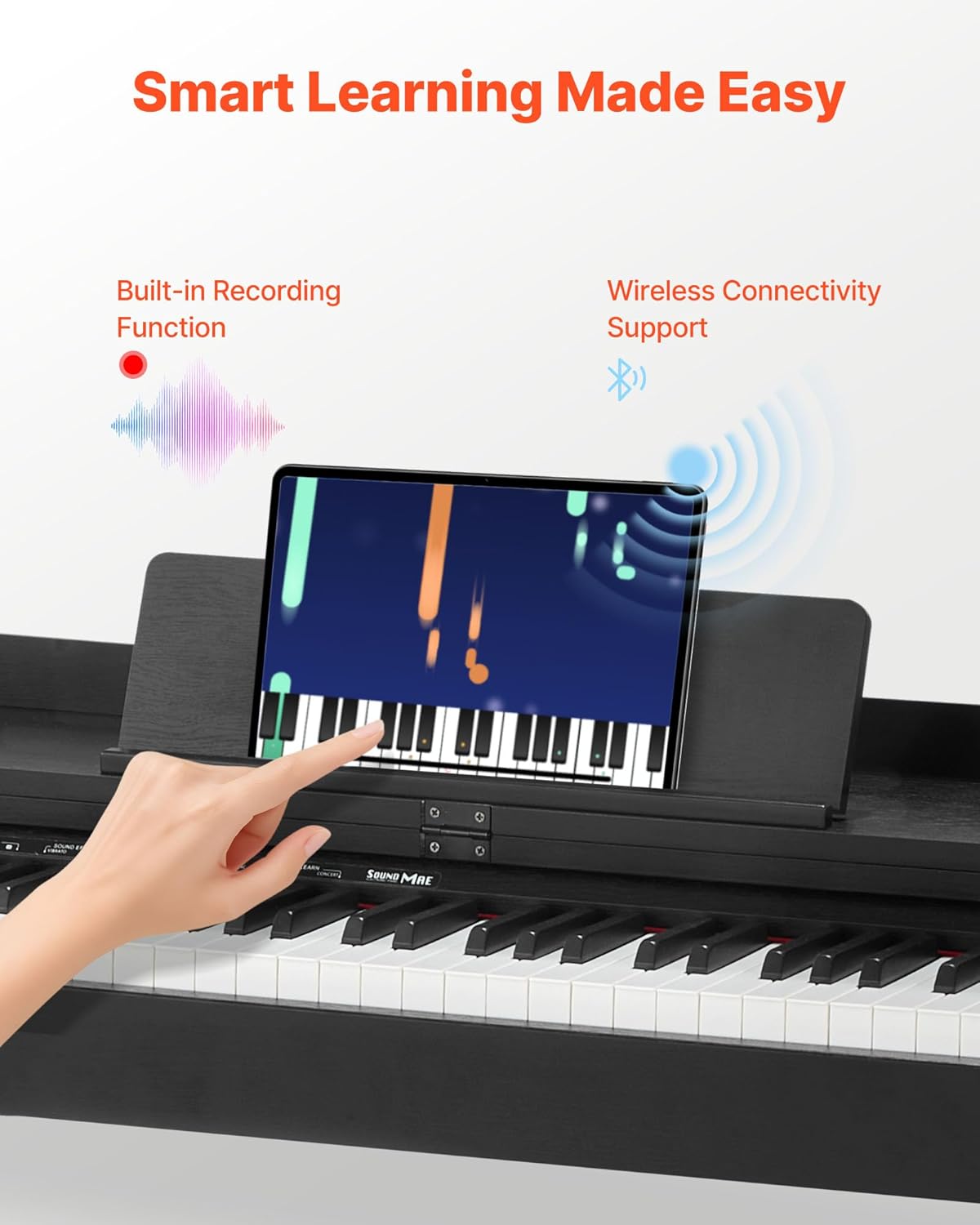
This image shows the piano's smart learning capabilities, including wireless connectivity to various apps and devices, and a built-in recording function.
Įrašymo funkcija
Utilize the built-in recording function to capture your performances. Refer to the control panel for specific record and playback buttons.
Metronome and Tempo
Engage the metronome function to assist with timing and rhythm practice. Adjust the tempo to match your practice needs.
Transponavimo funkcija
Use the transpose function to shift the pitch of the keyboard up or down, allowing you to play in different keys without changing your finger positions.
Pedal Usage
The triple pedal unit includes Soft, Sostenuto, and Sustain pedals, providing expressive control over your music, similar to an acoustic piano.
This official VEVOR video provides an overview of the Weighted Digital Piano, demonstrating its features and sound quality. It highlights the realistic touch, sound engine, and smart learning capabilities.
Priežiūra
Valymas ir priežiūra
To maintain the appearance and functionality of your digital piano, regularly wipe the keys and surfaces with a soft, dry cloth. Avoid using abrasive cleaners or solvents that could damage the finish. Keep the piano away from direct sunlight, extreme temperatures, and high humidity.
Sandėliavimas
When not in use, it is recommended to cover the piano with the provided piano cover to protect it from dust and debris.
Trikčių šalinimas
Nėra garso
- Ensure the piano is powered on and the volume is turned up.
- Check if headphones are plugged in; if so, unplug them or adjust headphone volume.
- Įsitikinkite, kad maitinimo adapteris yra tvirtai prijungtas.
Raktai nereaguoja
- Patikrinkite, ar tarp raktų nėra įstrigusių pašalinių objektų.
- Ensure the piano is powered on and not in a demo mode that might restrict manual play.
Pedals Not Functioning
- Confirm that the triple pedal unit is correctly plugged into the designated socket.
Specifikacijos
| Funkcija | Detalė |
|---|---|
| Modelio numeris | S186 |
| Raktų skaičius | 88 |
| Rakto tipas | Fully Weighted with Hammer Action, 3-level Touch Sensitivity |
| Tonai | 680 |
| Ritmai | 600 |
| Demo dainos | 200 |
| Garso variklis | French DREAM |
| Garsiakalbiai | Dviejų garsiakalbių sistema |
| Ryšys | Wireless Connection, USB, Audio Output, Headphone Jacks |
| Įrašymo funkcija | Įmontuotas |
| Pedalai | Trijų pedalų blokas (Soft, Sostenuto, Sustain) |
| Grynasis svoris | 61.7 svarai (28 kg) |
| Gaminio matmenys (su natų stovu) | 53.9 x 12.2 x 29.1 colio (1370 x 310 x 740 mm) |

The piano's dimensions are 53.9 x 12.2 x 29.1 inches (1370 x 310 x 740 mm) with the sheet music stand. Included accessories are 1x Headphones, 1x MIDI Cable, 1x DC Adapter & Power Cable, 1x Sheet Music Clip, 1x Piano Stickers, and 1x Piano Cover.
Garantija ir palaikymas
Informacija apie garantiją
For detailed warranty information, please refer to the documentation included with your product or contact VEVOR customer support.
Pagalba klientams
If you encounter any issues or have questions regarding your VEVOR Weighted Digital Piano, please contact our customer support team for assistance. Contact details can be found on the VEVOR official websvetainėje arba jūsų produkto pakuotėje.


