1. Įvadas
This manual provides essential information for the safe and efficient use of your KOORUI G2711P 27-inch IPS Full HD Gaming Monitor. Please read it thoroughly before operating the device and retain it for future reference.
The KOORUI G2711P monitor features a 27-inch IPS non-glare panel with Full HD (1920x1080) resolution, a 200Hz refresh rate, and a 1ms MPRT response time, designed for an immersive gaming and viewing experience. It includes multiple connectivity options and eye-care features.

1.1 vaizdas: priekis view of the KOORUI G2711P 27-inch IPS Full HD Gaming Monitor.
2. Saugos informacija
- Saugokite monitorių nuo lietaus ar drėgmės, kad išvengtumėte gaisro ar elektros smūgio.
- Neatidarykite monitoriaus c.asing. Viduje nėra dalių, kurias galėtų aptarnauti vartotojas. Visus techninės priežiūros darbus patikėkite kvalifikuotiems techninės priežiūros darbuotojams.
- Padėkite monitorių ant stabilaus, lygaus paviršiaus, kad jis nenukristų.
- Užtikrinkite tinkamą vėdinimą aplink monitorių. Neužblokuokite ventiliacijos angų.
- Naudokite tik prie monitoriaus pridėtą maitinimo adapterį.
- Atjunkite monitorių nuo maitinimo lizdo žaibuojant arba kai jis ilgą laiką nenaudojamas.
3. Sąranka
3.1 Išpakavimas
Carefully remove all components from the packaging. Ensure all parts listed in the packing list are present and undamaged. Keep packaging materials for future transport or return.
3.2 Stovo surinkimas
- Pritvirtinkite stovo pagrindą prie stovo kaklo.
- Secure the assembled stand to the back of the monitor panel. Refer to the product images for visual guidance on the attachment method.

Image 3.1: Monitor dimensions and side view, illustrating the stand attachment area.
3.3 Prisijungimas prie įrenginio
The monitor supports various input options:
- HDMI: Connect an HDMI cable from your computer or other device to one of the two HDMI 2.0 ports on the monitor.
- „DisplayPort“ (DP): Prijunkite kompiuterio „DisplayPort“ kabelį prie monitoriaus DP 1.4 prievado.
- Audio Out (A/O): Connect external speakers or headphones to the audio output port if desired, as the monitor does not have built-in speakers.

3.2 vaizdas: galinis view of the monitor showing HDMI, DisplayPort, and Audio Out connections, along with the 75x75mm VESA mount.
3.4 Maitinimo jungtis
Connect the power adapter to the monitor's power input, then plug the power cable into a wall outlet. The monitor is designed for 110V power input.
4. Naudojimo instrukcijos
4.1 Maitinimo įjungimas/išjungimas
Press the power button, typically located on the back or bottom of the monitor, to turn the monitor on or off. An indicator light will show the power status.
4.2 Ekrano meniu (OSD) naršymas
The monitor features a 5-way joystick for intuitive OSD menu navigation. This joystick allows you to access and adjust various display settings.
- Paspauskite valdymo svirtį: Patvirtinkite pasirinkimą.
- Move joystick up/down: Adjust or select options.
- Move joystick left/right: Adjust or select options.
- Move joystick back (usually left): Exit menu or go back.

Image 4.1: Illustration of the 5-way joystick control for OSD menu navigation.
4.3 Ekrano nustatymai
- Rezoliucija: The native resolution is 1920x1080 Full HD. Ensure your device is set to this resolution for optimal display quality.
- Atnaujinimo dažnis: The monitor supports up to 200Hz. Adjust your graphics card settings to utilize the higher refresh rate for smoother visuals.
- Atsakymo laikas (MPRT): The monitor features 1ms MPRT (Moving Picture Response Time) for reduced motion blur. This setting can usually be enabled or adjusted in the OSD menu.
- Adaptyvusis sinchronizavimas: This technology synchronizes the monitor's refresh rate with your graphics card's frame rate to eliminate screen tearing and stuttering. Enable it in the OSD menu and your graphics card control panel.
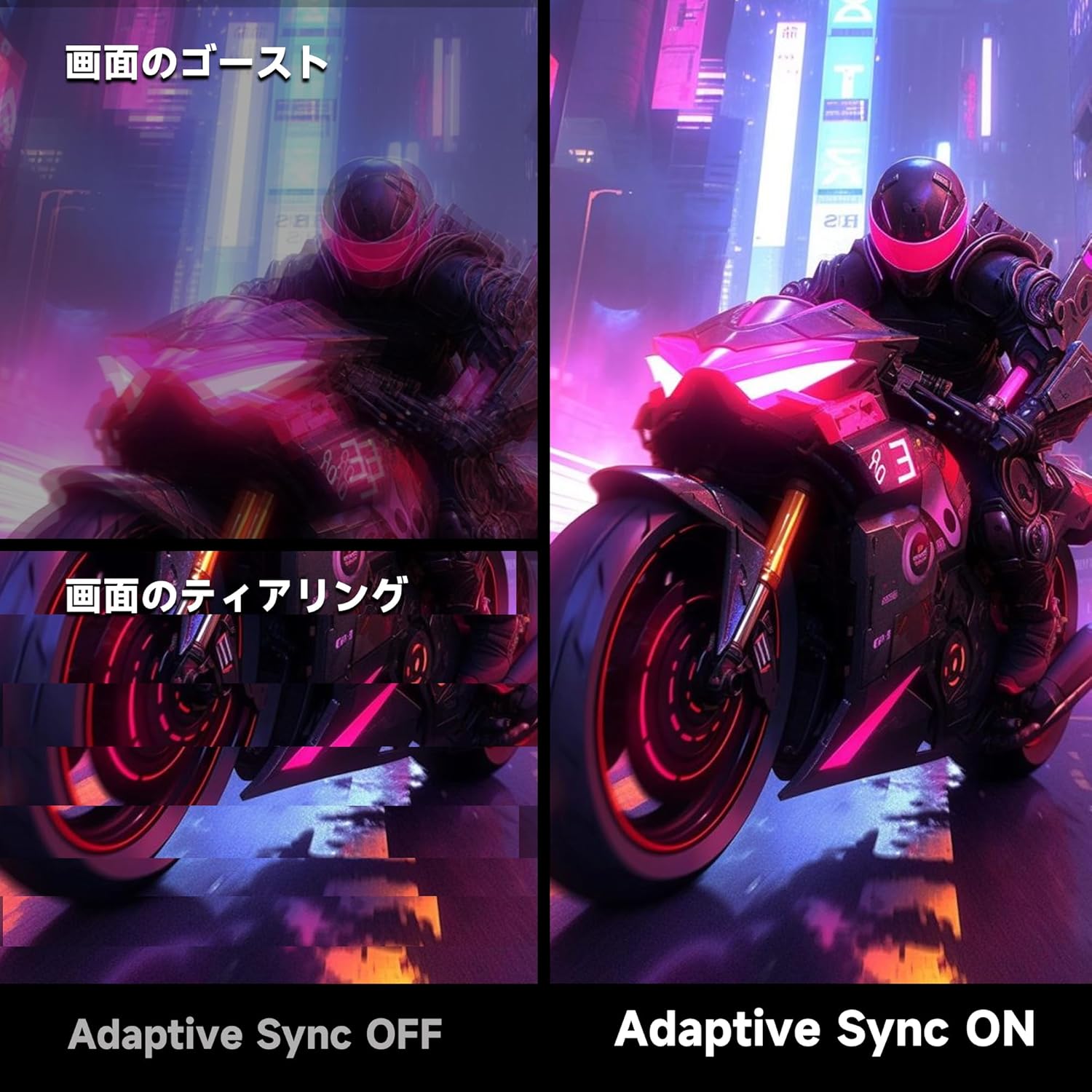
Image 4.2: Visual comparison demonstrating the effect of Adaptive Sync being OFF (showing ghosting and tearing) versus ON (smooth image).

Image 4.3: Comparison illustrating the difference in motion clarity between 200Hz 1ms MPRT and 75Hz 5ms settings.
- HDR 400: The monitor supports HDR 400 for enhanced contrast and color depth. Enable HDR in your operating system settings for compatible content.

Image 4.4: Visual representation of HDR 400 providing more impressive and vibrant images compared to standard HDR 10.
- Spalvų nustatymai: The monitor offers 93% DCI-P3 color gamut for accurate and vibrant color reproduction. Adjust brightness, contrast, and color temperature via the OSD menu.

Image 4.5: Display showing a wide range of colors, indicating 93% DCI-P3 color gamut coverage for accurate and vivid visuals.
- Akių priežiūros ypatybės: The monitor incorporates 'Blue Light Reduction' and 'Flicker-Free' technologies to minimize eye strain during prolonged use. These settings can be adjusted in the OSD menu.
- Crosshair Function: For shooting games, a built-in crosshair overlay can be enabled via the OSD menu to assist with aiming.

Image 4.6: A gaming scene demonstrating the monitor's crosshair function, which can be toggled ON or OFF to assist players in shooting games.
5. Priežiūra
5.1 Ekrano valymas
Švelniai nuvalykite ekraną minkštu, nepūkuotu skudurėliu. Jei dėmės sunkiai įveikiamos,ampen the cloth with a small amount of screen cleaner specifically designed for monitors. Do not spray cleaner directly onto the screen.
5.2 C valymasasing
Monitorių nuvalykite minkštu, sausu skudurėliu.asing. Avoid using abrasive cleaners or solvents that may damage the surface.
6. Problemų sprendimas
- Nėra galios: Įsitikinkite, kad maitinimo laidas yra tvirtai prijungtas prie monitoriaus ir maitinimo lizdo. Patikrinkite, ar veikia maitinimo lizdas.
- Nėra signalo: Verify that the video cable (HDMI or DisplayPort) is correctly connected to both the monitor and your computer. Ensure the correct input source is selected in the monitor's OSD menu.
- Mirgantis ekranas: Patikrinkite vaizdo kabelio jungtį. Išbandykite kitą kabelį arba prievadą. Įsitikinkite, kad jūsų vaizdo plokštės tvarkyklės yra atnaujintos.
- Image Distortion/Tearing: Ensure Adaptive Sync is enabled in both the monitor's OSD and your graphics card settings. Check for correct resolution and refresh rate settings.
- Prasta spalvų kokybė: Adjust color settings (brightness, contrast, color temperature) in the OSD menu. Ensure HDR is enabled for HDR content.
7. Specifikacijos
| Funkcija | Specifikacija |
|---|---|
| Prekės ženklas | KOORUI |
| Modelis | G2711P |
| Ekrano dydis | 27 colių |
| Skydelio tipas | IPS, Non-Glare |
| Rezoliucija | 1920 x 1080 (Full HD) |
| Krašto santykis | 16:9 |
| Atnaujinimo dažnis | 200 Hz |
| Reagavimo laikas | 1ms MPRT (GTG) |
| Ryškumas | 300 cd/m² |
| Kontrasto santykis | 1000:1 |
| Viewing kampas | 178° (horizontalus / vertikalus) |
| Spalvų gama | 93% DCI-P3 |
| HDR palaikymas | HDR 400 |
| Ryšys | 2 HDMI 2.0, 1 DisplayPort 1.4, 1 garso išvestis |
| Garsiakalbiai | Neįtraukta |
| VESA tvirtinimo suderinamumas | 75x75mm |
| Matmenys (P x A x G) | 61.34 x 47.23 x 21.49 cm (su stovu) |
| Svoris | 5.8 kg |
| Maitinimo įvestis | 110 V |
8. Garantija
The KOORUI G2711P monitor screen is covered by a 1 metų garantija from the date of purchase. All other included accessories are covered by a 3 metų garantija. Please retain your proof of purchase for warranty claims. The warranty covers manufacturing defects and malfunctions under normal use conditions.
9. Parama
For technical assistance, troubleshooting, or warranty inquiries, please contact KOORUI customer support through the retailer where you purchased the product or visit the official KOORUI website for contact information. When contacting support, please have your monitor model number (G2711P) and proof of purchase readily available.


