1. Įvadas
Ačiū, kad pirkoteasing the Muse M-1580-SBT Soundbar. This manual provides important information regarding the setup, operation, and maintenance of your new soundbar. Please read this manual thoroughly before using the product and keep it for future reference.
The Muse M-1580-SBT is a powerful 80W soundbar designed to enhance your audio experience, featuring Bluetooth connectivity, HDMI ARC, USB playback, and versatile mounting options.
2. Saugos instrukcijos
Norėdami užtikrinti saugų darbą ir išvengti žalos, laikykitės šių saugos priemonių:
- Saugokite įrenginį nuo lietaus, drėgmės ar ekstremalių temperatūrų.
- Neužblokuokite jokių ventiliacijos angų.
- Ensure the power adapter is compatible with your local power supply (AC 100-240V, 50/60Hz).
- Neatidarykite casing. Visus techninės priežiūros darbus patikėkite kvalifikuotiems darbuotojams.
- Keep the soundbar away from direct sunlight, heat sources, and strong magnetic fields.
- Valykite tik sausa šluoste.
3. Pakuotės turinys
Prašome patikrinti, ar visi daiktai yra ir yra geros būklės:
- Muse M-1580-SBT Soundbar
- Nuotolinio valdymo pultas
- Auxiliary Cable (3.5 mm)
- Kintamos srovės adapteris
- Vartotojo vadovas
- USB Key (32GB)
4. Produktas baigtasview

4.1 paveikslas: Priekyje view of the Muse M-1580-SBT Soundbar with a USB stick inserted into the front USB port. The soundbar features a sleek black design with a perforated grille and control buttons on the right side.

4.2 paveikslas: Priekyje view of the Muse M-1580-SBT Soundbar, showcasing its minimalist design and full-length speaker grille. The Muse logo is subtly visible on the top right.
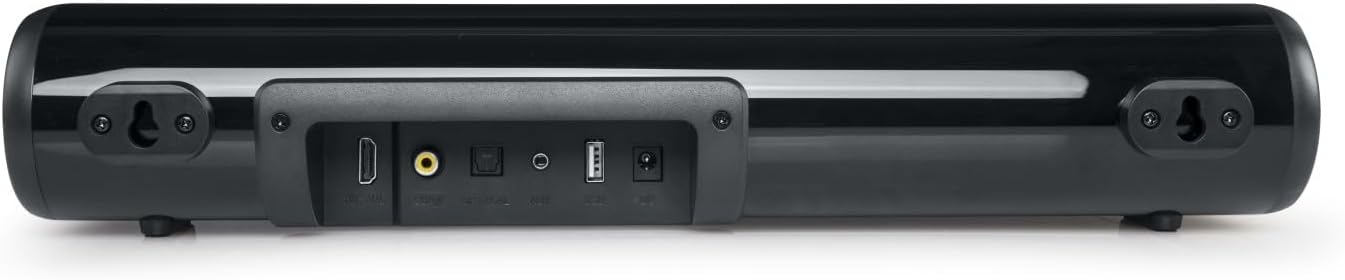
4.3 paveikslas: Galinis view of the Muse M-1580-SBT Soundbar, displaying the various input ports including HDMI ARC, Optical, Auxiliary (3.5mm), USB, and Coaxial. Wall mounting brackets are also visible.
5. Sąranka
5.1 Įdėjimas
Place the soundbar on a stable, flat surface in front of your TV, ensuring it does not block the TV's remote sensor. Alternatively, you can wall-mount the soundbar (see Section 5.3).
5.2 Maitinimo jungtis
- Prijunkite kintamosios srovės adapterį prie nuolatinės srovės įvesties (DC IN) prievado, esančio garso juostos gale.
- Kitą maitinimo adapterio galą įkiškite į sieninį lizdą.
- The LED indicator on the soundbar will light up, indicating it is in standby mode.
5.3 Tvirtinimas prie sienos
The soundbar is designed for wall mounting. Use appropriate screws and wall plugs (not supplied) suitable for your wall type. Ensure the soundbar is securely mounted to prevent accidental falls.
- Measure the distance between the two keyhole slots on the back of the soundbar.
- Mark two corresponding points on the wall.
- Pažymėtose vietose išgręžkite skyles ir, jei reikia, įstatykite kaiščius.
- Insert screws into the wall, leaving a small gap (approx. 5mm) between the screw head and the wall.
- Align the keyhole slots on the soundbar with the screws and carefully hang the soundbar. Ensure it is level and secure.
6. Jungtys
The Muse M-1580-SBT Soundbar offers multiple connectivity options:
- HDMI ARC: Connect to your TV's HDMI ARC port for high-quality audio and control via your TV remote.
- Optinis: Connect to your TV or other audio source using an optical cable (not supplied).
- Auxiliary (3.5 mm): Connect to devices with a 3.5mm audio output using the supplied auxiliary cable.
- Koaksialinis: Connect to your TV or other audio source using a coaxial cable (not supplied).
- USB: Garso įrašams leisti files iš USB atmintinės.
- Bluetooth: Belaidžiam garso transliavimui iš suderinamų įrenginių.
6.1 Connecting to TV via HDMI ARC
- Ensure your TV has an HDMI port labeled "ARC" (Audio Return Channel).
- Connect an HDMI cable (not supplied) from the HDMI ARC port on the soundbar to the HDMI ARC port on your TV.
- Turn on both the soundbar and the TV.
- Select the HDMI ARC input on the soundbar using the remote control or the soundbar's control buttons.
- Adjust your TV's audio settings to output sound through HDMI ARC.
6.2 Connecting via Optical/Coaxial
- Connect an optical or coaxial cable (not supplied) from your TV's corresponding output port to the soundbar's Optical or Coaxial input port.
- Turn on both the soundbar and the TV.
- Select the Optical or Coaxial input on the soundbar.
- Adjust your TV's audio settings to output sound through the selected digital output.
6.3 Connecting via Auxiliary (3.5 mm)
- Connect the supplied 3.5mm auxiliary cable from the AUX IN port on the soundbar to the headphone jack or audio output port of your device (e.g., smartphone, tablet, TV).
- Select the AUX input on the soundbar.
7. Naudojimo instrukcijos
7.1 Pagrindinės operacijos
- Maitinimo įjungimas/išjungimas: Paspauskite maitinimo mygtuką nuotolinio valdymo pulte arba garso juostoje.
- Garsumo valdymas: Naudokite garsumo didinimo (+) ir garsumo mažinimo (-) mygtukus ant nuotolinio valdymo pulto arba garso juostos.
- Įvesties pasirinkimas: Press the Input/Mode button on the remote or soundbar to cycle through available inputs (HDMI ARC, Optical, AUX, Coaxial, Bluetooth, USB).
- Nutildyti: Press the Mute button on the remote to mute/unmute the sound.
7.2 Bluetooth poravimas
- Turn on the soundbar and select Bluetooth mode. The LED indicator will flash, indicating pairing mode.
- Įjunkite „Bluetooth“ savo mobiliajame įrenginyje (išmaniajame telefone, planšetiniame kompiuteryje ir kt.).
- Ieškokite "M-1580-SBT" in the list of available devices and select it to pair.
- Kai susiejimas bus atliktas, LED indikatorius nustos mirksėti ir liks šviesti. Dabar galite leisti garsą iš savo įrenginio per garso juostą.
7.3 USB atkūrimas
- Insert a USB flash drive (FAT32 format) containing audio files į garso juostos USB prievadą.
- Select USB mode. The soundbar will automatically begin playing audio files iš USB atmintinės.
- Naudokite nuotolinio valdymo pultą, norėdami naršyti takelius (ankstesnis / kitas) ir valdyti atkūrimą (leisti / pristabdyti).
8. Priežiūra
- Valymas: Garso juostos paviršių valykite minkštu, sausu skudurėliu. Nenaudokite skystų valiklių ar aerozolių.
- Saugykla: Jei garso juostą ilgesnį laiką nenaudosite, atjunkite ją nuo maitinimo lizdo ir laikykite vėsioje, sausoje vietoje.
9. Problemų sprendimas
| Problema | Galima priežastis | Sprendimas |
|---|---|---|
| Nėra galios | Neprijungtas maitinimo adapteris arba neveikia maitinimo lizdas. | Ensure the power adapter is securely connected to the soundbar and a working power outlet. |
| Nėra garso | Pasirinkta neteisinga įvestis; per mažas garsumas; netinkamai prijungti laidai. | Select the correct input source. Increase the volume. Check all audio cables are securely connected. Ensure TV audio output is correctly configured. |
| „Bluetooth“ susiejimas nepavyksta | Garso juosta neįjungta susiejimo režimu; įrenginys per toli; trukdžiai. | Ensure the soundbar is in Bluetooth pairing mode (flashing LED). Move your device closer to the soundbar. Turn off other Bluetooth devices nearby. |
| USB atkūrimo problemos | Nepalaikoma file format; USB drive not formatted correctly; corrupted files. | Užtikrinkite garsą files are in a supported format (e.g., MP3). Format the USB drive to FAT32. Try a different USB drive or files. |
10. Specifikacijos
- Modelis: M-1580-SBT
- Išėjimo galia: 80W
- Ryšys: Bluetooth, HDMI ARC, USB, Auxiliary (3.5 mm), Optical, Coaxial
- Maitinimas: AC 100–240 V ~ 50 / 60Hz
- Dimensions (H x D x L): 73 mm x 95 mm x 410 mm
- Grynasis svoris: 1 kg
- Ypatingos savybės: LED Indicator, Wall Mount Support
11. Garantija ir palaikymas
This product comes with a standard manufacturer's warranty. For detailed warranty information and support, please refer to the warranty card included in your package or contact your retailer.
For technical assistance or service inquiries, please contact the customer support of your point of purchase.


