1. Įvadas
The XIAOMI Redmi Note 13 Pro 5G is a feature-rich smartphone designed for global use, offering advanced camera capabilities, a vibrant display, and robust performance. This manual provides essential information to help you set up, operate, and maintain your device effectively.
Key features include a flagship-level 200MP OIS anti-shake main camera, a 1.5K 120Hz AMOLED display, and support for 5G and 4G LTE global bands. The device is powered by the Snapdragon 7s Gen 2 Mobile Platform, ensuring smooth and efficient operation for various tasks.

Figure 1: Xiaomi Redmi Note 13 Pro 5G in various color options, showcasing its front display.
2. Kas yra dėžutėje
Upon unboxing your XIAOMI Redmi Note 13 Pro 5G, you should find the following items:
- „XIAOMI Redmi Note 13 Pro 5G“ išmanusis telefonas
- Greitas automobilio įkroviklis
- SIM dėklo išstūmiklis
- USB kabelis
- Sieninis adapteris
3. Fizinis viršusview
The Redmi Note 13 Pro 5G features a sleek design with a comfortable grip. Its dimensions are approximately 3.58 x 7.32 x 2.36 inches, and it weighs about 1.19 pounds (0.54 kilograms).
3.1 Ekranas
The device is equipped with a 6.67-inch AMOLED display, offering a refresh rate of up to 120Hz and a peak brightness of 1800 nits. The resolution is 2712x1220 pixels (446PPI), providing sharp and vibrant visuals. It features 12-bit color depth, a 5,000,000:1 contrast ratio, and 100% DCI-P3 color gamut. The screen is protected by Corning Gorilla Glass Victus and supports Dolby Vision.
3.2 kameros modulis
The rear camera system includes a triple camera setup:
- 200MP pagrindinė kamera: Features OIS (Optical Image Stabilization), f/1.65 aperture, 1/1.4” sensor size, and 7P lens for high-resolution photos and improved low-light performance.
- 8 MP itin plataus kampo kamera: With f/2.2 aperture for capturing broader scenes.
- 2 MP makro kamera: With f/2.4 aperture for detailed close-up shots.
The front camera is designed for selfies and video calls.
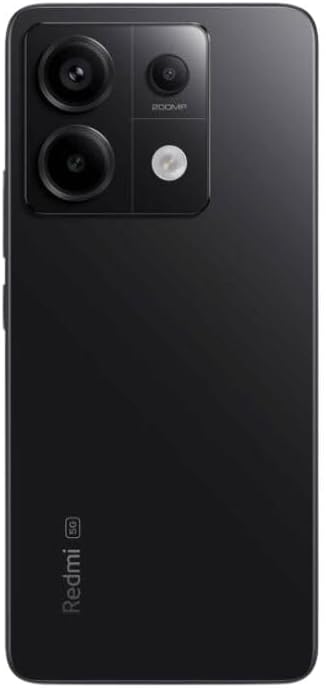
2 pav.: galinis view of the Xiaomi Redmi Note 13 Pro 5G, showing the 200MP triple camera setup.
3.3 Ports and Sensors
The device includes a USB-C port for charging and data transfer, and a 3.5mm headphone jack. Integrated sensors include an in-screen fingerprint sensor, AI Face Unlock, ambient light sensor, accelerometer, electronic compass, IR blaster, and gyroscope.
4. Sąranka
4.1 SIM kortelės montavimas
- Suraskite SIM kortelės dėklą savo įrenginio šone.
- Įkiškite SIM kortelės dėklo išstūmimo įrankį į mažą skylutę šalia dėklo ir tvirtai spauskite, kol dėklas iššoks.
- Place your nano-SIM card(s) into the designated slots on the tray. Ensure the gold contacts are facing down. The device supports Dual SIM (nano SIM + nano SIM or nano SIM + eSIM).
- Atsargiai įstatykite SIM kortelės dėklą į telefoną, kol jis spragtelės ir užsifiksuos.
4.2 Pradinis įjungimo ir sąrankos vedlys
- Paspauskite ir palaikykite maitinimo mygtuką (paprastai dešinėje pusėje), kol pasirodys „Xiaomi“ logotipas.
- Follow the on-screen instructions to select your language, region, and agree to the terms and conditions.
- Connect to a Wi-Fi network to complete the setup process and download necessary updates.
- Sign in with your Google account and/or Xiaomi account to access services and restore backups.
- Set up your preferred security methods, such as PIN, pattern, password, fingerprint, or AI Face Unlock.
5. Prietaiso valdymas
5.1 Ekrano navigacija
Navigate your device using intuitive touch gestures. Swipe, tap, pinch, and zoom to interact with apps and content. The 120Hz refresh rate ensures a smooth and fluid user experience. Unlock your device quickly and securely using the in-screen fingerprint sensor or AI Face Unlock.
5.2 Kameros naudojimas
Open the Camera app to capture photos and videos. Utilize the 200MP main camera for highly detailed images, the ultra-wide lens for expansive landscapes, and the macro lens for close-up photography. The camera supports 4K video recording at 30fps, 1080p at 30/60fps, and 720p at 30fps. Slow motion video is available at 1080p (120fps) and 720p (120/240fps).
5.3 Našumas
The Redmi Note 13 Pro 5G is powered by the Snapdragon 7s Gen 2 Mobile Platform, built on 4nm process technology with an octa-core CPU up to 2.4GHz and Adreno GPU. This configuration, combined with 8GB of RAM and 256GB of internal storage, provides strong performance for multitasking, gaming, and demanding applications.
5.4 garsas
Enjoy immersive audio with dual speakers and Dolby Atmos support. The device also retains a 3.5mm headphone jack for wired audio connections.
6. Priežiūra
6.1 Programinės įrangos naujiniai
Reguliariai tikrinkite, ar yra programinės įrangos atnaujinimų, ir juos įdiekite, kad jūsų įrenginyje būtų naujausios funkcijos, saugos pataisymai ir našumo patobulinimai. Eikite į Nustatymai > Apie telefoną > MIUI versija norėdami patikrinti, ar nėra atnaujinimų.
6.2 Akumuliatoriaus priežiūra
The 5000 mAh battery provides extended usage. To prolong battery life, avoid extreme temperatures, use the provided 67W fast charger, and manage background app usage. Avoid fully discharging the battery frequently.
6.3 Valymas
Use a soft, lint-free cloth to clean your device. Avoid harsh chemicals or abrasive materials that could damage the screen or finish. Do not expose the device to excessive moisture.
6.4 Saugojimo valdymas
Turėdami 256 GB vidinės atminties, galite ample space for apps and media. Regularly review tavo files and uninstall unused applications to optimize performance and free up space.
7. Problemų sprendimas
Jei kyla problemų dėl įrenginio, išbandykite šiuos pagrindinius trikčių šalinimo veiksmus:
- Įrenginys nereaguoja: Paspauskite ir palaikykite maitinimo mygtuką maždaug 10–15 sekundžių, kad priverstumėte paleisti iš naujo.
- Tinklo ryšio problemos: Check if your SIM card is properly inserted. Toggle Airplane Mode on and off. Restart your device. Verify Wi-Fi settings and router connection.
- Programėlės užstrigimas / užstrigimas: Close the app and reopen it. Clear the app's cache and data (Settings > Apps > Manage apps > [App Name] > Clear data). Update the app to its latest version.
- Akumuliatoriaus išsikrovimas: Patikrinkite akumuliatoriaus naudojimą nustatymuose, kad nustatytumėte daug energijos eikvojančias programas. Sumažinkite ekrano ryškumą, išjunkite nereikalingas funkcijas, pvz., GPS ar „Bluetooth“, kai jų nenaudojate.
- Lėtas našumas: Išvalykite talpyklą, pašalinkite nenaudojamas programas ir užtikrinkite pakankamai laisvos vietos saugykloje.
- Gamykliniai nustatymai: Jei problemos išlieka, kraštutiniu atveju galite atlikti gamyklinių parametrų atkūrimą. Įspėjimas: tai ištrins visus jūsų įrenginyje esančius duomenis. Prieš tęsdami sukurkite svarbių duomenų atsarginę kopiją. Eikite į Nustatymai > Apie telefoną > Atstatyti gamyklinius nustatymus.
8. Specifikacijos
| Funkcija | Specifikacija |
|---|---|
| Modelio pavadinimas | Redmi Note 13 Pro 5G |
| Prekės modelio numeris | 2312DRA50G |
| Prekės ženklas | XIAOMI |
| Operacinė sistema | Android 13.0 |
| CPU modelis | Snapdragon 7s Gen 2 Mobile Platform |
| CPU greitis | Iki 2.4 GHz |
| Įdiegtos RAM atminties dydis | 8 GB |
| Atminties talpa | 256 GB |
| Stovinčio ekrano dydis | 6.67 colio AMOLED |
| Rezoliucija | 2712x1220 (446PPI) |
| Atnaujinimo dažnis | Iki 120Hz |
| Didžiausias ryškumas | 1800 nitų |
| Pagrindinė kamera | 200 MP optinis vaizdo stabilizatorius |
| Itin plataus kampo kamera | 8 MP |
| Makrokamera | 2 MP |
| Akumuliatoriaus galios įvertinimas | 5000 milijonųamp Valandos |
| Įkrovimas | 67W greitas įkrovimas |
| Garso lizdas | 3.5 mm |
| Belaidis nešiklis | Unlocked (USA Market: T-Mobile, Mint, Tello or any under T-Mobile network) |
| Gaminio matmenys | 3.58 x 7.32 x 2.36 colio |
| Prekės svoris | 1.19 svaro (0.54 kilogramo) |
9. Garantija ir palaikymas
Your XIAOMI Redmi Note 13 Pro 5G is covered by a manufacturer's warranty. For detailed information regarding warranty terms, conditions, and duration, please refer to the warranty card included in your product packaging or visit the official XIAOMI support websvetainę.
For technical support, service requests, or further assistance, please visit the official XIAOMI website or contact their customer service. Keep your proof of purchase handy for any warranty claims.