1. Produktas baigtasview
The MATRIX MPS-3010H-3C is a high-precision, 3-channel adjustable DC power supply designed for various applications including laboratory work, electronic repair, and DIY projects. It features two adjustable channels (CH1 and CH2) providing 0-30V / 0-10A each, and one fixed 5V / 3A channel (CH3), with a total power output of up to 615W. The unit offers a 4-digit bright screen display for voltage and current, independent control for CH1 and CH2, and supports 110V/220V input voltage perjungimas.
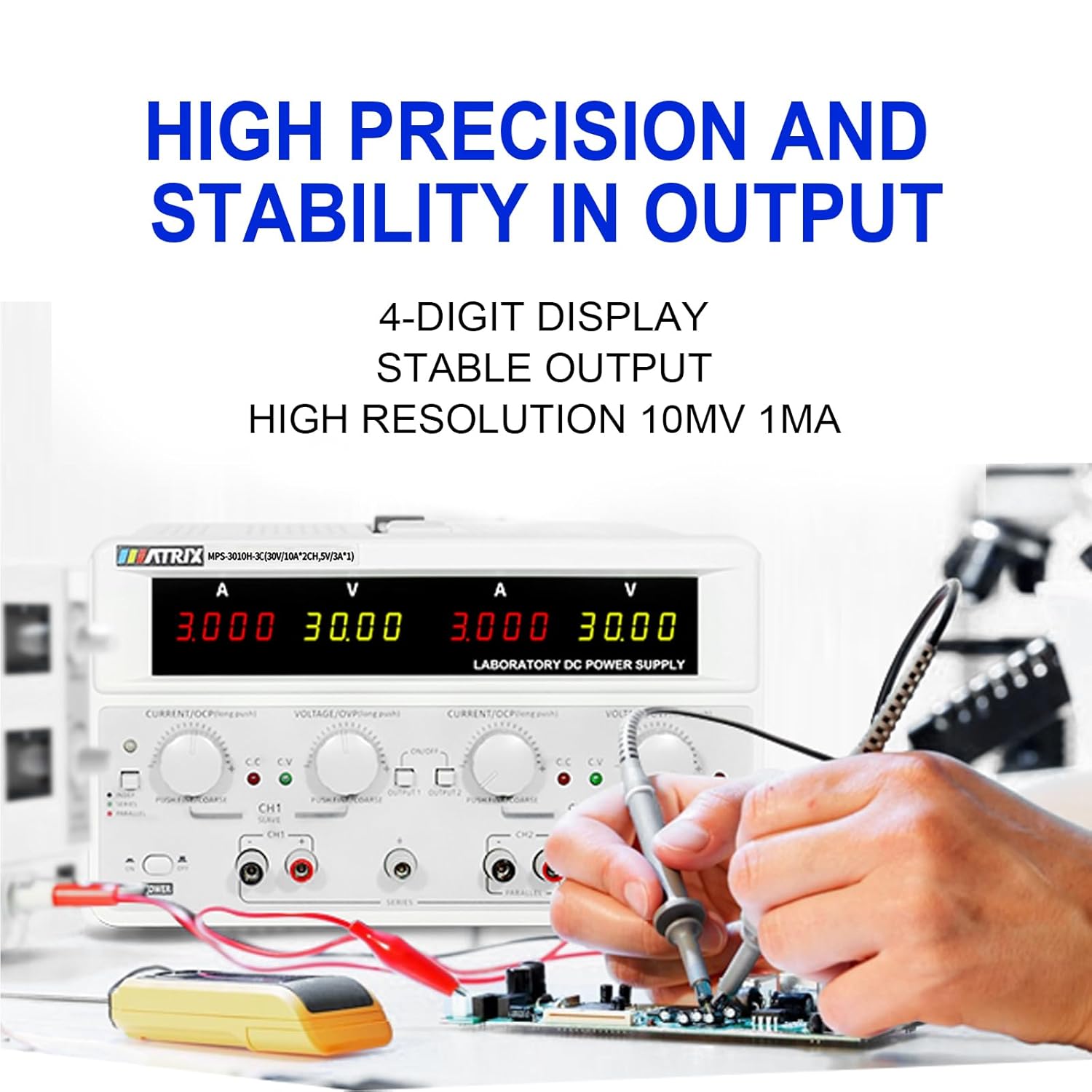
Key features include high precision (0.03% + 10 mV, 0.1% + 5 mA) and stability with 10 mV, 1 mA resolution and low ripple (2 mVrms, 5 mArms). It incorporates a power-on slow-start circuit for stable and accurate DC output. The power supply allows for easy switching between independent, series, and parallel modes with a single button, eliminating the need for manual wire reconnection. It also supports presetting current and voltage without short circuits. User-friendly features include precision encoder adjustment knobs for accurate value changes, OCP/OVP/OTP protection, an intelligent fan system, and USB, RS-232, and RS-485 interfaces for computer or automated device connectivity.

2. Saugos instrukcijos
Prieš naudodami įrenginį, perskaitykite ir supraskite visas saugos instrukcijas. Nesilaikant šių instrukcijų, gali kilti elektros smūgis, gaisras arba sugesti gaminys.
- Always connect the power supply to a grounded outlet.
- Nenaudokite įrenginio šlapioje arba damp sąlygas.
- Užtikrinkite tinkamą vėdinimą, kad išvengtumėte perkaitimo. Neužblokuokite ventiliacijos angų.
- Neatidarykite casing of the power supply. There are no user-serviceable parts inside. Refer servicing to qualified personnel.
- Patikrinkite įvesties tūrįtage selector (110V/220V) is set correctly for your region before connecting to AC power.
- Use only the provided power cord and test leads, or equivalent replacements that meet safety standards.
- Avoid touching output terminals when the device is powered on.
- Disconnect power before making or changing connections to the output terminals.
3. Pakuotės turinys
Carefully unpack the power supply and check for any damage. Retain the packaging for future transport or storage. Verify that all items listed below are included:
- MATRIX MPS-3010H-3C DC Power Supply Unit
- Kintamosios srovės maitinimo laidas
- Bandymo laidai (raudoni ir juodi)
- Vartotojo vadovas (šis dokumentas)
4. Produkto ypatybės
- 3 kanalų išvestis: Two adjustable channels (0-30V/0-10A) and one fixed channel (5V/3A).
- High Precision & Resolution: 10mV / 1mA resolution with 0.03% + 10mV voltage accuracy and 0.1% + 5mA current accuracy.
- Low Ripple & Noise: ≤2mVrms and ≤5mArms for stable output.
- 4 skaitmenų ekranas: Clear and bright display for voltage ir dabartiniai rodmenys.
- Series/Parallel Mode: One-button switching for series or parallel operation without manual rewiring.
- Iš anksto nustatyta funkcija: Ability to preset current and voltage without short-circuiting the output.
- Apsaugos mechanizmai: Over Current Protection (OCP), Over Voltage Protection (OVP), and Over Temperature Protection (OTP).
- Pažangus aušinimas: Fan system adjusts speed based on temperature to maintain optimal performance.
- Ryšys: Equipped with USB, RS-232, and RS-485 interfaces for remote control and automation.
- Atminties funkcija: Saves output status and values before shutdown.
- Garso signalo valdymas: Buzzer sound can be turned on or off.


5. Sąrankos vadovas
5.1 Išpakavimas ir įdėjimas
Remove the power supply from its packaging. Place the unit on a stable, level surface with adequate space around it for ventilation. Ensure that the front and rear panels are easily accessible.
5.2 Kintamosios srovės maitinimo prijungimas
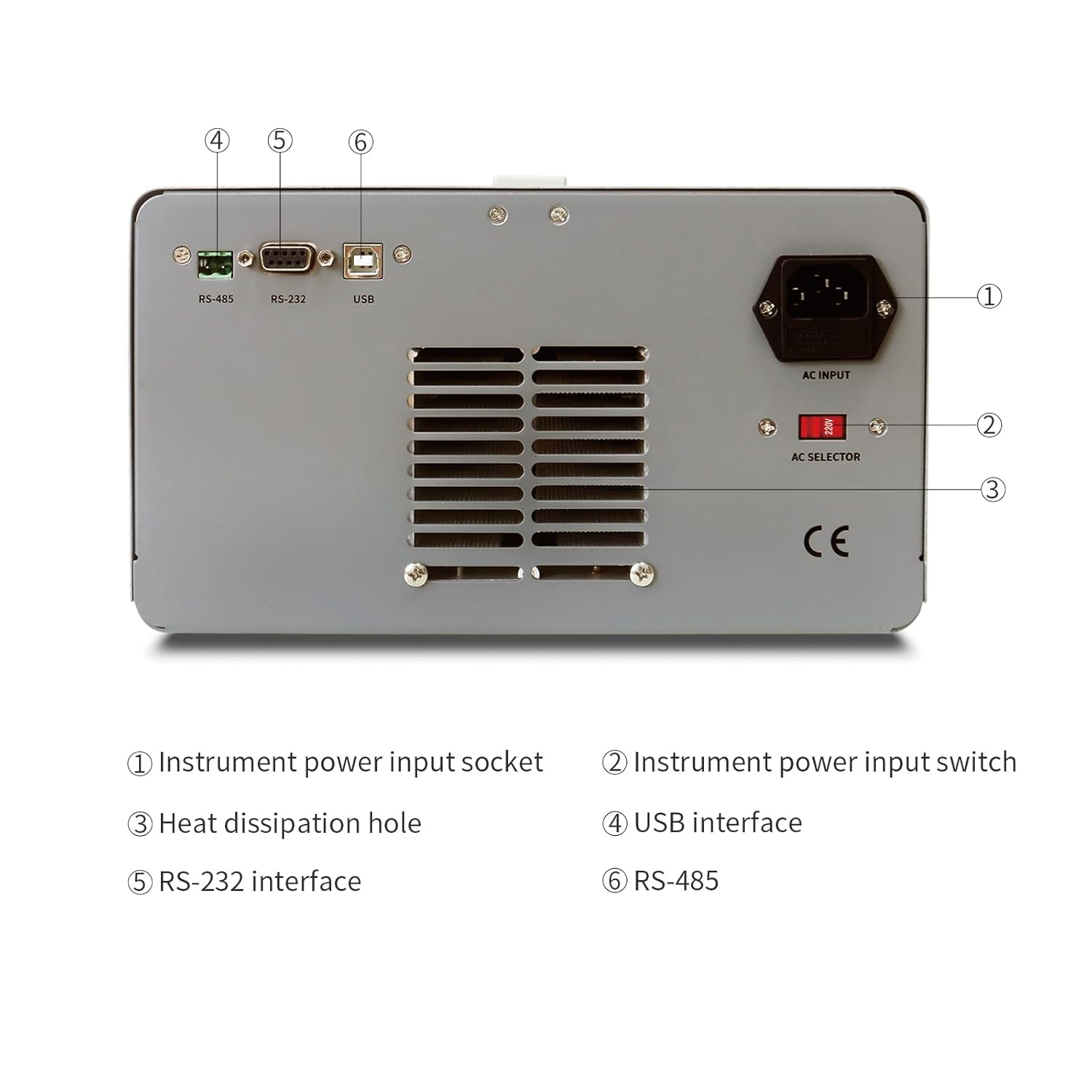
- Locate the AC input socket and the AC selector switch on the rear panel of the power supply.
- Svarbu: Before connecting the power cord, ensure the AC selector switch is set to the correct voltage (110V or 220V) for your local power grid. Incorrect setting can damage the unit.
- Connect the provided AC power cord to the AC input socket on the rear panel.
- Kitą kintamosios srovės maitinimo laido galą prijunkite prie įžeminto elektros lizdo.
5.3 Connecting Load
Use the provided test leads to connect your load to the output terminals. Ensure correct polarity (red for positive, black for negative). For CH1 and CH2, use the corresponding output terminals. CH3 (fixed 5V) also has dedicated output terminals.
6. Naudojimo instrukcijos
6.1 Priekinio skydelio viršusview
The front panel provides all necessary controls and displays for operating the power supply.

- CH1 V, A display: Digital displays for Voltage and Current of Channel 1.
- CH2 V, A display: Digital displays for Voltage and Current of Channel 2.
- CH1 Adjustment knob: Encoder knob for setting Voltage and Current for Channel 1. Push to switch between coarse/fine adjustment.
- CH2 Adjustment knob: Encoder knob for setting Voltage and Current for Channel 2. Push to switch between coarse/fine adjustment.
- Režimo indikatorius: Lights indicating CC (Constant Current) or CV (Constant Voltage) mode.
- Meniu: Button for accessing menu options.
- CH1, CH2 Output switch: Buttons to enable/disable output for Channel 1 and Channel 2 independently.
- Išvesties terminalas: Binding posts for connecting test leads (Red for positive, Black for negative).
- Maitinimo jungiklis: Main power ON/OFF switch for the unit.
6.2 Basic Operation (Independent Mode)
- Ensure the power supply is connected to AC power and the AC selector is correct.
- Paspauskite pagrindinį GALIA switch to turn on the unit. The displays will illuminate.
- For CH1 or CH2, rotate the respective VOLTAGE knob to set the desired output voltage. Push the knob to toggle between coarse and fine adjustment.
- Rotate the respective DABARTINĖ knob to set the desired current limit. This acts as a maximum current the channel will supply.
- Connect your load to the corresponding output terminals (CH1, CH2, or CH3).
- Paspauskite 1 REZULTATAS or 2 REZULTATAS switch to enable the output for the selected channel. The output indicator will light up.
- The display will show the actual output voltage ir srovė.
- To disable an output, press its respective IŠVADA vėl perjungti.
6.3 Series and Parallel Mode
The MPS-3010H-3C allows for easy configuration of CH1 and CH2 in series or parallel mode.
- Series Mode: Connect the positive terminal of CH1 to the negative terminal of CH2 using a short wire. Then, use the negative terminal of CH1 and the positive terminal of CH2 as the combined output. Press the SERIJA button. The voltage will be the sum of CH1 and CH2 voltages, while the current limit will be that of the lower-set channel.
- Lygiagretus režimas: Connect the positive terminals of CH1 and CH2 together, and the negative terminals of CH1 and CH2 together. Press the PARALELĖS button. The current will be the sum of CH1 and CH2 currents, while the voltage will be that of the lower-set channel.
In both series and parallel modes, the display will show the combined current and voltage values, providing intuitive readings.
6.4 Fixed 5V Output (CH3)
The CH3 output provides a fixed 5V at 3A. This channel is always active when the power supply is on and does not have independent ON/OFF control or adjustable settings.
6.5 Apsaugos funkcijos
- OCP (apsauga nuo per didelės srovės): If the output current exceeds the set limit, the power supply will enter constant current mode (CC) or shut down the output, depending on the setting.
- OVP (daugiau nei tomastage apsauga): Jei išvesties ttage exceeds a preset limit, the output will be shut down to protect the connected load.
- OTP (apsauga nuo perkaitimo): The unit will automatically shut down if its internal temperature exceeds a safe operating limit.
7. Connectivity and Remote Control
The MPS-3010H-3C offers multiple interfaces for remote control and integration into automated systems.
7.1 Sąsaja baigtaview

- USB sąsaja: For direct connection to a personal computer.
- RS-232 sąsaja: A standard serial communication port.
- RS-485 sąsaja: A robust serial communication standard suitable for longer distances and multi-drop networks.
7.2 Prijungimas prie kompiuterio
To control the power supply remotely, connect the appropriate cable (USB, RS-232, or RS-485) from the power supply to your computer. You will need to install the necessary drivers and control software, typically available from the MATRIX product support website. Refer to the software documentation for detailed instructions on remote operation and programming.
8. Priežiūra
Proper maintenance ensures the longevity and reliable operation of your power supply.
- Valymas: Disconnect the power supply from all power sources and loads before cleaning. Use a soft, dry cloth to wipe the exterior. Do not use abrasive cleaners or solvents.
- Vėdinimas: Regularly check that the ventilation openings on the sides and rear of the unit are clear of dust and obstructions.
- Saugykla: When not in use for extended periods, store the power supply in a dry, dust-free environment.
- Kalibravimas: For applications requiring high accuracy, periodic calibration by a qualified service center is recommended.
9. Problemų sprendimas
Šiame skyriuje aptariamos dažniausiai pasitaikančios problemos. Jei problema išlieka, susisiekite su klientų aptarnavimo tarnyba.
| Problema | Galima priežastis | Sprendimas |
|---|---|---|
| Įjungus nėra maitinimo | Power cord not connected; AC selector incorrect; Blown fuse | Check power cord connection; Verify AC selector setting; Replace fuse (refer to service manual or contact support). |
| Nėra išėjimo tūriotage/dabartinis | Output switch OFF; OVP/OCP triggered; Load disconnected or faulty | Press output switch ON; Check OVP/OCP settings and reset if necessary; Verify load connection and functionality. |
| Neteisingas ttage/current reading | Poor connection; Device malfunction | Check test lead connections; Contact customer support for calibration or repair. |
| Įrenginys perkaista | Blocked ventilation; Excessive load | Ensure ventilation openings are clear; Reduce load or operate within specified limits. |
10. Techninės specifikacijos
The following table details the technical specifications of the MATRIX MPS-3010H-3C DC Power Supply.

| Parametras | Specifikacija |
|---|---|
| Modelis | MPS-3010H-3C |
| Nominali įvestis ttage | AC220V/110V ±10% |
| 1 kanalo išvestis | 0-30V / 0-10A |
| 2 kanalo išvestis | 0-30V / 0-10A |
| 3 kanalo išvestis | 5V / 3A |
| Bendra galia | 615W |
| ttage Set Resolution | 10mV |
| Current Set Resolution | 1 mA |
| ttage Set Accuracy | ≤0.03% + 10mV |
| Current Set Accuracy | ≤0.1% + 5mA |
| Ripple & Noise (Voltage) | ≤2 mVrms |
| Ripple & Noise (Current) | ≤5 mArms |
| Darbinė temperatūra | 0-40°C, ≤80%RH |
| Gaminio matmenys (I x P x A) | 9.8 x 5.9 x 13 colio |
| Prekės svoris | 26.4 svarai (12 kg) |
| Sąsajos | RS-232, RS-485, USB |
11. Garantija ir klientų aptarnavimas
MATRIX TECHNOLOGY INC. provides a 3-year after-sales service for all MATRIX-branded products. For technical assistance, warranty claims, or general inquiries, please contact MATRIX customer support through the official website or your point of purchase. Please have your model number (MPS-3010H-3C) and purchase date available when contacting support.


