Įvadas
Thank you for choosing the GOBOULT Z60 Wireless Earbuds. This manual provides detailed instructions to help you set up, operate, and maintain your earbuds for an optimal audio experience. Please read this manual thoroughly before use and retain it for future reference.

Image: GOBOULT Z60 Earbuds, illustrating the brand transition from BOULT to GOBOULT, highlighting the new logo and packaging while assuring consistent product performance.
Kas yra dėžutėje
Įsitikinkite, kad pakuotėje yra visi daiktai:
- GOBOULT Z60 Wireless Earbuds (Left and Right)
- Įkrovimo dėklas
- C tipo USB įkrovimo laidas
- Ausų antgaliai (įvairių dydžių)
- Vartotojo vadovas
- Garantijos kortelė

Image: The GOBOULT Z60 Wireless Earbuds and their charging case, showcasing the product's design and included accessories.
Produktas baigtasview
The GOBOULT Z60 earbuds are designed for comfort and high-quality audio. Each earbud features a 13mm bass driver and multiple microphones for clear calls. The charging case provides extended battery life.
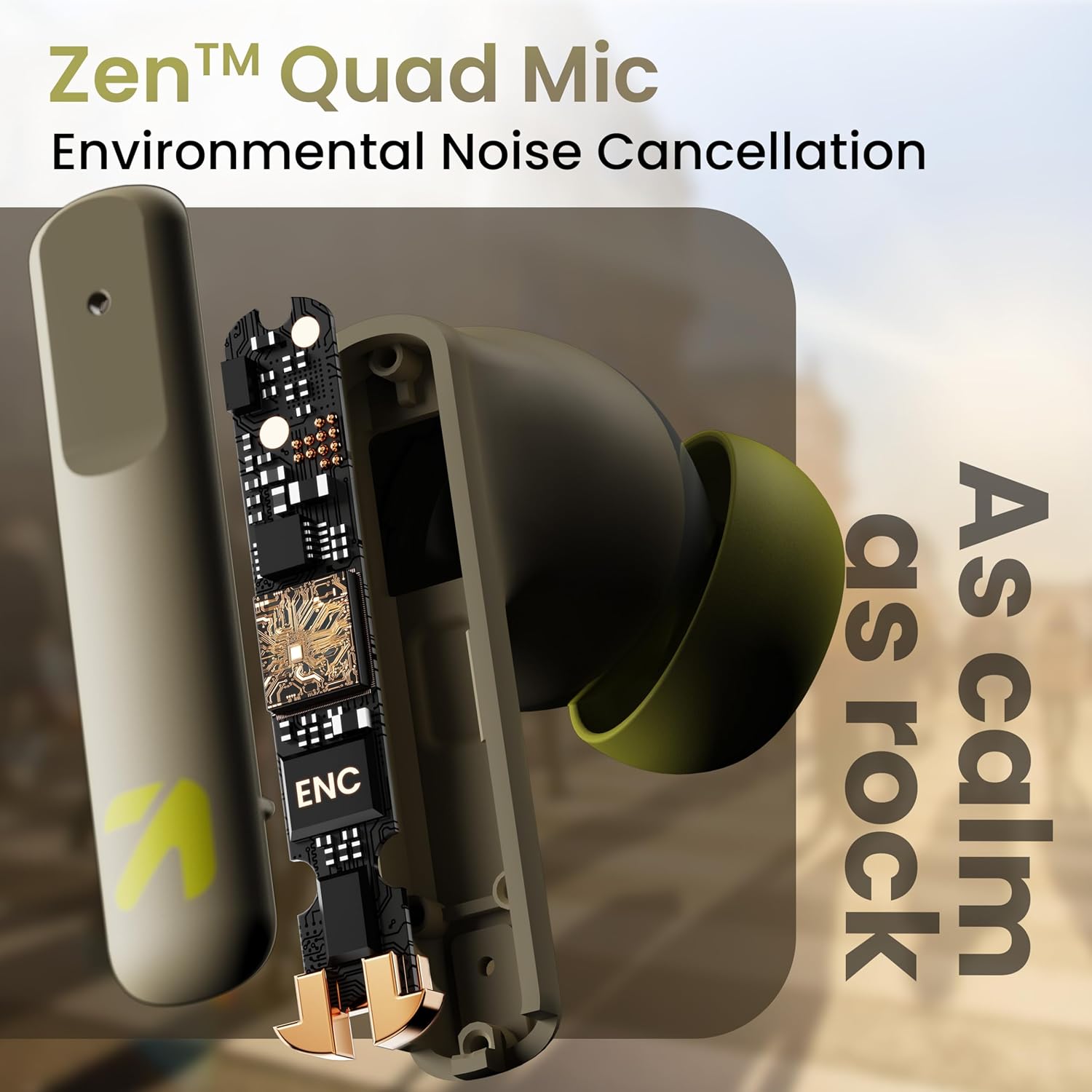
Paveikslėlis: vidinis view of a GOBOULT Z60 earbud, highlighting the Zen Quad Mic Environmental Noise Cancellation (ENC) technology for clear audio.

Image: A close-up of a GOBOULT Z60 earbud, emphasizing the 13mm BoomX Drivers responsible for rich bass and superior sound quality.
Įkrovimas
To charge your GOBOULT Z60 earbuds and charging case:
- Įdėkite ausines į įkrovimo dėklą. Įsitikinkite, kad jos tinkamai įstatytos.
- Prijunkite USB C tipo įkrovimo laidą prie dėklo įkrovimo prievado ir prie maitinimo šaltinio.
- Dėklo LED indikatorius rodys įkrovimo būseną.
A full charge provides up to 60 hours of total playtime with the charging case. A quick 10-minute charge can provide up to 150 minutes of playtime.

Image: The GOBOULT Z60 charging case connected via a Type-C cable, illustrating the fast charging capability with indicators for 10 minutes charge yielding 150 minutes playtime.

Image: GOBOULT Z60 earbuds in their charging case, highlighting the impressive 60 hours of total playtime and 8 hours of playtime on a single earbud charge.
Setup: Pairing with Your Device
The GOBOULT Z60 earbuds utilize Bluetooth 5.3 for stable and efficient wireless connectivity.
- Pradinis poravimas:
- Atidarykite įkrovimo dėklą. Ausinės automatiškai įsijungs susiejimo režimu.
- Savo įrenginyje (išmaniajame telefone, planšetiniame kompiuteryje, nešiojamajame kompiuteryje) įjunkite „Bluetooth“.
- Ieškokite "GOBOULT Z60" in the list of available Bluetooth devices and select it to connect.
- Once connected, you will hear an audio prompt, and the LED indicator on the case will change.
- Pakartotinis susiejimas: Ausinės automatiškai prisijungs prie paskutinio suporuoto įrenginio, kai bus išimtos iš dėklo, jei įrenginyje įjungtas „Bluetooth“.

Image: GOBOULT Z60 earbuds and their open charging case next to a smartphone, illustrating the Bluetooth 5.3 "Blink & Pair" feature for quick and stable connection.
Ausinių naudojimas
Palieskite valdiklius
The GOBOULT Z60 earbuds feature intuitive touch controls. The specific functions are:
- Muzikos atkūrimas:
- Vienu paspaudimu: paleisti / pristabdyti
- Double tap (Right earbud): Next track
- Double tap (Left earbud): Previous track
- Triple tap (Right earbud): Volume Up
- Triple tap (Left earbud): Volume Down
- Skambučių valdymas:
- Single tap: Answer/End call
- Long press: Reject call
- Padėjėjas balsu: Long press (either earbud) to activate Google Assistant or Siri.
- Žaidimų režimas: Tap 4 times on either earbud to activate/deactivate Combat Gaming Mode (50ms low latency).

Image: A visual guide to the GOBOULT Z60's touch controls, detailing actions for music playback (play/pause, next/back, volume), call management, activating voice assistance, and toggling game/music mode.
Žaidimų režimas
Activate the 50ms low latency Combat Gaming Mode for a synchronized audio-visual experience during gaming. Tap 4 times on either earbud to switch between gaming and normal modes.

Image: GOBOULT Z60 earbuds in use with a smartphone displaying a racing game, emphasizing the "Combat Gaming Mode" with 50ms ultra-low latency, activated by tapping the earbud 4 times.
Balso asistentas
Access your device's voice assistant (Google Assistant or Siri) by long-pressing either earbud. This allows for hands-free control of your device.

Image: GOBOULT Z60 earbuds and their charging case, illustrating how to activate voice assistance (Ok Google, Hey Siri) with a long press on an earbud.
Priežiūra
To ensure the longevity and optimal performance of your GOBOULT Z60 earbuds:
- Valymas: Reguliariai valykite ausines ir įkrovimo dėklą minkštu, sausu skudurėliu. Venkite naudoti stiprias chemines medžiagas ar abrazyvines medžiagas.
- Ausinės: Remove and clean the eartips periodically. Ensure they are dry before reattaching.
- Atsparumas vandeniui: The earbuds are IPX5 water-resistant, meaning they can withstand sweat and light rain. Do not submerge them in water or expose them to heavy downpours. Ensure the charging port is dry before charging.
- Saugykla: Kai nenaudojate, laikykite ausines įkrovimo dėkle, kad jos būtų apsaugotos ir įkrautos.

Image: A GOBOULT Z60 earbud with water droplets on its surface, illustrating its IPX5 water resistance, suitable for protection against sweat, rain, and splashes.
Trikčių šalinimas
If you encounter issues with your GOBOULT Z60 earbuds, refer to the following common solutions:
| Problema | Galimas sprendimas |
|---|---|
| Ausinės nesusiejamos |
|
| Nėra garso iš vienos ausinės |
|
| Ausinės neįkraunamos |
|
| Mažas garsumas arba prasta garso kokybė |
|
Specifikacijos
| Funkcija | Detalė |
|---|---|
| Modelio pavadinimas | AirBass (Z60) |
| Ryšio technologija | Belaidis ryšys („Bluetooth“) |
| Bluetooth versija | 5.3 |
| Bluetooth diapazonas | 10 metrų |
| Garso tvarkyklės dydis | 13 milimetrų |
| Garso tvarkyklės tipas | Dinaminis vairuotojas |
| Baterijos veikimo laikas (bendras) | Iki 60 valandų (su įkrovimo dėklu) |
| Įkrovimo laikas | Maždaug 90 minučių |
| Greitas įkrovimas | 10 min. įkrovimas = 150 min. grojimo laiko |
| Įkrovimo prievadas | C tipas |
| Mikrofonai | 4 ENC Mics for Clear Calling |
| Garso vėlavimas | 50 milisekundės (žaidimo režimas) |
| Atsparumas vandeniui | IPX5 (atsparus prakaitui, lietui, purslams) |
| Kontrolės metodas | Touch, Voice |
| Prekės svoris | 41.5 gramų |
| Kilmės šalis | Indija |
Garantija ir palaikymas
Your GOBOULT Z60 Wireless Earbuds come with a 1 metų gamintojo garantija nuo pirkimo datos.
For any support, warranty claims, or technical assistance, please refer to the contact information provided on your warranty card or visit the official GOBOULT support websvetainę.


