1. Produktas baigtasview
The Canon PowerShot A2500 is a compact digital camera designed for ease of use and reliable performance. It features a 16-megapixel sensor, 5x optical zoom, and digital image stabilization, making it suitable for capturing everyday moments in both photos and 720p HD video.

1 vaizdas: priekis view of the Canon PowerShot A2500 digital camera in red.
Pagrindinės funkcijos:
- 16 Megapixel, 1/2.3-inch CCD sensor and Canon DIGIC 4 image processor for enhanced image quality.
- 5x optical zoom and 28mm wide-angle lens with Digital Image Stabilizer.
- Capture impressive 720p HD video in stereo sound with a dedicated movie button.
- Smart Auto intelligently selects the proper settings based on 32 predefined shooting situations.
- ECO Mode to reduce power consumption.
2. Pakuotės turinys
Please ensure all items are present in your product package:
- „Canon PowerShot A2500“ skaitmeninis fotoaparatas
- Baterijų paketas
- Akumuliatoriaus įkroviklis
- Riešo dirželis

Image 2: Contents of the Canon PowerShot A2500 package, including the camera, battery, charger, and wrist strap.
3. Pradinė sąranka
3.1. Akumuliatoriaus įkrovimas
- Įdėkite bateriją į pateiktą baterijos įkroviklį.
- Prijunkite įkroviklį prie maitinimo lizdo. Užsidegs įkrovimo indikatoriaus lemputė.
- Once charging is complete, the indicator light will change or turn off. Remove the battery.
3.2. Baterijos ir atminties kortelės įdėjimas
- Atidarykite akumuliatoriaus / kortelės skyriaus dangtelį fotoaparato apačioje.
- Insert the charged battery into the compartment, ensuring correct orientation.
- Insert a compatible SD/SDHC/SDXC memory card into the card slot until it clicks into place.
- Saugiai uždarykite skyriaus dangtelį.
4. Naudojimo instrukcijos
4.1. Maitinimo įjungimas/išjungimas
Paspauskite ĮJUNGTA/IŠJUNGTA mygtuką, esantį fotoaparato viršuje, kad jį įjungtumėte arba išjungtumėte.
4.2. Fotografavimas
- Įjunkite fotoaparatą.
- Select your desired shooting mode (e.g., Smart Auto) using the mode dial or menu.
- Kadruokite kadrą naudodami 2.7 colių LCD ekraną.
- Press the shutter button halfway down to focus. The focus frame will appear.
- Press the shutter button all the way down to capture the photo.

3 vaizdas: priekis view of the camera, highlighting the lens and flash for photo capture.
4.3. Vaizdo įrašų įrašymas
- Įjunkite fotoaparatą.
- Paspauskite skirtą Filmo mygtukas (often marked with a red dot) to start recording.
- Norėdami sustabdyti įrašymą, dar kartą paspauskite filmavimo mygtuką.
4.4. Atkūrimas
- Paspauskite Atkūrimo mygtukas (often marked with a triangle icon) to enter playback mode.
- Norėdami naršyti nuotraukas ir vaizdo įrašus, naudokite krypties mygtukus.
- Press the Playback Button again to exit playback mode.
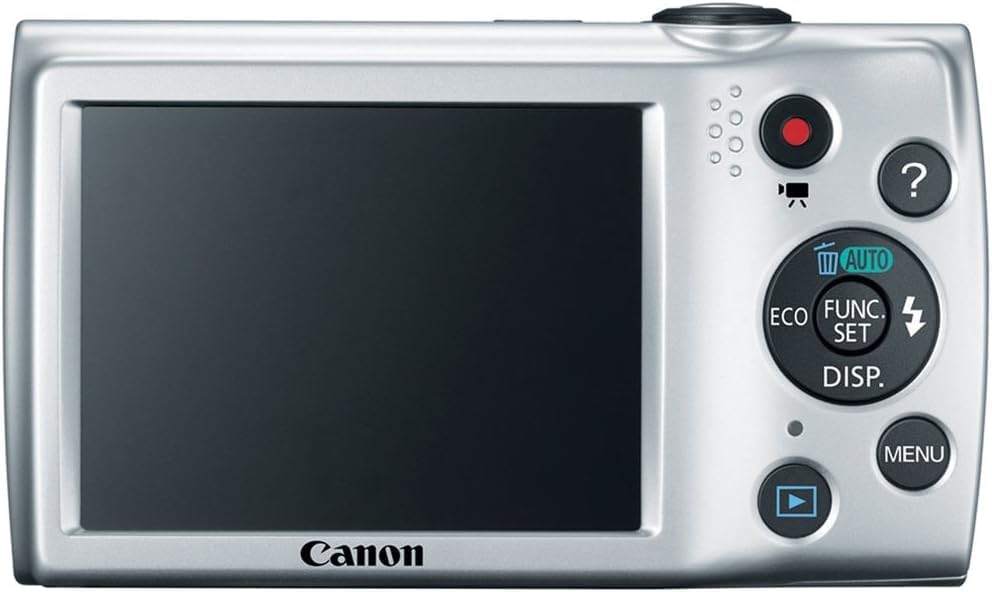
4 paveikslas: Nugara view of the camera, showing the LCD screen and control buttons for navigation and settings.
5. Priežiūra
5.1. Kameros valymas
- Kameros korpusas: Kameros korpusą nuvalykite minkšta, sausa šluoste. Jei nešvarumai sunkiai įveikiami, lengvai nuvalykite.amplt audinį supilkite vandeniu.
- Objektyvas: Use a lens brush to remove dust, then gently wipe with a lens cleaning cloth. Avoid touching the lens directly with your fingers.
- LCD ekranas: Use a soft, dry cloth to clean the screen. Avoid harsh chemicals.
5.2. Akumuliatoriaus priežiūra
- Nenaudojamas baterijas laikykite vėsioje, sausoje vietoje.
- Kad pailgintumėte akumuliatoriaus tarnavimo laiką, venkite jo dažnai visiškai iškrauti.
- Nelaikykite baterijų ekstremaliose temperatūrose.
6. Problemų sprendimas
| Problema | Galima priežastis | Sprendimas |
|---|---|---|
| Kamera neįsijungia. | Baterija išsikrovusi arba neteisingai įdėta. | Visiškai įkraukite bateriją ir įsitikinkite, kad ji tinkamai įdėta. |
| Nuotraukos neryškios. | Fotoaparato drebėjimas, objekto judėjimas arba neteisingas fokusavimas. | Hold the camera steady, ensure adequate lighting, or use a tripod. Allow the camera to focus before fully pressing the shutter. |
| Atminties kortelės klaida. | Kortelė pilna, sugadinta arba nesuderinama. | Ištrinkite nereikalingus files, format the card (this will erase all data), or try a different compatible memory card. |
| Blykstė nesuveikia. | Blykstė išjungta arba baterija išsikrovusi. | Check flash settings in the menu to ensure it is set to Auto or On. Charge the battery. |
7. Specifikacijos
| Funkcija | Detalė |
|---|---|
| Prekės ženklas | Canon |
| Modelio pavadinimas | A2500 |
| Nuotraukų jutiklio skiriamoji geba | 16 MP |
| Optinis priartinimas | 5x |
| Skaitmeninis priartinimas | 4x |
| Vaizdo stabilizavimas | Skaitmeninis |
| Ekrano dydis | 2.7 colių |
| Ekrano tipas | LCD |
| Vaizdo raiška | 720p |
| Palaikoma File Formatas | JPEG (Image), MP4 (Video) |
| Nuotraukų jutiklių technologija | CCD |
| Minimalus židinio nuotolis | 28 milimetrų |
| Maksimalus židinio nuotolis | 140 milimetrų |
| Ryšio technologija | USB |
| „Flash“ atminties tipas | SD/SDHC/SDXC |
| Prekės svoris | 4.4 uncijos |
8. Garantija ir palaikymas
8.1. Informacija apie garantiją
Šis produktas tiekiamas su a 90 dienų ribota garantija. Please retain your proof of purchase for warranty claims. For specific terms and conditions, refer to the warranty documentation included with your product or visit the official Canon support websvetainę.
8.2. Pagalba klientams
Dėl papildomos pagalbos, techninės pagalbos ar paslaugų klausimų apsilankykite oficialioje „Canon“ palaikymo svetainėje websvetainėje arba susisiekite su jų klientų aptarnavimo tarnyba. Paprastai kontaktinę informaciją ir DUK galite rasti gamintojo svetainėje websvetainę.


