1. Įvadas
Thank you for choosing the Omega OM0520WB 1600 dpi Wireless Optical Mouse. This manual provides detailed instructions for setting up, operating, maintaining, and troubleshooting your new device. Please read this manual carefully before use to ensure optimal performance and longevity of your mouse.
2. Pakuotės turinys
Patikrinkite pakuotę, ar joje yra šie daiktai:
- Omega OM0520WB Wireless Optical Mouse
- Vartotojo vadovas
- 1 x AA Battery (may be pre-installed or included separately)
3. Produktas baigtasview
Familiarize yourself with the components of your Omega OM0520WB mouse:
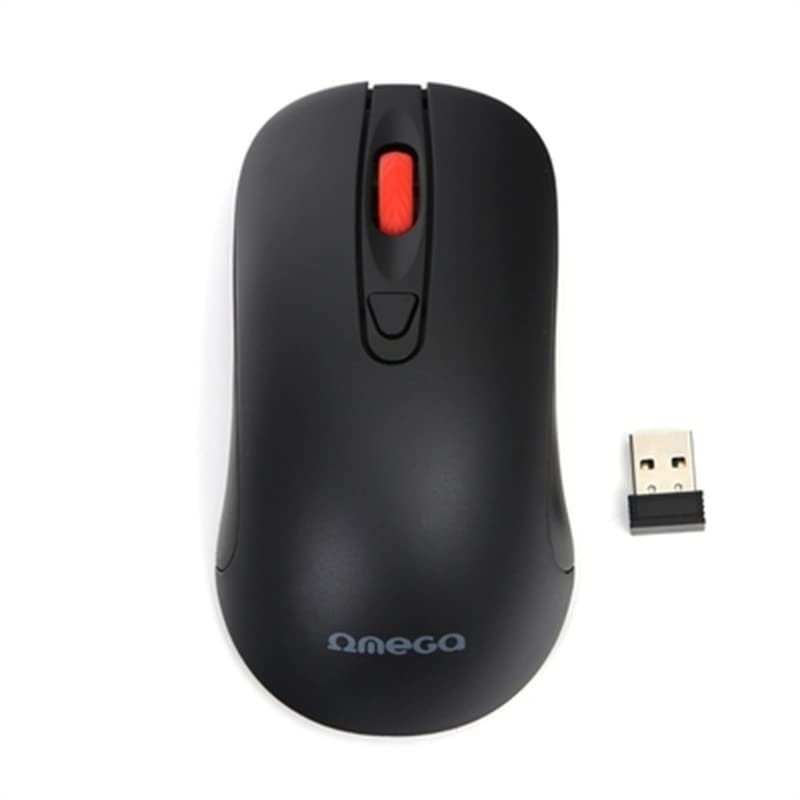
Image: The Omega OM0520WB Wireless Optical Mouse, shown in black. It features a sleek, ergonomic design with standard left and right click buttons, a scroll wheel, and a smooth finish.
- Kairysis paspaudimo mygtukas: Standartinė pagrindinio paspaudimo funkcija.
- Dešinysis pelės mygtuko paspaudimas: Standartinė antrinio paspaudimo funkcija.
- Slinkties ratukas: Vertikalaus slinkimo ir vidurinio pelės mygtuko paspaudimo funkcijai.
- Optinis jutiklis: Located on the underside, for precise tracking.
- Baterijų skyrius: Located on the underside, for inserting the AA battery.
- Maitinimo jungiklis: On/Off switch, usually on the underside of the mouse.
4. Sąrankos instrukcijos
Follow these steps to set up your Omega OM0520WB mouse:
- Įdėkite akumuliatorių: Atidarykite baterijų skyriaus dangtelį pelės apačioje. Įdėkite vieną AA bateriją, užtikrindami, kad poliškumas (+/-) atitiktų diagramą skyriaus viduje. Tvirtai uždarykite dangtelį.
- Turn On Mouse: Suraskite maitinimo jungiklį pelės apačioje ir pastumkite jį į padėtį „ĮJUNGTA“.
- Prisijunkite per Bluetooth:
- On your computer or laptop, navigate to the Bluetooth settings.
- Įsitikinkite, kad „Bluetooth“ įjungtas.
- Ieškokite new devices. The mouse should appear as 'Omega OM0520WB' or similar.
- Select the mouse to pair. Once paired, your mouse is ready for use.
5. Naudojimo instrukcijos
Your Omega OM0520WB mouse is designed for intuitive use:
- Pagrindinė navigacija: Norėdami valdyti žymeklį ekrane, judinkite pelę ant lygaus paviršiaus.
- Paspaudus: Use the left button for primary clicks (e.g., selecting items) and the right button for secondary clicks (e.g., opening context menus).
- Slinkimas: Norėdami naršyti dokumentuose, sukite slinkties ratuką aukštyn arba žemyn ir web pages. Press the scroll wheel for a middle-click function, if supported by your application.
- DPI nustatymas: The mouse operates at a fixed 1600 dpi, providing a balance of speed and precision for most tasks.
- Abipusis dizainas: The symmetrical design allows comfortable use for both left-handed and right-handed users.
6. Priežiūra
Norėdami užtikrinti pelės ilgaamžiškumą ir optimalų veikimą, laikykitės šių priežiūros nurodymų:
- Valymas: Pelės paviršiui nuvalyti naudokite minkštą, sausą šluostę. Jei nešvarumai sunkiai įveikiami, šiek tiek pamirkykite.ampNuvalykite šluostę vandeniu. Venkite naudoti stiprias chemines medžiagas ar abrazyvinius valiklius.
- Optinis jutiklis: Keep the optical sensor on the underside clean and free from dust or debris.
- Baterijos keitimas: When the mouse performance degrades or it stops responding, replace the AA battery. Always use a fresh, high-quality battery.
- Saugykla: When not in use for extended periods, turn off the mouse using the power switch to conserve battery life. Store it in a cool, dry place.
7. Problemų sprendimas
If you encounter issues with your Omega OM0520WB mouse, refer to the following solutions:
- Pelė nereaguoja:
- Įsitikinkite, kad pelė įjungta.
- Patikrinkite bateriją. Jei reikia, pakeiskite ją.
- Verify that Bluetooth is enabled on your computer and the mouse is paired. Try re-pairing the mouse.
- Move the mouse closer to your computer to ensure a strong Bluetooth signal.
- Nereguliarus žymeklio judėjimas:
- Nuvalykite optinį jutiklį pelės apačioje.
- Pelę naudokite ant švaraus, neatspindinčio ir lygaus paviršiaus. Rekomenduojama naudoti pelės kilimėlius.
- Ryšio problemos:
- Iš naujo paleiskite kompiuterį ir bandykite prisijungti dar kartą.
- Remove the mouse from your computer's Bluetooth device list and then re-pair it.
- Ensure there are no other devices interfering with the Bluetooth signal.
8. Specifikacijos
| Modelio pavadinimas | OM0520WB |
| Ryšio technologija | Belaidis ryšys („Bluetooth“) |
| Judesio aptikimo technologija | Optinis |
| DPI | 1600 dpi |
| Mygtukų skaičius | 3 (kairėn, dešinėn, slinkties ratukas) |
| Rankų orientacija | Abipusis |
| Maitinimo šaltinis | 1 x AA Lithium-ion battery (required) |
| Suderinami įrenginiai | Asmeninis kompiuteris, nešiojamas kompiuteris |
| Svoris | Maždaug 73 g |
| Spalva | Juoda |
9. Garantija ir palaikymas
Omega products are designed for reliability and performance. For information regarding warranty coverage, technical support, or service, please refer to the warranty card included with your product or visit the official Omega websvetainėje. Išsaugokite pirkimo kvitą kaip pirkimo įrodymą.


