„Snom M18 KLE SIP DECT“ 4 linijų stalo telefono naudotojo vadovas
Model: M18 KLE
This manual provides comprehensive instructions for the setup, operation, and maintenance of your Snom M18 KLE SIP DECT 4-Line Desk Office Phone.
Sąrankos vadovas
Pakuotės turinys
- Snom M18 KLE Desk Phone Unit
- Ragelis
- Ragelio laidas
- Ethernet kabelis
- Kintamos srovės adapteris
Fizinis montavimas
Prijunkite ragelį: Plug one end of the coiled handset cord into the handset and the other end into the port labeled with a handset icon on the side of the phone base.
Prisijunkite prie tinklo: Connect one end of the Ethernet cable to the LAN port on the back of the phone and the other end to your network router or switch.
Prijunkite maitinimą: Plug the AC power adapter into the power port on the back of the phone, then plug the adapter into a standard electrical outlet. The phone will power on automatically.
Pradinė konfigūracija
Upon first power-on, the phone may display a setup wizard or attempt to obtain network settings via DHCP. Follow the on-screen prompts to configure basic settings such as language, time zone, and network parameters if not automatically assigned.
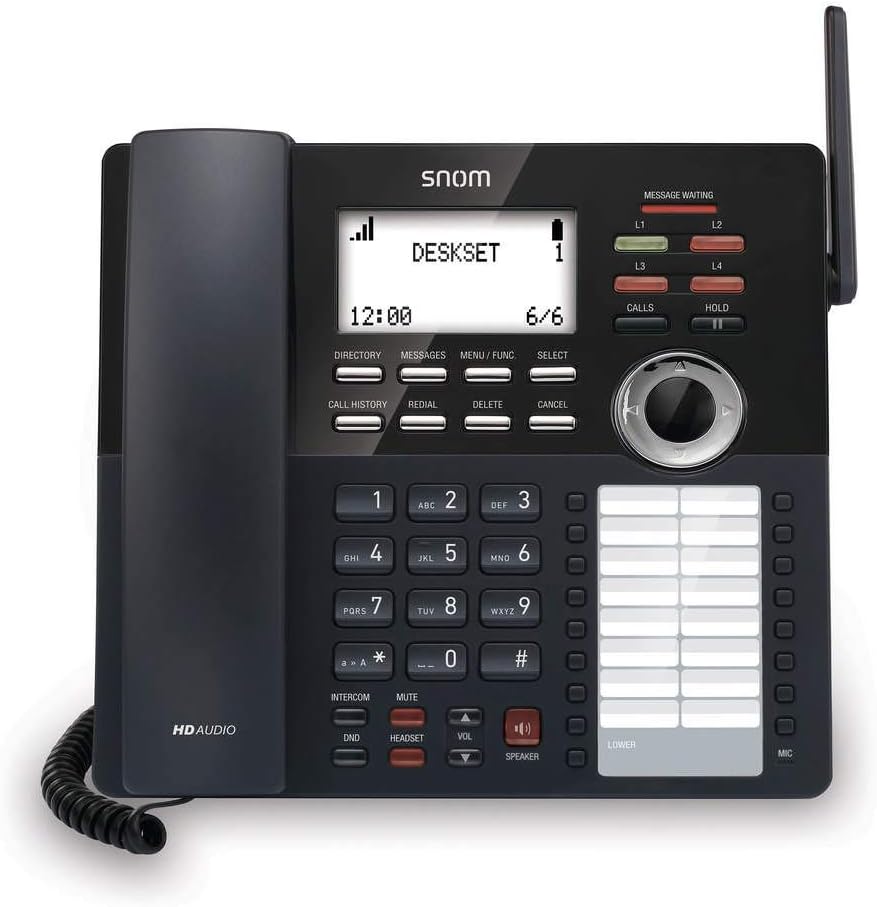
Vaizdas: priekis view of the Snom M18 KLE Desk Office Phone, showing the display, keypad, and function buttons. The handset is cradled on the left side, and a DECT antenna is visible on the right.
Naudojimo instrukcijos
Pagrindinės skambučių funkcijos
Skambinimas:
Pakelkite ragelį arba paspauskite GALBĖJAS mygtuką.
Surinkite norimą telefono numerį naudodami klaviatūrą.
Paspauskite SKAMBINIAI button or wait a few seconds for the call to connect automatically.
Atsiliepimas į skambutį:
Kai suskamba telefonas, pakelkite ragelį arba paspauskite GALBĖJAS mygtuką atsakyti.
Skambučio pabaiga:
Įdėkite ragelį atgal į laikiklį arba paspauskite GALBĖJAS mygtuką dar kartą.
Išplėstinės skambučių funkcijos
Laikyti: Aktyvaus skambučio metu paspauskite LAIKYTI Norėdami atidėti skambutį, paspauskite mygtuką LAIKYTI dar kartą norėdami tęsti skambutį.
Pervedimas:
Aktyvaus skambučio metu paspauskite PERDAVIMAS soft key (may be labeled differently on screen).
Surinkite numerį, į kurį norite perkelti skambutį.
Norėdami atlikti a aklas perkėlimas, paspauskite PERDAVIMAS soft key again before the recipient answers. To perform an attended transfer, wait for the recipient to answer, announce the call, then press PERDAVIMAS.
Konferencija: The phone supports 3-way local conferencing. During an active call:
Paspauskite KONF soft key (or similar). The first call is placed on hold.
Surinkite trečiosios šalies numerį.
Kai trečioji šalis atsilieps, paspauskite KONF dar kartą paspauskite programinį klavišą, kad prisijungtumėte prie visų pašnekovų.
Nutildyti: Paspauskite Nutildyti mygtuką, kad nutildytumėte mikrofoną skambučio metu. Paspauskite jį dar kartą, kad įjungtumėte nutildymą.
Netrukdyti (DND): Paspauskite DND button to activate or deactivate Do Not Disturb mode. When active, incoming calls will be redirected or sent to voicemail without ringing the phone.
Meniu naršymas
Use the 4-way navigational pad and the PASIRINKTI soft key to navigate through the phone's menus. Soft keys below the display change functionality based on the current screen.
Phonebook and Call History
Katalogas: Paspauskite KATALOGAS soft key to access your local phonebook. You can add, edit, and delete contacts.
Skambučių istorija: Paspauskite SKAMBUČIŲ ISTORIJA mygtuką prie view a list of dialed, received, and missed calls.
Priežiūra ir priežiūra
Prietaiso valymas
Telefonui valyti naudokite minkštą,amp cloth. Avoid using abrasive cleaners or solvents, as these can damage the phone's surface. Ensure the phone is unplugged before cleaning.
Baterijos keitimas
The deskset contains a 2.4V/750 mAh Ni-MH battery. If battery performance degrades significantly over time, contact Snom support or a qualified technician for replacement. Do not attempt to replace the battery yourself unless specifically instructed by Snom.
Programinės aparatinės įrangos naujiniai
Periodically, Snom may release firmware updates to improve performance and add new features. Consult your system administrator or the Snom website for instructions on how to update your phone's firmware.
Trikčių šalinimas
| Problema | Galima priežastis | Sprendimas |
|---|---|---|
| Nėra rinkimo tono | Phone not powered, network cable disconnected, or SIP registration failure. | Check power connection. Ensure Ethernet cable is securely connected. Verify SIP account registration status on the display. Restart the phone. |
| Negaliu skambinti / priimti skambučių | SIP registration issue, DND active, or network problem. | Check SIP registration. Deactivate DND. Verify network connectivity. Contact your IT administrator. |
| Ekranas tuščias arba užstrigo | Power issue or software error. | Unplug the power adapter, wait 10 seconds, then plug it back in. If the issue persists, contact support. |
| Prasta garso kokybė | Network congestion, faulty cable, or handset issue. | Check network connection and bandwidth. Try a different handset or headset. |
Techninės specifikacijos
- Ekranas: 3.5-inch 102 x 66 pixels (w x h) mono LCD with blue/white backlighting
- Eilučių klavišai: 4 programmable LED backlit line keys
- Feature Keys: 17 dedicated feature keys
- Navigacija: 4-way navigational pad
- Greitasis rinkimas: 32 speed dial keys (2 pages x 16)
- Voice Quality: HD voice for receiver and speakerphone, Full-duplex speakerphone
- Ausinių palaikymas: HAC receiver, 2.5mm corded headset jack
- Skambučių valdymas: 4-line call handling (active and held), 3-way local conference, N-way network conference, Intercom, Call transfer (blind/attended), Call hold, Call forwarding, Mute, Redial, Caller ID
- Telefonų knyga: Local up to 1,000 entries, XML/LDAP remote phonebook
- Skambučių istorija: Iki 200 įrašų
- Baterija: Deskset battery: 2.4v/750 mAh Ni-MH
- Maitinimo šaltinis: Corded Electric (Included AC Adapter)
- Standby/Talk Time: 36 hours standby / 7 hours talk time
Informacija apie garantiją
The Snom M18 KLE SIP DECT 4-Line Desk Office Phone comes with a 3-year limited warranty from the date of purchase. This warranty covers defects in materials and workmanship under normal use. For full terms and conditions, please refer to the official Snom warranty policy available on their websvetainėje arba susisiekite su klientų aptarnavimo tarnyba.
Pagalba klientams
For technical assistance, warranty claims, or further information, please visit the official Snom website or contact their customer support department. Keep your product model number (M18 KLE) and purchase details ready when contacting support.


