Įvadas
This manual provides essential information for the safe and effective use of your Canon PowerShot SX420 IS digital camera. Please read this manual thoroughly before using the camera and retain it for future reference. The Canon PowerShot SX420 IS is a compact digital camera featuring a powerful 42x optical zoom, 20.0 Megapixel sensor, and built-in Wi-Fi and NFC connectivity.

Vaizdas: priekis view of the Canon PowerShot SX420 IS digital camera.
Sąranka
1. Išpakavimas ir turinio patikrinimas
Įsitikinkite, kad yra visi komponentai:
- Canon PowerShot SX420 IS Camera Body
- Baterijų paketas
- Akumuliatoriaus įkroviklis
- Riešo dirželis
- Objektyvo dangtelis

Image: Canon PowerShot SX420 IS camera with included battery, charger, wrist strap, and lens cap.
2. Akumuliatoriaus įkrovimas
- Įdėkite akumuliatorių į įkroviklį.
- Prijunkite įkroviklį prie maitinimo lizdo. Užsidegs įkrovimo indikatoriaus lemputė.
- Once charging is complete, the indicator light will change or turn off (refer to charger specific instructions).
3. Baterijos ir atminties kortelės įdėjimas
- Atidarykite akumuliatoriaus / kortelės skyriaus dangtelį fotoaparato apačioje.
- Insert the charged battery pack, ensuring correct orientation.
- Insert an SDHC or SDXC memory card into the card slot until it clicks into place.
- Saugiai uždarykite skyriaus dangtelį.
4. Pradinis įjungimas ir pagrindiniai nustatymai
- Paspauskite ĮJUNGTA/IŠJUNGTA mygtuką, kad įjungtumėte fotoaparatą.
- Vykdykite ekrane pateikiamus nurodymus, kad nustatytumėte datą, laiką ir kalbą.
Fotoaparato valdymas
1. Pagrindiniai valdikliai
- ĮJUNGIMO/IŠJUNGIMO mygtukas: Įjungia arba išjungia fotoaparatą.
- Užrakto mygtukas: Norėdami sufokusuoti, paspauskite iki pusės, o norėdami nufotografuoti, paspauskite iki galo.
- Priartinimo svirtis: Controls the 42x optical zoom for telephoto and wide-angle shots.
- Režimo ratukas: Selects shooting modes such as Auto, Program, Portrait, Landscape, and Movie.
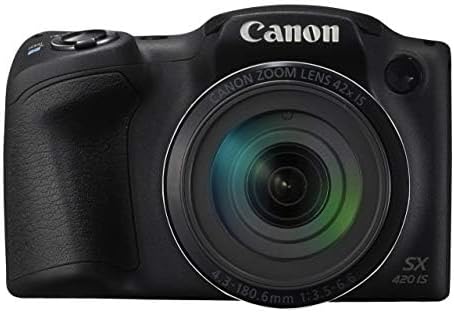
Vaizdas: priekis view of the Canon PowerShot SX420 IS, highlighting the lens and zoom capabilities.
2. Fotografavimas
- Turn on the camera and select your desired shooting mode using the mode dial. For general use, select Auto režimu.
- Kadruokite kadrą naudodami 3.0 colių LCD ekraną.
- Židinio nuotolį galite reguliuoti priartinimo svirtimi.
- Press the shutter button halfway down to allow the camera to focus. The focus frame will turn green when focus is achieved.
- Press the shutter button fully to capture the image. The camera's optical image stabilizer helps reduce blur from camera shake.
3. Vaizdo įrašų įrašymas
- Režimo ratuką nustatykite į padėtį Filmas režimu.
- Press the dedicated movie button to start recording. The camera records in HD 720p resolution in MP4 format.
- Press the movie button again to stop recording.
4. Reviewvaizdų ir vaizdo įrašų naudojimas
- Paspauskite Atkūrimas mygtuką (paprastai žymimą paleidimo piktograma).
- Use the directional buttons to navigate through your captured images and videos.
- Paspauskite MENIU button to access playback options.
5. „Wi-Fi“ ir NFC ryšys
The camera features built-in Wi-Fi and NFC for easy sharing and transferring of images and videos.
- Enable Wi-Fi or NFC from the camera's menu.
- Follow the on-screen instructions to connect to a compatible smartphone, tablet, or computer.
- Use the Canon Camera Connect app (available for iOS and Android) for remote shooting and image transfer.
Priežiūra
1. Kameros valymas
- Kameros korpusas: Nuvalykite minkšta, sausa šluoste. Įsisenėjusiam purvui naudokite šiek tiek drėgnąamp skudurėliu ir tada gerai išdžiovinkite.
- Objektyvas: Dulkėms pašalinti naudokite objektyvo šepetėlį, tada švelniai nuvalykite objektyvo valymo šluoste ir objektyvo valymo tirpalu. Nelieskite objektyvo paviršiaus pirštais.
- LCD ekranas: Use a soft, dry cloth. For smudges, use a screen cleaner specifically designed for electronics.
2. Akumuliatoriaus priežiūra
- Always use genuine Canon battery packs and chargers.
- Saugokite, kad akumuliatorius nepatektų į ekstremalias temperatūras.
- If not using the camera for an extended period, remove the battery and store it in a cool, dry place.
3. Sandėliavimas
Store the camera in a dry, well-ventilated area, away from direct sunlight, high temperatures, and humidity. Use a camera bag or case to protect it from dust and physical damage.
Trikčių šalinimas
Jei kyla problemų dėl fotoaparato, žr. šiuos dažniausiai pasitaikančius sprendimus:
| Problema | Sprendimas |
|---|---|
| Kamera neįsijungia. | Įsitikinkite, kad akumuliatorius yra visiškai įkrautas ir teisingai įdėtas. Jei įmanoma, pabandykite naudoti kitą įkrautą akumuliatorių. |
| Vaizdai neryškūs. | Check that the lens is clean. Ensure the camera is focusing correctly (press shutter halfway). Use the optical image stabilizer and hold the camera steady. Consider using a tripod in low light. |
| Cannot connect via Wi-Fi/NFC. | Ensure Wi-Fi/NFC is enabled on both the camera and the connecting device. Check network settings and password. Restart both devices. |
| Atminties kortelės klaida. | Ensure the memory card is inserted correctly. Try formatting the card (this will erase all data). Use a different compatible memory card. |
| Blykstė nesuveikia. | Check flash mode settings. Ensure the flash is not set to 'Off'. The flash may not fire if the battery is low or in certain shooting modes. |
Specifikacijos
| Funkcija | Detalė |
|---|---|
| Modelio pavadinimas | PSSX420IS |
| Veiksminga nejudančioji raiška | 20 MP |
| Optinis priartinimas | 42x |
| Vaizdo stabilizavimas | Optinis |
| Nuotraukų jutiklių technologija | CMOS |
| Ekrano dydis | 3 colių |
| Ekrano tipas | LCD |
| Ryšio technologija | NFC, WiFi |
| Palaikoma File Formatas | JPEG, RAW |
| Vaizdo raiška | HD 720p |
| Vaizdo įrašymo formatas | MP4 |
| „Flash“ atminties tipas | SDHC arba SDXC |
| Didžiausia diafragma | 3.5 f |
| Išplėstas ISO diapazonas | 100 - 1600 |
| Prekės svoris | 1.5 svaro |
| Spalva | Juoda |
Informacija apie garantiją
This Canon PowerShot SX420 IS camera comes with a 90 dienų ribota garantija. Please retain your proof of purchase for warranty claims. For detailed terms and conditions, refer to the warranty documentation provided with your product or visit the official Canon websvetainę.
Pagalba klientams
Dėl papildomos pagalbos, techninės pagalbos ar paslaugų klausimų apsilankykite oficialioje „Canon“ palaikymo svetainėje websvetainėje arba susisiekite su jų klientų aptarnavimo tarnyba. Paprastai kontaktinę informaciją ir DUK galite rasti gamintojo svetainėje websvetainę.
Oficialus kanonas Websvetainė: www.usa.canon.com


