1. Įvadas ir pabaigaview
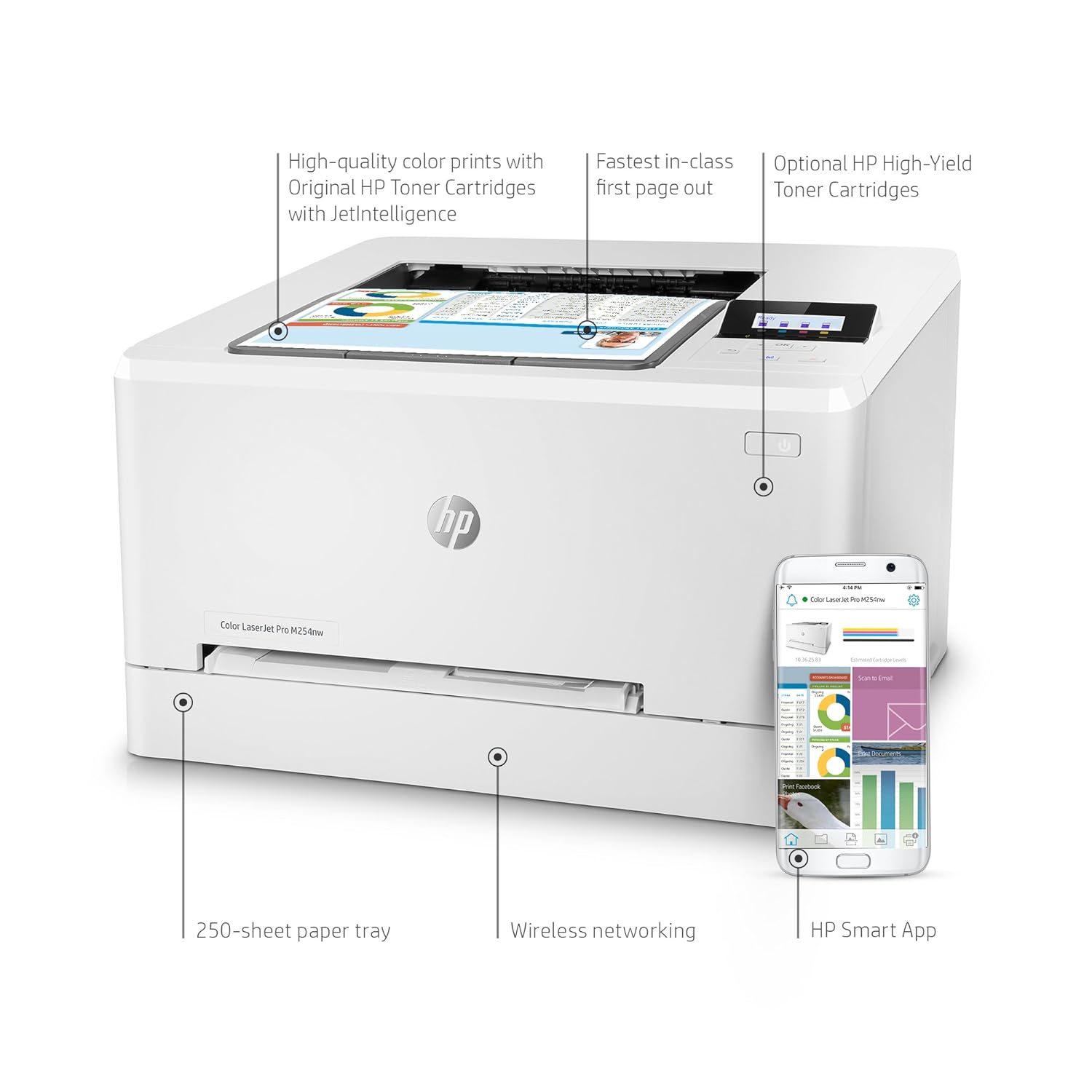
The HP Color LaserJet Pro M154NW is a network and wireless printer designed for efficient color printing. It produces high-quality color documents at fast speeds, offering excellent value. This printer utilizes Original HP toner cartridges with JetIntelligence for enhanced performance and protection. Users can print and scan directly from their smartphone using the HP Smart app, which also facilitates easy toner ordering. The device ensures a stable and reliable wireless connection with dual-band Wi-Fi.

2. Sąranka
2.1 Išpakavimas ir pradinis pastatymas
Carefully remove the printer from its packaging. Ensure all packing materials, including tapes and protective films, are removed from the device. Place the printer on a stable, flat surface with adequate space for ventilation and access to power and network connections.

2.2 Spausdintuvo prijungimas
Connect the power cord to the printer and then to a wall outlet. For wired network connectivity, connect an Ethernet cable to the printer's Ethernet port and to your network router or switch. For wireless setup, follow the instructions in the included installation guide or use the HP Smart app.

2.3 Programinės įrangos diegimas
Insert the provided CD-ROM to install printer drivers and software, or download the latest software from the official HP website. The HP Smart app is recommended for smartphone integration and management.
3. Naudojimo instrukcijos
3.1 Popieriaus įdėjimas
The printer features an enclosed paper tray with a maximum input sheet capacity of 150 sheets. Adjust the paper guides to fit the paper size (e.g., Letter, A4) to prevent jams.
3.2 Dokumentų spausdinimas
Send print jobs from your computer or mobile device. The printer supports color output with a maximum color print resolution of 600 x 600 Pixels and a maximum black and white print resolution of 600 x 600 Pixels. It offers fast print speeds of up to 19 ppm for color and 27 ppm for monochrome, with an initial page print time of 11.5 seconds.

3.3 Mobilusis spausdinimas
Utilize the HP Smart App for convenient mobile printing and scanning. The printer is compatible with Wi-Fi Direct and Apple AirPrint, supporting Android, Apple, and Windows devices.

3.4 Dvipusis spausdinimas
The printer supports automatic dual-sided printing (duplex) for efficient paper usage.
4. Priežiūra
4.1 Tonerio kasečių keitimas
When print quality degrades or the printer indicates low toner, it's time to replace the toner cartridges. The HP Color LaserJet Pro M154NW uses HP 204A (Black, Cyan, Yellow, Magenta) or HP 205A (Black, Cyan, Yellow, Magenta) LaserJet Toner Cartridges.

Watch the video below for a detailed guide on replacing a toner cartridge:
4.2 Spausdintuvo valymas
Reguliariai valykite spausdintuvo išorę minkšta, drėgna šluosteamp cloth. Refer to the full user manual for instructions on cleaning internal components if print quality issues persist.
5. Problemų sprendimas
5.1 Maitinimo problemos
If the printer does not power on, ensure the power cord is securely connected to both the printer and a working electrical outlet. Check the power switch on the back of the printer. The HP Auto-On/Auto-Off Technology helps save energy by turning your printer on only when needed, so a brief delay before it becomes active is normal.
5.2 Spausdinimo kokybės problemos
Poor print quality can often be resolved by ensuring the toner cartridges are properly installed and by gently shaking them to redistribute toner. If issues persist, check for any obstructions in the paper path or consult the printer's internal diagnostics.
5.3 Ryšio problemos
For network or wireless connectivity problems, verify that the printer is connected to the correct network. Restart your router, printer, and computer/mobile device. Ensure the printer's Wi-Fi is enabled and configured correctly. The HP Smart App can assist with network setup and diagnostics.
6. Specifikacijos
| Modelio numeris | M154NW |
| Spausdinimo technologija | Lazeris |
| Spausdintuvo išvestis | Spalva |
| Maksimalus spausdinimo greitis (spalvotas) | 19 ppm |
| Maksimalus spausdinimo greitis (vienspalvis) | 27 ppm |
| Maximum Colour Print Resolution | 600 x 600 pikselių |
| Maksimali juodai balto spausdinimo skiriamoji geba | 600 x 600 pikselių |
| Dvipusis spausdinimas | Taip (automatinis) |
| Pradinio puslapio spausdinimo laikas | 11.5 sekundės |
| Ryšio technologija | Belaidis, Ethernet |
| Belaidis tipas | 802.11 milijardo |
| Suderinami įrenginiai | Išmanieji telefonai |
| Kontrolės metodas | Programėlė |
| Maksimali įvesties lapo talpa | 150 |
| Maksimalus laikmenos dydis | A4 |
| RAM dydis | 256 MB |
| Energijos suvartojimas | 343 Watts (active printing) |
| Gaminio matmenys | 4.98 x 2.98 x 4.64 cm; 13.3 kg |
| Įtraukti komponentai | HP Color LaserJet Pro M154nw, Installation guide, Printer documentation and software on CD-ROM, Power cord, USB cable |
7. Garantija ir palaikymas
7.1 Gaminio garantija
This HP Color LaserJet Pro M154NW printer comes with a 1 Year Warranty Care. Please refer to your purchase documentation for specific terms and conditions.
7.2 Pagalba klientams
For further assistance, technical support, or to access additional resources, please visit the official HP support website or contact HP customer service. Keep your product model number (M154NW) and serial number ready when contacting support.