1. Įvadas
The BroadLink RM4 Pro is a versatile IR/RF universal remote control designed to integrate and manage various smart home and entertainment devices. It supports both Infrared (IR) and Radio Frequency (RF 433MHz) controlled appliances, allowing you to consolidate control of your TV, set-top box, air conditioner, fans, curtain motors, and more through a single application on your smartphone or via voice commands.
This manual provides detailed instructions for setting up, operating, maintaining, and troubleshooting your BroadLink RM4 Pro to ensure optimal performance and a seamless smart home experience.
2. Produktas baigtasview

Figure 2.1: BroadLink RM4 Pro Device. This image shows the compact, black, oval-shaped BroadLink RM4 Pro universal remote with a subtle blue LED indicator on the front, designed to blend seamlessly into any home environment.

2.2 pav.: Nuotolinis valdymas programėle. A user is shown controlling an air conditioner remotely via the BroadLink app on their smartphone, illustrating the convenience of managing appliances from anywhere.

Figure 2.3: IR and RF Appliance Integration. This diagram highlights the BroadLink RM4 Pro's ability to integrate various IR (TV, STB, Air Conditioner, Audio Equipment, RF Fan, DVD Player) and RF (Electric Curtain, Electric Roller Blind, RF Light Switch, RF Light) appliances for full home automation.

Figure 2.4: Schedule Control. The image depicts the scheduling capability of the RM4 Pro, allowing users to set specific times for actions, such as turning on a TV to a particular channel at 2:00 PM.

Figure 2.5: BroadLink RM4 Pro with USB Cable and Sensor. Šis paveikslėlis pateikia išsamų view of the RM4 Pro unit, its micro USB power input, and the reset button. It also shows the included USB cable which can support an external temperature and humidity sensor (sold separately).
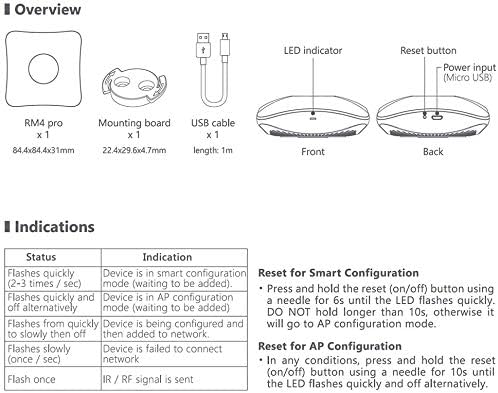
Figure 2.6: BroadLink RM4 Pro Overview. A diagram illustrating the components included with the RM4 Pro: the device itself, a mounting board, and a USB cable. It also details the LED indicator and reset button functions.
3. Sąrankos vadovas
Follow these steps to set up your BroadLink RM4 Pro universal remote.
3.1. Įrenginio maitinimas
Connect the provided USB cable to the micro USB port on the RM4 Pro. Plug the other end of the USB cable into a 5V 1A (or 5V 2A) USB power adapter (not included). The device will power on, and the LED indicator will begin to flash.
3.2. Programos diegimas
Download the latest BroadLink App from the App Store (for iOS) or Google Play Store (for Android). Ieškokite "BroadLink" or "BroadLink - Universal TV Remote".

Figure 3.1: BroadLink App. Screenshot of the BroadLink App download page in an app store.
3.3. Device Connection (Wi-Fi)
- Open the BroadLink App and sign in or create a new account.
- Tap "+" on the top right corner and choose "Add device". The app will start scanning for devices.
- Choose your home Wi-Fi network (Tik 2.4 GHz) and enter the password. The RM4 Pro does not support 5 GHz Wi-Fi networks. If you have a dual-band router, temporarily disable the 5 GHz band during setup if you encounter connection issues.
- Tap "Connect to Wi-Fi". The LED indicator on the RM4 Pro will flash slower and then turn off once successfully connected.
- Choose a room and name your device for easy identification.

Figure 3.2: Wi-Fi Setup. This image shows the BroadLink app interface for connecting the device to a 2.4 GHz Wi-Fi network, emphasizing the need to select the correct frequency.
3.4. Adding IR/RF Appliances
After connecting the RM4 Pro to your Wi-Fi network, you can start adding your appliances.
- In the app, tap "Add appliances".
- Choose the type of appliance (e.g., TV, A/C, STB) and its brand. The app will attempt to find a matching code from its cloud library.
- If your brand or model is not found, you can use the "Learn button" or "Continue match" options to manually teach the RM4 Pro commands from your original remote.
- For IR code learning, aim your appliance remote control at the RM4 Pro. Wait for the device LED indicator to light up, then briefly press the remote button you want to learn.
- For RF appliances, follow the specific instructions in the app for RF code learning, which may involve pressing buttons multiple times or for a longer duration.

Figure 3.3: Adding Appliances. The BroadLink app interface displaying various appliance categories (TV, STB, A/C, Fan, etc.) for adding and controlling via IR and RF signals.
4. Naudojimo instrukcijos
Once your devices are set up, you can control them using the BroadLink App or voice commands.
4.1. Programos valdymas
The BroadLink App provides a virtual remote interface for each added appliance. You can power devices on/off, change channels, adjust volume, set temperatures, and perform other functions just as you would with their original remote controls. The app also allows for creating custom scenes and routines.
4.2. Balso valdymas („Alexa“ ir „Google Home“)
The RM4 Pro is compatible with Amazon Alexa and Google Home for voice control. To enable this feature:
- Atidarykite „Alexa“ arba „Google Home“ programėlę.
- Enable the "BroadLink" skill/service.
- Susiekite „BroadLink“ paskyrą su „Alexa“ / „Google Home“ paskyra.
- Discover devices. Your configured appliances from the BroadLink App should now appear in your voice assistant app.
You can then use voice commands such as: "Alexa, turn on TV" or "Hey Google, set A/C to 24 degrees."

Figure 4.1: Voice Control. A user interacting with an Alexa device to control an IR appliance, demonstrating seamless voice integration with the BroadLink RM4 Pro.
4.3. Tvarkaraščių sudarymas ir rutina
Create schedules and routines within the BroadLink App or your voice assistant app to automate your devices. For example, you can set your air conditioner to turn on before you arrive home or schedule your curtains to open at sunrise.
4.4. Temperatūros ir drėgmės stebėjimas
If you have purchased the external Temperature and Humidity Sensor USB Cable (sold separately), connect it to the RM4 Pro. The BroadLink App will then display real-time room temperature and humidity, allowing for more intelligent automation based on environmental conditions.
5. Priežiūra
To ensure the longevity and optimal performance of your BroadLink RM4 Pro, follow these maintenance guidelines:
- Valymas: Įrenginį valykite minkšta, sausa šluoste. Venkite naudoti skystus valiklius ar aerozolius, nes jie gali pažeisti įrenginį.
- Vieta: Place the RM4 Pro in a central location within the room where it can have a clear line of sight to IR-controlled devices. Avoid placing it behind obstacles or in direct sunlight.
- Firmware atnaujinimai: Regularly check for and install firmware updates through the BroadLink App. Updates often include performance improvements, bug fixes, and new features.
- Maitinimas: Always use a stable 5V 1A/2A USB power adapter. Unstable power can affect device performance and lifespan.
6. Problemų sprendimas
If you encounter issues with your BroadLink RM4 Pro, refer to the following common troubleshooting steps:
- Įrenginys neprisijungia prie „Wi-Fi“:
- Įsitikinkite, kad jūsų „Wi-Fi“ tinklas yra 2.4 GHz dažnio. „RM4 Pro“ nepalaiko 5 GHz tinklų.
- Patikrinkite, ar jūsų „Wi-Fi“ slaptažodis teisingas.
- Try temporarily disabling the 5 GHz band on your router during the setup process.
- Move the RM4 Pro closer to your Wi-Fi router.
- Perform a factory reset on the RM4 Pro (refer to Figure 2.6 for reset button location) and attempt setup again.
- IR/RF Commands Not Working:
- Ensure the RM4 Pro has a clear line of sight to the IR-controlled appliance.
- During the learning process, ensure the original remote is aimed directly at the RM4 Pro and pressed firmly.
- Verify the frequency of your RF device (RM4 Pro supports 433MHz). Some older or specialized RF devices may use different frequencies (e.g., 308MHz, 868MHz) or rolling codes, which are not supported.
- Re-learn the problematic commands if they are not consistently working.
- Valdymo balsu problemos:
- Confirm that the BroadLink skill/service is enabled and linked correctly in your Alexa/Google Home app.
- Ensure your devices are discovered by the voice assistant.
- Patikrinkite savo interneto ryšį.
7. Specifikacijos
| Funkcija | Specifikacija |
|---|---|
| Modelio numeris | RM4 Pro |
| Gaminio matmenys | 4.33 x 4.33 x 1.18 colio |
| Prekės svoris | 5 uncijos |
| Ryšio technologija | Infrared, Radio Frequency 433 MHz, Wi-Fi (2.4 GHz Only) |
| Maksimalus palaikomų įrenginių skaičius | 18 |
| Suderinami įrenginiai | Television, STB, Air Conditioner, Fan, Video Recorder, DVD, Curtain Motor, Light Switch, etc. |
| Maitinimo įvestis | 5V 1A/2A (USB Micro-B) |
| Gamintojas | Hangzhou BroadLink Technology Co., Ltd. |
| Pasiekiama pirmoji data | 24 m. rugpjūčio 2017 d |
8. Garantija ir palaikymas
BroadLink offers a Vienerių metų garantija for the RM4 Pro. For technical assistance, you can access 24/7 Technical Support. Video guides are available on the BroadLink Amazon Brand Store and YouTube channels.
You can also find the Global Hotline on the product manual (PDF) or get help and provide feedback directly through the BroadLink Community within the App.
For additional resources, please refer to the official user guide: BroadLink RM4 Pro User Guide (PDF)


