1. ຜະລິດຕະພັນເກີນview
The IS 3.3-15V Forward/Reverse DC Motor Controller is a versatile module designed for precise control of DC brushed motors. It offers adjustable speed, forward and reverse rotation capabilities, and integrated timing and delay relay functions. This controller supports various input signals for activation, making it suitable for a wide range of industrial and hobbyist applications requiring automated motor control.
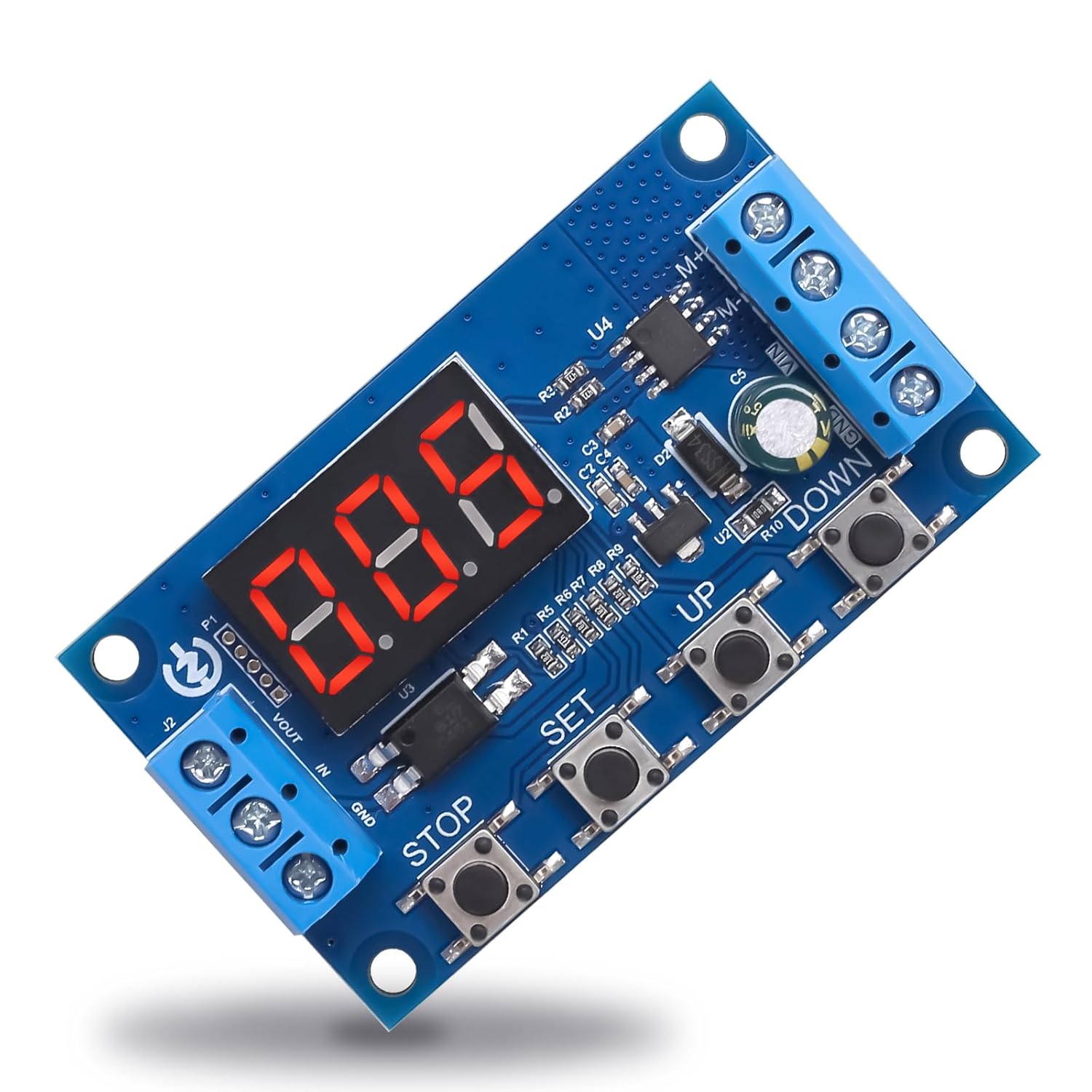
ຮູບພາບ 1.1: ເທິງລົງລຸ່ມ view of the IS DC Motor Controller, highlighting its compact design and onboard components including the digital display and control buttons.
2. ຄຸນນະສົມບັດທີ່ສໍາຄັນ
- Multi-Function Integration: Features 18 distinct operational modes, enabling easy control of motor forward/reverse rotation, adjustable speed, and fixed speed maintenance.
- Flexible Start/Stop Methods: Supports three activation methods: automatic operation upon power-on, control via switch buttons, and control via inductive sensors.
- Screen Off & Timed Shutdown: Configurable idle screen-off times and system runtime thresholds to conserve energy, protect the display, and enhance safety.
- ພາຣາມິເຕີຟັງຊັນຫນ່ວຍຄວາມຈໍາ: All configured settings are saved automatically and retained even after power loss, eliminating the need for repeated setup.
- ຄວາມເຂົ້າກັນໄດ້ຢ່າງກວ້າງຂວາງ: Compatible with DC brushed motors and push rod motors up to 50W.

Image 2.1: Visual representation of the controller's key features, including 18 work modes, 3 control methods, parameter memory, adjustable motor speed, and reciprocating/limit motion.
3. ຂໍ້ກໍານົດດ້ານວິຊາການ
| ພາລາມິເຕີ | ມູນຄ່າ |
|---|---|
| ຂະຫນາດຜະລິດຕະພັນ | 60 x 34 x 12 ມມ (2.36 x 1.33 x 0.47 ນິ້ວ) |
| ການປ້ອນຂໍ້ມູນ Voltage | DC 3.3-15V |
| ລະດັບການຄວບຄຸມຄວາມໄວ | 0-100% |
| ປະຈຸບັນຜົນຜະລິດສູງສຸດ | 4.2A |
| ພະລັງງານສູງສຸດ | 60W |
| ອຸນຫະພູມສະພາບແວດລ້ອມ | -20 ຫາ 50 ℃ (-4 ຫາ 122 ℉) |
| ຊ່ວງເວລາ | 0.01s - 999min |
| ການບໍລິໂພກພະລັງງານ | 18mA |

Image 3.1: Detailed technical parameters including size, input voltage, speed range, time range, power consumption, and maximum power.

Image 3.2: Physical dimensions of the motor controller, showing length (60mm), width (34mm), and height (12mm).
4. ການຕິດຕັ້ງແລະການຕິດຕັ້ງ
Before connecting the controller, ensure your power supply and motor are compatible with the specified voltage and power ratings. Incorrect connections can damage the device or connected components.
4.1 ຄໍາແນະນໍາການສາຍ
- ການປ້ອນຂໍ້ມູນພະລັງງານ: Connect your DC power supply (3.3-15V) to the 'VOUT IN' and 'GND' terminals on the left side of the board. Ensure correct polarity.
- ການເຊື່ອມຕໍ່ມໍເຕີ: Connect your DC brushed motor to the 'M+' and 'M-' terminals on the right side of the board. The polarity here will determine the initial direction of rotation, which can be reversed via control.
- Sensor/Switch Input (Optional): For external control, connect NPN sensors or passive switches to the designated input terminals as per your chosen operational mode. Refer to the detailed mode descriptions for specific wiring.
Always double-check all connections before applying power to prevent short circuits or damage.
5. ຄໍາແນະນໍາການດໍາເນີນງານ
The controller features a digital display and four buttons: 'STOP', 'SET', 'UP', and 'DOWN'. These buttons are used for navigating menus, adjusting parameters, and controlling motor operation.
5.1 ການຄວບຄຸມພື້ນຖານ
- ປຸ່ມ SET: Enters parameter setting mode, cycles through parameters, and confirms selections.
- ປຸ່ມຂຶ້ນ: Increases parameter values or navigates up in menus.
- ປຸ່ມລົງ: Decreases parameter values or navigates down in menus.
- ປຸ່ມຢຸດ: Initiates or halts motor operation, or exits setting mode without saving changes.
5.2 ຮູບແບບການໃຊ້ງານ
The controller supports 18 different operational modes, each designed for specific motor control scenarios. These modes include various combinations of forward/reverse rotation, speed adjustment, timing, and cycle functions. Detailed instructions for configuring each mode are typically provided in the full product documentation or on the manufacturer's webເວັບໄຊ.
5.3 ການປັບຄວາມໄວ
Motor speed can be adjusted from 0% to 100% using the UP and DOWN buttons when in the appropriate speed control mode. The digital display will show the current speed percentage or a related value.
5.4 Timing and Delay Functions
The controller allows for precise timing and delay settings, ranging from 0.01 seconds to 999 minutes. These functions can be configured to control motor run times, pause durations, and cycle repetitions. Access these settings via the SET button and adjust with UP/DOWN.
5.5 Screen Off and Timed Shutdown
To configure screen off or timed shutdown features, enter the system settings menu using the SET button. You can set an idle time after which the screen will turn off, or a total runtime after which the system will power down. This helps in energy conservation and extends the lifespan of the display.
6. Wide Applications
This motor controller is suitable for a variety of applications involving DC brushed motors within a 50W power limit. Its versatility makes it ideal for:
- Small fans and cooling systems
- Toy car models and robotics projects
- Automated push rod mechanisms
- DIY automation projects requiring precise motor control
- Educational electronics and prototyping

ຮູບພາບ 6.1: ຕົວຢ່າງamples of common applications for the motor controller, including robotic vacuum cleaners, electric toothbrushes, small fans, toy cars, and automated window blinds.
7. ການແກ້ໄຂບັນຫາ
If you encounter issues with your motor controller, consider the following common troubleshooting steps:
- ບໍ່ມີພະລັງງານ / ຈໍສະແດງຜົນປິດ: ກວດສອບການປ້ອນຂໍ້ມູນ voltage (DC 3.3-15V) and ensure power connections are secure and correctly polarized. Check for blown fuses if applicable in your power supply circuit.
- ມໍເຕີບໍ່ຕອບສະໜອງ: Confirm the motor is correctly wired to the M+ and M- terminals. Ensure the motor is a DC brushed type and within the 50W power limit. Check if the controller is in an active operational mode.
- Incorrect Motor Speed/Direction: Review the configured operational mode and parameter settings. Use the UP/DOWN buttons to adjust speed. For direction, ensure the mode supports forward/reverse control.
- ພຶດຕິກຳທີ່ຜິດພາດ: Check for loose connections or interference. Ensure the ambient temperature is within the specified operating range.
- ການຕັ້ງຄ່າບໍ່ໄດ້ບັນທຶກ: The controller has a memory function. If settings are not retained, ensure they were properly confirmed using the SET button before exiting the configuration menu.
For persistent issues, consult the detailed product manual or contact customer support.
8. ບໍາລຸງຮັກສາ
To ensure the longevity and optimal performance of your motor controller, follow these maintenance guidelines:
- ທໍາຄວາມສະອາດ: Keep the module clean and free from dust and debris. Use a soft, dry cloth for cleaning. Avoid using liquids or abrasive cleaners.
- ເງື່ອນໄຂສິ່ງແວດລ້ອມ: Operate the controller within the specified ambient temperature range (-20 to 50 ℃). Avoid exposure to excessive moisture, direct sunlight, or corrosive environments.
- ການເຊື່ອມຕໍ່: Periodically check all wiring connections to ensure they remain secure. Loose connections can lead to intermittent operation or damage.
- ການເກັບຮັກສາ: When not in use for extended periods, store the controller in a dry, cool place, away from static electricity.
9. ການຮັບປະກັນແລະການສະຫນັບສະຫນູນ
This product is manufactured by IS. For specific warranty information, please refer to the documentation included with your purchase or contact the retailer. General support inquiries can often be directed to the point of purchase or the manufacturer's official support channels.
ກະລຸນາຮັກສາຫຼັກຖານການຊື້ຂອງທ່ານສໍາລັບການຮຽກຮ້ອງການຮັບປະກັນໃດໆ.