1. ບົດແນະນຳ
ຂອບໃຈສໍາລັບການຊື້asing the IEE P3200 Portable Power Station. This device is designed to provide reliable and versatile power for both indoor and outdoor applications, featuring a high-capacity LiFePO4 battery, multiple output ports, and smart control capabilities. Please read this manual thoroughly before operating the device to ensure safe and optimal performance.
2. ຄໍາແນະນໍາຄວາມປອດໄພ
To prevent injury, damage to the device, or damage to other property, observe the following safety precautions:
- ຫ້າມຖອດ, ສ້ອມແປງຫລືດັດແປງ ໜ່ວຍ ງານ.
- ຮັກສາເຄື່ອງໃຫ້ຫ່າງຈາກແຫຼ່ງຄວາມຮ້ອນ, ແສງແດດໂດຍກົງ, ແລະວັດຖຸທີ່ຕິດໄຟໄດ້.
- ຫ້າມຈຸ່ມເຄື່ອງລົງໃນນໍ້າ ຫຼື ປະໃຫ້ມັນຕົກໜັກ.
- ຮັບປະກັນການລະບາຍອາກາດທີ່ເຫມາະສົມໃນລະຫວ່າງການໃຊ້ແລະການສາກໄຟເພື່ອປ້ອງກັນຄວາມຮ້ອນເກີນໄປ.
- ຮັກສາໃຫ້ໄກຈາກເດັກນ້ອຍ ແລະສັດລ້ຽງ.
- ໃຊ້ພຽງແຕ່ອຸປະກອນເສີມ ແລະສາຍສາກທີ່ໄດ້ຮັບອະນຸມັດ.
- ໃນກໍລະນີເກີດໄຟໄໝ້, ໃຫ້ໃຊ້ເຄື່ອງດັບເພີງແບບຜົງແຫ້ງ. ນ້ຳອາດຈະເຮັດໃຫ້ເກີດໄຟຟ້າຊັອດໄດ້.
- ຫຼີກລ້ຽງການລຸດລົງຫຼືເຮັດໃຫ້ຫນ່ວຍງານໄດ້ຮັບຜົນກະທົບທີ່ເຂັ້ມແຂງ.
3. ເນື້ອໃນຊຸດ
ກວດສອບວ່າລາຍການທັງຫມົດແມ່ນລວມຢູ່ໃນຊຸດຂອງທ່ານ:
- 1 x IEE P3200 Portable Power Station
- 2 x IEE 200W Solar Panels
- 1 x 4-in-1 Data Cable
- 1 x ສາຍສາກ AC
- ສາຍສາກໄຟແສງອາທິດ 1 x
- 1 x ຄູ່ມືຜູ້ໃຊ້
- 1 x ບັດຮັບປະກັນ

Image: Contents of the IEE P3200 package, including the power station, solar panels, and various cables.
4. ຜະລິດຕະພັນເກີນview
4.1. ຄຸນລັກສະນະຫຼັກຂອງໜ່ວຍ
- ຄວາມຈຸ ແລະ ຜົນຜະລິດສູງ: 2048Wh capacity with 3200W AC output (6400W peak).
- ແບັດເຕີຣີທົນທານ: Utilizes LiFePO4 battery cells, offering over 4000 charge cycles to 80% capacity, ensuring a lifespan of 10+ years.
- ການສາກໄວ: Supports ultra-fast charging, reaching 80% in 50 minutes via AC input.
- ຜົນອອກມາຫຼາຍອັນ: Equipped with 16 output ports including AC, USB-A, USB-C, and DC5521.
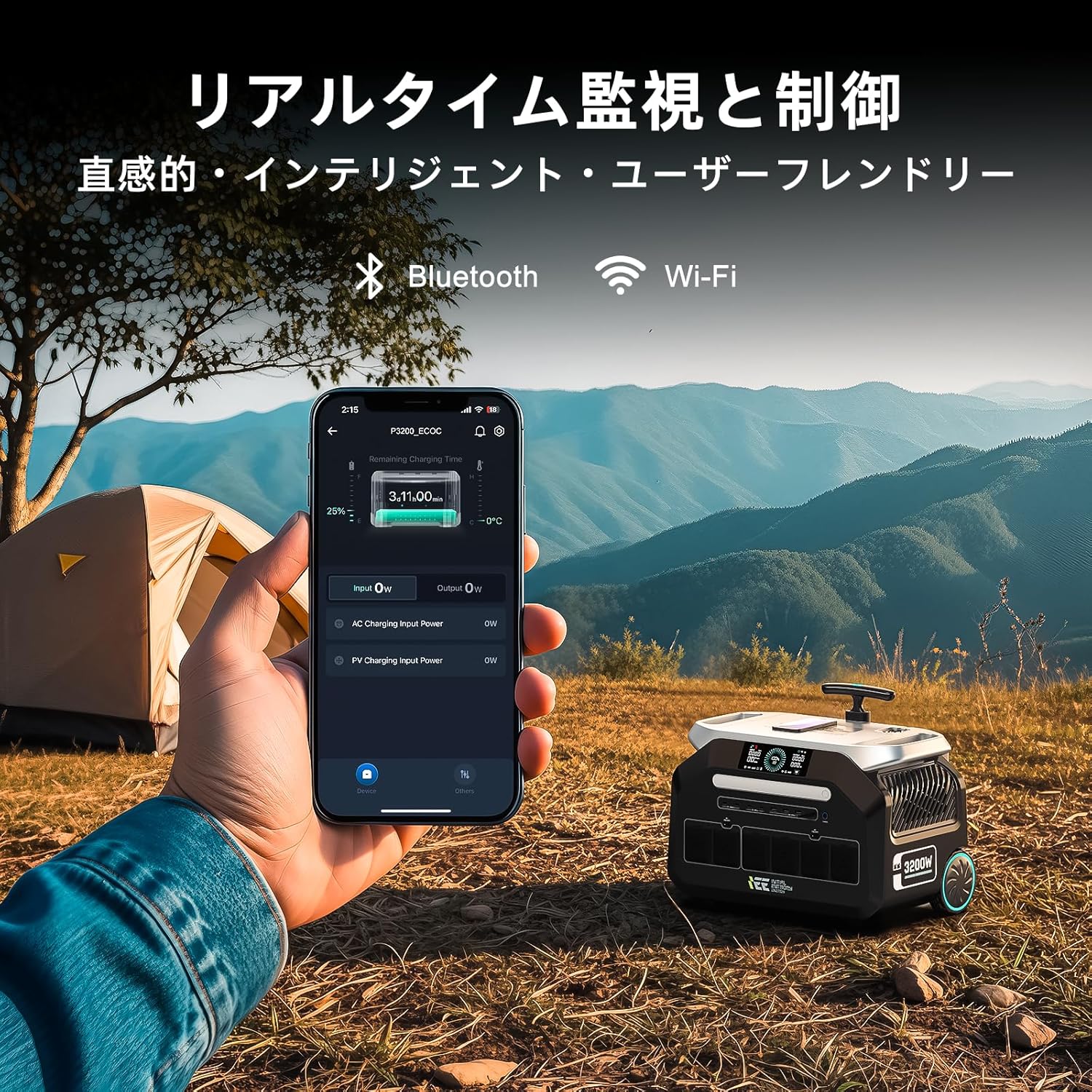
- ການຄວບຄຸມອັດສະລິຍະ: Integrated Wi-Fi and Bluetooth for remote monitoring and control via the IEE App.
- ຟັງຊັນ UPS: Uninterruptible Power Supply (UPS) with a switchover time of less than 10ms.
- ການດໍາເນີນງານງຽບ: Designed for low noise levels, typically below 40dB during use and charging.
- ການອອກແບບແບບພົກພາ: Features a retractable handle and durable wheels for easy transport.
4.2. ອົງປະກອບ ແລະ ພອດຕ່າງໆ

ຮູບພາບ: ທາງຫນ້າ view of the IEE P3200 Portable Power Station with included solar panels, highlighting its compact design and multiple ports.
ຮູບພາບ: ໃກ້ຊິດ view of the IEE P3200's display and various output ports, including AC, USB, and DC outlets.
The IEE P3200 features a clear display panel showing battery status, input/output power, and remaining charge time. Output ports are conveniently located on the front and side for easy access.
5. ຕັ້ງຄ່າ
5.1. ຄ່າບໍລິການເບື້ອງຕົ້ນ
Before first use, fully charge the IEE P3200. Connect the AC charging cable to the AC input port on the unit and then to a wall outlet. The display will indicate charging status. For optimal battery health, it is recommended to fully charge the unit upon receipt.

Image: The IEE P3200 connected to a wall outlet for AC charging, demonstrating the fast charging capability.
5.2. Solar Panel Connection
To charge using solar panels, connect the solar charging cable to the solar input port on the P3200 and then to your IEE 200W solar panels. Position the solar panels in direct sunlight for maximum efficiency. The unit supports up to 1000W solar input.

Image: The IEE P3200 connected to solar panels for charging, set up in an outdoor environment.
6. ຄໍາແນະນໍາການດໍາເນີນງານ
6.1. ເປີດ / ປິດພະລັງງານ
Press and hold the main power button for 3 seconds to turn the unit on or off. The display will illuminate upon power-on.
6.2. Using AC/DC/USB Outputs
Once the unit is powered on, press the respective AC, DC, or USB button to activate the desired output ports. Connect your devices to the appropriate ports. Ensure the total power consumption of connected devices does not exceed the unit's rated output (3200W).

Image: The IEE P3200 powering various household appliances and electronic devices simultaneously, demonstrating its high output capability.
6.3. IEE App Remote Control
Download the official IEE App from your smartphone's app store. Connect the P3200 via Wi-Fi or Bluetooth. The app allows you to:
- Monitor real-time battery status, input/output power.
- Remotely control input speed (charging rate).
- Schedule charging times to optimize electricity costs.
- Access general settings and device information.

Image: A smartphone displaying the IEE app interface, showing real-time monitoring of the P3200 power station in an outdoor campສະຖານະການ ing.

Image: Screenshots of the IEE app interface, showing real-time status and general settings for the power station.
6.4. ຟັງຊັນການສະຫນອງພະລັງງານທີ່ບໍ່ຕິດຂັດ (UPS).
The P3200 features an EPS (Emergency Power Supply) function. When connected to a wall outlet and devices are powered through the P3200, it acts as a pass-through. In the event of a power outage, the unit will automatically switch to battery power within 0.01 seconds, ensuring uninterrupted operation for connected devices.

Image: The IEE P3200 connected to a medical device, illustrating its UPS function providing continuous power during an outage.
7. ບໍາລຸງຮັກສາ
- ທໍາຄວາມສະອາດ: ໃຊ້ຜ້າແຫ້ງ ແລະ ອ່ອນເພື່ອທຳຄວາມສະອາດເຄື່ອງ. ຢ່າໃຊ້ນ້ຳຢາທຳຄວາມສະອາດທີ່ມີສີຂັດ ຫຼື ຕົວລະລາຍ.
- ການເກັບຮັກສາ: If storing for extended periods, charge the unit to 50-80% every 3-6 months to maintain battery health. Store in a cool, dry place away from direct sunlight.
- ອຸນຫະພູມ: Operate and store the unit within the recommended temperature range (refer to specifications).
8. ການແກ້ໄຂບັນຫາ
| ບັນຫາ | ສາເຫດທີ່ເປັນໄປໄດ້ | ການແກ້ໄຂ |
|---|---|---|
| ຫນ່ວຍບໍລິການບໍ່ເປີດ. | ແບັດເຕີຣີໝົດ. | ສາກເຄື່ອງໂດຍໃຊ້ໄຟຟ້າ AC ຫຼື ພະລັງງານແສງຕາເວັນ. |
| ບໍ່ມີຜົນຜະລິດຈາກພອດ AC/DC/USB. | Output ports are not activated. | Press the corresponding AC/DC/USB button to activate. |
| ຄຳເຕືອນກ່ຽວກັບການໂຫຼດເກີນສະແດງຢູ່ໜ້າຈໍ. | Connected devices exceed rated output. | Disconnect some devices or use lower power devices. |
| ຫົວໜ່ວຍບໍ່ໄດ້ສາກໄຟ. | Charging cable not properly connected or power source issue. | Check cable connections and ensure power source is active. For solar, ensure panels are in direct sunlight. |
ຖ້າບັນຫາຍັງຄົງຢູ່, ກະລຸນາຕິດຕໍ່ຝ່າຍຊ່ວຍເຫຼືອລູກຄ້າ.
9. ຂໍ້ມູນຈໍາເພາະ
| ຄຸນສົມບັດ | ລາຍລະອຽດ |
|---|---|
| ຕົວແບບ | P3200 |
| ປະເພດຫມໍ້ໄຟ | LiFePO4 (Lithium Iron Phosphate) |
| ຄວາມອາດສາມາດ | 2048Wh (640000mAh) |
| AC Output | 3200W (ຈັດອັນດັບ), 6400W (ສູງສຸດ) |
| AC Input | ສູງສຸດ 1500W (ສາກໄວ) |
| ວັດສະດຸປ້ອນແສງອາທິດ | ສູງເຖິງ 1000W |
| ຜົນຜະລິດ USB-A | 4 ພອດ |
| USB-C Output | 4 ພອດ |
| DC5521 ຜົນຜະລິດ | 2 ພອດ |
| ຜົນຜະລິດສີມ້ວງອ່ອນກວ່າ | 2 ພອດ |
| ອາຍຸຍືນ | 4000+ cycles to 80% capacity (approx. 10-15 years) |
| ລະດັບສຽງ | ≤40dB |
| ຂະໜາດ (L x W x H) | 44.5ຊມ x 29.8ຊມ x 36.7ຊມ (ປະມານ) |
| ນ້ຳໜັກ | 24 ກິໂລ (52.91 ປອນ) |
10. ການຮັບປະກັນແລະການສະຫນັບສະຫນູນ
The IEE P3200 Portable Power Station comes with a ການຮັບປະກັນຂອງຜູ້ຜະລິດ 5 ປີ. ການຮັບປະກັນນີ້ກວມເອົາຂໍ້ບົກພ່ອງຂອງວັດສະດຸແລະການເຮັດວຽກພາຍໃຕ້ການນໍາໃຊ້ປົກກະຕິ.
For warranty claims, technical support, or any inquiries, please contact IEE customer support through the following channels:
- Refer to the contact information provided on your Warranty Card.
- Visit the official IEE webເວັບໄຊສໍາລັບຊັບພະຍາກອນສະຫນັບສະຫນູນແລະຮູບແບບການຕິດຕໍ່.
- Contact the seller directly via your purchase platform.
ກະລຸນາກຽມໝາຍເລກຮຸ່ນຜະລິດຕະພັນ (P3200) ແລະ ລາຍລະອຽດການຊື້ຂອງທ່ານໃຫ້ພ້ອມເມື່ອຕິດຕໍ່ຝ່າຍຊ່ວຍເຫຼືອ.


