1. ບົດແນະນຳ
Thank you for choosing the Groove Electronics Wireless Bluetooth Earbuds, Model X31. These earbuds are designed to provide a high-fidelity audio experience with the convenience of wireless connectivity, perfect for an active lifestyle. Featuring IPX7 waterproof protection, a secure comfort fit, and extended battery life, they are built to accompany you through workouts, daily commutes, and leisure activities. This manual provides essential information on how to set up, operate, maintain, and troubleshoot your new earbuds to ensure optimal performance and longevity.
2. ສິ່ງທີ່ຢູ່ໃນກ່ອງ
ກະລຸນາກວດສອບວ່າລາຍການທັງຫມົດທີ່ລະບຸໄວ້ຂ້າງລຸ່ມນີ້ແມ່ນລວມຢູ່ໃນຊຸດຂອງທ່ານ:
- Groove Electronics Wireless Bluetooth Earbuds (Left & Right)
- ກ່ອງສາກແບບພົກພາ
- ສາຍສາກ USB-C
- Multiple Sizes of Eartips (Small, Medium, Large)

Contents of the product packaging, including the wireless earbuds, charging case, eartips, and USB-C charging cable.
3. ຜະລິດຕະພັນເກີນview
The Groove Electronics X31 earbuds are designed for comfort, durability, and superior sound quality. They feature an ergonomic ear hook design for a secure fit during any activity and are equipped with advanced Bluetooth 5.3 technology for stable and fast connections.
3.1 ລັກສະນະທີ່ສໍາຄັນ
- ການປົກປ້ອງກັນນ້ໍາ IPX7: Resistant to sweat, rain, and accidental immersion.
- Secure Comfort Fit: Ergonomic ear hooks ensure stability during intense activities.
- ຂະຫຍາຍເວລາຫຼິ້ນ: ໃຊ້ໄດ້ດົນເຖິງ 14 ຊົ່ວໂມງຕໍ່ການສາກໄຟຄັ້ງດຽວ, ແລະ 80 ຊົ່ວໂມງກັບກ່ອງສາກໄຟ.
- ສຽງຄວາມສັດຊື່ສູງ: Dynamic drivers deliver crisp highs, rich mids, and powerful bass.
- ການຄວບຄຸມປຸ່ມທີ່ໃຊ້ງ່າຍ: Easy management of music, calls, and voice assistant.
- Fast Bluetooth 5.3 Pairing: Quick and stable connection to your devices.
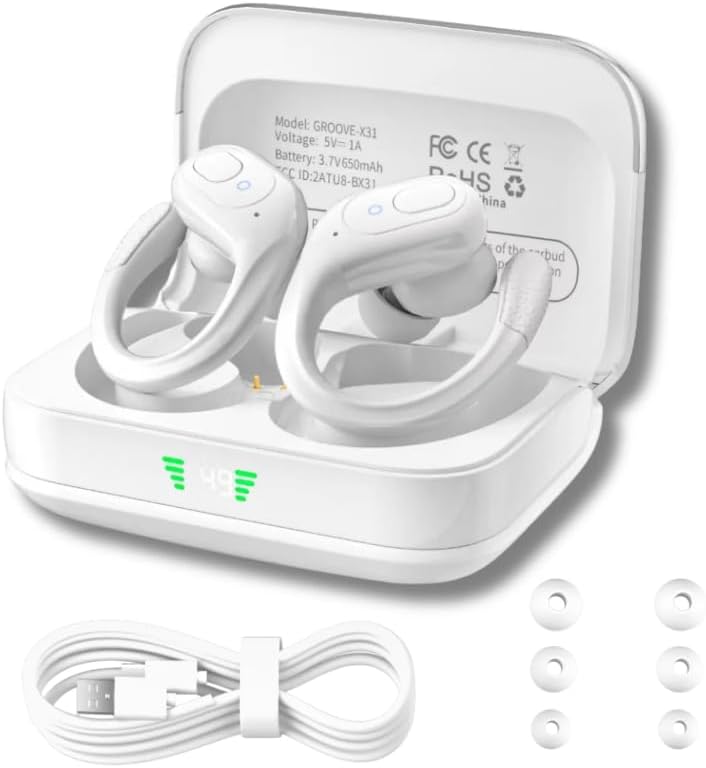
Groove Electronics Wireless Bluetooth Earbuds (Model X31) in their charging case, accompanied by a USB-C charging cable and various sizes of eartips.

Close-up of the earbuds with water droplets, highlighting their IPX7 waterproof and sweat-resistant design for active use.

Diagram illustrating the immersive high-definition stereo sound experience provided by the earbuds, with musical notes and a speaker icon.
4. ຕັ້ງຄ່າ
4.1 ການສາກຫູຟັງ ແລະ ເຄສ
Before first use, fully charge the earbuds and the charging case. The charging case features an LED display indicating the battery percentage.
- ວາງຫູຟັງໃສ່ໃນກະເປົ໋າສາກໄຟ, ຮັບປະກັນວ່າພວກມັນຖືກນັ່ງຢ່າງຖືກຕ້ອງ.
- Connect the USB-C charging cable to the charging port on the case and plug the other end into a USB power source (e.g., wall adapter, computer USB port).
- The LED display on the case will show the charging status. Once fully charged, the display will indicate 100%.
- A full charge provides up to 14 hours of playtime for the earbuds, and the charging case holds multiple charges for a total of up to 80 hours of listening time.

Illustration demonstrating the extended battery life of the earbuds, showing 14 hours on a single charge and up to 80 hours with the charging case, along with the convenient LED power display.
4.2 ການຈັບຄູ່ກັບອຸປະກອນຂອງທ່ານ
ຫູຟັງເອຍບັດຈະເຂົ້າສູ່ໂໝດຈັບຄູ່ໂດຍອັດຕະໂນມັດເມື່ອເອົາອອກຈາກກ່ອງສາກ.
- ເປີດກ່ອງສາກ ແລະຖອດຫູຟັງທັງສອງຂ້າງອອກ. ພວກເຂົາຈະເປີດເຄື່ອງອັດຕະໂນມັດ ແລະເຂົ້າສູ່ໂໝດຈັບຄູ່.
- ໃນອຸປະກອນຂອງທ່ານ (ໂທລະສັບສະຫຼາດ, ແທັບເລັດ, ແລັບທັອບ, ແລະອື່ນໆ), ເປີດໃຊ້ Bluetooth.
- ຊອກຫາ new Bluetooth devices. Select "GROOVE-X31" from the list of available devices.
- ເມື່ອເຊື່ອມຕໍ່ແລ້ວ, ທ່ານຈະໄດ້ຍິນສຽງຢືນຢັນ, ແລະຫູຟັງເອຍບັດຈະພ້ອມໃຫ້ໃຊ້.
- ຫູຟັງເອຍບັດຈະເຊື່ອມຕໍ່ໃໝ່ໂດຍອັດຕະໂນມັດກັບອຸປະກອນທີ່ຈັບຄູ່ສຸດທ້າຍເມື່ອຖອດອອກຈາກເຄສ, ຖ້າ Bluetooth ຖືກເປີດໃຊ້ໃນອຸປະກອນ.

Image depicting the fast Bluetooth pairing process, showing the earbuds connecting to a smartphone with Bluetooth 5.3 technology for seamless connectivity.
5. ການດໍາເນີນງານ
5.1 ການຄວບຄຸມປຸ່ມ
The earbuds feature intuitive push-button controls on each earbud. The functions can be performed on either the left (L) or right (R) earbud unless specified.
| ການປະຕິບັດ | ການຄວບຄຸມ | ຟັງຊັນ |
|---|---|---|
| Single Press (x1) | L/R | ຫຼິ້ນ/ຢຸດເພງຊົ່ວຄາວ, ຮັບສາຍ/ວາງສາຍ |
| Double Press (x2) | L/R | Switch Song (Next Track) |
| Triple Press (x3) | L/R | ເປີດໃຊ້ Voice Assistant (Siri, Google Assistant) |
| Press & Hold (2S) | L/R | Adjust Volume (L: Volume Down, R: Volume Up) |
| Press & Hold (2S) | L/R | ປະຕິເສດການໂທ |
| Press & Hold (5S) | L/R | ເປີດ/ປິດ |
| Five Presses (x5) | L/R | ປັບຫູຫູຄືນ |

Detailed diagram of the intuitive push-button controls on the earbuds, outlining functions such as play/pause, track switching, volume adjustment, call management, voice assistant activation, and power on/off.
6. ບໍາລຸງຮັກສາ
Proper care and maintenance will ensure the longevity and optimal performance of your earbuds.
- ທໍາຄວາມສະອາດ: Regularly clean the earbuds and charging case with a soft, dry, lint-free cloth. For the eartips, remove them and clean with a mild soap solution if necessary, then rinse and dry thoroughly before reattaching. Ensure charging contacts are free of debris.
- ການເປີດເຜີຍນ້ໍາ: While IPX7 waterproof, avoid prolonged submersion. After exposure to sweat or water, wipe the earbuds dry before placing them back in the charging case to prevent corrosion of charging contacts.
- ການເກັບຮັກສາ: Store the earbuds in their charging case when not in use to protect them from dust and damage. Store in a cool, dry place away from extreme temperatures.
- ການດູແລຫມໍ້ໄຟ: ເພື່ອຮັກສາອາຍຸແບັດເຕີຣີ, ຫຼີກເວັ້ນການຖອດຫູຟັງຫູຟັງອອກເຕັມທີ່ ແລະ ກ່ອງສາກໄຟເລື້ອຍໆ. ໄລ່ພວກມັນເປັນປົກກະຕິ, ເຖິງແມ່ນວ່າບໍ່ໄດ້ໃຊ້ສໍາລັບໄລຍະເວລາທີ່ຍາວນານ.
7. ການແກ້ໄຂບັນຫາ
ຖ້າທ່ານພົບບັນຫາໃດໆກັບຫູຟັງເອຍບັດຂອງທ່ານ, ກະລຸນາອ້າງອີງເຖິງວິທີແກ້ໄຂທົ່ວໄປຕໍ່ໄປນີ້:
| ບັນຫາ | ສາເຫດທີ່ເປັນໄປໄດ້ | ການແກ້ໄຂ |
|---|---|---|
| ຫູຟັງບໍ່ເປີດ | ແບັດເຕີຣີຕໍ່າ | ວາງຫູຟັງເອຍບັດໃສ່ໃນກະເປົ໋າສາກໄຟ ແລະຮັບປະກັນວ່າເຄສຈະສາກແລ້ວ. |
| ບໍ່ສາມາດຈັບຄູ່ກັບອຸປະກອນໄດ້ | Bluetooth off, out of range, or previously paired | Ensure Bluetooth is on. Move closer to device. Forget "GROOVE-X31" on your device's Bluetooth list and re-pair. |
| ຫູຟັງຫູຟັງອັນດຽວເຮັດວຽກໄດ້ | Connection issue between earbuds or with device | Place both earbuds back in the case, close it, then open and remove them again. If issue persists, perform a factory reset (see below). |
| ບໍ່ມີສຽງຫລືປະລິມານຕ່ ຳ | Volume too low, incorrect audio output, or earbud blockage | Adjust volume on both earbuds and your device. Check device's audio output settings. Clean eartips and earbud mesh. |
| ກ່ອງສາກບໍ່ສາກ | Faulty cable/adapter or dirty port | ລອງໃຊ້ສາຍ USB-C ແລະອະແດັບເຕີໄຟອື່ນ. ກວດໃຫ້ແນ່ໃຈວ່າຊ່ອງສາກໄຟສະອາດ ແລະ ບໍ່ມີສິ່ງເສດເຫຼືອ. |
7.1 ຣີເຊັດເປັນຄ່າໂຮງງານ
If you experience persistent connectivity issues or other malfunctions, a factory reset may resolve the problem:
- Ensure both earbuds are in the charging case.
- On each earbud, quickly press the control button five times (x5).
- The earbuds will reset. Remove them from the case and attempt to re-pair with your device.
8. ຂໍ້ມູນຈໍາເພາະ
| ຄຸນສົມບັດ | ລາຍລະອຽດ |
|---|---|
| ຊື່ຕົວແບບ | Groove Electronics Wireless Bluetooth Earbuds with Charging Case |
| ໝາຍເລກຕົວແບບ | X31 |
| ເຕັກໂນໂລຊີການເຊື່ອມຕໍ່ | ໄຮ້ສາຍ |
| ເຕັກໂນໂລຊີການສື່ສານໄຮ້ສາຍ | Bluetooth |
| ລຸ້ນ Bluetooth | 5.3 |
| ຊ່ວງ Bluetooth | 50 ຟຸດ |
| ລະດັບຄວາມຕ້ານທານນ້ໍາ | ກັນນໍ້າ (IPX7) |
| ອາຍຸແບັດເຕີຣີ (ຫູຟັງ) | ສູງສຸດ 14 ຊົ່ວໂມງ (ຄ່າບໍລິການດຽວ) |
| ເວລາຫຼິ້ນທັງໝົດ (ພ້ອມກໍລະນີ) | ສູງສຸດ 80 ຊົ່ວໂມງ |
| ວິທີການຄວບຄຸມ | Remote (Button Control) |
| ການຈັດວາງຫູ | In Ear (with ear hook) |
| ປະເພດໄດເວີສຽງ | ໄດນາມິກໄດເວີ |
| ການຄວບຄຸມສິ່ງລົບກວນ | Active Noise Cancellation (ENC ສໍາລັບການໂທ) |
| ອຸປະກອນທີ່ເຂົ້າກັນໄດ້ | Smartphones, Tablets, Laptops, Smart Speakers, Gaming Consoles, Television, Cars, Motorcycles |
| ນ້ໍາຫນັກລາຍການ | 5.3 ອອນ |
| ສີ | ສີຂາວ |
9. ການຮັບປະກັນແລະການສະ ໜັບ ສະ ໜູນ
Groove Electronics stands behind the quality of its products. Your Groove Electronics Wireless Bluetooth Earbuds (Model X31) are covered by a standard manufacturer's warranty against defects in materials and workmanship.
For specific warranty terms, registration, or technical support, please refer to the warranty card included in your product packaging or visit the official Groove Electronics website. You may also contact our customer support team through the details provided on our webເວັບໄຊ ຫຼືເວທີການຊື້ຂອງທ່ານ.
ສະຫນັບສະຫນູນອອນໄລນ໌: For FAQs, troubleshooting guides, and contact information, please visit the Groove Electronics Store on Amazon.


