
1. ບົດແນະນຳ
The VERTU H1 Diamonds Smart Watch combines sophisticated design with advanced smart technology. Crafted with aerospace-grade carbon fiber and a sapphire crystal display, this smartwatch offers durability and clarity. It features comprehensive health monitoring, over 100 sports modes, and seamless connectivity with Android devices.
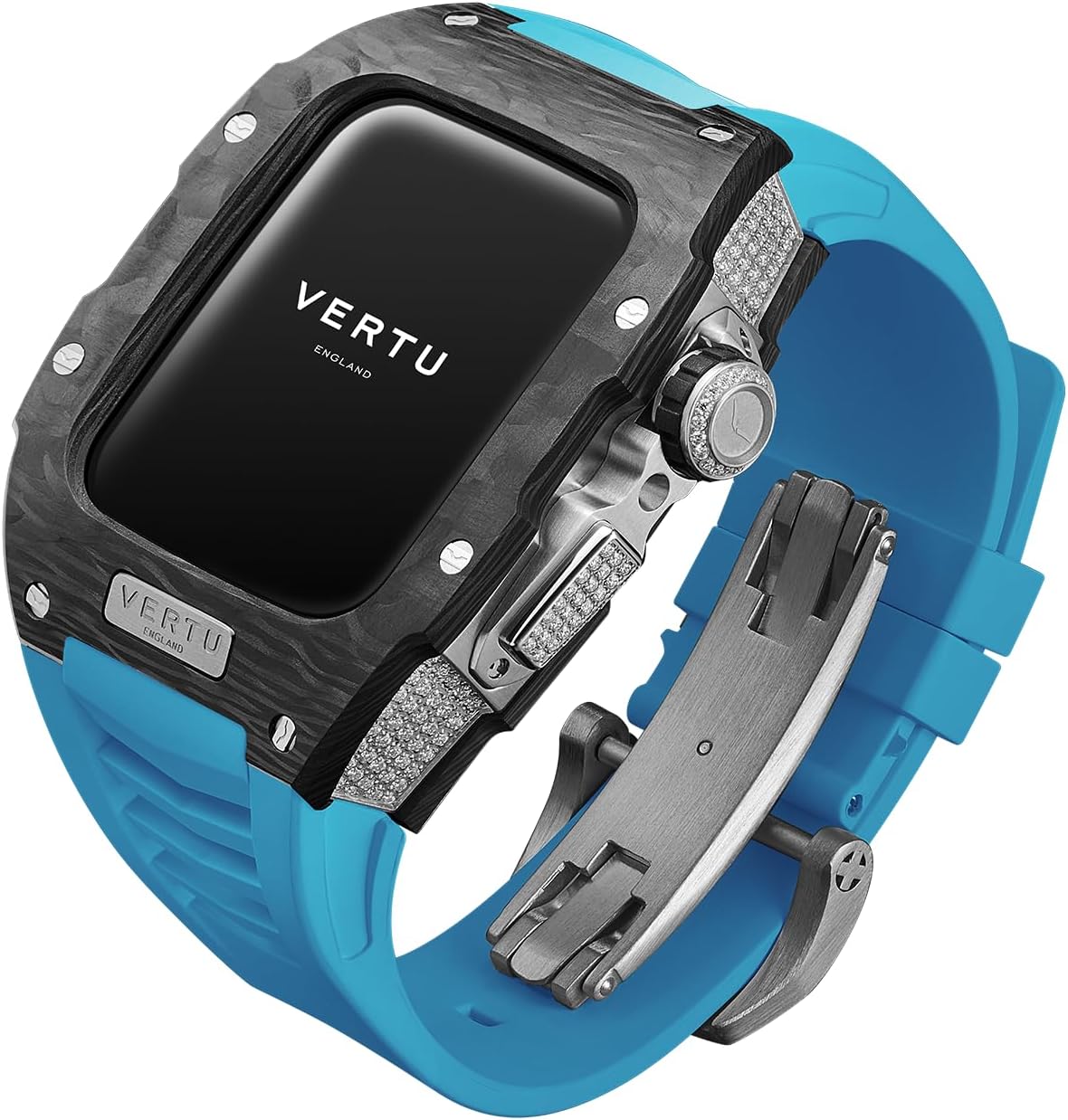
Image: The VERTU H1 Diamonds Smart Watch, showcasing ການອອກແບບ ແລະ ວັດສະດຸຂອງມັນ.
ແມ່ນຫຍັງຢູ່ໃນກ່ອງ
- METAWATCH 1 Smart Watch
- ເຄື່ອງສາກໄຮ້ສາຍ
- ຄູ່ມືຜູ້ໃຊ້
2. ຕັ້ງຄ່າ
2.1 ການສາກອຸປະກອນ
Before initial use, fully charge your VERTU H1 Smart Watch. Connect the wireless charger to a power source and place the watch onto the charging pad. The watch display will indicate charging status.
2.2 ການເປີດ/ປິດ
- ເປີດ: Press and hold the side button until the VERTU logo appears.
- ປິດພະລັງງານ: ກົດປຸ່ມດ້ານຂ້າງຄ້າງໄວ້, ຈາກນັ້ນເລືອກ 'ປິດເຄື່ອງ' ໃນໜ້າຈໍ.
2.3 Pairing with Your Android Device
- Download the official VERTU companion application from the Google Play Store on your Android smartphone.
- ໃຫ້ແນ່ໃຈວ່າ Bluetooth ຖືກເປີດໃຊ້ຢູ່ໃນໂທລະສັບສະຫຼາດຂອງທ່ານ.
- Open the VERTU application and follow the on-screen instructions to search for and pair with your METAWATCH 1.
- ຢືນຢັນຄຳຮ້ອງຂໍການຈັບຄູ່ຢູ່ໃນທັງໂມງ ແລະສະມາດໂຟນຂອງທ່ານ.


Image: The watch display showing the pairing process and successful connection to a smartphone.
3. ການໃຊ້ງານ Smart Watch ຂອງທ່ານ
3.1 ການນໍາທາງ ແລະການສະແດງຜົນ
The VERTU H1 features a 1.85-inch sapphire crystal display for clear visuals. Navigate through menus by swiping across the touchscreen. The side crown and button provide additional control for various functions.

Image: Close-up of the watch face, highlighting the sapphire crystal display.
3.2 ລັກສະນະການສື່ສານ
- ຕອບ/ໂທ: Once paired, you can answer incoming calls directly from your watch or initiate calls using the watch interface.
- ການແຈ້ງເຕືອນ: Receive notifications for messages, emails, and other app alerts directly on your wrist.
3.3 ການຕິດຕາມສຸຂະພາບ
The watch provides continuous, real-time monitoring of key health metrics.
- ອັດຕາການເຕັ້ນຫົວໃຈ: Monitor your heart rate throughout the day and during workouts.
- ອົກຊີໃນເລືອດ (SpO2): Track your blood oxygen levels to assess overall well-being.
- ການຕິດຕາມການນອນ: Scientifically monitors sleep quality, including deep sleep and light sleep phases.

Image: The watch screen showing health synchronization data, including heart rate and sleep patterns.
3.4 ໂໝດກິລາ
With over 100 built-in sports modes, the watch tracks your activity with advanced data detection functionalities.
- Select your desired sport from the watch menu.
- The watch will record real-time data such as duration, distance, calories burned, and heart rate.

Image: The watch screen displaying various sports mode options like outdoor running, indoor running, and outdoor walking.
3.5 ຄຸນສົມບັດອັດສະລິຍະ
- Customized Chip: The integrated chip manages multitasking, call answering, text messaging, and AI functions for hands-free convenience.
- Intelligent Life Butler: Provides reminders for hydration, sedentary alerts, and other personalized health prompts.
- ສະຫນັບສະຫນູນຫຼາຍພາສາ: The watch supports 22 UI languages and 41 message languages.
- ອັບເດດ OTA: Supports Over-The-Air updates for software enhancements and new features.
ວິດີໂອ: ວິດີໂອຜະລິດຕະພັນຢ່າງເປັນທາງການasing the design and various features of the VERTU H1 Smart Watch.
4. ການບໍາລຸງຮັກສາແລະການດູແລ
4.1 ຄໍາແນະນໍາການທໍາຄວາມສະອາດ
ເພື່ອຮັກສາຮູບລັກສະນະ ແລະການເຮັດວຽກຂອງໂມງຂອງທ່ານ:
- ເຊັດກະເປົ໋າໂມງ ແລະສາຍດ້ວຍຜ້າອ່ອນ, ງamp ຜ້າ.
- Avoid using harsh chemicals, abrasive materials, or solvents.
- ກວດໃຫ້ແນ່ໃຈວ່າບ່ອນຕິດຕໍ່ສາກໄຟສະອາດ ແລະແຫ້ງກ່ອນການສາກໄຟ.
4.2 ກັນນ້ຳ (IP68)
The VERTU H1 Smart Watch is IP68 rated, providing protection against dust and water immersion up to 1.5 meters for 30 minutes. It is suitable for daily wear and activities like swimming, but not recommended for diving or high-pressure water activities.
4.3 ການດູແລວັດສະດຸ
- Carbon Fiber Case: The aerospace-grade carbon fiber is highly durable. Avoid extreme impacts to prevent damage.
- Sapphire Crystal Display: While highly scratch-resistant, sapphire can still be damaged by extreme force. Avoid direct contact with sharp objects.
- Fluoroelastomer (FKM) Strap: The FKM strap is resistant to extreme temperatures and corrosion. Clean regularly to prevent buildup from sweat and dirt.

Image: Close-up of the watch case, highlighting the carbon fiber material.
5. ການແກ້ໄຂບັນຫາ
5.1 ໂມງບໍ່ເປີດເຄື່ອງ
- Ensure the watch is fully charged. Place it on the wireless charger for at least 30 minutes.
- ລອງກົດປຸ່ມດ້ານຂ້າງຄ້າງໄວ້ປະມານ 10-15 ວິນາທີເພື່ອບັງຄັບໃຫ້ຣີສະຕາດ.
5.2 ບໍ່ສາມາດຈັບຄູ່ກັບໂທລະສັບໄດ້
- Verify Bluetooth is enabled on your smartphone and the watch.
- Ensure the VERTU companion app is installed and updated to the latest version.
- Restart both your watch and smartphone, then attempt pairing again.
- If issues persist, try unpairing the watch from your phone's Bluetooth settings and re-pairing through the app.
5.3 ການອ່ານສຸຂະພາບທີ່ບໍ່ຖືກຕ້ອງ
- ໃຫ້ແນ່ໃຈວ່າໂມງຖືກໃສ່ຢູ່ໃນຂໍ້ມືຂອງເຈົ້າຢ່າງສະບາຍ, ແຕ່ບໍ່ແຫນ້ນເກີນໄປ.
- ເຮັດຄວາມສະອາດເຊັນເຊີຢູ່ດ້ານຫຼັງຂອງໂມງ.
- Avoid excessive movement during measurements for best accuracy.
5.4 ອາຍຸແບັດເຕີຣີສັ້ນ
- ຫຼຸດຄວາມສະຫວ່າງໜ້າຈໍ ແລະເວລາເປີດໜ້າຈໍ.
- Disable unnecessary notifications or background app refresh.
- Limit continuous health monitoring if not required.
6. ຂໍ້ມູນຈໍາເພາະ
| ຄຸນສົມບັດ | ລາຍລະອຽດ |
|---|---|
| ຊື່ຕົວແບບ | METAWATCH 1 |
| ຂະໜາດໜ້າຈໍ | 1.85 ນິ້ວ |
| ປະເພດການສະແດງ | Sapphire Crystal |
| ວັດສະດຸກໍລະນີ | Aerospace-grade Carbon Fiber |
| ວັດສະດຸສາຍ | Fluoroelastomer (FKM) |
| ການຕໍ່ຕ້ານນ້ໍາ | IP68 |
| ການເຊື່ອມຕໍ່ | Bluetooth |
| ຄວາມອາດສາມາດຫມໍ້ໄຟ | 260 Amp ຊົ່ວໂມງ |
| ຄຸນນະສົມບັດພິເສດ | Activity Tracker, GPS, Heart Rate/Blood Oxygen Detection, Phone Call, Sedentary Reminder |
| ຄວາມເຂົ້າກັນໄດ້ | ລະບົບ Android |
7. ການຮັບປະກັນແລະການສະຫນັບສະຫນູນ
7.1 ການຮັບປະກັນຜະລິດຕະພັນ
Your VERTU H1 Diamonds Smart Watch is covered by a manufacturer's warranty against defects in materials and workmanship. Please refer to the warranty card included with your product for specific terms, conditions, and duration of coverage. Keep your proof of purchase for warranty claims.
7.2 ສະຫນັບສະຫນູນລູກຄ້າ
For technical assistance, troubleshooting, or service inquiries, please contact VERTU customer support. Contact information can typically be found on the official VERTU webສະຖານທີ່ຫຼືຢູ່ໃນບັດຮັບປະກັນທີ່ສະຫນອງໃຫ້ກັບຜະລິດຕະພັນຂອງທ່ານ.


