1. ບົດແນະນຳ
This manual provides detailed instructions for the installation, operation, and maintenance of your MOUNT PRO Triple Monitor Mount. Please read this manual thoroughly before installation to ensure correct setup and safe usage. Keep this manual for future reference.
2. ຂໍ້ມູນຄວາມປອດໄພ
ຄໍາແນະນໍາຄວາມປອດໄພທີ່ສໍາຄັນ:
- Ensure your desk surface is stable and capable of supporting the combined weight of the mount and all monitors.
- Do not exceed the maximum weight capacity of 17.6 lbs (8 kg) per arm.
- Use only the provided hardware. If any parts are missing or damaged, contact MOUNT PRO customer service.
- ການຕິດຕັ້ງທີ່ບໍ່ຖືກຕ້ອງອາດຈະເຮັດໃຫ້ຊັບສິນເສຍຫາຍຫຼືການບາດເຈັບສ່ວນບຸກຄົນ.
- Adjust gas spring tension carefully. Refer to the adjustment section for proper procedure.
3. ເນື້ອໃນຊຸດ
Verify that all components are present before beginning installation. While a complete list is not provided, typical components include:
- Main Pole and Base (C-Clamp and Grommet options)
- Monitor Arms (Gas Spring Arms)
- ແຜ່ນ VESA
- ຄລິບການຈັດການສາຍ
- ຊຸດຮາດແວ (ສະກູ, ແຜ່ນຮອງ, ປະແຈ Allen)

Image: Typical package contents for the MOUNT PRO Triple Monitor Mount.
4. ການຕິດຕັ້ງແລະການຕິດຕັ້ງ
The MOUNT PRO Triple Monitor Mount offers two installation methods: C-Clamp and Grommet mounting. Choose the method suitable for your desk.
4.1. Choose Mounting Method

Image: Illustration of C-Clamp ແລະຕົວເລືອກການຕິດຕັ້ງ Grommet.
- C-Clamp ການຕິດຕັ້ງ: Fits desks with a thickness of 0.39" - 3.15" (10mm - 80mm).
- Grommet Mounting: Fits desks with a thickness of 0.39" - 1.97" (10mm - 50mm) and requires an existing hole in the desk.
4.2. Base Assembly (C-Clamp)
- Attach the L-plate to the bottom of the pole base using the provided screws.
- ຮັບປະກັນ C-clamp to the L-plate.
- Place the assembled base onto your desk and tighten the C-clamp to secure it firmly.
Video: Step-by-step guide on how to install the MOUNT PRO Triple Monitor Mount, including base assembly.
4.3. Base Assembly (Grommet)
- If using grommet mounting, detach the bolt from the C-clamp ການຊຸມນຸມ.
- Insert the grommet bolt through the desk hole and secure it from underneath with the washer and nut.
- Attach the pole base to the grommet bolt.
4.4. Pole Installation
- Connect the upper and lower sections of the pole and secure them with the provided screw.
- Slide the pole onto the mounted base and tighten the securing screw.
4.5. Arm and VESA Plate Installation
- Slide the cable clips and fixators onto the pole at desired heights.
- Attach the monitor arms to the pole, securing them with the fixators.
- ຕິດແຜ່ນ VESA ເຂົ້າກັບດ້ານຫຼັງຂອງຈໍພາບຂອງທ່ານໂດຍໃຊ້ສະກູທີ່ເໝາະສົມ. ຮັບປະກັນວ່າສະກູໄດ້ຖືກຂັນແໜ້ນຢ່າງແໜ້ນໜາ.
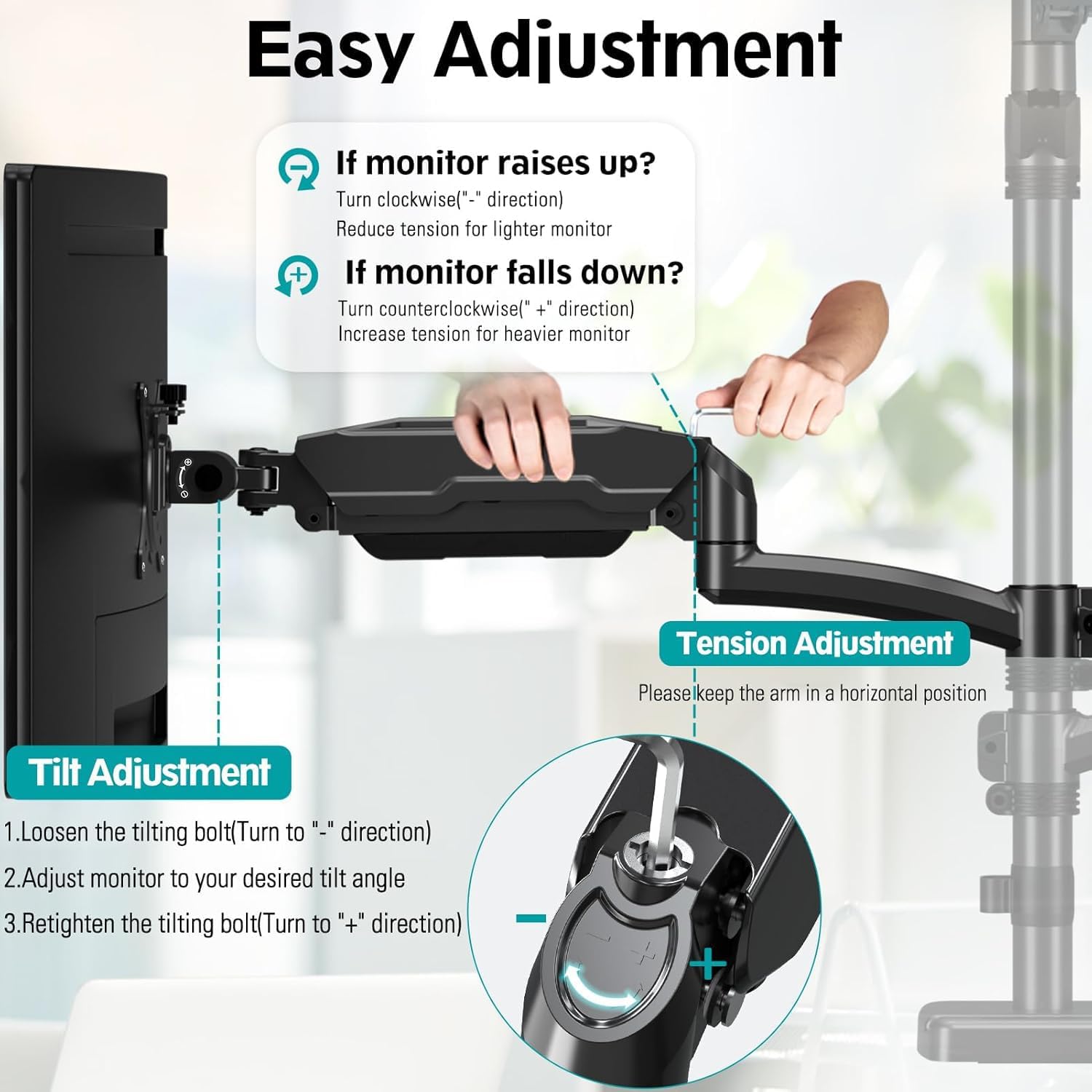
Image: Attaching the VESA plate to the back of a monitor.
4.6. ການຕິດຕັ້ງຈໍພາບ
- Carefully slide each monitor (with VESA plate attached) onto the head of its respective arm.
- ຍຶດຈໍພາບໃສ່ແຂນດ້ວຍການຮັດສະກູລັອກໃສ່ຫົວ VESA.
5. ການດໍາເນີນງານແລະການປັບຕົວ
The MOUNT PRO Triple Monitor Mount offers extensive adjustability for optimal viewສະດວກສະບາຍ.
5.1. ການປັບຄວາມຕຶງຂອງສະປິງແກັສ
The gas spring arms allow for smooth height adjustments. Adjust the tension based on your monitor's weight.
- ຖ້າຈໍສະແດງຜົນ raises up, turn the tension screw counter-clockwise ("-" direction) to reduce tension for a lighter monitor.
- ຖ້າຈໍສະແດງຜົນ falls down, turn the tension screw clockwise ("+" direction) to increase tension for a heavier monitor.
- Keep the arm in a horizontal position during adjustment.

Image: Instructions for adjusting gas spring tension.
5.2. ການອຽງ, ການໝຸນ ແລະ ການໝຸນ
- ອຽງ: Adjust your screen from +90° to -90° for vertical angle. Loosen the tilting bolt, adjust, then retighten.
- ໝູນ: Swivel the monitor 180° for horizontal angle adjustment.
- ໝຸນ: ໝຸນຈໍພາບ 360° ເພື່ອສະຫຼັບລະຫວ່າງທິດທາງລວງນອນ ແລະ ລວງຕັ້ງ.

Image: Visual representation of tilt, swivel, and rotation adjustments.
Video: Demonstration of the MOUNT PRO Triple Monitor Mount's full motion capabilities.
5.3. ການຄຸ້ມຄອງສາຍໄຟ
Utilize the integrated cable management system to keep your workspace tidy.
- Route monitor cables through the cable clips on the arms and along the main pole.
- Secure the cable covers on the arms to conceal the cables.
6. ບໍາລຸງຮັກສາ
ການບຳລຸງຮັກສາເປັນປະຈຳຮັບປະກັນອາຍຸການໃຊ້ງານທີ່ຍາວນານ ແລະ ປອດໄພຂອງຕົວຍຶດຈໍພາບຂອງທ່ານ.
- ທໍາຄວາມສະອາດ: ເຊັດ mount ກັບອ່ອນ, damp ຜ້າ. ຫຼີກລ້ຽງການເຮັດຄວາມສະອາດຂັດ.
- ກວດສອບເປັນໄລຍະ: ກວດສອບສະກູ ແລະ ຈຸດເຊື່ອມຕໍ່ທັງໝົດເປັນໄລຍະເພື່ອຮັບປະກັນວ່າພວກມັນແໜ້ນ ແລະ ແໜ້ນດີ. ຂັນຄືນຖ້າຈຳເປັນ.
- ອາຍແກັສ Spring: If monitors feel loose or too stiff, re-adjust the gas spring tension as described in Section 5.1.
7. ການແກ້ໄຂບັນຫາ
ຖ້າຫາກທ່ານພົບບັນຫາ, ເບິ່ງບັນຫາທົ່ວໄປດັ່ງຕໍ່ໄປນີ້ແລະການແກ້ໄຂ:
- ຕິດຕາມການຢ່ອນຕົວ ຫຼື ບໍ່ຮັກສາຕຳແໜ່ງ:
- The gas spring tension may be too low for the monitor's weight. Increase tension by turning the screw clockwise ("+" direction).
- Ensure all VESA plate screws and arm connections are securely tightened.
- Monitor is too stiff to move:
- The gas spring tension may be too high. Decrease tension by turning the screw counter-clockwise ("-" direction).
- Mount ຮູ້ສຶກບໍ່ຫມັ້ນຄົງ:
- ຮັບປະກັນ C-clamp or grommet base is securely fastened to the desk.
- Verify that the main pole is firmly attached to the base.
- Check that the combined weight of your monitors does not exceed the mount's capacity.
8. ຂໍ້ມູນຈໍາເພາະ
| ຄຸນສົມບັດ | ຂໍ້ມູນຈໍາເພາະ |
|---|---|
| ຍີ່ຫໍ້ | mount PRO |
| ຕົວແບບ | B0CHF3PC58 |
| ຄວາມເຂົ້າກັນໄດ້ຂອງຂະຫນາດຫນ້າຈໍ | Max 32" (not compatible with 1000R curved screens) |
| ນ້ຳໜັກທີ່ຮັບໄດ້ຕໍ່ແຂນ | ສູງສຸດ 17.6 lbs (8 kg) |
| ຄວາມເຂົ້າກັນໄດ້ຂອງ VESA | 75x75mm, 100x100mm |
| ປະເພດການຕິດຕັ້ງ | C-Clamp (0.39"-3.15" desk thickness), Grommet (0.39"-1.97" desk thickness) |
| ປະເພດການເຄື່ອນໄຫວ | ໝຸນ, ໝຸນ, ອຽງ, ກະຕຸ້ນ |
| Maximum Arm Height | 36.3 inches (from desk surface) |
| ການຍືດແຂນ | ເຖິງ 18.1 ນິ້ວ |
| ວັດສະດຸ | ອາລູມີນຽມ |
| ສີ | ດຳ |
9. ການຮັບປະກັນແລະການສະຫນັບສະຫນູນ
For warranty information or technical support, please refer to the MOUNT PRO official webເວັບໄຊ ຫຼືຕິດຕໍ່ບໍລິການລູກຄ້າຂອງເຂົາເຈົ້າໂດຍກົງ. ຮັກສາໃບຮັບເງິນການຊື້ຂອງທ່ານສໍາລັບການຮ້ອງຂໍການຮັບປະກັນ.


