1. ບົດແນະນຳ
This manual provides essential information for the safe and efficient operation of the MATRIX MPS-3010H-1FBM Adjustable Linear DC Power Supply. This high-precision laboratory power supply features a 5-digit display, SENSE setting for voltage compensation, and a toroidal transformer design. It offers voltage accuracy of ≤0.01%+10mV and current accuracy of ≤0.1%+10mA. Key functionalities include memory data storage and OVP/OCP (Over Voltage Protection/Over Current Protection) settings for enhanced safety.
2. ຂໍ້ມູນຄວາມປອດໄພ
Always observe the following safety precautions to prevent injury and damage to the instrument:
- Ensure the power supply is connected to a grounded outlet.
- ຢ່າປະຕິບັດອຸປະກອນໃນປຽກຫຼື damp ເງື່ອນໄຂ.
- ກວດສອບການປ້ອນຂໍ້ມູນ voltage selector switch (110V/220V) on the rear panel matches your local power supply before connecting.
- ຫຼີກລ້ຽງການລັດວົງຈອນສັ້ນຢູ່ປາຍຍອດຜົນຜະລິດໄດ້.
- ຫ້າມເປີດຄasing; ບໍ່ມີສ່ວນທີ່ຜູ້ໃຊ້ບໍລິການພາຍໃນ. ອ້າງເຖິງການບໍລິການບຸກຄະລາກອນທີ່ມີຄຸນວຸດທິ.
- ຮັບປະກັນການລະບາຍອາກາດທີ່ເຫມາະສົມເພື່ອປ້ອງກັນຄວາມຮ້ອນເກີນ.
3. ຜະລິດຕະພັນເກີນview
The MPS-3010H-1FBM is a linear DC power supply designed for laboratory and industrial applications requiring precise and stable power output. It features a robust design with advanced protection mechanisms.
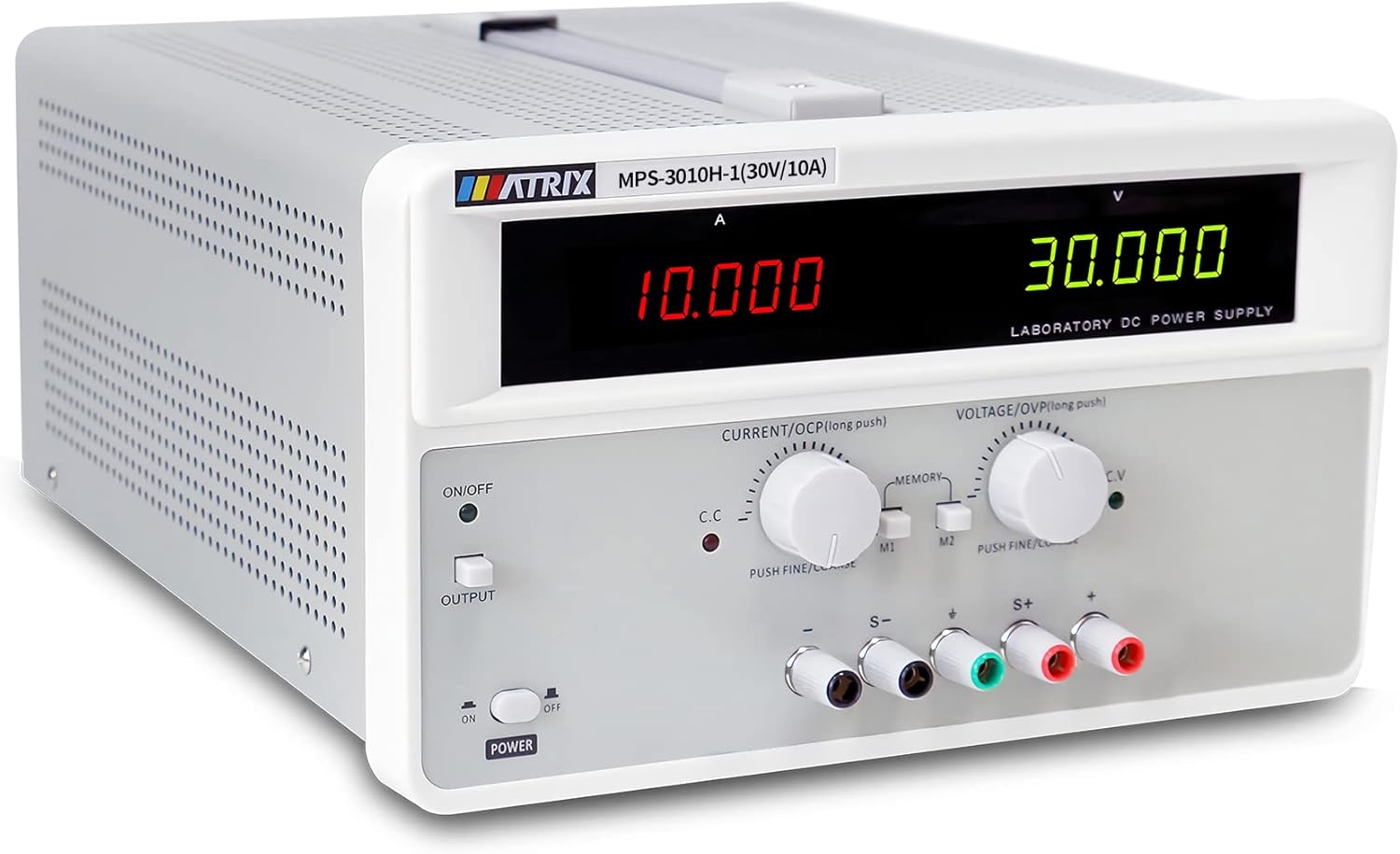
ຮູບ 3.1: ດ້ານຫນ້າ view of the MPS-3010H-1FBM power supply, showing the digital displays and control knobs.
3.1 ລາຍລະອຽດແຜງໜ້າ

ຮູບທີ 3.2: ລາຍລະອຽດ view of the front panel with labels for each control and display element.
- Current Display Window: Shows the output current in Amperes (A).
- ສະບັບtage Display Window: ສະແດງໃຫ້ເຫັນລະດັບສຽງຜົນຜະລິດtage ໃນ Volts (V).
- Output Switch Menu Function Key: Toggles the output on/off.
- Current Regulation Knob (OCP Setting): Adjusts the output current limit. Push for fine/coarse adjustment. Long push for OCP setting.
- ສະບັບtage Regulation Knob (OVP Setting): ປັບຜົນຜະລິດ voltage. Push for fine/coarse adjustment. Long push for OVP setting.
- Store/Call Buttons (M1, M2): Used to save and recall preset voltage/ຄ່າປັດຈຸບັນ.
- Instrument Power Switch: ສະຫຼັບພະລັງງານຕົ້ນຕໍສໍາລັບຫນ່ວຍບໍລິການ.
- Output Terminal Negative Terminal (-): Connects to the negative side of the load.
- ຂົ້ວດິນ: For safety grounding.
- Remote Compensation Terminals (S-, S+): Used for remote sensing to compensate for voltage drop across load wires.
- Positive End of Output Terminal (+): Connects to the positive side of the load.
3.2 ລາຍລະອຽດແຜງດ້ານຫຼັງ
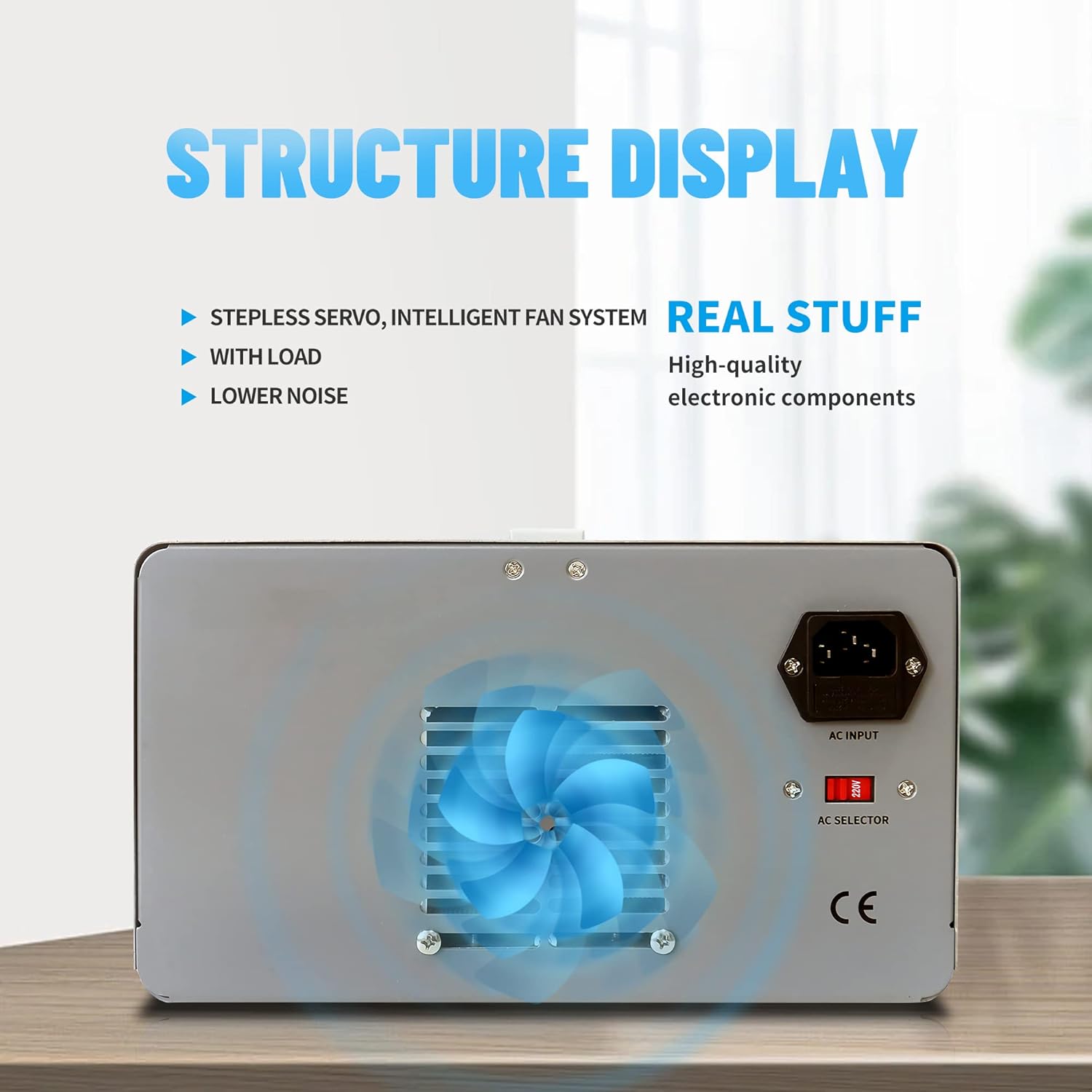
Figure 3.3: Rear panel of the power supply, highlighting the cooling fan and AC input.
- AC Input Socket: For connecting the main power cord.
- AC Selector Switch (110V/220V): ເລືອກການປ້ອນຂໍ້ມູນທີ່ເຫມາະສົມtage.
- ພັດລົມເຢັນ: Provides air circulation for heat dissipation.
4. ຕັ້ງຄ່າ
Follow these steps to set up your power supply:
- ການຫຸ້ມຫໍ່: ຄ່ອຍໆເອົາແຫຼ່ງຈ່າຍໄຟອອກຈາກການຫຸ້ມຫໍ່. ກວດສອບວ່າມີຮ່ອງຮອຍຂອງຄວາມເສຍຫາຍຫຼືບໍ່.
- ການຈັດວາງ: Place the unit on a stable, level surface with adequate ventilation around the rear cooling fan.
- ການປ້ອນຂໍ້ມູນ Voltage ການຄັດເລືອກ: Locate the AC selector switch on the rear panel. Ensure it is set to match your local mains voltage (110V ຫຼື 220V). Incorrect setting can damage the unit.

Figure 4.1: AC input and voltagຕົວສະຫຼັບຕົວເລືອກ e.
- ການເຊື່ອມຕໍ່ພະລັງງານ: Connect the provided power cord to the AC input socket on the rear panel and then to a grounded wall outlet.
- Output Cable Connection: Connect the provided banana-to-alligator clip cables to the output terminals (+ and -) on the front panel. The red cable connects to the positive (+) terminal, and the black cable connects to the negative (-) terminal. Ensure connections are secure.

Figure 4.2: Output terminals for connecting load cables.
5. ຄໍາແນະນໍາການດໍາເນີນງານ
5.1 ການດໍາເນີນງານພື້ນຖານ
- ເປີດ: Flip the Instrument Power Switch on the front panel to the 'ON' position. The display will illuminate.
- ກໍານົດ Voltage: Rotate the Voltage Regulation Knob to adjust the desired output voltage. Push the knob for fine adjustment, release for coarse adjustment.
- Set Current Limit: Rotate the Current Regulation Knob to set the maximum output current limit. Push the knob for fine adjustment, release for coarse adjustment. This acts as a current protection threshold.
- Enable Output: Press the Output Switch Menu Function Key to enable the power output. The 'OUTPUT' indicator will light up. The voltage and current displays will show the actual output values.

Figure 5.1: Output ON/OFF switch.
- ເຊື່ອມຕໍ່ການໂຫຼດ: With the output disabled, connect your load to the output terminals. Ensure correct polarity.
- ຈໍພາບຜົນໄດ້ຮັບ: The 5-digit displays provide real-time readings of the output voltage ແລະປະຈຸບັນ.

Figure 5.2: High-resolution current display.
- ປິດພະລັງງານ: Press the Output Switch Menu Function Key to disable the output, then flip the Instrument Power Switch to 'OFF'.
5.2 ຟັງຊັນ ໜ່ວຍ ຄວາມ ຈຳ
The power supply allows you to save and recall two sets of voltage and current settings (M1, M2).
- ການບັນທຶກການຕັ້ງຄ່າ:
- ປັບ Voltage Regulation Knob and Current Regulation Knob to your desired values.
- ກົດແລະຖືທັງ M1 or M2 button until a confirmation beep or indicator appears, indicating the settings are saved.
- ການຕັ້ງຄ່າການເອີ້ນຄືນ:
- ຫຍໍ້ໆ ກົດເຂົ້າ M1 or M2 button. The saved voltage and current values will be loaded and displayed.

Figure 5.3: Control knobs and memory function buttons.
5.3 OVP/OCP Settings (Over Voltage/Current Protection)
The unit features adjustable Over Voltage Protection (OVP) and Over Current Protection (OCP) to safeguard connected devices and the power supply itself.
- Setting OVP:
- With the output disabled, long-press the Voltage Regulation Knob. The display will show the current OVP setting.
- Rotate the knob to adjust the OVP threshold. This value should be set slightly above your desired maximum operating voltage.
- Briefly press the knob again to confirm and exit OVP setting mode.
- Setting OCP:
- With the output disabled, long-press the Current Regulation Knob. The display will show the current OCP setting.
- Rotate the knob to adjust the OCP threshold. This value should be set slightly above your desired maximum operating current.
- Briefly press the knob again to confirm and exit OCP setting mode.
6. ບໍາລຸງຮັກສາ
ການບໍາລຸງຮັກສາທີ່ເຫມາະສົມຮັບປະກັນຄວາມທົນທານແລະການດໍາເນີນງານທີ່ຫນ້າເຊື່ອຖືຂອງການສະຫນອງພະລັງງານຂອງທ່ານ.
- ທໍາຄວາມສະອາດ: Disconnect the power supply from the mains before cleaning. Use a soft, dry cloth to wipe the exterior. Do not use abrasive cleaners or solvents.
- ການລະບາຍອາກາດ: Ensure the ventilation holes and cooling fan on the rear panel are free from dust and obstructions. Periodically clean with compressed air if necessary.
- ການເກັບຮັກສາ: When not in use for extended periods, store the power supply in a dry, dust-free environment.

Figure 6.1: Heat dissipation holes for optimal cooling.
7. ການແກ້ໄຂບັນຫາ
ອ້າງອີງໃສ່ພາກນີ້ສໍາລັບບັນຫາທົ່ວໄປແລະການແກ້ໄຂຂອງພວກເຂົາ.
| ບັນຫາ | ສາເຫດທີ່ເປັນໄປໄດ້ | ການແກ້ໄຂ |
|---|---|---|
| ບໍ່ມີໄຟເມື່ອເປີດ | Power cord not connected; AC selector switch incorrect; Blown fuse | Check power cord connection; Verify AC selector switch setting; Replace fuse (refer to qualified personnel) |
| ບໍ່ມີຜົນຜະລິດ voltage/ປັດຈຸບັນ | Output switch is OFF; OVP/OCP triggered; Load disconnected or faulty | Press the Output switch; Check OVP/OCP settings and reset if necessary; Verify load connection and functionality |
| ຜົນຜະລິດ voltage/current unstable | Poor load connection; Overheating; Internal fault | Check load connections; Ensure adequate ventilation; Contact support if problem persists |
| ພັດລົມບໍ່ແລ່ນ | Unit not under load/not hot enough (intelligent fan control); Fan fault | Fan operates based on temperature; If unit is hot and fan is off, contact support |
8. ຂໍ້ມູນຈໍາເພາະ
Technical specifications for the MPS-3010H-1FBM model:
- ຕົວແບບ: MPS-3010H-1FBM
- ຜົນໄດ້ຮັບ Voltage: 0-30V (ສາມາດປັບໄດ້)
- ປະຈຸບັນຜົນຜະລິດ: 0-10A (ສາມາດປັບໄດ້)
- ຜົນຜະລິດວັດtage: 300 ວັດ
- ສະບັບtage ຄວາມຖືກຕ້ອງ: ≤0.01%+10mV
- ຄວາມຖືກຕ້ອງໃນປະຈຸບັນ: ≤0.1%+10mA
- ຈໍສະແດງຜົນ: ໄຟ LED 5 ຕົວເລກ
- ການປ້ອນຂໍ້ມູນ Voltage: 110V/220V AC (Switchable)
- ວິທີການເຮັດຄວາມເຢັນ: ອາກາດ (ການຄວບຄຸມພັດລົມອັດສະລິຍະ)
- ຈຳນວນພັດລົມ: 1
- ນ້ໍາຫນັກລາຍການ: 29 ປອນ
- ຂະໜາດແພັກເກດ: 17 x 14 x 10 ນິ້ວ

ຮູບ 8.1: ຂະຫນາດຜະລິດຕະພັນ (ໂດຍປະມານ).
9. ການຮັບປະກັນແລະການສະຫນັບສະຫນູນ
The MATRIX MPS-3010H-1FBM Adjustable Linear DC Power Supply comes with a ຮັບປະກັນ 3 ປີ ຈາກວັນທີ່ຊື້. ການຮັບປະກັນນີ້ກວມເອົາຂໍ້ບົກພ່ອງຂອງວັດສະດຸແລະການເຮັດວຽກພາຍໃຕ້ການນໍາໃຊ້ປົກກະຕິ.
For technical support, warranty claims, or service inquiries, please contact MATRIX customer service. Refer to the official MATRIX webເວັບໄຊ ຫຼືເອກະສານການຊື້ຂອງເຈົ້າສຳລັບລາຍລະອຽດການຕິດຕໍ່.


