1. ບົດແນະນຳ
This manual provides essential instructions for the safe and efficient use of your ZENS Wireless Single Qi Charging Pad, Model ZESC08W00. Please read this manual thoroughly before operating the device and retain it for future reference.
The ZENS Wireless Charging Pad offers a convenient way to charge your Qi-enabled smartphone without the need for cables. Simply place your device on the pad, and charging will commence automatically. An included USB cable powers the charging pad.

ຮູບພາບ 1: ທາງເທິງ view of the ZENS Wireless Single Qi Charging Pad.
2. ເນື້ອໃນຊຸດ
ກວດສອບວ່າລາຍການທັງຫມົດແມ່ນມີຢູ່ໃນຊຸດ:
- 1x ZENS Wireless Single Qi Charging Pad (Model ZESC08W00)
- 1x ສາຍ USB

Image 2: ZENS Wireless Single Qi Charging Pad highlighting key features.
3. ຕັ້ງຄ່າ
- ເຊື່ອມຕໍ່ສາຍ USB: Insert the small end of the included USB cable into the charging port on the ZENS Wireless Charging Pad.
- ເຊື່ອມຕໍ່ກັບແຫລ່ງພະລັງງານ: Insert the larger end of the USB cable into a compatible USB power adapter (not included). For optimal performance, especially for Samsung Fast Charging, a QC 2.0 or 3.0 adapter is recommended.
- ການຈັດວາງ: Place the charging pad on a flat, stable surface away from direct sunlight and heat sources.
4. ຄໍາແນະນໍາການດໍາເນີນງານ
- ເລີ່ມການສາກໄຟ: Place your Qi-enabled smartphone directly onto the center of the ZENS Wireless Charging Pad.
- ການຢືນຢັນການສາກໄຟ: A smart LED indicator light on the charging pad will illuminate to confirm that charging has begun.
- ການຈັດວາງທີ່ດີທີ່ສຸດ: The inductive technology ensures reliable charging regardless of precise device orientation. However, centering the device generally provides the most efficient charge.
- ສຳເລັດການສາກໄຟ: Charging automatically stops when your phone reaches full charge. The pad will resume charging if the battery level drops.
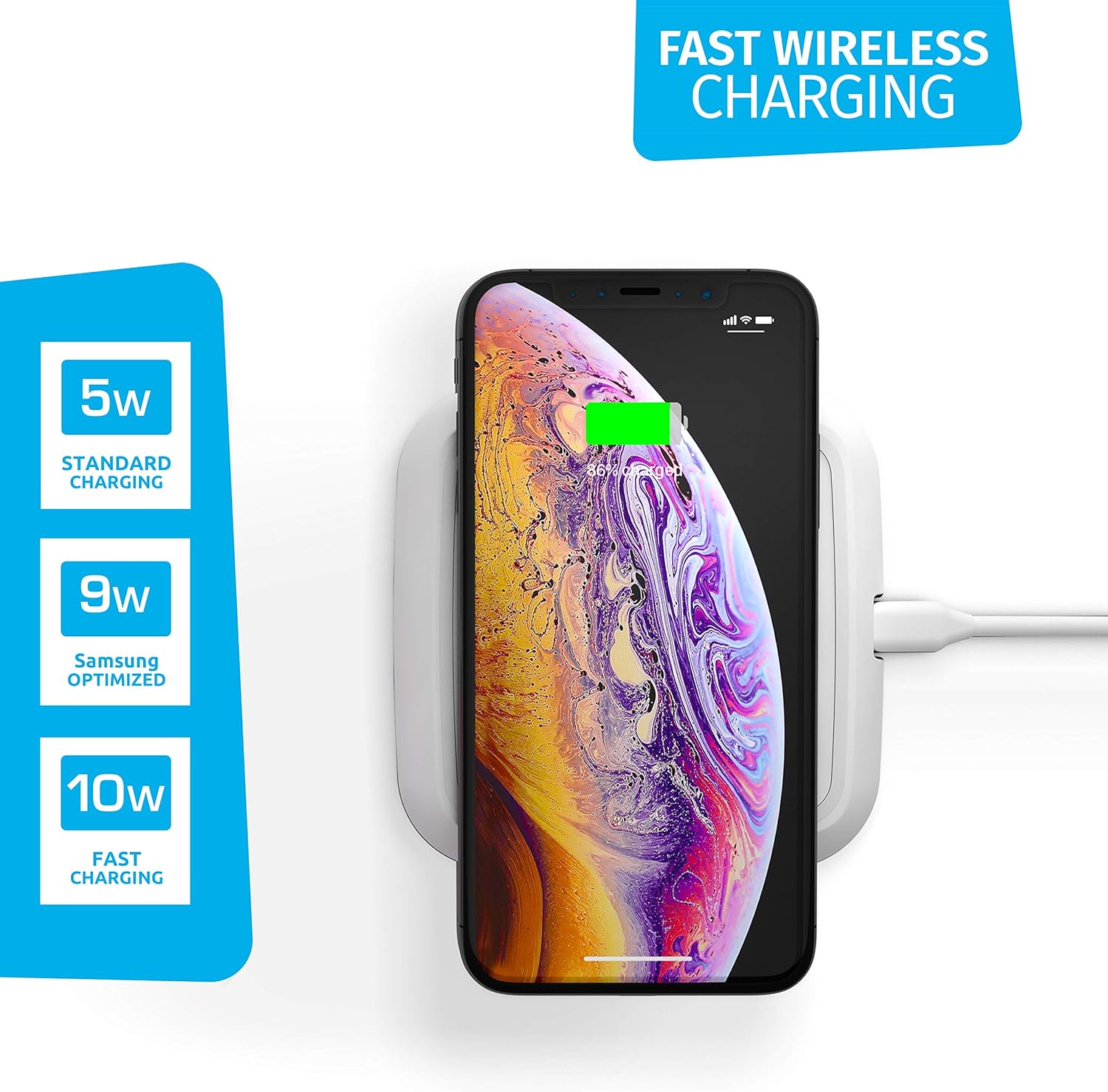
Image 3: Illustration of various charging speeds supported by the pad.
5. ຄຸນສົມບັດ ແລະ ເຕັກໂນໂລຊີ
The ZENS Wireless Charging Pad incorporates advanced technology for efficient and safe charging:
- ພະລັງງານ 10 ວັດ: Provides fast wireless charging for compatible devices.
- Qi-Certified: Ensures compatibility and safety with all Qi-enabled devices.
- Ultra-Low Standby Power: Minimizes energy consumption when not actively charging.
- ການຈັດການຄວາມຮ້ອນ: Prevents overheating during the charging process.
- ການກວດຫາວັດຖຸຕ່າງປະເທດ (FOD): Automatically detects and prevents charging if metal objects are placed on the pad, ensuring safety.
- ແຫວນປ້ອງກັນການເລື່ອນ: Provides extra grip to keep your device securely in place during charging.
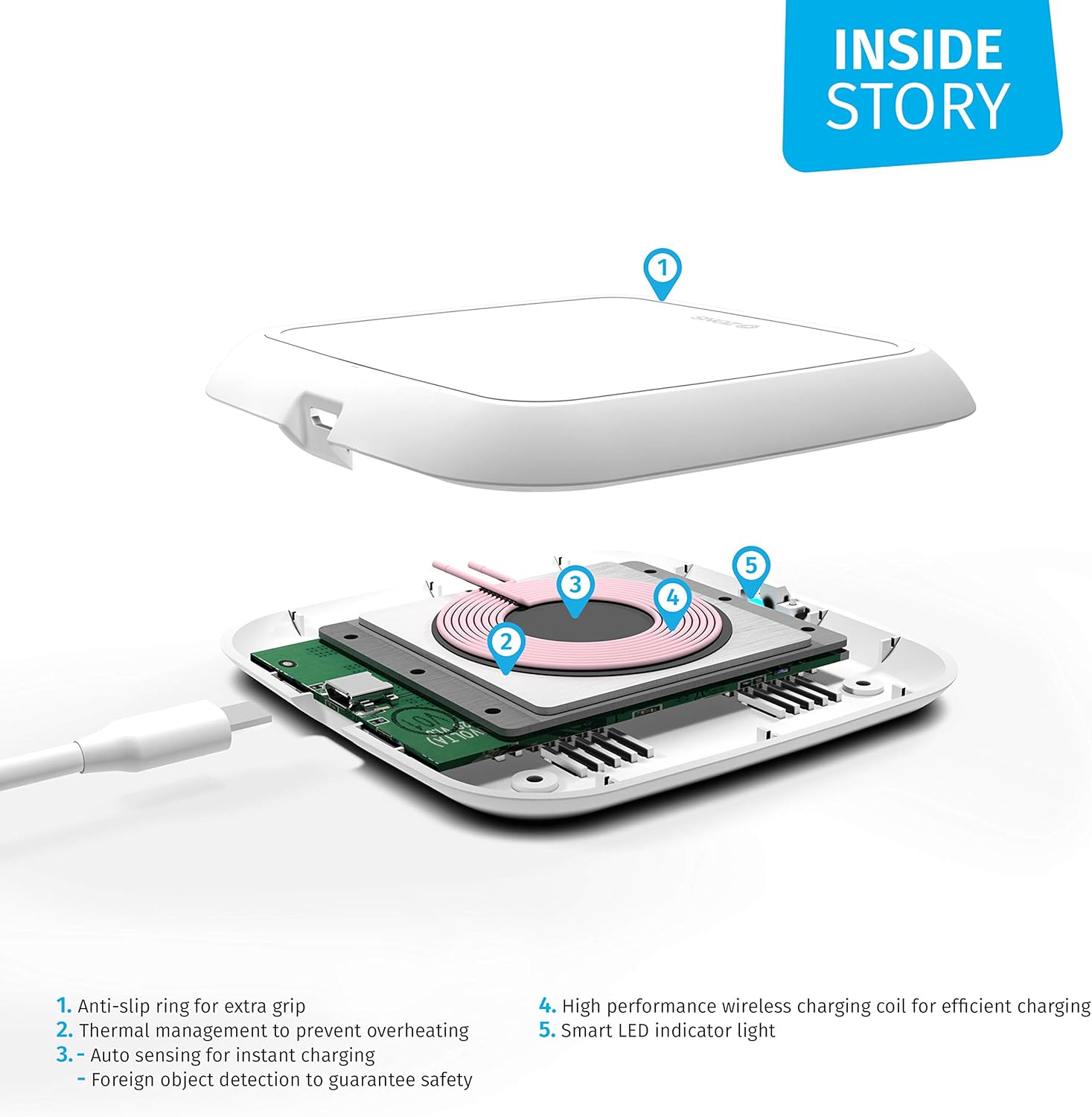
Image 4: Internal components and their functions within the charging pad.
6. ຄວາມເຂົ້າກັນໄດ້
The ZENS Wireless Single Qi Charging Pad is designed for broad compatibility with Qi-enabled devices.
- ຮູບແບບໂທລະສັບທີ່ເຂົ້າກັນໄດ້: iPhone (X, 8, 8+), Samsung Galaxy (S9, S9+, S8, S8+, S7, S7 edge, Note 8), and all other Qi-Enabled Devices.
- ຄວາມເຂົ້າກັນໄດ້ຂອງກໍລະນີ: The charger is designed to work with most phone cases up to 3mm thick. Cases with metal lining should be removed before charging.

ຮູບພາບ 5: ຕົວຢ່າງamples of multi-brand compatibility.

Image 6: Visual representation of case compatibility.
7. ບໍາລຸງຮັກສາ
To ensure the longevity and optimal performance of your ZENS Wireless Charging Pad, follow these simple maintenance guidelines:
- ທໍາຄວາມສະອາດ: Disconnect the power before cleaning. Use a soft, dry, or slightly damp cloth to wipe the surface of the charging pad. Avoid using harsh chemicals, abrasive cleaners, or solvents.
- ການເກັບຮັກສາ: When not in use, store the charging pad in a cool, dry place away from extreme temperatures and humidity.
- ການຈັດການ: ຫຼີກລ້ຽງການວາງອຸປະກອນລົງ ຫຼືຖືກຜົນກະທົບທີ່ຮຸນແຮງ.
8. ການແກ້ໄຂບັນຫາ
If you encounter issues with your ZENS Wireless Charging Pad, refer to the following common solutions:
- ອຸປະກອນບໍ່ໄດ້ສາກໄຟ:
- Ensure the USB cable is securely connected to both the charging pad and the power adapter.
- ກວດສອບວ່າອະແດັບເຕີໄຟໃຊ້ງານໄດ້ຖືກຕ້ອງ ແລະສຽບໃສ່ປລັກສຽບໄຟ.
- Reposition your smartphone on the center of the charging pad.
- ເອົາເຄສໂທລະສັບທີ່ໜາ ຫຼື ເປັນໂລຫະອອກ.
- Check for any foreign objects (e.g., coins, keys) between the phone and the charging pad.
- Confirm your smartphone is Qi-enabled.
- ການສາກໄຟຊ້າ:
- Ensure you are using a QC 2.0 or 3.0 compatible power adapter for fast charging.
- ປິດແອັບພລິເຄຊັນພື້ນຫຼັງທີ່ບໍ່ຈຳເປັນໃນໂທລະສັບຂອງທ່ານ.
- LED Indicator Not Illuminating:
- ກວດສອບການເຊື່ອມຕໍ່ໄຟຟ້າຕາມທີ່ໄດ້ອະທິບາຍຂ້າງເທິງ.
- If the LED flashes, it may indicate a foreign object detection or an incompatible device.
9. ຂໍ້ມູນຈໍາເພາະ
| ຂໍ້ມູນຈໍາເພາະ | ລາຍລະອຽດ |
|---|---|
| ໝາຍເລກຕົວແບບ | ZESC08W00 |
| ຂະໜາດສິນຄ້າ | 0.98 x 4.45 x 4.45 ນິ້ວ |
| ນ້ໍາຫນັກລາຍການ | 3.52 ອອນ |
| ວັດtage | 10 ວັດ |
| ປະເພດຕົວເຊື່ອມຕໍ່ | USB, Wireless |
| ອຸປະກອນທີ່ເຂົ້າກັນໄດ້ | Smartphones, Smartwatches (Qi-enabled) |
| ສີ | ສີຂາວ |
| ສະເພາະເຈາະຈົງ | Qi |
10. ການຮັບປະກັນແລະການສະຫນັບສະຫນູນ
ZENS provides an industry-leading ຮັບປະກັນ 2 ປີ for all its products. An additional 1-year warranty can be obtained by registering your product on the official ZENS webເວັບໄຊ.
For further assistance, technical support, or warranty claims, please visit the official ZENS webເວັບໄຊ ຫຼືຕິດຕໍ່ພະແນກບໍລິການລູກຄ້າຂອງເຂົາເຈົ້າ.
ZENS is a proud member of the Wireless Power Consortium (WPC) since 2011, ensuring all ZENS wireless chargers are Qi-certified for safety, interoperability, and energy efficiency.


