ແນະນຳ
This manual provides comprehensive instructions for the setup, operation, maintenance, and troubleshooting of your Musky Portable Bluetooth Speaker. Please read this manual carefully before using the product to ensure proper function and longevity.

ຮູບ 1: ດ້ານຫນ້າ view of the Musky Portable Bluetooth Speaker, displaying the LED clock.
ເນື້ອໃນຊຸດ
ກວດສອບວ່າລາຍການທັງຫມົດແມ່ນມີຢູ່ໃນຊຸດ:
- Musky Portable Bluetooth Speaker
- ສາຍສຽງ 3.5 ມມ
- ສາຍສາກ (USB)
- ເຄື່ອງອ່ານບັດ
- ຄູ່ມືຜູ້ໃຊ້ (ເອກະສານນີ້)
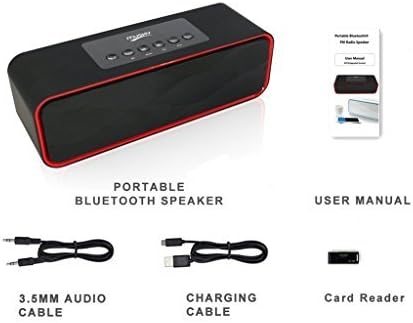
Figure 2: Included accessories: 3.5mm audio cable, charging cable, and card reader, alongside the speaker and user manual.
ສິນຄ້າເກີນview
ການຄວບຄຸມແລະພອດ

Figure 3: Top panel controls of the speaker.
- Play/Pause/Call Answer Button: Controls media playback and answers/ends phone calls.
- ປຸ່ມເລືອກໂໝດ: Switches between Bluetooth, FM Radio, Micro SD card, USB flash drive, and AUX-in modes.
- ປຸ່ມຕິດຕາມກ່ອນ ໜ້າ ນີ້: Skips to the previous track or station.
- ປຸ່ມຕິດຕາມຕໍ່ໄປ: Skips to the next track or station.
- ປະລິມານ - ປຸ່ມ: ຫຼຸດສຽງລົງ.
- ປຸ່ມ + ລະດັບສຽງ: ເພີ່ມປະລິມານ.

Figure 4: Rear panel ports for USB, TF (Micro SD) card, and AUX input.
- ພອດ USB: ສໍາລັບການຫຼິ້ນ USB flash drive.
- ຊ່ອງສຽບກາດ TF (Micro SD): ສຳລັບຫຼິ້ນບັດ Micro SD.
- AUX-in Port: ສໍາລັບການເຊື່ອມຕໍ່ອຸປະກອນສຽງພາຍນອກຜ່ານສາຍສຽງ 3.5mm.
- ຊ່ອງສາກໄຟ: ພອດ Micro USB ສໍາລັບການສາກໄຟລໍາໂພງ.
ຕັ້ງຄ່າ
ກຳລັງສາກລຳໂພງ
Before first use, fully charge the speaker. Connect the supplied USB charging cable to the speaker's charging port and the other end to a USB power adapter (not included) or a computer's USB port. The LED display will indicate charging status.
ເປີດ/ປິດ
To power on the speaker, press and hold the power button (usually integrated with the Play/Pause button or a dedicated switch). To power off, press and hold the same button again.
ຄໍາແນະນໍາການດໍາເນີນງານ
ແບບ Bluetooth
- Power on the speaker. It will automatically enter Bluetooth pairing mode, indicated by a soft tone.
- ເປີດໃຊ້ Bluetooth ໃນອຸປະກອນຂອງທ່ານ (ໂທລະສັບສະຫຼາດ, ແທັບເລັດ, ແລະອື່ນໆ) ແລະຄົ້ນຫາອຸປະກອນທີ່ມີຢູ່.
- Select "Musky Speaker" (or similar name) from the list to pair. Once connected, a confirmation tone will sound.
- ດຽວນີ້ທ່ານສາມາດຫຼິ້ນສຽງຈາກອຸປະກອນຂອງທ່ານຜ່ານລຳໂພງໄດ້.

Figure 5: Illustrates wireless Bluetooth connectivity for audio streaming.
ໂຫມດວິທະຍຸ FM
- ກົດ ເລືອກໂໝດ button until "FM" appears on the LED display.
- To auto-scan and save stations, press and hold the ຫຼິ້ນ/ຢຸດຊົ່ວຄາວ button. The speaker will scan and store available FM stations.
- ໃຊ້ ເພງກ່ອນໜ້າ ແລະ ຕິດຕາມຕໍ່ໄປ ປຸ່ມເພື່ອນຳທາງລະຫວ່າງສະຖານີທີ່ບັນທຶກໄວ້.
- ເຄັດລັບ: For improved FM reception, connect the supplied 3.5mm audio cable or a USB cable to the AUX-in or USB port, as it acts as an external antenna.
Micro SD Card / USB Flash Drive Mode
- Insert a Micro SD card into the TF slot or a USB flash drive into the USB port.
- ລຳໂພງຈະປ່ຽນເປັນໂໝດທີ່ສອດຄ້ອງກັນໂດຍອັດຕະໂນມັດ ແລະ ເລີ່ມຫຼິ້ນສຽງ fileຖ້າບໍ່, ໃຫ້ກົດປຸ່ມ ເລືອກໂໝດ button until the correct mode is active.
- ໃຊ້ ເພງກ່ອນໜ້າ ແລະ ຕິດຕາມຕໍ່ໄປ ປຸ່ມເພື່ອຂ້າມເພງ.
- The speaker supports auto-play function for both Micro SD card and USB thumb drive.
ໂXດ AUX-in
- Connect one end of the 3.5mm audio cable to the speaker's AUX-in port and the other end to the audio output of your external device.
- ກົດ ເລືອກໂໝດ button until "AUX" appears on the LED display.
- ດຽວນີ້ສຽງຈະຫຼິ້ນຜ່ານລຳໂພງຈາກອຸປະກອນທີ່ເຊື່ອມຕໍ່ຂອງທ່ານ.
ຟັງຊັນໂມງປຸກ
The speaker features an alarm clock with an LED display. The display remains on to function as a desk or bedside clock.
- ການຕັ້ງຄ່າປຸກ: Refer to the specific instructions in the full manual for detailed steps on setting the time and alarm.
- ສຽງປຸກ: You can set the alarm to wake you with bird singing sounds or your own music (if playing from SD card/USB). Radio cannot be set as an alarm sound.
- ໄລຍະເວລາປຸກ: The alarm will sound for 1 minute and will repeat once if no button is pressed.
ບໍາລຸງຮັກສາ
- ທໍາຄວາມສະອາດ: ໃຊ້ຜ້າປຽກແຫ້ງເພື່ອເຮັດຄວາມສະອາດພື້ນຜິວຂອງລໍາໂພງ. ຢ່າໃຊ້ເຄື່ອງເຮັດຄວາມສະອາດຂັດຫຼືສານລະລາຍ.
- ການເກັບຮັກສາ: ເກັບຮັກສາລຳໂພງໄວ້ໃນບ່ອນທີ່ເຢັນ, ແຫ້ງ, ຫ່າງຈາກແສງແດດໂດຍກົງ ແລະ ອຸນຫະພູມທີ່ຮ້າຍກາດ.
- ການດູແລຫມໍ້ໄຟ: ເພື່ອຍືດອາຍຸແບັດເຕີລີ, ຫຼີກເວັ້ນການຖອດແບດເຕີລີ່ເຕັມເລື້ອຍໆ. ສາກລຳໂພງເປັນປະຈຳ, ເຖິງແມ່ນວ່າບໍ່ໄດ້ໃຊ້ເປັນເວລາດົນກໍຕາມ.
- ຮູບເງົາປ້ອງກັນ: A thin protective film may be present on the control panel. This can be peeled off.
ການແກ້ໄຂບັນຫາ
| ບັນຫາ | ສາເຫດທີ່ເປັນໄປໄດ້ | ການແກ້ໄຂ |
|---|---|---|
| ລຳໂພງບໍ່ເປີດ. | ແບັດເຕີຣີຕໍ່າ. | ສາກລຳໂພງໃຫ້ເຕັມ. |
| ບໍ່ສາມາດຈັບຄູ່ຜ່ານ Bluetooth ໄດ້. | ລຳໂພງບໍ່ຢູ່ໃນໂໝດຈັບຄູ່; ອຸປະກອນ Bluetooth ປິດ; ໄກຈາກລໍາໂພງເກີນໄປ. | Ensure speaker is in Bluetooth mode. Turn device Bluetooth off/on. Move device closer to speaker (within 33 feet). |
| ບໍ່ມີສຽງຈາກລຳໂພງ. | ລະດັບສຽງຕໍ່າເກີນໄປ; ເລືອກໂໝດບໍ່ຖືກຕ້ອງ; ມີບັນຫາແຫຼ່ງສຽງ. | Increase speaker and device volume. Verify correct mode (BT, FM, SD, USB, AUX). Check audio source playback. |
| ການຮັບວິທະຍຸ FM ບໍ່ດີ. | ສັນຍານອ່ອນ. | Connect a 3.5mm audio cable or USB cable to the AUX-in/USB port to act as an external antenna. Reposition the speaker. |
| Audio lag/poor quality in Bluetooth mode. | Interference; distance; device compatibility. | Reduce distance between speaker and device. Minimize obstacles. Ensure device supports aptX for low latency if desired. |
| Cannot select folders on SD card/USB drive. | ບໍ່ຮອງຮັບຄຸນສົມບັດ. | The speaker does not support folder selection. All songs on the card/drive will be played sequentially. |
| Voice prompt removed, max volume warning beep added. | This is an upgraded version feature. | This is intended behavior for the upgraded model. Voice prompt version may be available upon request from manufacturer. |
ຂໍ້ມູນຈໍາເພາະ
| ຄຸນສົມບັດ | ລາຍລະອຽດ |
|---|---|
| ຍີ່ຫໍ້ | Musky |
| ໝາຍເລກຕົວແບບ | 5647426339 |
| ປະເພດລຳໂພງ | ຫ້ອງຫຼາຍ |
| ຄຸນນະສົມບັດພິເສດ | Radio, Alarm Clock, LED Display |
| ເຕັກໂນໂລຊີການເຊື່ອມຕໍ່ | Bluetooth, ຕົວຊ່ວຍ, USB |
| ລຳໂພງກຳລັງຜົນຜະລິດສູງສຸດ | 10 Watts (2x5W Acoustic Drivers) |
| ແຫຼ່ງພະລັງງານ | ພະລັງງານຫມໍ້ໄຟ |
| ປະເພດຫມໍ້ໄຟ | ແບັດເຕີຣີ Lithium Ion 1 ອັນ (ລວມ) |
| ຊີວິດຫມໍ້ໄຟ | Up to 8-10 hours of playtime |
| ຂະໜາດສິນຄ້າ | 8.7 x 2.8 x 2.8 ນິ້ວ |
| ນ້ໍາຫນັກລາຍການ | 1.5 ປອນ |
| ສີ | ດຳ |
| ວິທີການຄວບຄຸມ | ປຸ່ມ |
| ຮູບແບບການອອກສຽງ | ສະເຕຣິໂອ |
| UPC | 605757354439 |

ຮູບທີ 6: ຂະໜາດຂອງລຳໂພງສຳລັບການອ້າງອີງ.

Figure 7: Internal components, highlighting the HIFI speakers and passive vibration diaphragm for enhanced bass.
ການຮັບປະກັນແລະການສະຫນັບສະຫນູນ
For warranty information and customer support, please refer to the contact details provided with your purchase or visit the official Musky webເວັບໄຊ. ຮັກສາໃບຮັບເງິນການຊື້ຂອງທ່ານສໍາລັບການຮ້ອງຂໍການຮັບປະກັນ.
ຄຳຖາມທີ່ຖາມເລື້ອຍໆ (FAQ):
- Q: Can I select folders on an SD card/USB drive? A: ບໍ່.
- Q: Will it charge my phone? A: ແມ່ນແລ້ວ.
- Q: Can I charge and listen to music at the same time? A: Yes. It is safe to keep the charging cable plugged in all the time.
- Q: Can I loop/repeat my songs when playing music from SD card/USB drive? A: Yes. It loops all the songs. To repeat a single song, there should be only one song on the SD card/USB drive.
- Q: Can I connect it with my Bluetooth headsets? A: No. This is a Bluetooth receiving device, not a transmitting device.
- Q: How to convert M4A/MP4 music into Mp3? A: You can use a free audio converter.
- Q: How can I improve the reception of the radio? A: You can use an audio cable or USB cable as an external antenna; the longer the better.


