
LEAB MelfBox Connection Cable User Guide

MelfBox
Quick start guide
08/04/2026
V 5
General Safety
This guide supports safe handling of the product. Use the product only in accordance with its intended use:
The MelfBox is a vehicle electrical supply system. Assembly and installation should only be carried out by qualified electricians. Any modifications to the product or its components are prohibited and do not conform to its intended use. Only use original LEAB or LEAB approved accessories.
Observe the safety instructions:
DANGER! Danger from short circuits: Before operating, make sure there are no open or damaged cables.
DANGER! Replace defective parts or damaged cables immediately.
NOTE! Reverse polarity can damage the unit: Before operating, make sure that all cables are connected correctly.
NOTE! Equipment damage and danger of cable fire: Only use the device within the specified voltage limits.
Package Contents

Accessories

Technical Specifications


Creating a Body Cutout

Fig. 1: MelfBox dimensions
To create the body cutout, proceed as follows:
✔ Choose a vertical surface.
✔ Make sure that there is sufficient space at the assembly site.
- Cut a circular hole with a diameter of 56 mm in the vehicle body, e.g. using a hole saw.
- Deburr the cut edges.
- If the body is made of steel, apply corrosion protection to the cut surfaces.
→ The body cutout is now created.
Installation
To install the device, perform the following steps:
CAUTION! Install a suitable fuse in the vehicle (up to 16 A).
- Route a connection cable (H07RN-F, 3 x 2.5) in the vehicle.
- Attach the connection cable to the vehicle installation.
- Pierce the housing seal at the intended location with a pointed tool.
- Feed the connection cable (H07RN-F, 3 x 2.5) through the hole.
- Connect the wires of the connection cable to the corresponding screw terminals.
→ The device is installed.
Optional: Connect the immobiliser
To prevent the vehicle from starting or moving, the MelfBox has a potential-free normally open contact (NO) which is closed when the power supply is active (status indicator illuminated).
To connect the immobiliser, proceed as follows:
CAUTION! Secure the wiring for the start prevention with a suitable fuse (up to 1 A).
- Route a cable (H05RN-F, 2 × 0.5) for the immobiliser in the vehicle and connect it to the specific vehicle installation (control module or similar).
- Insert the immobiliser cable (H05RN-F, 2 × 0.5) through the second hole of the housing seal.
- Insert the wires of the immobiliser cable into the push-in terminals (max. current: 1 A) of the normally open contacts.
→ The immobiliser is connected.
Assembly
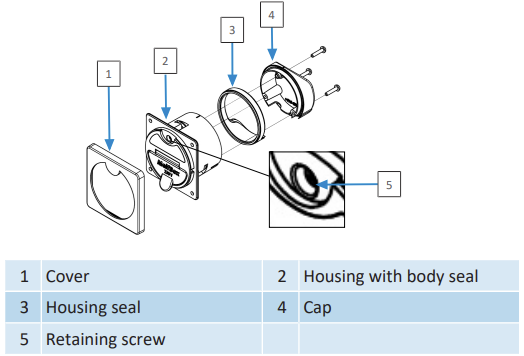
To install the device, proceed as follows:
- Place the housing seal in the cap.
- Attach the cap to the supply unit with the 3 screws (3.5 x 14).
- Check the tightness of the housing seal.
- Push the supply unit into the body cutout.
- Tighten the 3 screws on the front until the supply unit is firmly seated in the body cutout (maximum torque: 1 Nm).
- Attach the cover.
→ The device is mounted and ready.
Operation
CAUTION! Malfunction due to rapidly repeated plugging and unplugging. After disconnecting the power supply (e.g. by pulling the plug), wait at least 20 seconds before reconnecting the MelfBox to the mains.
NOTE! Device defect due to inactive immobiliser. The immobiliser only works when the MelfBox is active (status indicator lit).
- Plug the two-pin earthed plug of the connection cable into a 230-V mains supply
- Open the flap of the supply unit.
- Plug the coupling into the supply unit.
→ The voltage input is provided at the load output of the supply unit. Connected consumers are supplied. The operating display shows the operating status of the MelfBox.

Disposal

Dispose of the device in accordance with the Waste Electrical and Electronic Equipment Regulations (WEEE).
The system must not be disposed of with household waste. Take it to a recycling point or return it to your point of sale.
EU Declaration of Conformity

The MelfBox complies with the requirements of the following directives:
– 2014/30/EU: EMV
– 2011/65/EU: RoHS
LEAB Automotive GmbH
Thorshammer 6
24866 Busdorf
info@leab.eu
+49 (0) 4621 – 97860-0
Documents / Resources
 | MelfBox Connection Cable |
References
- User Manualmanual.tools