Introduction
This manual provides essential instructions for the safe operation, maintenance, and troubleshooting of your Hisense RVCG144AB Robot Vacuum Mop. Please read this manual thoroughly before using the product and retain it for future reference.
Коопсуздук нускамалары
Жаракат алуу же зыян келтирүү коркунучун азайтуу үчүн төмөнкү коопсуздук чараларын сактаңыз:
- Биринчи колдонуудан мурун роботтун толук заряддалганын текшериңиз.
- Роботту ачык оттун же тез күйүүчү материалдардын жанында иштетпеңиз.
- Чачты, кенен кийимдерди, манжаларды жана дененин бардык бөлүктөрүн тешиктерден жана кыймылдуу бөлүктөрдөн алыс кармаңыз.
- Do not allow children to operate the robot. Supervise children and pets when the robot is in operation.
- Use only the original charging adapter and dock provided by Hisense.
- Remove power cords, small objects, and fragile items from the floor before cleaning to prevent entanglement or damage.
- Роботту чоң таштандыларды, суюктуктарды же күйүп жаткан нерселерди чогултуу үчүн колдонбоңуз.
- Оптималдуу иштеши үчүн щеткаларды жана чыпкаларды дайыма тазалаңыз.
Продукт бүттүview
The Hisense RVCG144AB is a versatile robot vacuum mop designed for efficient floor cleaning. It features gyroscopic mapping for systematic navigation, adjustable power and water levels, and convenient control via a mobile application.
Пакеттин мазмуну
Таңгактан чыгарганда, бардык компоненттердин бар экендигин текшериңиз:
- Hisense RVCG144AB Robot Vacuum Mop
- Кубаттоочу станция
- Заряддоо кабели
- Алыстан башкаруу
- HEPA Filter (1 piece)
- Cleaning Pad (Mop Cloth)
- Каптал щеткалар (2 даана)
- Колдонмо (бул колдонмо)
Робот компоненттери
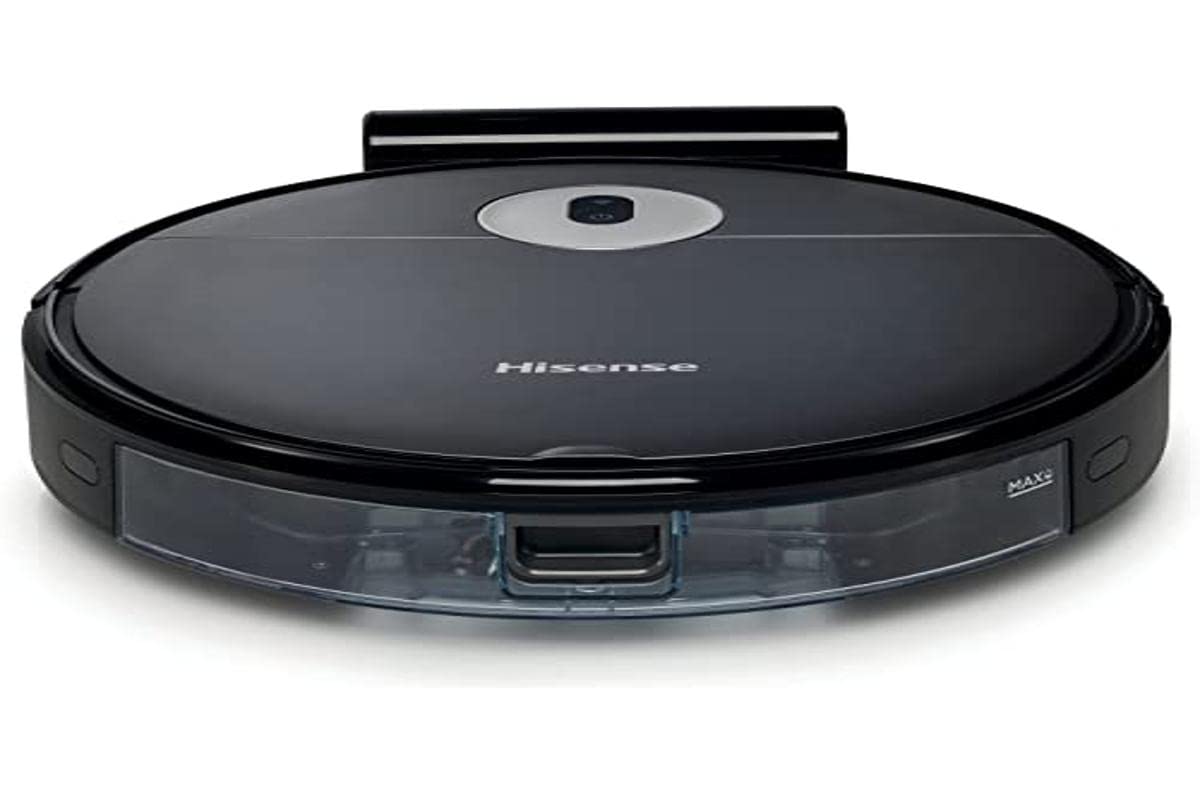
Image: The Hisense RVCG144AB Robot Vacuum Mop, showcasing анын саркеч кара дизайны жана компакт форма фактору.
The robot includes a floating roller brush for adapting to different floor conditions and dual-sided brushes for edge cleaning and preventing hair entanglement.
Жайгашуу
1. Заряддоо станциясын жайгаштыруу
Place the charging station against a wall in an open area, ensuring there are no obstacles within 1 meter (3 feet) to the sides and 2 meters (6 feet) in front of the station. Connect the charging cable to the station and plug it into a power outlet.

Image: Illustration of the charging station, showing its power connection and recommended clear space around it.
2. Баштапкы заряддоо
Place the robot onto the charging station. Ensure the charging contacts on the robot align with those on the station. The robot will begin charging automatically. For first use, allow the robot to charge completely, which typically takes several hours.
3. Каптал щеткаларды орнотуңуз
Каптал щеткаларды роботтун астыңкы жагындагы мамыларга алар ордуна чыкылдаганча басыңыз.
4. Колдонмого туташуу (Wi-Fi)
- Download the Hisense ConnectLife app from your smartphone's app store.
- Каттоо эсебин жана кирүү.
- Follow the in-app instructions to add your RVCG144AB robot vacuum. This typically involves connecting the robot to your home Wi-Fi network.
- Ensure your Wi-Fi network is 2.4GHz for optimal connectivity.
Иштөө нускамалары
1. Тазалоону баштоо жана токтотуу
- Кол менен баштоо: Press the power button on the robot once to start cleaning. Press again to pause.
- Колдонмону башкаруу: Use the Hisense ConnectLife app to start, pause, or stop cleaning from anywhere.
- Алыстан башкаруу: Use the provided remote control to initiate or stop cleaning.
2. Тазалоо режимдери
The robot offers various cleaning modes to suit different needs:
- Автоматтык тазалоо: Робот акылдуу навигациялап, бардык жеткиликтүү аймакты тазалайт.
- Selective Room/Zone Cleaning: Use the app to define specific rooms or areas for cleaning.
- Терең тазалоо: For thorough cleaning of a specific area.
- Зигзаг менен тазалоо: A systematic cleaning pattern to cover large areas efficiently.
- Четтерин тазалоо: Робот дубалдарды жана эмеректердин четтерин тазалайт.
3. Adjusting Suction Power and Water Flow
The robot features 3 levels of suction power and water flow. These can be adjusted via the mobile app to match your cleaning requirements and floor type.
4. Scheduling Cleanings
Set up cleaning schedules through the Hisense ConnectLife app. This allows the robot to automatically clean at preferred times and days.
Техникалык тейлөө
Үзгүлтүксүз техникалык тейлөө робот чаң соргучуңуздун оптималдуу иштешин камсыздайт жана иштөө мөөнөтүн узартат.
1. Таштанды кутусун бошотуу
Open the top cover of the robot and remove the dustbin. Empty its contents into a trash bin. It is recommended to empty the dustbin after each cleaning cycle.

Сүрөт: жакын план view of the robot's dustbin being removed for emptying, highlighting its capacity.
2. HEPA чыпкасын тазалоо
Remove the HEPA filter from the dustbin. Tap it gently to remove dust. Do not wash the HEPA filter with water; replace it every 3-6 months depending on usage.
3. Негизги щетканы тазалоо
Remove the main brush cover and then the main brush. Use the cleaning tool to remove hair and debris tangled around the brush. Reinstall the brush and cover.
4. Тазалоочу каптал щеткалары
Periodically check the side brushes for tangled hair or debris. Remove them by pulling gently and clean as needed. Replace if damaged.
5. Cleaning the Water Tank and Mop Pad
Detach the water tank and empty any remaining water. Clean the mop pad by hand or machine wash. Allow all components to dry completely before reassembly.

Image: The water tank and mop pad assembly, illustrating how to detach and clean them.
6. Сенсорлорду жана заряддоо контакттарын тазалоо
Роботтун да, кубаттоо станциясынын да жар сенсорлорун, дубал сенсорлорун жана кубаттоо контакттарын таза, кургак чүпүрөк менен сүртүп, туура иштешин камсыз кылыңыз.
Проблемаларды чечүү
Жалпы маселелер жана алардын чечимдери үчүн бул бөлүмдү караңыз.
| Көйгөй | Мүмкүн себеп | Чечим |
|---|---|---|
| Робот күйбөйт жана заряддалбайт. | Battery depleted; charging contacts dirty; charging station not powered. | Ensure robot is on charging station; clean charging contacts; check power to charging station. |
| Робот бат-баттан тыгылып калат. | Obstacles on floor; robot caught on wires or rugs. | Clear floor of obstacles, wires, and thick rugs before cleaning. |
| Начар тазалоо көрсөткүчү. | таштанды челек толгон; щеткалар чаташкан; фильтр бүтүп калган. | Empty dustbin; clean main and side brushes; clean or replace HEPA filter. |
| Колдонмо роботко туташа албайт. | Incorrect Wi-Fi password; robot out of Wi-Fi range; 5GHz Wi-Fi network. | Wi-Fi сырсөзүн текшериңиз; роботту роутерге жакындатыңыз; 2.4 ГГц Wi-Fi колдонулуп жатканын текшериңиз. |
Техникалык шарттар
Technical specifications for the Hisense RVCG144AB Robot Vacuum Mop:
| Өзгөчөлүк | Деталь |
|---|---|
| Бренд | Hisense |
| Модель номери | RVCG144AB |
| Түс | Кара |
| Күч | 55 Ватт |
| Соруу күчү | 4000 Па |
| Number of Speeds/Levels | 3 (Power and Wash) |
| Батарея түрү | Литий-ион |
| Батарея сыйымдуулугу | 2600 мАч |
| Runtime | 90 мүнөткө чейин |
| Таштанды кутусунун сыйымдуулугу | 500 мл |
| Суу резервуарынын сыйымдуулугу | 250 мл |
| Чыпка түрү | HEPA |
| Навигация | Gyroscopic Mapping |
| Башкаруу түрү | App Control (Wi-Fi), Remote Control |
| Продукциянын өлчөмдөрү | 35L x 35W x 4H см |
| Элемент Салмагы | 5.4 килограмм |
| Сунушталган бет | Marble, laminate, linoleum, carpet, wood |
Кепилдик жана колдоо
For warranty information, please refer to the warranty card included with your product packaging or visit the official Hisense website. For technical support or service inquiries, please contact Hisense customer service through their official channels.
Көбүрөөк маалымат жана колдоо булактарын таба аласыз Hisense official webсайт.


