1. Киришүү
This manual provides comprehensive instructions for the proper setup, operation, and maintenance of your Sony RM-DX300 remote control. This remote is specifically designed for use with Sony CD Changer models CDP-CX300, CDP-CX335, CDP-CX355, and CDP-X300. Please read this manual thoroughly before using the remote control to ensure optimal performance and longevity.
2. Коопсуздук маалыматы
- Батарея менен иштөө: Always insert batteries with the correct polarity (+/-). Do not mix old and new batteries, or different types of batteries (e.g., alkaline and rechargeable). Remove batteries if the remote will not be used for an extended period to prevent leakage.
- Жоюу: Колдонулган батарейкаларды жергиликтүү эрежелерге ылайык жок кылыңыз. Батареяларды отко таштабаңыз.
- Суюктук таасири: Avoid exposing the remote control to liquids or excessive moisture.
- Температура: Пультту экстремалдык температурага же тике күн нуруна тийгизбеңиз.
- Тазалоо: Тазалоо үчүн жумшак, кургак чүпүрөктү колдонуңуз. Абразивдүү тазалагычтарды же эриткичтерди колдонбоңуз.
3. Пакеттин мазмуну
Пакетиңизде төмөнкү заттар бар экенин текшериңиз:
- Sony RM-DX300 Remote Control
- Көрсөтмө (бул документ)
Эскертүү: Батареялар, адатта, комплектке кирбейт жана өзүнчө сатып алынышы керек.
4. Орнотуу
4.1 Батареяны орнотуу
To power your RM-DX300 remote control, you will need to install two (2) AA batteries (not included).
- Пульттун артындагы батарея бөлүкчөсүнүн капкагын табыңыз.
- Press down on the tab and slide the cover off in the direction indicated by the arrow.
- Эки AA батарейкасын салып, оң (+) жана терс (-) терминалдары бөлүмдүн ичиндеги белгилер менен туура дал келгенин текшериңиз.
- Батарея бөлүкчөсүнүн капкагын бекем чыккыча ордуна жылдырыңыз.
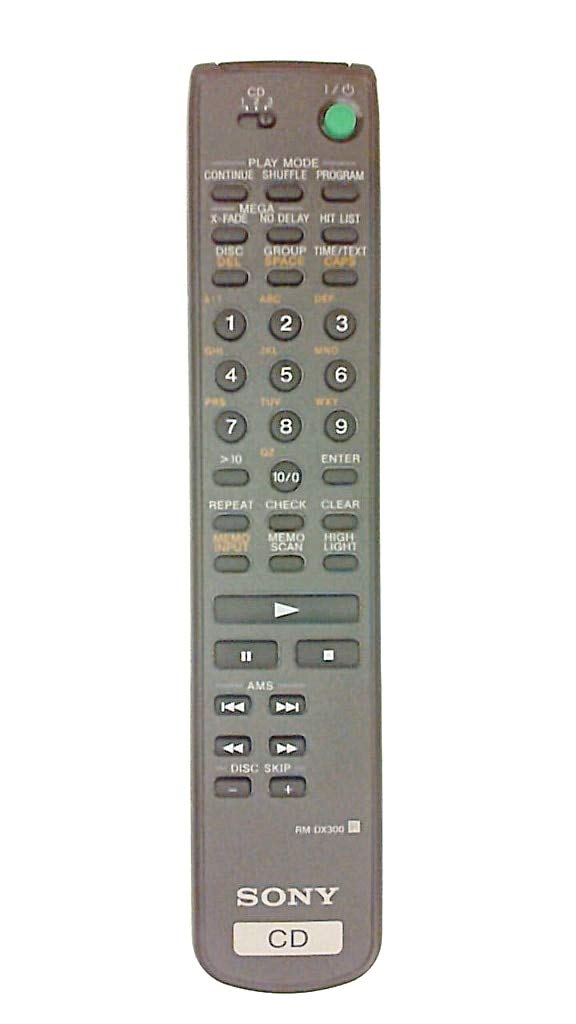
Image 4.1: The Sony RM-DX300 remote control. The battery compartment is located on the back.
5. Иштөө нускамалары
The RM-DX300 remote control allows you to operate your compatible Sony CD Changer from a distance. Ensure there is a clear line of sight between the remote's infrared emitter and the CD changer's IR receiver.
5.1 Негизги функциялар
- КҮЧ: Turns the CD changer on or off.
- ОЙНОО (►): CD ойнотууну баштайт.
- PAUSE (−): CD ойнотууну тындырат. Улантуу үчүн кайра басыңыз.
- STOP (■): CD ойнотууну токтотот.
- ӨТКӨРҮҮ (►►| / |◄◄): Skips to the next track or returns to the beginning of the current/previous track.
- SEARCH (►► / ◄◄): Трек боюнча алдыга же артка тез жылуу.
- DISC SELECT (Numeric Keypad): Directly select a disc by entering its number.
- TRACK SELECT (Numeric Keypad): Directly select a track by entering its number.
- ПРОГРАММА: Allows programming of tracks for custom playback sequences. Refer to your CD changer's manual for detailed programming instructions.
- КАЙТАЛОО: Repeats the current track, disc, or programmed sequence.
- SHUFFLE/RANDOM: Plays tracks or discs in a random order.
Note: Specific button labels and advanced functions may vary slightly depending on your CD changer model. Consult your CD changer's original instruction manual for detailed information on all features.
6. Техникалык тейлөө
6.1 Пультту тазалоо
To clean the remote control, gently wipe its surface with a soft, dry cloth. Do not use liquid cleaners, sprays, or abrasive materials, as these can damage the remote's finish or internal components.
6.2 Батареяны алмаштыруу
Replace the batteries when the remote control's range decreases or if it stops responding. Follow the battery installation steps outlined in Section 4.1. Always replace both batteries at the same time with new ones of the same type.
7. Кыйынчылыктарды
| Көйгөй | Мүмкүн себеп | Чечим |
|---|---|---|
| Remote control does not operate the CD changer. |
|
|
| Remote control operates intermittently. |
|
|
8. Техникалык шарттар
| Модел: | RM-DX300 |
| Шайкеш түзмөктөр: | Sony CD Changer models CDP-CX300, CDP-CX335, CDP-CX355, CDP-X300 |
| Байланыш технологиясы: | Инфракызыл (IR) |
| Кубат булагы: | 2 x AA батарейкалар (киргизилген эмес) |
| Продукциянын өлчөмдөрү: | 8.1 x 1.5 x 1 дюйм |
| Элемент Салмагы: | 3.2 унция |
| Өндүрүүчү: | Sony |
9. Кепилдик жана колдоо
This remote control is manufactured by Sony. For information regarding warranty coverage, technical support, or service, please refer to the documentation provided with your original Sony CD Changer or visit the official Sony support webсайт. Сатып алуу квитанциясын кепилдик дооматтары үчүн сатып алуунун далили катары сактаңыз.
Sony колдоо Webсайт: https://www.sony.com/electronics/support