1. Destpêk
Thank you for choosing the FLYLINKTECH BD10 6000A 12V Car Jump Starter and Power Bank. This device is designed to provide emergency jump-starting for vehicles and serve as a portable power bank for various electronic devices. Please read this manual thoroughly before use to ensure safe and optimal operation.

Image 1.1: The FLYLINKTECH BD10 Jump Starter unit with its smart battery clamps.
2. Agahiyên Ewlekariyê
Always observe the following safety precautions to prevent injury or damage to the device or vehicle:
- Do not attempt to jump-start a frozen battery.
- Girêdana polarîteya rast piştrast bikin (kilîta sor)amp bi erênî, reş clamp to negative). Reverse polarity can cause damage.
- Do not allow the smart clampDema ku bi destpêkera jumpê ve girêdayî ne, bila li hev bikevin.
- Amûrê ji zarokan dûr bixin.
- Do not expose the device to extreme temperatures (above 60°C / 140°F or below -20°C / -4°F) or direct sunlight for extended periods.
- Amûrê ji hev dernexin û neguherînin.
- Tenê cl-ya jîr a ku hatiye dayîn bikar bînin.amps û kabloyên şarjkirinê.
- Ger amûr di dema bikaranînê de pir germ bibe, tavilê jê veqetînin.

Image 2.1: The jump starter incorporates multiple safety features such as spark-proof, reverse polarity, overvoltage, short circuit, overload, and high-temperature protection.
3. Naveroka pakêtê
Piştrast bike ku hemî tişt di pakêtê de hene:
- FLYLINKTECH BD10 Jump Starter Unit
- Pîlê Smart Clamps
- Kabloya USB-C ber USB-C
- Kabloya USB-A ber USB-C
- 12V DC Car Charger Adapter
- Manual Bikarhêner
- Storage Case

Image 3.1: The complete package includes the jump starter, smart clamps, various cables, user manual, and a protective storage case.
4. Setup û Charging
4.1 Xerca Destpêkê
Before first use, fully charge the jump starter. The device features a 26800mAh battery capacity.
- Connect the provided USB-C cable to the jump starter's USB-C input port.
- Connect the other end of the cable to a compatible USB wall charger (not included). For fastest charging, use a PD 45W charger.
- The LED screen will display the charging status and battery percentage.
4.2 Demên Barkirinê
| Charger Rating | Dema Barkirinê ya Texmînî |
|---|---|
| 5W | 18 Saet |
| 18W | 7 Saet |
| 45W | 2 Saet |
Note: A 45W wall charger is not included in the package.

Image 4.1: The device supports PD 45W fast charging, significantly reducing recharge time when using a compatible charger.
5. Telîmatên Operating
5.1 Bikeve Destpêkirina Wesayîtek
The FLYLINKTECH BD10 is capable of jump-starting all gas engines and diesel engines up to 12.0L.
- Ensure Sufficient Charge: Check the jump starter's LED screen to ensure it has at least 50% charge.
- Connect Smart Clamps: Insert the blue plug of the smart clamps into the jump starter's 12V output port. Ensure a firm connection.
- Girêdana bi bataryaya otomobîlê re:
- Pêve bikin sor (+) clamp to the vehicle's positive battery terminal.
- Pêve bikin reş (-) clamp to the vehicle's negative battery terminal.
- Nîşana kontrol bikin: The smart clamp indicator light should turn solid green, indicating a correct connection. If it flashes or shows red, check connections and battery status.
- Press BOOST (if needed): If the vehicle battery is extremely low or completely dead, press the 'BOOST' button on the jump starter. Wait for the indicator light on the smart clamps to turn solid green.
- Destpêkirina Wesayîtê: Attempt to start your vehicle. If it doesn't start on the first try, wait 30 seconds before trying again. Do not attempt more than 3 consecutive starts.
- Clamps: Dema ku wesayît dest pê kir, tavilê klîma jîr derxîninamps from the car battery, then disconnect them from the jump starter.

Image 5.1: The jump starter connected to a car battery, ready for operation. It supports 6000A peak current, 12V output, and is suitable for a wide range of engines.

Image 5.2: Visual guide illustrating the four steps to jump-start a vehicle: connect the plug, attach clamps, press boost, and start the engine.
5.2 Fonksiyona Bankeya Hêzê
The BD10 can charge multiple electronic devices via its USB-A and USB-C ports.
- Derketina USB1: Up to 18W (max)
- Derketina USB2: Up to 18W (max)
- Derketina USB-C: Heta 45W (PD)
Connect your device using the appropriate USB cable to the desired output port. The LED screen will show 'OUT' and the wattage being drawn.

Image 5.3: The jump starter functioning as a power bank, simultaneously charging a smartphone and a tablet via its USB ports.
5.3 Çira LED
The built-in LED flashlight offers three modes: constant light, SOS signal, and strobe light.
- Press and hold the flashlight button to turn on the constant light.
- Press the button again to cycle through SOS and strobe modes.
- Ji bo vemirandinê dîsa bitikîne û bigire.

Image 5.4: The integrated LED flashlight provides illumination, an SOS signal, and a strobe function for emergency situations.
5.4 Informative LED Screen
The 6.0-inch LED screen provides real-time information about the device's status:
- Asta Pîlê: Ji sedî batarya mayî nîşan didetage.
- IN/OUT Indicator: Shows whether the device is charging (IN) or discharging (OUT).
- Wattage Nîşandan: Indicates the power (W) being drawn or supplied.
- Hişyariyên çewtiyê: Displays specific error codes or symbols if an issue occurs.
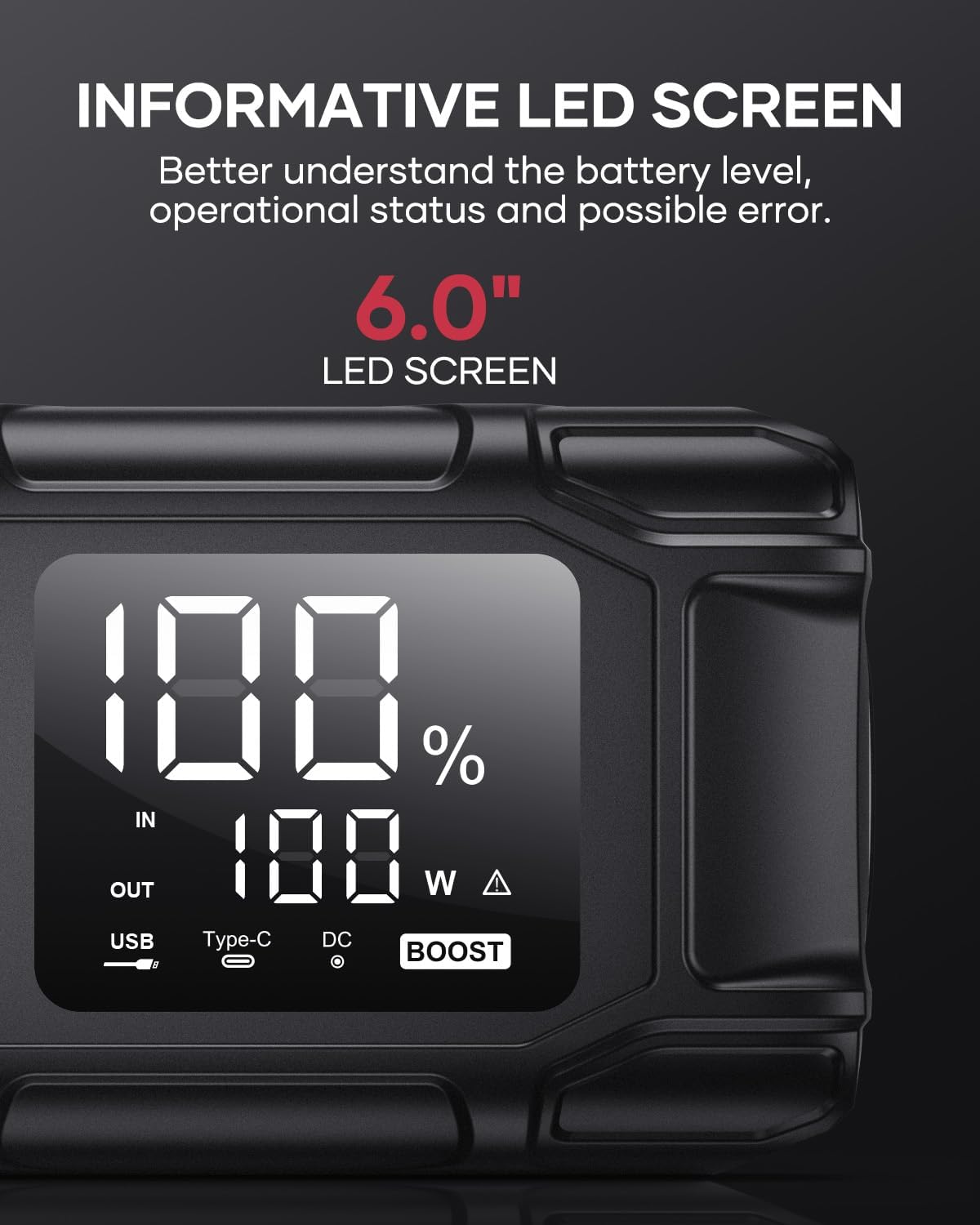
Image 5.5: The 6.0-inch LED screen provides clear information on battery percentage, input/output status, and power consumption.
6. Maintenance
- Bi rêkûpêk barkirin: To prolong battery life, recharge the jump starter every 3-6 months, even if not in use.
- Embarkirinî: Store the device in its protective case in a cool, dry place, away from direct sunlight and moisture.
- Paqijî: Amûrê bi qumaşek nerm û hişk paqij bikin. Kîmyewiyên dijwar an jî madeyên aşınker bikar neynin.
- Clamp Bibalî: Ensure the smart clamps are clean and free of corrosion before and after each use.
7. Destpêkirin
The device features multiple alarm situations indicated by audible signals and screen displays:
- Low Voltage Parastin: Audible signal "3". Recharge the device.
- External Voltage Exceeds Vehicle Voltage: Audible signal "4". Check vehicle battery voltage.
- Parastina Circuit Kurte: Audible signal "5". Check clamp connections for short circuits.
- Safety Mode Activated: Audible signal "6". Device has entered safety mode due to an issue.
- Parastina Zêdeyî: Audible signal "7". Reduce load or check connections.
- Alarm Germahiya Bilind / Nizm: Audible signal "8". Allow device to return to operating temperature range (-20°C to 60°C).
- Reverse Connection: Audible signal "9". Correct the clamp polarity.

Wêne 7.1: Serview of the device's multi-alarm system, indicating various protection states with unique audible signals.
Eger piştî şopandina van gavan pirsgirêk berdewam bikin, ji kerema xwe bi piştgiriya xerîdar re têkilî daynin.
8. Specifications
| Taybetî | Specification |
|---|---|
| Nîşan | FLYLINKTECH |
| Cins | BD10 |
| Peak Output Current | 6000 Ampere |
| Kapasîteya Pîl | 26800 mAh |
| Output Voltage | 12V |
| Têketin/Derketin USB-C | PD 45W |
| USB-A Derket | 18W (herî zêde) |
| Cureyên Motorên Pêkanîn | All Gas, up to 12.0L Diesel |
| Germahiya xebitandinê | -20°C heta 60°C (-4°F heta 140°F) |
| Mezinahiya Hilberê | 23.95 x 10 x 5.69 cm |
| Babetê Weight | 920 g |

Image 8.1: The device is designed to operate reliably in extreme climates, from -20°C (-4°F) to 60°C (140°F).
9. Garantî û Piştgirî
FLYLINKTECH is committed to providing high-quality products. For any questions, technical assistance, or warranty claims, please refer to the contact information provided with your purchase or visit the official FLYLINKTECH webmalper. Ji kerema xwe delîla kirînê ji bo armancên garantiyê biparêzin.


