1. 서론
This manual provides detailed instructions for the installation, operation, and maintenance of your GEREE DB6 Video Doorbell. Please read this manual thoroughly before using the product to ensure proper functionality and safety. The GEREE DB6 is a wireless video doorbell system designed to enhance home security and convenience, allowing you to see and communicate with visitors from your smartphone.
2. 제품 오버view
2.1 패키지 내용
- GEREE DB6 Video Doorbell Unit
- Wireless Chime Unit (USB-powered)
- 장착 브래킷
- 장착 나사 및 벽 앵커
- 접착식 장착 스트립
- SIM Pin (for doorbell removal)
- 사용 설명서(본 문서)
2.2 주요 특징
- 고화질 비디오: 선명한 비디오 영상을 촬영합니다tage.
- 양방향 오디오 : Communicate with visitors remotely.
- 동작 감지: 집 앞 움직임에 대한 알림을 받으세요.
- 무선 차임벨: Audible alert inside your home.
- 앱 제어: Manage and monitor your doorbell via the VicoHome application.
- 배터리 구동: Cordless operation for flexible installation.
2.3 Product Components Diagram
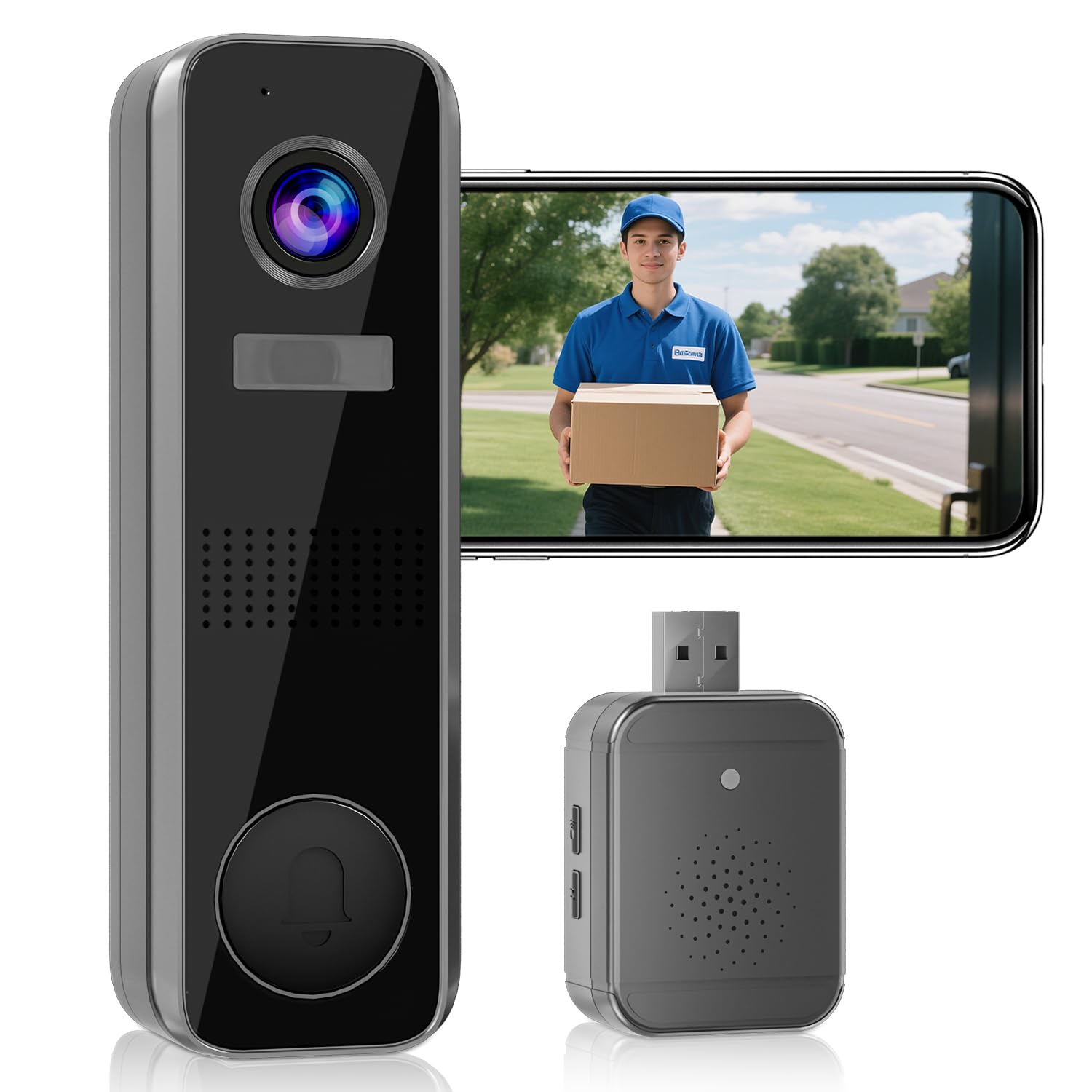
이미지 1: The GEREE DB6 Video Doorbell unit (left), showing the camera lens, speaker, microphone, and doorbell button. To the right, a smartphone screen displays a live view of a delivery person. Below the smartphone, the compact wireless chime unit with a USB-A connector is visible.
3. 설정
3.1 초인종 충전하기
Before initial use, ensure the doorbell unit is fully charged. Connect the doorbell to a standard USB power adapter (not included) using a compatible charging cable. The LED indicator will show charging status. A full charge can last for an extended period, but actual battery life varies based on usage and environmental factors.
3.2 Installing the VicoHome App
- 다운로드 비코홈 스마트폰의 앱 스토어(iOS 앱 스토어 또는 구글 플레이 스토어)에서 앱을 다운로드하세요.
- 앱을 열고 화면의 지시에 따라 계정을 만들거나 로그인하세요.
3.3 초인종 장치 설치
The doorbell can be mounted using either the included adhesive strip or screws.
- 접착 장착: Clean the desired mounting surface thoroughly. Apply the adhesive strip to the back of the mounting bracket, then firmly press the bracket onto the surface.
- 나사 장착: Position the mounting bracket at the desired location. Mark the screw holes. Drill pilot holes if necessary, then secure the bracket to the wall using the provided screws and wall anchors.
- Once the bracket is secured, attach the doorbell unit to the bracket. Ensure it clicks into place.
- To remove the doorbell unit from its bracket (e.g., for charging), insert the provided SIM pin into the designated release hole on the bottom of the unit and gently pry it off.
3.4 Pairing the Doorbell with the App
- 스마트폰이 2.4GHz Wi-Fi 네트워크에 연결되어 있는지 확인하세요.
- Open the VicoHome app and tap the "Add Device" or "+" icon.
- Follow the in-app instructions to put the doorbell into pairing mode (usually by holding the power button for a few seconds).
- Scan the QR code on the doorbell unit or packaging if prompted.
- 앱의 안내에 따라 페어링 과정을 완료하세요.
3.5 Setting Up the Wireless Chime
- Plug the wireless chime unit into a standard USB Type-A power source (e.g., a USB wall adapter, computer USB port).
- The chime should automatically pair with the doorbell unit once both are powered on and within range.
- Use the buttons on the chime unit to adjust volume and select desired chime melodies.
4. 사용 설명서
4.1 Responding to Doorbell Presses
- When a visitor presses the doorbell button, the wireless chime will sound, and you will receive a notification on your smartphone via the VicoHome app.
- Tap the notification to open the app and view a live video feed from the doorbell.
- Use the two-way audio function within the app to speak with the visitor.
4.2 동작 감지
- The doorbell is equipped with motion sensors that detect movement in its field of view.
- Upon detecting motion, the doorbell will send a notification to your smartphone.
- You can customize motion detection sensitivity and zones within the VicoHome app to reduce false alerts.
- Video recording of motion events may require a subscription service for cloud storage. Refer to the VicoHome app for subscription details.
4.3 라이브 View
You can access a live video feed from your doorbell at any time through the VicoHome app, even if no one has pressed the doorbell or triggered motion detection.
5. 유지관리
- 충전 중: Recharge the doorbell unit when the battery level is low. The app will typically notify you.
- 청소: 카메라 렌즈와 초인종 외부를 주기적으로 부드러운 천으로 닦아주세요.amp 천으로 먼지와 얼룩을 제거하세요. 독한 화학 물질을 사용하지 마세요.
- 앱 업데이트: Keep the VicoHome app updated to the latest version to ensure optimal performance and access to new features.
6. 문제 해결
| 문제 | 가능한 해결책 |
|---|---|
| 초인종이 와이파이에 연결되지 않습니다. |
|
| 스마트폰에 알림이 없습니다. |
|
| Chime not sounding. |
|
| 비디오 품질이 좋지 않습니다. |
|
| 배터리 수명이 짧습니다. |
|
For further assistance, please refer to the VicoHome app's help section or contact GEREE customer support.
7. 사양
| 특징 | 세부 사항 |
|---|---|
| 상표 | 지리 |
| 모델명 | DB6 |
| 제품 크기(L x W x H) | 14.7 x 4.7 x 3.3cm |
| 품목 무게 | 320그램 |
| 비디오 녹화 해상도 | 1440p(2K HD) |
| 연결 프로토콜 | Bluetooth (for initial setup/pairing, Wi-Fi for operation) |
| 장착 유형 | Door Mount (Adhesive or Screw) |
| 사용환경 | Designed for outdoor use at entrances, though listed as 'Indoor' in some specifications, its function is for exterior monitoring. |
| 전원 | Battery (rechargeable) for doorbell, USB for chime |
| 포함된 구성 요소 | Video Doorbell, Wireless Chime, Mounting Accessories, Instruction Manual |
8. 보증 및 지원
For warranty information and customer support, please refer to the documentation included with your purchase or visit the official GEREE website. You can also find support resources within the VicoHome application. Please retain your proof of purchase for any warranty claims.


