1. 서론
This manual provides essential information for the safe and efficient operation of your Anern FGI-DU4200 Dual Voltage Hybrid Solar Inverter. Please read this manual thoroughly before installation and use, and retain it for future reference. This inverter is designed to provide reliable power for various applications, integrating solar charging, AC utility charging, and inverter output functions.
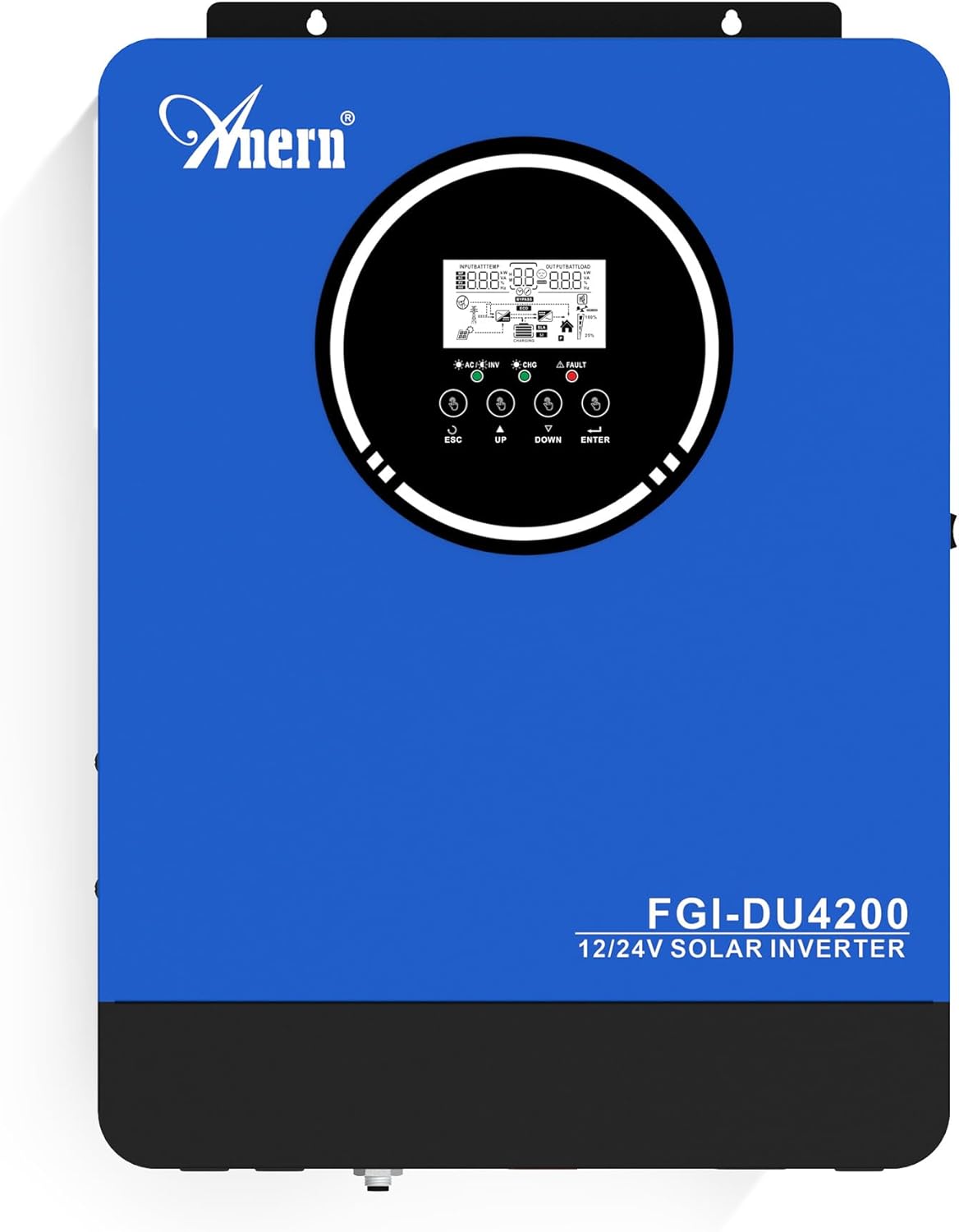
그림 1: Anern FGI-DU4200 Dual Voltage Hybrid Solar Inverter. This image shows the front panel of the inverter, featuring the display screen and control buttons.
2. 안전 지침
Please observe the following safety precautions to prevent injury and damage to the inverter or connected equipment:
- 설치는 해당 지역의 전기 규정에 따라 자격을 갖춘 인력이 수행해야 합니다.
- 모든 배선의 크기가 적절하고 연결 상태가 올바른지 확인하십시오.
- 인버터를 분해하지 마십시오. 내부에는 사용자가 수리할 수 있는 부품이 없습니다.
- 인버터를 인화성 물질, 습기 및 직사광선으로부터 멀리하십시오.
- 과열을 방지하기 위해 인버터 주변에 적절한 환기가 이루어지도록 하세요.
- Always disconnect all power sources (solar, battery, utility) before performing any maintenance or wiring.
- 설치 및 유지관리 시에는 적절한 개인 보호 장비(PPE)를 착용하세요.
3. 제품 오버view 및 기능
The Anern FGI-DU4200 is a versatile hybrid solar inverter designed for both on-grid and off-grid applications. It features automatic dual-voltage operation and a 120A MPPT solar charge controller.
주요 특징:
- Automatic Dual-Voltage 작업: Automatically recognizes 12VDC (2300W output) or 24VDC (4200W output) battery systems.
- High-Efficiency Pure Sine Wave Output: Provides stable 220-230VAC ±5% output (50Hz) with 90% efficiency.
- Integrated 120A MPPT Solar Charge Controller: Maximizes solar power harvesting.
- 다양한 충전 모드: Solar, Solar and Utility, Solar Priority.
- 다중 출력 모드: Solar Priority, Utility Priority, SBU (Solar-Battery-Utility) Mode.
- Seamless Transfer: Grid/generator transfer time less than 20ms for critical loads.
- 종합 보호: Overload, over-temperature, and short-circuit protection.
- 배터리 호환성: Supports 12V/24V Lithium, Lead-Acid, and Gel batteries.
- 콜드 스타트 기능: Ensures operation in extreme conditions.
- Wi-Fi Monitoring: Allows system operation control via mobile phone (requires optional Wi-Fi module).

그림 2: 위에view of key features including frequency range, waveform, charging currents, battery voltag예, 그리고 보호 메커니즘.

그림 3: Illustration of the inverter's dual voltage capability, supporting 4.2KW at 24V and 2.3KW at 12V battery systems.
4. 설정 및 설치
4.1 풀기 및 검사
Upon receiving the inverter, carefully unpack it and inspect for any shipping damage. Ensure all components listed in the packing list are present. If any damage or missing parts are found, contact your dealer immediately.
4.2 인버터 장착
Mount the inverter vertically on a sturdy wall or surface. Ensure there is sufficient clearance around the unit for proper ventilation (at least 20 cm on all sides). Avoid mounting in direct sunlight, near heat sources, or in areas with excessive dust or moisture.
4.3 배선 연결
All wiring must comply with local electrical codes. Use appropriate wire gauges for all connections to prevent overheating and ensure efficient power transfer.
4.3.1 배터리 연결
The inverter supports both 12VDC and 24VDC battery systems. The inverter automatically detects the battery voltage. Ensure correct polarity when connecting batteries. For 12V systems, batteries are typically connected in parallel. For 24V systems, batteries are typically connected in series.

그림 4: Wiring diagram illustrating parallel connection for 12V battery systems (2300W output) and series connection for 24V battery systems (4200W output).

그림 5: The inverter is compatible with various battery types, including Gel, AGM, Flooded (FLD), Lithium (LI), and Sealed Lead-Acid (SLD) batteries.
4.3.2 태양광 패널 연결
Connect your solar panels to the designated PV input terminals. Ensure the open circuit voltage (Voc) of your solar array does not exceed the inverter's maximum PV input voltage (500Vdc). Observe correct polarity.
4.3.3 AC Input Connection (Utility/Generator)
Connect the AC utility grid or a compatible generator to the AC input terminals. The inverter supports 220-230VAC input. Ensure proper grounding.
4.3.4 AC Output Connection (Loads)
Connect your household or office loads to the AC output terminals. The inverter provides a pure sine wave output suitable for sensitive electronics. Do not exceed the rated output power of the inverter (2300W for 12VDC systems, 4200W for 24VDC systems).
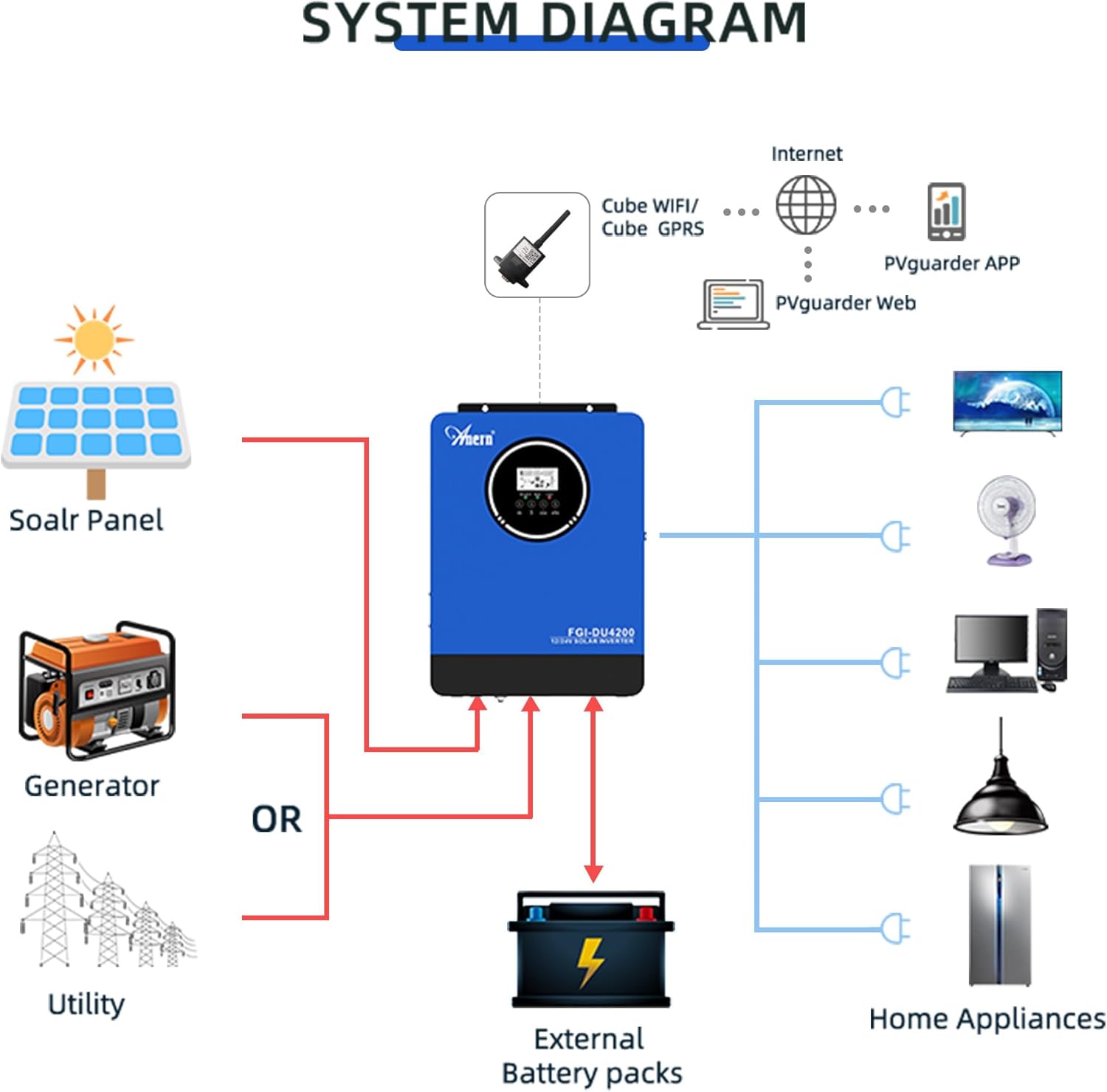
그림 6: Comprehensive system diagram showing connections for solar panels, generator/utility, external battery packs, and various home appliances.

그림 7: Example of an outdoor installation of the Anern FGI-DU4200 inverter, demonstrating its integration into a home solar power system.
5. 사용 설명서
5.1 전원 켜기/끄기
After all connections are securely made, switch on the battery breaker first, then the solar array breaker, and finally the AC input breaker (if connected). Press the power button on the inverter to turn it on. To power off, reverse the sequence: turn off AC input, then solar, then battery, and finally the inverter power button.
5.2 LCD 디스플레이 및 제어 버튼
이 인버터는 실시간 작동 상태와 입력/출력 볼륨을 표시하는 LCD 디스플레이를 갖추고 있습니다.tages, battery status, and error codes. Use the control buttons (ESC, UP, DOWN, ENTER) to navigate through menus and adjust settings.
5.3 충전 모드
이 인버터는 네 가지 충전 모드를 선택할 수 있습니다.
- 태양광 우선 순위: Solar power charges the battery first. If solar is insufficient, utility power supplements.
- 유틸리티 우선순위: Utility power charges the battery first. Solar power supplements if utility is unavailable.
- 태양광 전용: Only solar power charges the battery.
- 태양광 및 공공시설: Both solar and utility power charge the battery simultaneously.
5.4가지 출력 모드
The inverter offers three selectable output modes:
- 유틸리티 우선순위: Loads are primarily powered by utility. If utility fails, the inverter switches to battery power.
- 태양광 우선 순위: Loads are primarily powered by solar. If solar is insufficient, battery power is used. If both are insufficient, utility power is used (if connected).
- SBU (Solar-Battery-Utility) Mode: Loads are powered by solar first, then battery, and finally utility if both solar and battery are depleted or unavailable.
5.5 Wi-Fi Monitoring (Optional)
If equipped with the optional Wi-Fi module, the inverter can be monitored and controlled via a mobile application. Connect the Wi-Fi module to the designated port on the inverter and follow the instructions provided with the module for setup.

그림 8: Diagram illustrating the connection of an optional Wi-Fi module for remote monitoring and control of the inverter system via a mobile application or web 인터페이스.
6. 유지관리
정기적인 유지관리는 인버터의 수명과 최적의 성능을 보장합니다.
- 청소: Periodically clean the inverter's exterior with a dry cloth. Ensure ventilation openings are free from dust and debris.
- 사이: Annually check all electrical connections for tightness and corrosion. Re-tighten if necessary.
- 배터리 검사: For lead-acid batteries, check electrolyte levels and terminal condition as per battery manufacturer guidelines.
- 환경: 작동 환경이 지정된 온도 및 습도 범위 내에 유지되도록 하세요.
7. 문제 해결
이 섹션에서는 일반적인 문제에 대한 해결 방법을 제공합니다. 여기에 나와 있지 않은 문제는 기술 지원팀에 문의하십시오.
| 문제 | 가능한 원인 | 해결책 |
|---|---|---|
| 인버터가 켜지지 않습니다 | 배터리 연결 없음; 배터리 용량tage 값이 너무 낮습니다. 전원 버튼이 눌러지지 않았습니다. | 배터리 연결 및 용량 확인tage; Charge battery; Press and hold power button. |
| AC 출력 없음 | Overload; Short circuit; Battery low; Inverter fault. | Reduce load; Check for short circuits; Charge battery; Restart inverter. |
| 태양광 충전이 작동하지 않습니다 | Solar panels disconnected; Insufficient sunlight; PV voltage too low/high; MPPT fault. | Check PV connections; Ensure adequate sunlight; Verify PV voltag범위 내에 있음. |
| 오류 코드가 표시됨 | Specific fault detected by the inverter. | Refer to the inverter's LCD display for the specific error code and consult the full manual (if available) or contact support for detailed interpretation and resolution. |
8. 사양
| 매개변수 | 값 |
|---|---|
| 모델 | FGI-DU4200 |
| Rated Power (12VDC) | 2300와트 |
| Rated Power (24VDC) | 4200와트 |
| 배터리 용량tage | 12VDC / 24VDC (자동 감지) |
| 출력 볼륨tage | 220-230VAC ±5% (50Hz) |
| 파형 | 순수한 사인 웨이브 |
| MPPT Solar Charge Controller Current | 120A |
| 최대 PV 어레이 개방 회로 Voltage | 500Vdc |
| AC 충전 전류 | 60A |
| 능률 | 90% |
| 전송 시간 | <20ms |
| 제품 치수 | 16.9 x 8.27 x 21.6 인치 |
| 품목 무게 | 19.14파운드 |
| 제조업체 | 아네른 |
9. 보증 및 지원
Anern products are designed for reliability and performance. For warranty information, please refer to the warranty card included with your product or visit the official Anern website. For technical support, troubleshooting assistance, or spare parts, please contact Anern customer service through their official channels. Please have your model number (FGI-DU4200) and purchase date ready when contacting support.
연락처 정보: Refer to your product packaging or the official Anern web최신 연락처 정보는 사이트에서 확인하세요.


