AULA WIN60 HE PRO 60% Mechanical Gaming Keyboard User Manual
Model: WIN60 HE PRO | Brand: AULA
1. 서론
This manual provides detailed instructions for the AULA WIN60 HE PRO 60% Mechanical Gaming Keyboard. Designed for high-performance gaming, this keyboard features Hall Effect magnetic switches, rapid trigger mode, an 8000Hz polling rate, and customizable RGB lighting. Please read this manual thoroughly to ensure proper setup, operation, and maintenance of your keyboard.
Figure 1: AULA WIN60 HE PRO 60% Mechanical Gaming Keyboard with highlighted features.
2. 설정
2.1 언박싱
모든 구성품을 포장에서 조심스럽게 꺼내세요. 다음 품목이 모두 있는지 확인하세요.
AULA WIN60 HE PRO Keyboard
USB-C 케이블
키캡 풀러
추가 스위치(포함된 경우)
Video 1: Unboxing the AULA WIN60 HE Gaming Keyboard, showing the contents including the keyboard, USB-C cable, and switch puller.
2.2 키보드 연결
키보드 뒷면에서 USB-C 포트를 찾으세요.
제공된 USB-C 케이블을 키보드에 연결하세요.
USB-C 케이블의 다른 쪽 끝을 컴퓨터의 사용 가능한 USB 포트에 연결합니다.
The keyboard will automatically be recognized by your operating system (Windows PC/Laptop compatible).
Note: This keyboard is not compatible with PlayStation 5/4 (PS5/PS4) and OBOX.
2.3 드라이버 설치 (Web-Based)
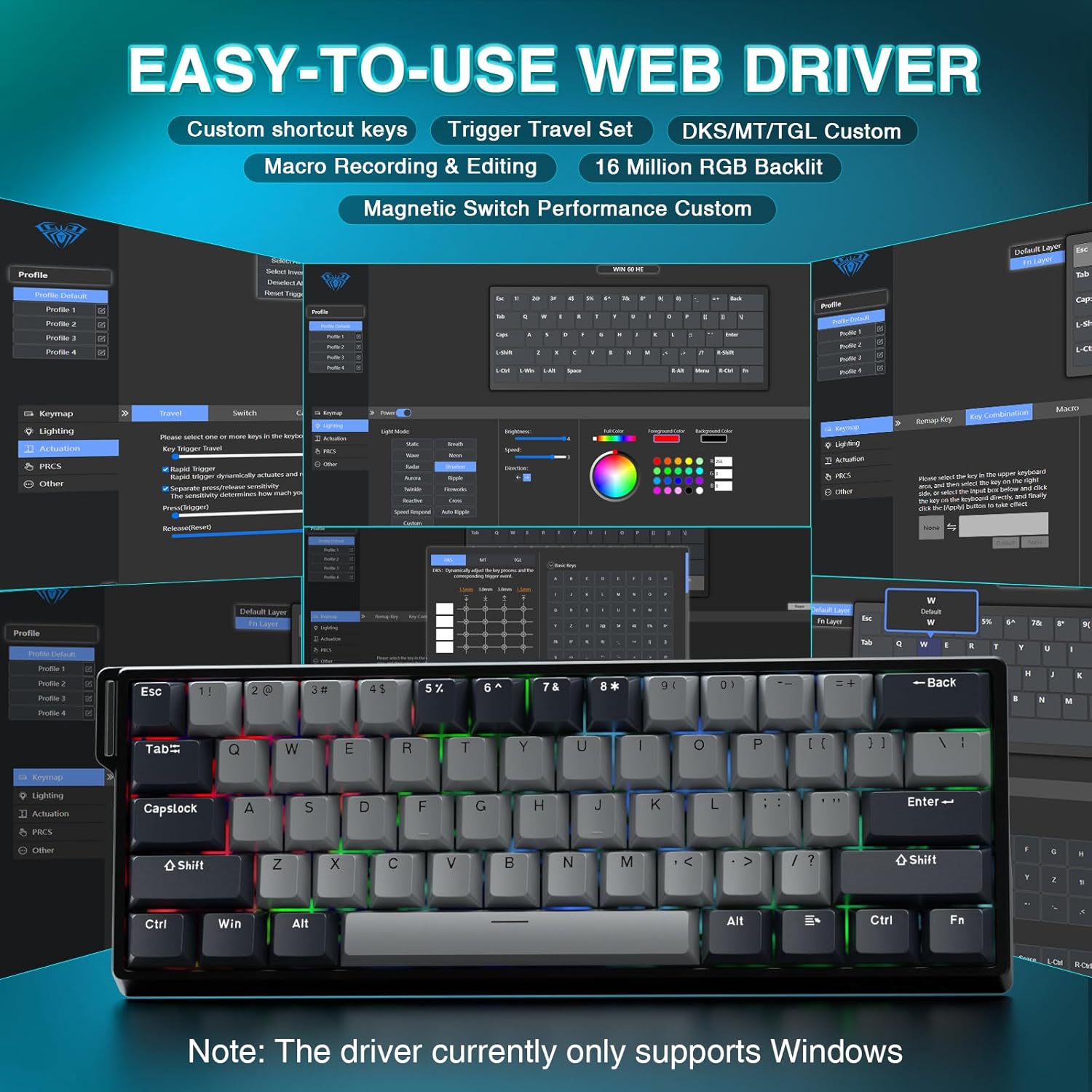
The AULA WIN60 HE PRO utilizes a web-based driver for customization, eliminating the need for software downloads.
컴퓨터가 인터넷에 연결되어 있는지 확인하세요.
선호하는 것을 열어보세요 web 브라우저.
Navigate to the official AULA web driver portal (refer to the product packaging or manufacturer's web정확한 사이트 URL).
그만큼 web interface will allow you to customize settings directly.
그림 2: 사용하기 쉬움 web 사용자 정의를 위한 드라이버 인터페이스.
참고사항: web driver currently only supports Windows operating systems.
3. 운영
3.1 Hall Effect Magnetic Switches & Rapid Trigger
The AULA WIN60 HE PRO features advanced Hall Effect magnetic switches, which detect key presses using magnetic fields rather than physical contact. This design provides:
조절 가능한 작동: Customize the actuation point of each key to your preference for faster response or more deliberate presses.
고속 트리거 모드: Allows keys to activate and deactivate based on movement rather than a fixed actuation point, enabling ultra-fast repeated inputs and precise control, especially beneficial for FPS games. The ultra-low RT step distance is 0.02mm.
내구성: Absence of physical contact reduces wear and tear.
Figure 3: Rapid Trigger technology for enhanced gaming performance.
Video 2: Demonstrating the hot-swappable magnetic switches, including Gray Wood Magnetic Switch and Wing Chun Magnetic Switch variants.
3.2 8000Hz 폴링 속도
The keyboard features an 8000Hz polling rate, meaning it reports key presses to your computer 8000 times per second. This results in:
Ultra-Fast Response Times: Minimizes input lag for immediate in-game actions.
정밀 제어: Ensures every keystroke is registered accurately and without delay.
Figure 4: 8000Hz Hyper-Polling Technology for minimal latency.
3.3 동적 RGB 조명
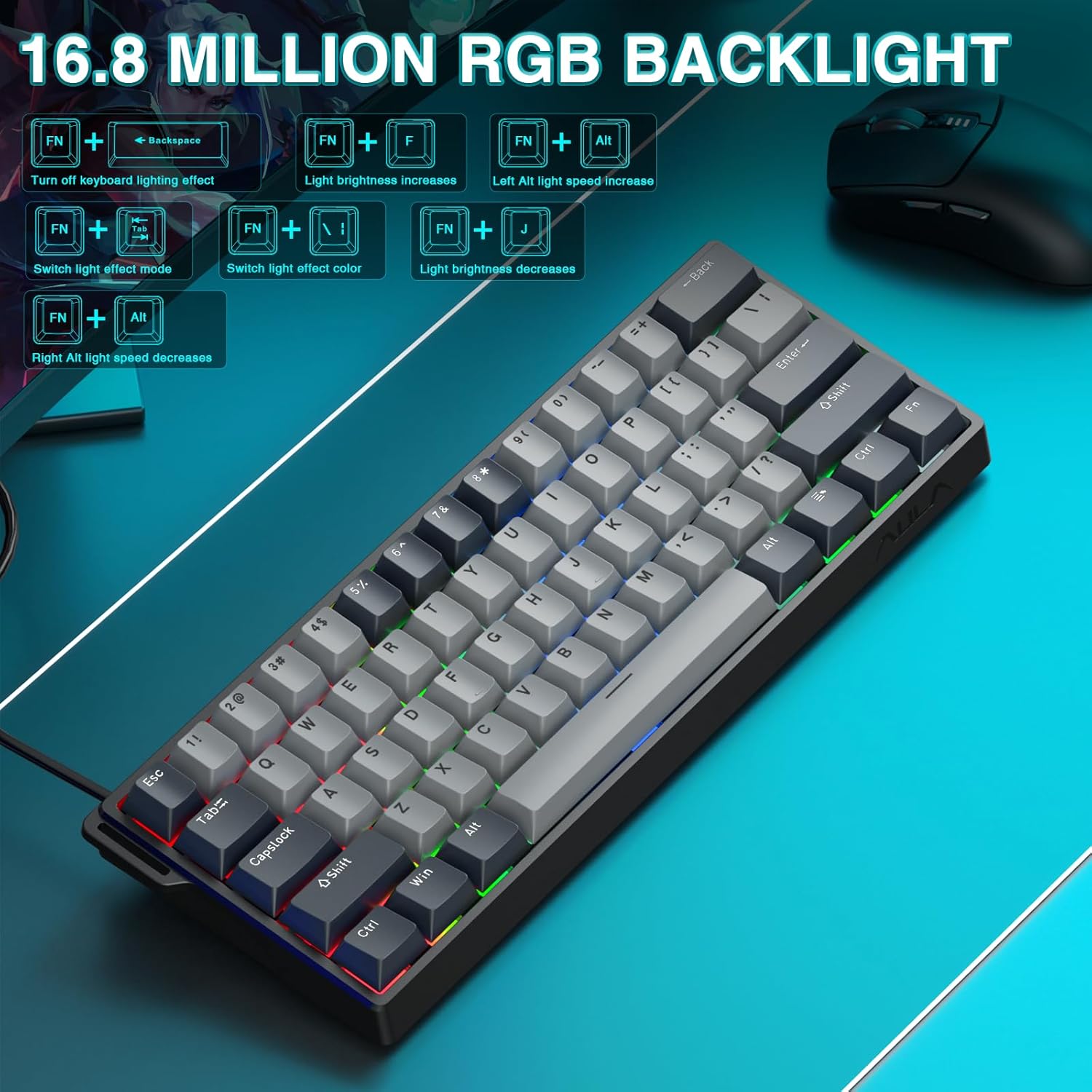
The keyboard offers 16.8 million customizable RGB color options and various lighting effects. Use the following key combinations for quick adjustments:
RGB Lighting Control Hotkeys
키 조합
기능
FN + 역행 키이
Turn off keyboard lighting effect
FN + [
빛의 밝기가 증가합니다.
FN + ]
조명 밝기가 감소합니다.
FN + {
Left Alt light speed increase
FN + }
Right Alt light speed decrease
FN + \
조명 효과 모드 전환
FN + 대체
조명 효과 색상 전환
Figure 5: RGB Backlight controls and effects.
3.4 사용자 정의 기능 Web 운전사
그만큼 web-based driver provides extensive customization options:
키 리매핑: 모든 키에 모든 기능을 할당합니다.
매크로 생성: 복잡한 명령 시퀀스를 단일 키에 기록하고 할당합니다.
RGB 조명 사용자 정의: Fine-tune lighting effects, colors, and patterns beyond the basic hotkeys.
작동 지점 조정: Precisely set the actuation distance for each magnetic switch.
접근하기 web driver as described in Section 2.3.
4. 유지관리
4.1 키보드 청소
최적의 성능과 외관을 유지하려면:
청소하기 전에 키보드를 컴퓨터에서 분리하세요.
부드럽고 털이 없는 천을 살짝 사용하세요.amp물이나 순한 세척액을 사용하여 키캡과 섀시를 닦으세요.
키캡 사이의 먼지와 이물질을 제거하려면 압축 공기를 사용하세요.
가혹한 화학물질이나 연마재는 피하세요.
4.2 핫스왑 가능 스위치
The AULA WIN60 HE PRO features hot-swappable magnetic switches, allowing for easy replacement or customization without soldering.
제공된 키캡 풀러를 사용하여 키캡을 조심스럽게 제거하세요.
Use a switch puller (not explicitly mentioned as included, but implied by "hot-swappable" and video) to carefully remove the switch.
Align the new switch with the socket and press firmly until it clicks into place.
키캡을 교체하세요.
Caution: Apply gentle force to avoid damaging the switch sockets.
5. 문제 해결
5.1 키보드가 응답하지 않음
USB-C 케이블이 키보드와 컴퓨터에 모두 단단히 연결되어 있는지 확인하세요.
키보드를 컴퓨터의 다른 USB 포트에 연결해보세요.
시스템 특정 문제를 배제하기 위해 다른 컴퓨터에서 키보드를 테스트하세요.
컴퓨터를 다시 시작하세요.
5.2 RGB 조명이 작동하지 않음
Check if the lighting is turned off using the FN + 역행 키이 단축키.
밝기를 조정하려면 다음을 사용하세요. FN + [ or FN + ].
확인하십시오 web driver settings haven't disabled lighting.
5.3 Keys Sticking or Not Registering
해당 키캡 주변을 청소하여 이물질을 제거하십시오.
If a specific switch is faulty, consider replacing it using the hot-swappable feature (refer to Section 4.2).
작동 지점 설정을 확인하십시오. web driver; it might be set too high or too low for your preference.
6. 사양
특징
세부 사항
모델
WIN60 HE PRO
키보드 유형
60% 기계식 게임용 키보드
스위치 유형
Hall Effect Magnetic Switch, Hot-Swappable
연결성
USB-C 유선
폴링 속도
8000Hz
특별 기능
Rapid Trigger Mode, Adjustable Actuation, RGB Backlit, Programmable Keys, Hotkeys and Media Keys, Portable
호환 장치
Laptop, PC Windows (Not compatible with PS5/PS4, OBOX)
제품 치수
11 x 5 x 1.1인치(27.94 x 12.7 x 2.79cm)
품목 무게
2.18파운드(0.99kg)
제조업체
아울라
Figure 6: Detailed comparison of AULA WIN60 HE series magnetic switches.
7. 보증 및 지원
For warranty information, technical support, or service inquiries, please refer to the warranty card included with your product or visit the official AULA/CORBOBO web해당 사이트를 이용하세요. 또한 구매 플랫폼을 통해 판매자에게 직접 문의하여 도움을 받을 수도 있습니다.
AULA WIN60 유선 자석 스위치 키보드 제품 설명서 이 설명서는 AULA WIN60 유선 마그네틱 스위치 키보드에 대한 포괄적인 가이드를 제공하며, PRO/Max 및 Standard 에디션의 특징, 기능 및 작동 모드를 다룹니다. 백라이트 조정, 시스템 전환, 단축키 설명 및 마그네틱 스위치 조정 방법에 대해서도 설명합니다.
AULA F99 기계식 키보드 사용 설명서 AULA F99 3-in-1 핫스왑 가능 RGB 개스킷 기계식 키보드의 사용 설명서로, 유선, 2.4G, 블루투스 모드에 대한 기능, 사양 및 작동 지침을 자세히 설명합니다.
AULA F75 기계식 키보드 사용 설명서 AULA F75 3-in-1 핫스왑 RGB 개스킷 기계식 키보드의 기능과 사용 설명서를 확인하세요. 이 설명서에는 연결, 기능, 사양 및 문제 해결 방법이 설명되어 있습니다.
AULA F108 Pro 3-in-1 Mechanical Keyboard: User Manual & Features Comprehensive guide to the AULA F108 Pro 3-in-1 mechanical keyboard. Details connectivity (Wired, 2.4G, Bluetooth), RGB lighting, LCD screen functions, shortcut keys, system compatibility, and specifications.