소개
The Gembird SPK-BT-LED-07 Bluetooth LED Speaker is a versatile portable audio device designed for high-quality sound and dynamic visual effects. It integrates Bluetooth 5.3 connectivity, multiple playback options, and vibrant RGB LED lighting to enhance your listening experience. This manual provides essential information for the safe and efficient use of your speaker.
제품 특징
- 원활한 음악 스트리밍: Bluetooth version 5.3 allows wireless audio streaming from smartphones or tablets up to 10 meters away.
- 다양한 재생 옵션: Supports music playback directly from Micro SD cards, USB flash drives, FM radio, and AUX input.
- Integrated Light and Sound: Features multi-color RGB LED lighting effects with 5 distinct color modes, paired with a powerful 5-watt speaker.
- 긴 배터리 수명: Provides up to 4 hours of music playback on a single charge. Fast charging via USB Type-C port, with a full charge in approximately 3 hours.
- 소형 및 휴대성: Measures 103 × 103 × 203 mm and weighs 0.58 kg, making it easy to transport for on-the-go entertainment.
- 핸즈프리 기능: Built-in microphone for convenient hands-free calling.
설정
1. 언박싱 및 초기 검사
Carefully remove the speaker and all accessories from the packaging. Inspect the device for any signs of damage. The package should include the Gembird Bluetooth LED Speaker and a USB Type-C charging cable.
2. 스피커 충전
Before first use, fully charge the speaker. Connect the provided USB Type-C cable to the speaker's charging port and the other end to a compatible USB power adapter (not included) or a computer's USB port. The charging indicator light will typically show red while charging and turn off or change color when fully charged. A full charge takes approximately 3 hours.
3. 전원 켜기 / 끄기
To power on the speaker, press and hold the Power button (usually marked with a power symbol) for a few seconds until you hear an audible prompt or see the LED lights activate. To power off, press and hold the Power button again until the speaker shuts down.
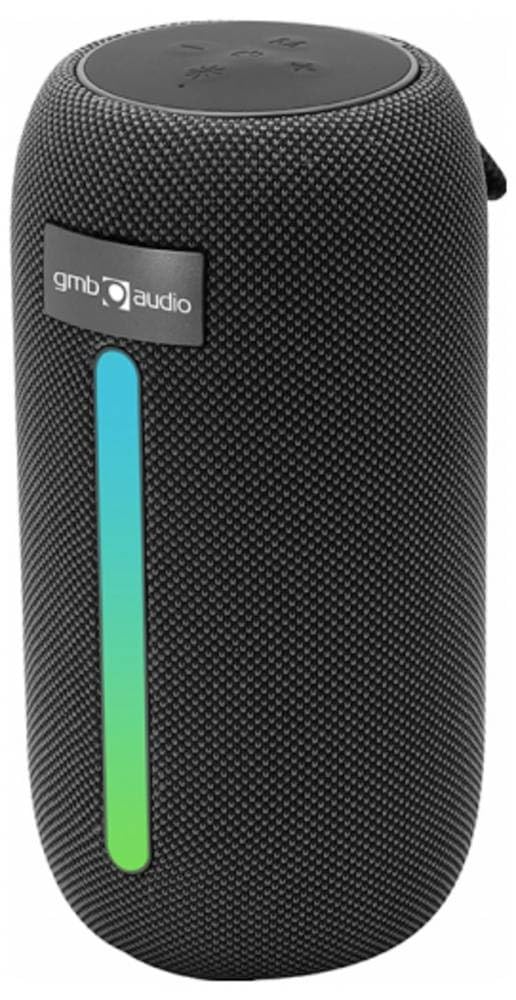
Image: The Gembird SPK-BT-LED-07 Bluetooth LED Speaker, showcasin컴팩트한 디자인과 통합 RGB 조명이 특징입니다.
작동 지침
1. 블루투스 페어링
- Ensure the speaker is powered on and in Bluetooth pairing mode (indicated by a flashing LED light, often blue). If not, press the Mode button to switch to Bluetooth mode.
- 스마트폰이나 태블릿에서 블루투스를 활성화하고 사용 가능한 장치를 검색하세요.
- Select "Gembird SPK-BT-LED-07" (or similar name) from the list of devices.
- Once paired, the speaker will confirm with an audible prompt, and the LED light will stop flashing. You can now stream audio wirelessly.
2. FM 라디오 모드
- Press the Mode button repeatedly until you enter FM Radio mode.
- 재생/일시정지 버튼을 눌러 사용 가능한 FM 방송국을 자동으로 검색하고 저장하세요.
- 저장된 역 사이를 이동하려면 다음/이전 트랙 버튼을 사용하세요.
3. USB/MicroSD 재생
- Insert a USB flash drive or a Micro SD card (up to 32GB) containing MP3 audio file스피커의 해당 포트에 연결하십시오.
- The speaker should automatically switch to USB or MicroSD mode and begin playing music. If not, press the Mode button to select the correct input.
- Use the Play/Pause and Next/Previous track buttons to control playback.
4. AUX 입력
- Connect one end of a 3.5mm audio cable (not included) to the AUX port on the speaker and the other end to the audio output of your device (e.g., laptop, MP3 player).
- Press the Mode button to switch to AUX input mode.
- Audio will now play through the speaker from your connected device. Control playback from your device.
5. 핸즈프리 통화
- When the speaker is connected to your phone via Bluetooth, incoming calls will be routed to the speaker.
- 걸려오는 전화를 받으려면 재생/일시정지 버튼을 누르세요.
- 통화를 종료하려면 재생/일시 중지 버튼을 다시 누르세요.
6. LED 조명 모드
The speaker features 5 different RGB LED light modes. Press the dedicated Light Mode button (if available, or a long press on the Mode button) to cycle through the available lighting effects and select your preferred visual ambiance.
유지
1. 청소
To clean the speaker, ensure it is powered off and disconnected from any power source. Use a soft, dry, lint-free cloth to wipe the exterior surfaces. Do not use abrasive cleaners, solvents, or chemical sprays, as these can damage the finish or internal components. Avoid getting moisture into any openings.
2. 보관
When not in use for extended periods, store the speaker in a cool, dry place away from direct sunlight, extreme temperatures, and high humidity. It is recommended to charge the battery at least once every three months to maintain battery health.
문제 해결
| 문제 | 가능한 원인 | 해결책 |
|---|---|---|
| 스피커의 전원이 켜지지 않습니다. | 배터리가 부족합니다. | 스피커를 완전히 충전하세요. |
| 블루투스로 페어링할 수 없습니다. | 스피커가 페어링 모드가 아닙니다. 기기의 Bluetooth가 꺼져 있습니다. 스피커와의 거리가 너무 멀습니다. | Ensure speaker is in Bluetooth pairing mode. Turn on Bluetooth on your device. Move device closer to speaker (within 10m). Forget previous pairings and try again. |
| 스피커에서 소리가 나지 않습니다. | 볼륨이 너무 낮음; 입력 모드가 올바르지 않음; 기기가 재생되지 않음. | Increase speaker and device volume. Ensure correct input mode (Bluetooth, AUX, USB, MicroSD, FM). Check if the source device is playing audio. |
| FM 라디오 수신 상태가 좋지 않습니다. | 신호가 약합니다. | 스피커를 신호 수신이 더 잘 되는 곳으로 옮기세요. |
| USB/MicroSD 카드가 작동하지 않습니다. | 지원되지 않음 file 포맷; 카드/드라이브가 올바르게 삽입되지 않음; 손상됨 files. | 보장하다 files are MP3 format. Reinsert the USB drive/MicroSD card. Try with different file저장 장치 또는 저장 장치. |
명세서
| 특징 | 세부 사항 |
|---|---|
| 모델 번호 | SPK-BT-LED-07 |
| 상표 | 젬버드 |
| 색상 | 검은색 |
| 연결 기술 | 블루투스 v5.3 |
| 최대 범위 | 100 Meters (Bluetooth range up to 10 meters) |
| 스피커 출력 전력 | 5 와트 |
| 스피커 유형 | 서브우퍼 |
| 임피던스 | 32옴 |
| 전원 | 배터리 구동(1500mAh) |
| 배터리 수명 | 최대 4시간 |
| 충전 시간 | Approx. 3 hours via USB Type-C |
| 제품 크기(D x W x H) | 11 x 11 x 22cm |
| 품목 무게 | 750그램 |
| 제어 방법 | 만지다 |
| 방수 | 아니요 |
| 지원되는 미디어 | Micro SD (up to 32GB), USB Flash Drive (up to 32GB), FM Radio, AUX |
| 포함된 구성 요소 | Bluetooth LED Speaker, USB Type-C Charging Cable |
보증 및 지원
For warranty information and technical support, please refer to the documentation provided with your purchase or visit the official Gembird web사이트. 보증 청구를 위해 구매 증빙 자료를 보관하세요.


