소개
Thank you for choosing the Spigen Active Noise Cancelling Headphones SA-HP P10. These headphones are designed to provide an immersive audio experience with advanced noise cancellation, powerful sound, and convenient features for various uses including commuting, gaming, and music listening. Please read this manual carefully to ensure proper use and optimal performance of your new headphones.
패키지 내용
패키지에 모든 품목이 들어 있는지 확인하세요.
- Spigen Active Noise Cancelling Headphones SA-HP P10
- USB-C 충전 케이블(50cm)
- AUX Audio Cable (1.2m)
- 운반 파우치
- 사용 설명서 (본 문서)

Image: The Spigen SA-HP P10 headphones, a 50cm USB-C charging cable, and a 1.2m AUX audio cable, representing the complete package contents.
제품 끝view
Familiarize yourself with the headphone components and controls.
컨트롤 및 포트:
- 전원 버튼: Press and hold to power on/off. Short press for play/pause or answer/end calls.
- 볼륨 버튼(+/-): Short press to adjust volume. Long press to skip tracks.
- ANC/투명 모드 전환: Toggle to activate Active Noise Cancellation (ANC) or Transparency Mode.
- USB-C 포트: 헤드폰을 충전합니다.
- 3.5mm 오디오 잭: AUX 케이블을 사용하여 유선으로 연결합니다.
- 마이크: Integrated 5-MIC system for clear calls and ANC.
설정
1. 헤드폰 충전:
- Connect the USB-C charging cable to the headphone's USB-C port and a power source.
- LED 표시등이 충전 상태를 표시합니다. 완전히 충전하는 데는 약 2시간이 걸립니다.
- 처음 사용하기 전에 헤드폰이 완전히 충전되어 있는지 확인하세요.
2. 전원 켜기/끄기:
- 전원을 켜려면 LED 표시등이 켜질 때까지 전원 버튼을 길게 누르세요.
- 전원을 끄려면 LED 표시등이 꺼질 때까지 전원 버튼을 길게 누르십시오.
3. 블루투스 페어링:
- With the headphones powered off, press and hold the Power Button for 5 seconds until the LED indicator flashes blue and red, indicating pairing mode.
- On your device (smartphone, tablet, computer), enable Bluetooth and search for "Spigen SA-HP P10".
- 연결할 헤드폰을 선택하세요. 페어링이 완료되면 LED 표시등이 파란색으로 켜집니다.
- The headphones support Bluetooth 5.4 for seamless pairing and multi-device connectivity.
4. Spigen Audio App:
- Download the "Spigen Audio" app from your device's app store.
- Connect your headphones to the app for customizable sound profiles, EQ 설정 및 펌웨어 업데이트.
Image: The Spigen Audio App interface, displaying options for sound profiles (Default, Pop, Bass, Rock) and noise control modes (Multi-Mode ANC, Transparency, Normal, Indoor, Commuting, Noisy).
작동 지침
1. Active Noise Cancellation (ANC) & Transparency Mode:
- Use the dedicated ANC/Transparency Mode switch on the headphones to toggle between modes.
- ANC 모드: Reduces external noise by up to 43dB, ideal for focused listening.
- 투명 모드: 주변 소리가 통과되도록 하여 주변 환경을 인지할 수 있도록 도와줍니다.
- Customize ANC levels and modes (Indoor, Commuting, Noisy) via the Spigen Audio App.
Image: The Spigen SA-HP P10 headphones with visual cues indicating 43dB Active Noise Cancelling, 5-Mode Hybrid Adaptive ANC, Transparency Mode, and Clear Calls with 5 MICs.
2. 게임 모드:
- Activate Gaming Mode via the Spigen Audio App for crystal-clear, low-latency audio transmission.
- This mode is optimized for an uninterrupted gaming experience.
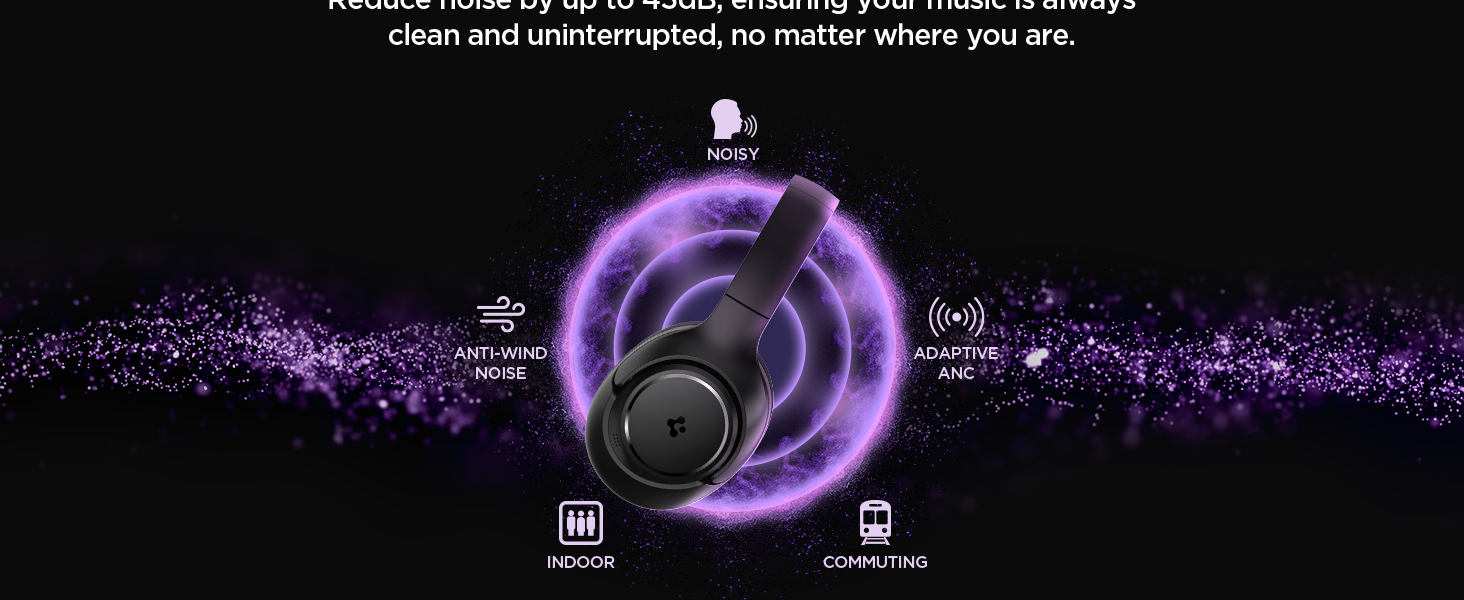
Image: Spigen SA-HP P10 headphones positioned next to a smartphone and a game controller, emphasizing the low-latency feature for an enhanced gaming experience.
3. 전화 걸기:
- 전화 받기/종료: 전원 버튼을 짧게 누르세요.
- 전화 거부: 전원 버튼을 길게 누르세요.
- The 5-MIC system ensures clear voice pickup and ambient noise reduction during calls.
유지
Cleaning EarPads:
- The ear pads are detachable for easy cleaning.
- Gently remove the ear pads from the headphones.
- 부드러운 천으로 닦아주세요amp 천과 순한 비누로 닦아주세요. 완전히 말린 후 다시 부착하세요.
- 가혹한 화학물질이나 연마재를 사용하지 마십시오.

Image: Hands gently cleaning a detachable earpad of the Spigen SA-HP P10 headphones with a white cloth, demonstrating the ease of maintenance.
문제 해결
- 전원 없음: 헤드폰이 완전히 충전되었는지 확인하세요.
- 페어링할 수 없습니다: Make sure headphones are in pairing mode (flashing blue/red LED). Turn off and on your device's Bluetooth.
- 사운드 문제: Check volume levels on both headphones and your device. Ensure headphones are within Bluetooth range. Try re-pairing.
- ANC가 작동하지 않음: Ensure ANC mode is activated via the switch or app.
명세서
| 모델명 | SA-HP P10 |
| 블루투스 버전 | 5.4 |
| 배터리 수명 | 최대 60시간 |
| 능동 소음 제거 | 최대 43dB |
| 드라이버 크기 | 40mm 다이나믹 드라이버 |
| 마이크 | 5-MIC System |
| 제어 방법 | App / On-device Buttons |
| 품목 무게 | 273그램(9.6온스) |
| 제품 치수 | 3.22 x 6.31 x 7.75 인치 |
보증 및 지원
For warranty information or technical support, please visit the official Spigen website or contact Spigen customer service directly. Keep your purchase receipt for warranty claims.


