LAUNCH X431 CRP919 EV Scanner User Manual
Model: LAUNCH X431 CRP919 EV
브랜드: LAUNCH
1. 서론
The LAUNCH X431 CRP919 EV is a state-of-the-art diagnostic scan tool designed for both traditional internal combustion engine (ICE) vehicles and the rapidly growing new energy vehicle (NEV) market, including hybrid and electric vehicles (EVs). This intelligent scanner provides comprehensive system diagnostics, advanced service functions, and bidirectional control capabilities, making it an essential tool for professional technicians and advanced DIY enthusiasts.
Equipped with an Android 10.0 operating system, a 7.0-inch touch screen, and robust hardware, the CRP919 EV offers fast, efficient, and accurate vehicle diagnostics. It supports modern communication protocols like CANFD and DOIP, ensuring broad compatibility with vehicles up to the latest models.

Figure 1.1: LAUNCH X431 CRP919 EV Scanner and its protective carrying case.
2. 안전 정보
Always observe the following safety precautions when operating the LAUNCH X431 CRP919 EV scanner to prevent personal injury or damage to the device or vehicle:
- Ensure the vehicle's ignition is off before connecting or disconnecting the diagnostic cable.
- Do not operate the scanner in wet conditions or with wet hands.
- 기기를 강한 자기장이나 고온 환경에 노출시키지 마십시오.
- Always refer to the vehicle manufacturer's service manual for specific diagnostic procedures and safety warnings, especially when working with high-voltage EV systems.
- Use appropriate personal protective equipment (PPE) when performing vehicle diagnostics.
- Do not attempt to disassemble or modify the scanner. Refer all servicing to authorized personnel.
3. 상자 안에 무엇이 들어있나요?
포장을 개봉한 후 다음 구성품이 모두 포함되어 있는지 확인하십시오.
- LAUNCH X431 CRP919 EV Main Unit
- Main Diagnostic Cables
- C형 충전기
- Power Adaptors (various regional types)
- 사용자 설명서
- 빠른 시작 가이드
- 보호용 운반 케이스
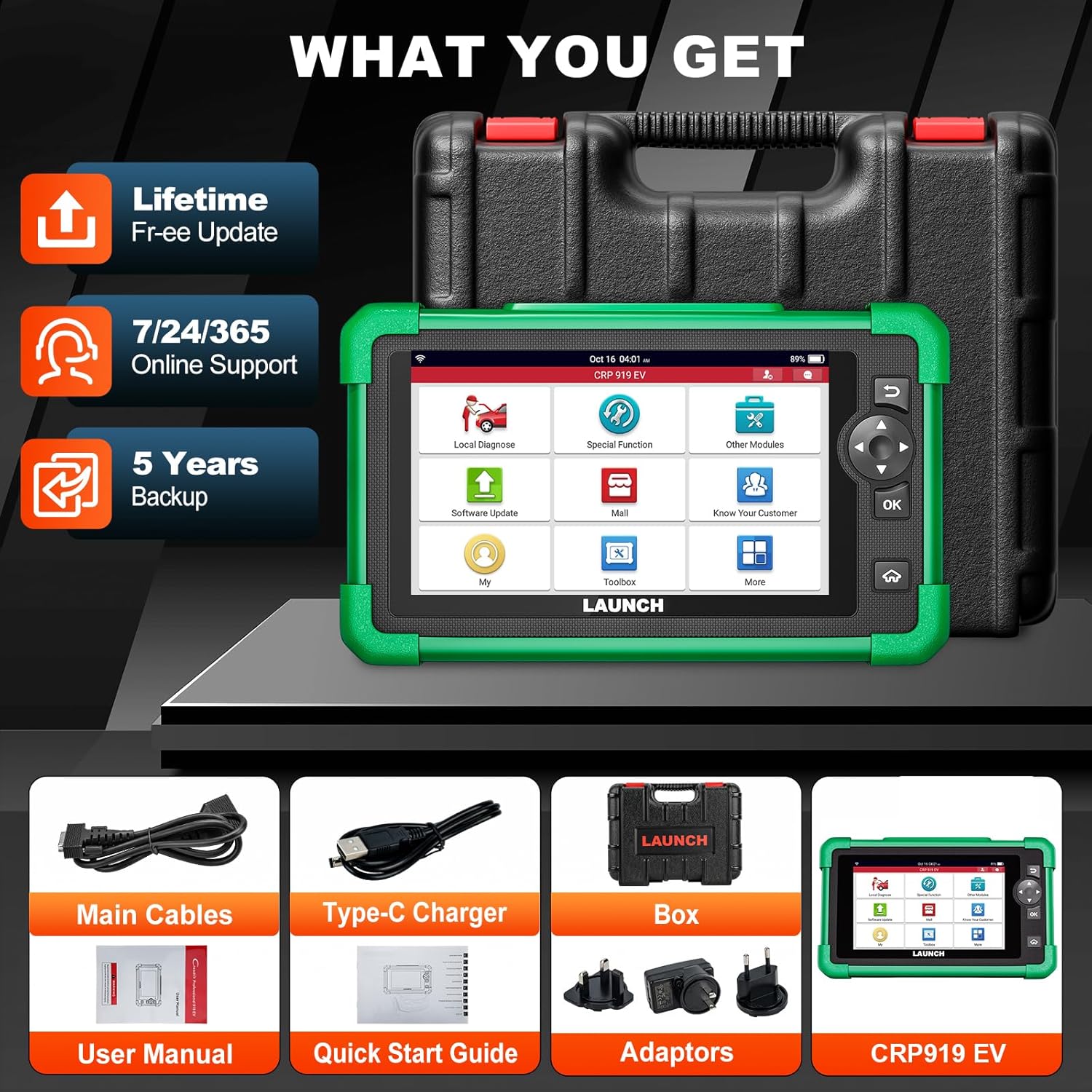
Figure 3.1: Included components with the LAUNCH X431 CRP919 EV scanner.
4. 설정
4.1 초기 충전
Before first use, fully charge the CRP919 EV scanner. Connect the Type-C charger to the device's charging port and plug it into a power outlet. The charging indicator will show the charging status. A full charge can provide up to 15 hours or more of battery life.
4.2 전원 켜기/끄기
- 전원을 켜려면: 기기 측면에 있는 전원 버튼을 화면이 켜질 때까지 길게 누르세요.
- 전원을 끄려면: 전원 끄기 메뉴가 나타날 때까지 전원 버튼을 길게 누르세요. "전원 끄기"를 선택하고 확인하세요.
4.3 네트워크 연결
For software updates, online feedback, and cloud services, connect the device to a Wi-Fi network:
- From the main menu, tap "Settings".
- "Wi-Fi"를 선택하고 켜세요.
- 목록에서 원하는 Wi-Fi 네트워크를 선택하고, 메시지가 나타나면 비밀번호를 입력하세요.
- Confirm connection. The device supports 2.4GHz and 5GHz dual-band Wi-Fi for faster transmission.
4.4 소프트웨어 업데이트
Regular software updates are crucial for optimal performance, new vehicle coverage, and bug fixes. The CRP919 EV offers 2 years of free updates.
- 기기가 Wi-Fi에 연결되어 있는지 확인하십시오.
- From the main menu, tap "Software Update".
- The system will check for available updates. Follow the on-screen prompts to download and install them.

Figure 4.1: Software update interface and hardware optimization.
5. 사용 설명서
The LAUNCH X431 CRP919 EV provides a wide range of diagnostic and service functions. Below are key operational aspects:
5.1 차량에 연결하기
- Locate the vehicle's OBD-II diagnostic port (usually under the dashboard).
- Connect the main diagnostic cable to the CRP919 EV and then to the vehicle's OBD-II port.
- 차량의 점화 장치를 "ON" 위치(엔진 끄기)로 돌립니다.
- On the scanner, select "Local Diagnose" to begin communication.
5.2 Full System Diagnostics (EV & ICE)
This function allows you to scan all available electronic control units (ECUs) in the vehicle, including engine, transmission, ABS, SRS, and specific EV high-voltag전자 시스템.
- 자동 스캔 2.0: The device features an intelligent Auto VIN function that automatically identifies the vehicle's VIN for quick system access.
- 코드 읽기/삭제: Retrieve diagnostic trouble codes (DTCs) and clear them after repairs.
- 라이브 데이터 스트림: View real-time data parameters from various sensors and components in text, graph, or multi-in-one formats.
- EV System Diagnostics: Specifically for EVs, perform battery pack analysis and high-voltage system diagnostics. This includes reading/clearing codes, performing HV parts replacement, and generating HV system diagnostic reports.

그림 5.1: 이상view of All System Diagnose capabilities.
5.3 양방향 제어(능동 테스트)
Bidirectional control allows the scanner to send commands to vehicle ECUs to perform specific tests and functions, such as activating solenoids, relays, or motors, to verify system integrity without using the vehicle's controls.
- Access this function from the "Active Test" menu.
- Common tests include activating fuel pumps, cycling ABS solenoids, testing window motors, or operating cooling fans.
- This feature helps in quickly locating faulty components.

Figure 5.2: Bidirectional control functionality for component testing.
5.4 43개 이상의 서비스 기능
The CRP919 EV supports over 43 common maintenance and reset functions, accelerating repair processes.
- 오일 리셋: 오일 교환 후 오일 수명 시스템을 재설정하세요.
- EPB 재설정: 브레이크 패드 교체 후 전자 주차 브레이크를 재설정하세요.
- SAS 재설정: 조향 각도 센서를 보정합니다.
- BMS 재설정: Register new battery and clear fault codes.
- 스로틀 리셋: 스로틀 바디 위치를 다시 알아보세요.
- ABS 출혈: ABS 브레이크 공기 빼기 작업을 수행하십시오.
- TPMS 재설정: 타이어 공기압 모니터링 시스템을 재설정하세요.
- And many more, including Injector Coding, Gear Reset, DPF Regeneration, etc.

그림 5.3: 예amples of 43+ service functions available.
5.5 ECU 코딩
ECU Coding allows for customization of vehicle settings, module matching, unlocking hidden functions, and module retrofitting. This advanced function requires careful operation and knowledge of vehicle systems.
5.6 CANFD & DOIP Protocols
The CRP919 EV supports the latest CANFD and DOIP communication protocols, ensuring compatibility with newer vehicle models (up to 2024/2025) that utilize these advanced network architectures.
5.7 FCA 자동 인증
For FCA (Fiat Chrysler Automobiles) vehicles, the scanner supports FCA AutoAuth, allowing secure access to protected diagnostic functions on these vehicles.

Figure 5.4: Global compatibility and protocol support.
5.8 추가 기능
- WiFi Print: Directly print diagnostic reports via Wi-Fi.
- Cloud Health Report: Generate and store vehicle health reports in the cloud for easy access and sharing.
- 온라인 피드백: Submit feedback or issues directly to LAUNCH for support.
- DTCs Library: Built-in database for looking up diagnostic trouble code definitions.
- 원격 진단: Potential for remote assistance (requires additional setup/software).

Figure 5.5: User interface and support features.
6. 유지관리
Proper maintenance ensures the longevity and optimal performance of your LAUNCH X431 CRP919 EV scanner:
- 청소: 부드럽고 마른 천을 사용하여 기기를 닦으세요. 연마성 세척제나 용제는 사용하지 마세요.
- 저장: Store the scanner in its protective carrying case in a cool, dry place when not in use. Avoid extreme temperatures.
- 배터리 관리 : For long-term storage, ensure the battery is charged to approximately 50-70% to preserve its lifespan. Recharge periodically if stored for extended periods.
- 소프트웨어 업데이트: Regularly update the software to ensure compatibility with new vehicles and access to the latest features and bug fixes.
- 케이블 검사: Periodically inspect diagnostic cables for any signs of wear, damage, or corrosion. Replace damaged cables immediately.
7. 문제 해결
This section addresses common issues you might encounter with the CRP919 EV scanner.
| 문제 | 가능한 원인 | 해결책 |
|---|---|---|
| 장치의 전원이 켜지지 않습니다. | 배터리 부족; 전원 버튼을 충분히 누르지 않음; 기기 오작동. | Charge the device; Press and hold the Power button for 3-5 seconds; Contact technical support. |
| 차량에 연결할 수 없습니다. | Loose cable connection; Vehicle ignition off; Damaged OBD-II port; Vehicle not supported. | Ensure cable is securely connected; Turn ignition ON; Check vehicle's OBD-II port; Verify vehicle compatibility. |
| Software is slow or freezes. | Too many applications running; Low storage; Software bug. | Close unnecessary applications; Clear cache/data; Perform software update; Restart device. |
| Wi-Fi 연결 문제. | 비밀번호가 잘못되었습니다. 범위를 벗어났습니다. 라우터 문제입니다. | Re-enter password; Move closer to router; Restart router; Try another Wi-Fi network. |
| "Mall" features require additional payment. | Certain advanced features or brand-specific software are add-ons. | This is by design. Purchase desired add-ons through the "Mall" section if needed. |
8. 사양
| 특징 | 세부 사항 |
|---|---|
| 모델 | LAUNCH X431 CRP919 EV |
| 운영 체제 | 안드로이드 10.0 |
| 표시하다 | 7.0-inch Touch Screen, 1024x600 resolution |
| 프로세서 | 1.8GHz Octa-core Qualcomm Snapdragon CPU |
| 메모리 / 스토리지 | 64GB (내장) |
| 배터리 | 6000mAh rechargeable battery (up to 15+ hours) |
| 연결성 | 2.4GHz & 5GHz Dual-band Wi-Fi, USB Type-C |
| 치수(길이 x 너비 x 높이) | 12.8인치 x 5.38인치 x 11.4인치 |
| 품목 무게 | 6.82파운드 |
| 지원되는 프로토콜 | CANFD, DOIP, OBD-II/EOBD, etc. |
| 차량 보장 | 150+ car brands, 1996-2025 models (including EV/HEV) |
9. 보증 및 지원
LAUNCH provides comprehensive support for the CRP919 EV scanner:
- 소프트웨어 업데이트: Enjoy 2 years of free software updates from the date of activation.
- 기술 지원: Access 7/24/365 online support for any operational or technical queries.
- 온라인 리소스: Utilize the built-in "Online Library," "FAQ," and "Online Feedback" features for self-help and direct communication with LAUNCH support.
- 보증: Refer to your purchase documentation for specific warranty terms and conditions. Typically, LAUNCH products come with a standard manufacturer's warranty covering defects in materials and workmanship.
For further assistance, please visit the official LAUNCH web사이트를 방문하거나 고객 서비스에 직접 문의하세요.


