1. 서론
The NEDIS WIFICI12CWT SmartLife Indoor Wi-Fi Camera is designed for home surveillance, offering 3MP 1296p Full HD video quality. It features infrared night vision, intelligent motion detection, and two-way audio communication. This camera is compatible with Onvif standards and integrates seamlessly with the SmartLife application for remote access and control. Video recordings can be stored on a microSD card (up to 128 GB) or via an optional cloud storage service. This manual provides essential information for the proper installation, operation, and maintenance of your camera.
2. 상자 안에 무엇이 들어있나요?
- 1x NEDIS WIFICI12CWT Camera
- 1x 전원 어댑터
- 1x USB 타입-C 케이블
- 1x 사용 설명서
3. 제품 오버view
Familiarize yourself with the components of your NEDIS WIFICI12CWT camera.

This image displays the front of the NEDIS WIFICI12CWT camera, highlighting its key functionalities such as Wi-Fi connectivity, control via a mobile application, voice control compatibility, infrared night vision, and 3MP Full HD resolution for clear video.
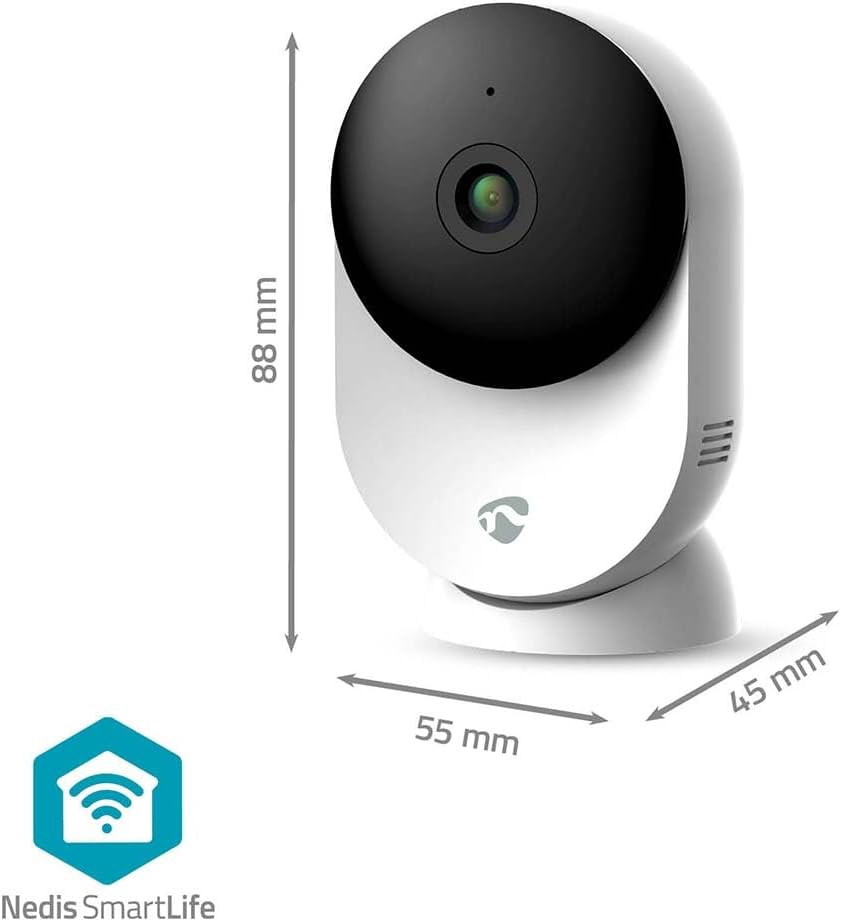
이 이미지는 명확한 view of the NEDIS WIFICI12CWT camera along with its physical dimensions: 88 mm in height, 55 mm in width, and 45 mm in depth, aiding in placement planning.

후면 view of the camera is shown, highlighting the speaker grille for two-way audio and the 'PUSH' button, which typically serves as a reset or pairing button.
주요 구성 요소:
- 카메라 렌즈: 동영상 foo를 캡처합니다.tage.
- LED 표시등: Shows camera status (e.g., power, connection).
- 마이크로폰: 음성 입력 및 양방향 통신용입니다.
- 스피커: 오디오 출력 및 양방향 통신용입니다.
- Power Port (USB Type-C): 전원 어댑터에 연결합니다.
- 재설정 버튼: 공장 초기화 또는 페어링 모드에 사용됩니다.
- MicroSD 카드 슬롯: 로컬 비디오 저장용.
4. 설정
Follow these steps to set up your NEDIS WIFICI12CWT camera:
- SmartLife 앱을 다운로드하세요: 검색 "SmartLife" in your mobile device's app store (iOS or Android) and install it.
- 계정 생성: Open the SmartLife app and register for a new account or log in if you already have one.
- 카메라 전원 켜기: Connect the USB Type-C cable to the camera's power port and plug the power adapter into an electrical outlet. The camera will power on, and the LED indicator will typically blink, indicating it's ready for pairing.
- 장치 추가: In the SmartLife app, tap the "+" icon (usually in the top right corner) to add a new device. Select "Security & Video Surveillance" then "Smart Camera (Wi-Fi)" or similar.
- Wi-Fi에 연결: Follow the on-screen instructions in the app. Ensure your mobile device is connected to a 2.4 GHz Wi-Fi network. The camera does not support 5 GHz Wi-Fi. You may need to scan a QR code displayed on your phone with the camera lens.
- 설정 완료: Once the camera connects successfully, you can name it and begin using it.

A user is shown interacting with the NEDIS WIFICI12CWT camera through the SmartLife mobile application on a smartphone, illustrating the remote viewing capability and ease of control.
5. 카메라 작동
살다 View:
Open the SmartLife app and select your camera from the device list to access the live video feed. You can view your space in real-time from anywhere.
동작 감지:
The camera features intelligent motion detection. When motion is detected, the camera can send instant notifications to your smartphone via the SmartLife app. You can adjust sensitivity settings within the app.
야간 투시경:
Equipped with infrared LEDs, the camera automatically switches to night vision mode in low-light conditions, providing clear black-and-white video up to 10 meters.
양방향 오디오 :
Use the built-in microphone and speaker for two-way communication. Tap the microphone icon in the app to speak, and listen through the camera's speaker.

A couple is depicted using a tablet to monitor a baby, showcasing the camera's ability to provide live video feed and two-way audio communication, useful for calming a child or general baby surveillance.
녹음 및 저장:
- MicroSD 카드: Insert a microSD card (up to 128 GB, not included) into the designated slot for local storage of recordings. The camera supports continuous recording or event-triggered recording.
- 클라우드 스토리지: Optional cloud storage services may be available through the SmartLife app for secure off-site storage of your video footage.
팬/틸트 기능:
The camera features motorized pan and tilt capabilities, allowing for 360° horizontal and vertical tracking. Control the camera's viewing direction directly from the SmartLife app to cover a wider area.

This image shows the camera placed in a room, with graphical overlays emphasizing its 110-degree viewing angle, intelligent movement detection, and dual-band 2.4/5 GHz Wi-Fi connectivity for flexible placement.
6. 유지관리
청소:
To clean the camera, gently wipe the exterior with a soft, dry cloth. Do not use liquid cleaners or aerosols, as they may damage the device.
펌웨어 업데이트:
Periodically check the SmartLife app for available firmware updates. Keeping your camera's firmware up-to-date ensures optimal performance and security.
7. 문제 해결
- 카메라 전원이 켜지지 않음: 전원 어댑터가 카메라와 작동하는 콘센트에 제대로 연결되어 있는지 확인하십시오.
- Wi-Fi에 연결할 수 없습니다.
- Wi-Fi 네트워크가 2.4GHz 대역인지 확인하십시오. 카메라는 5GHz 네트워크를 지원하지 않습니다.
- 정확한지 Wi-Fi 비밀번호를 확인하세요.
- 카메라가 Wi-Fi 라우터 범위 내에 있는지 확인하세요.
- Try resetting the camera by pressing and holding the reset button for several seconds until the LED indicator changes.
- microSD 카드에 녹화되지 않음:
- microSD 카드가 올바르게 삽입되었는지 확인하세요.
- Check if the microSD card is formatted correctly (usually FAT32). You may need to format it via the app.
- Verify that recording settings are enabled in the SmartLife app.
- 이미지 품질이 좋지 않음:
- 부드럽고 마른 천으로 카메라 렌즈를 닦아주세요.
- Ensure adequate lighting in the environment, or that night vision is functioning correctly in dark conditions.
- 인터넷 연결 속도를 확인하세요. 연결 속도가 느리면 스트리밍 품질에 영향을 줄 수 있습니다.
8. 사양
| 특징 | 사양 |
|---|---|
| 모델명 | 와이파이12CWT |
| 비디오 녹화 해상도 | 1296p(3MP) |
| 무선 통신 기술 | Wi-Fi (2.4GHz) |
| View잉 각도 | 110도 |
| 나이트 비전 범위 | 10 미터 |
| 전원 입력 | 5 볼트 |
| 전력 소비 | 4.5 와트시 |
| 치수(길이 x 너비 x 높이) | 45 x 55 x 88mm |
| 무게 | 161그램 |
| 재료 | 아크릴로니트릴 부타디엔 스티렌(ABS) |
| 특별 기능 | Two-way audio, Motion detector, Cry detection, Sound-triggered recording, HD resolution, Night vision |
| 사용환경 | 실내 |
| 호환 장치 | 스마트폰, 태블릿 |
| 컨트롤러 유형 | 안드로이드, iOS |
9. 안전 정보
- This product is designed for indoor use only. Do not expose it to rain or moisture.
- 기기 손상을 방지하려면 제공된 전원 어댑터만 사용하세요.
- 카메라를 직사광선, 열원 및 강한 자기장으로부터 멀리하십시오.
- 카메라를 직접 분해하거나 수리하려고 하지 마십시오. 자격을 갖춘 서비스 담당자에게 도움을 요청하십시오.
- 어린이와 애완동물의 손이 닿지 않는 곳에 보관하세요.
10. 보증 및 지원
For warranty information and technical support, please refer to the documentation included with your product or visit the official NEDIS website. You can also contact NEDIS customer service for further assistance.


