소개
Welcome to the user manual for your KEXIN 64GB USB 2.0 Flash Drive 10 Pack. This guide provides essential information on how to set up, operate, maintain, and troubleshoot your new flash drives. Please read this manual carefully to ensure optimal performance and longevity of your product.

Image: The KEXIN 64GB USB 2.0 Flash Drive 10 Pack, showcasing the quantity and design of the drives.
제품 특징
The KEXIN 64GB USB 2.0 Flash Drives are designed for reliable and convenient data storage. Key features include:
- 높은 호환성: Supports Windows 7 / 8 / 10 / Vista / XP / Unix / 2000 / ME / NT Linux and Mac OS. Compatible with USB 2.0 and backward compatible with USB 1.1.
- 플러그 앤 플레이: No software installation required for immediate use.
- 다양한 용도: Compatible with PCs, laptops, TVs, car audio systems, and other devices. Ideal for storing music, videos, photos, documents, and software.
- Amp용량: Each 64GB drive can store approximately 23 hours of 1080P video (6Mbps), 20,000 photos (10MP/3Mb), or over 150,000 Office Word documents (400Kb).
- 접이식 디자인: Features a glide-in/out design that protects the USB plug when not in use, eliminating the need for a cap.
- 내구성 있는 구조: Designed to be dust-proof and shock-proof for enhanced data protection.

Image: Illustration of the retractable design, highlighting the capless and protective mechanism of the USB drive.
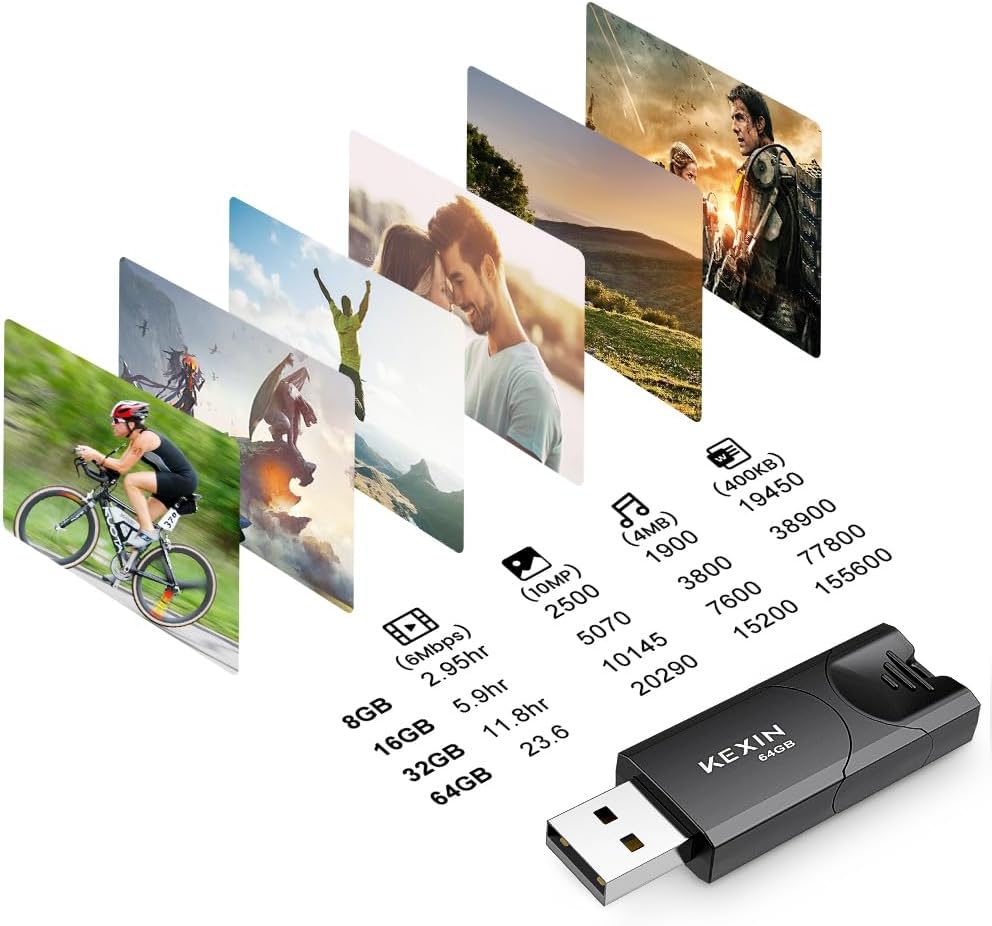
Image: Visual representation of the storage capacity, detailing how many hours of video, photos, or documents can be stored on various drive sizes, including 64GB.
설정
Setting up your KEXIN USB flash drive is a straightforward process:
- 드라이브 삽입: Gently slide the USB connector out of its casing and insert the flash drive into an available USB 2.0 or USB 1.1 port on your computer or compatible device.
- 자동 인식: Most operating systems will automatically detect the drive and install necessary drivers (Plug and Play). The drive will appear as a removable disk in 'My Computer' (Windows) or on your desktop (Mac).
- 서식 지정(선택 사항): The drives come pre-formatted with exFAT. If you need to store individual files larger than 4GB, you may need to reformat the drive to NTFS.
To reformat the drive:
- Connect the USB drive to your computer.
- Open 'This PC' or 'My Computer' (Windows) or 'Disk Utility' (Mac).
- Right-click on the USB drive icon and select 'Format'.
- Choose 'NTFS' as the file system (for Windows) or 'Mac OS Extended (Journaled)' (for Mac) and click 'Start'.
- 중요한: Formatting will erase all data on the drive. Ensure you back up any important file진행하기 전에 s.

Image: A KEXIN USB flash drive connected to a laptop, demonstrating the plug-and-play setup.
작동 지침
Using your KEXIN USB flash drive for data transfer is simple:
- 드라이브에 액세스하세요: Once recognized by your device, open the drive folder.
- 옮기다 Files: 드래그 앤 드롭 files or folders from your computer to the USB drive, or vice versa. You can also copy and paste.
- Monitor Transfer: A progress bar will indicate the status of your file 이전.
The KEXIN USB flash drives offer wide compatibility with various devices and operating systems, making them suitable for diverse applications.

Image: Icons illustrating the wide compatibility of the USB drive with devices such as laptops, PCs, TVs, cars, and music players.

Image: A banner highlighting the KEXIN USB 2.0 Flash Drive's versatility for various file types, ready for use anytime, anywhere.

Image: A user transferring files to a KEXIN USB flash drive connected to a laptop, demonstrating typical usage.
유지
Proper care and maintenance will help extend the life of your KEXIN USB flash drives and protect your data:
- 안전한 제거: Always use the 'Safely Remove Hardware' option (Windows) or drag the drive icon to the Trash (Mac) before physically disconnecting the drive. This prevents data corruption.
- 데이터 백업: Regularly back up important data stored on your flash drives to another storage medium (e.g., cloud storage, external hard drive) to prevent data loss.
- 물리적 보호: While the drives are designed to be dust-proof and shock-proof, avoid exposing them to extreme temperatures, moisture, or strong impacts. Keep the retractable connector protected when not in use.
- 청소: If necessary, gently clean the exterior of the drive with a soft, dry cloth. Avoid using liquid cleaners.

Image: Visuals highlighting the dust-proof, shock-proof, and general protection features of the KEXIN USB flash drive, ensuring data safety.
문제 해결
If you encounter issues with your KEXIN USB flash drives, consider the following common solutions:
- 드라이브가 감지되지 않음:
- 컴퓨터의 다른 USB 포트에 드라이브를 꽂아보세요.
- Test the drive on another computer to rule out a port or system issue.
- USB 커넥터가 완전히 확장되어 포트에 제대로 꽂혔는지 확인하십시오.
- Cannot Transfer Large Files (over 4GB):
- The drive is likely formatted as exFAT, which has a 4GB file size limit. Reformat the drive to NTFS (Windows) or Mac OS Extended (Journaled) (Mac). Remember to back up data before formatting.
- 느린 전송 속도:
- Ensure you are using a USB 2.0 port for optimal speeds. USB 1.1 ports will result in slower transfers.
- 많은 작은 것을 전송합니다 file여러 개를 한꺼번에 옮기는 것보다 속도가 느릴 수 있습니다. file 전체 크기가 동일합니다.
- Interference with Wireless Devices:
- If the USB drive is plugged in directly next to a wireless mouse transmitter, it may cause interference. Try moving the USB drive to a different port further away from the wireless receiver. This issue is more common with some USB 3.0/3.1 drives but can occasionally affect USB 2.0 devices in close proximity to wireless peripherals.
- 데이터 손상:
- Always safely remove the drive before unplugging it. Unplugging abruptly can lead to data corruption.
- If data appears corrupted, try running a disk check utility on your computer.
명세서
| 특징 | 세부 사항 |
|---|---|
| 상표 | KEXIN |
| 모델 번호 | KEXIN_FLASH_64 |
| 메모리 저장 용량 | 64 GB (per drive) |
| 하드웨어 인터페이스 | USB 2.0 |
| 연결 기술 | USB |
| 플래시 메모리 유형 | USB |
| 쓰기 속도 | 5MB/S~8MB/S |
| 제품 치수 | 폭 2.28인치 x 깊이 0.77인치 x 높이 0.35인치 |
| 품목 무게 | 0.282 ounces (per drive) |
| 특징 | Lightweight, Fashion, Retractable Design |
| 색상 | 검은색 |
보증 및 지원
KEXIN products are manufactured to high-quality standards. For any warranty claims or technical support inquiries, please refer to the contact information provided with your purchase or visit the official KEXIN web사이트. 보증 확인을 위해 구매 증빙 자료를 보관하세요.
For additional assistance, you may also refer to the KEXIN store on Amazon: KEXIN Amazon Store.