소개
This manual provides essential information for the safe and effective operation, maintenance, and troubleshooting of your Silvergear Luchtreiniger Pro air purifier. This device is designed to improve indoor air quality by filtering out allergens, fine dust, and other airborne particles, utilizing an H13 HEPA filter, ionizer, and UV-C lamp.

Silvergear Luchtreiniger Pro air purifier, shown with its H13 HEPA filter and a smartphone displaying the companion app interface.
안전 지침
Please read all safety instructions carefully before using the appliance. Failure to follow these instructions may result in electric shock, fire, or injury.
- 전원 공급 장치 볼륨을 확인하십시오.tage는 기기의 정격 라벨과 일치합니다.
- 손상된 코드나 플러그로 기기를 작동하지 마세요.
- 제품을 물이나 기타 액체로부터 멀리하십시오. 제품을 물에 담그지 마십시오.
- 공기 흡입구나 배출구를 막지 마십시오. 장치 주변에 적절한 간격을 유지하십시오.
- 청소, 유지 보수 또는 이동 전에 제품의 전원을 뽑으십시오.
- Do not use the appliance in environments with flammable or explosive gases.
- 본 기기는 신체적, 감각적 또는 정신적 능력이 저하된 사람(어린이 포함)이나 경험 및 지식이 부족한 사람이 사용하도록 의도된 것이 아니며, 안전을 책임질 사람으로부터 기기 사용에 관한 감독이나 지시를 받은 경우에만 사용할 수 있습니다.
- 어린이가 이 제품을 가지고 놀지 않도록 감독해야 합니다.
상자 안에 무엇이 들어있나요?
포장을 풀 때 모든 구성품이 들어 있는지 확인하세요.
- 1x Silvergear Luchtreiniger Pro Unit
- 1x H13 HEPA Filter (pre-installed or separate)
- 1x 사용자 설명서

Contents of the Silvergear Luchtreiniger Pro package: air purifier unit, H13 HEPA filter, and user manual.
설치 가이드
1. 풀기
Carefully remove the air purifier and all accessories from the packaging. Retain packaging for future storage or transport.
2. 필터 설치
The H13 HEPA filter may come pre-installed or require installation. If separate, remove the base cover of the air purifier, insert the filter, and secure the cover. Ensure the filter is correctly oriented.
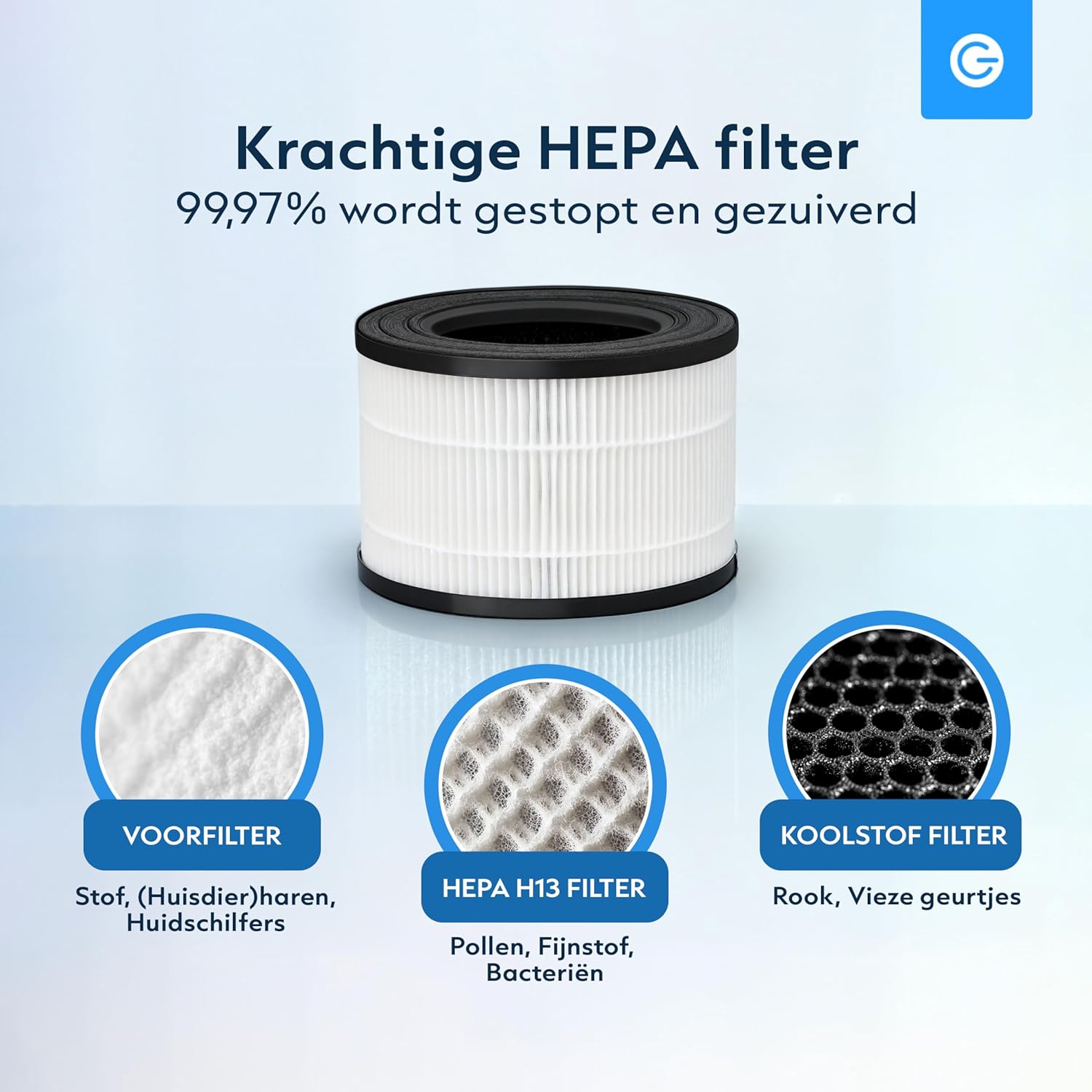
The multi-layer filter system includes a pre-filter for large particles, an H13 HEPA filter for fine particles, and an activated carbon filter for odors.
3. 전원 연결
Place the air purifier on a flat, stable surface. Plug the power cord into a suitable electrical outlet.
4. 앱 연결 (선택 사항)
For smart control features, download the Silvergear app from your smartphone's app store. Follow the in-app instructions to pair your device. This allows for remote control and real-time air quality monitoring.

The Silvergear app provides remote control and air quality insights.
공기 청정기 작동
제어판 이상view
The control panel is located on the top of the unit. Refer to the diagram below for button functions.

Control panel functions: UV-C Mode, Filter Reset, Timer, Sleep Mode, Fan Speed, and Power On/Off.
전원 켜기/끄기
를 누르세요 힘 버튼을 눌러 장치를 켜거나 끕니다.
팬 속도 조정
를 누르세요 속도 button to cycle through 4 fan speeds (1, 2, 3, Auto). The Auto mode adjusts speed based on detected air quality.

The air purifier features 4 fan speeds, including an automatic mode.
타이머 기능
를 누르세요 시간제 노동자 button to set the operating time for 2, 4, or 8 hours. The unit will automatically shut off after the selected duration.
UV-C Mode
를 누르세요 UV button to activate or deactivate the UV-C disinfection lamp. UV-C lamp helps eliminate bacteria and viruses.

The integrated UV-C lamp provides additional air disinfection.
수면 모드
를 누르세요 잠 button to enter sleep mode. In this mode, the fan operates at its lowest speed, and indicator lights dim for quiet operation during rest periods.

Sleep mode ensures quiet operation and dimmed lights for an undisturbed environment.
대기질 지표
The air purifier features an automatic sensor that indicates air quality through color changes:
- 파란색: 매우 좋은 공기 질
- 녹색: 좋은 공기질
- 노란색 : 보통의 공기질
- 빨간색: 공기 질이 좋지 않음

The air quality sensor provides real-time feedback via color-coded lights.
앱 제어
Utilize the Silvergear app for full control over all functions, including power, fan speed, timer, UV-C mode, and to monitor air quality remotely.

The air purifier draws in dirty air from the bottom and releases clean, purified air from the top.
유지
필터 교체
The H13 HEPA filter has a limited lifespan and needs regular replacement to maintain optimal performance. The filter replacement indicator light will illuminate when it's time to change the filter. After replacing the filter, press and hold the 필터 재설정 필터 타이머를 재설정하려면 버튼을 3초 동안 누르십시오.
Replacement filters can be purchased from authorized Silvergear retailers.
장치 청소
Wipe the exterior of the air purifier with a soft, dry cloth. Do not use abrasive cleaners or solvents. Ensure the unit is unplugged before cleaning.
문제 해결
| 문제 | 가능한 원인 | 해결책 |
|---|---|---|
| 장치가 켜지지 않습니다 | 전원 공급이 없습니다 전원 코드가 제대로 연결되지 않았습니다. | 전원 콘센트 확인 전원 코드가 안전하게 연결되어 있는지 확인하세요 |
| 약한 기류 | 필터가 더럽거나 막혔습니다 공기 흡입구/배출구가 막혔습니다 | 필터를 교체하세요 장애물 제거 |
| 비정상적인 소음 | 필터가 올바르게 설치되지 않았습니다. Foreign object inside unit | Reinstall filter properly Unplug and check for foreign objects (if safe to do so) |
| 공기질 표시기는 항상 빨간색/노란색입니다. | High pollution in environment 센서가 더러워짐 | Allow unit to run longer Clean the air quality sensor (refer to maintenance section) |
| 앱을 기기에 연결할 수 없습니다. | Wi-Fi 문제 잘못된 페어링 과정 | Ensure stable 2.4GHz Wi-Fi connection Repeat app pairing steps carefully |
제품 사양
| 특징 | 세부 사항 |
|---|---|
| 모델 번호 | 3445 |
| 치수(길이 x 너비 x 높이) | 21 x 21 x 33cm |
| 무게 | 100g |
| 필터 유형 | H13 HEPA Filter with Pre-filter and Activated Carbon |
| 추가 기능 | UV-CLamp, Ionizer, Smart App Control, 4 Fan Speeds, Timer (2/4/8h), Sleep Mode, Air Quality Sensor |
| 색상 | 하얀색 |
| 제조업체 | Karsten International |
보증 및 고객 지원
보증 정보, 기술 지원 또는 서비스 문의는 판매점이나 제조업체에 직접 문의해 주세요. 보증 청구를 위해 구매 증빙 자료를 보관해 주세요.


