1. 서론
This manual provides detailed instructions for the installation, operation, and maintenance of your LSLYA RB-7018B Double Din Car Stereo. Please read this manual thoroughly before using the product to ensure proper function and safety.
2. 안전 정보
- Ensure the car stereo is only compatible with a 12V DC car power supply. Incorrect voltag손상을 초래할 수 있습니다.
- Professional installation is recommended for wiring to prevent electrical damage or fire.
- 운전에 방해가 되는 방식으로 기기를 작동하지 마세요.
- 제품을 극한 온도, 장시간 직사광선 또는 습기에 노출시키지 마십시오.
- Always disconnect the car battery's negative terminal before starting any installation or wiring work.
3. 패키지 내용
패키지에 모든 품목이 들어 있는지 확인하세요.
- LSLYA RB-7018B Car Stereo Unit
- 원격 제어
- 뒤쪽 View 카메라
- 전원 케이블 하네스
- 사용 설명서 (본 문서)
- Steering Wheel Control (SWC) Interface
- 마이크로폰

4. 제품 오버view
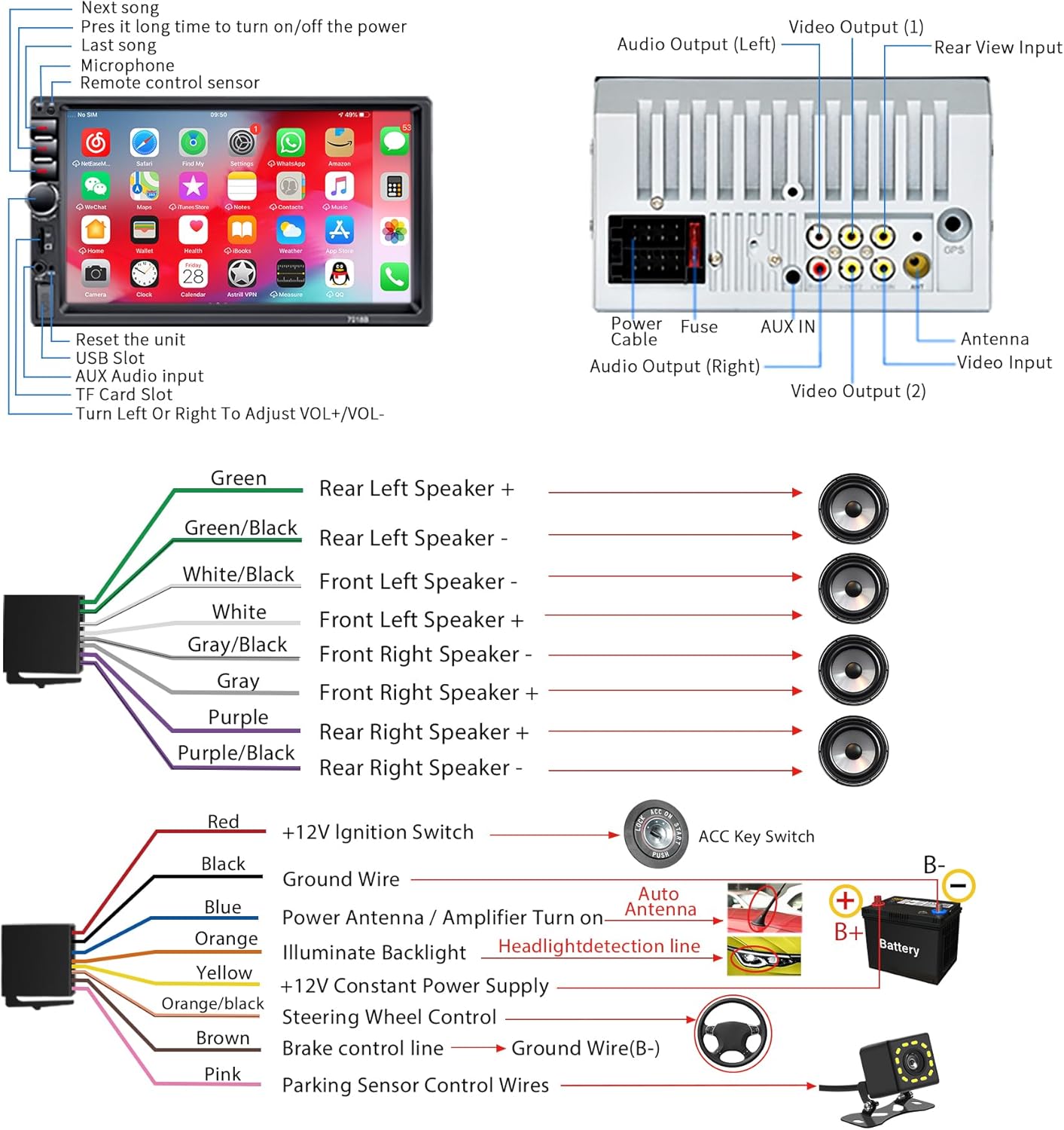
Familiarize yourself with the main components and connections of your car stereo.
5. 설치
5.1 전원 공급 요구 사항
This car audio system is designed for a 12V DC car power supply only. Before installation, confirm your vehicle's power supply specifications. Using an incorrect power supply can damage the unit and void the warranty.
5.2 배선도
Refer to the following diagram for correct wiring connections. It is highly recommended to have this unit installed by a qualified professional.
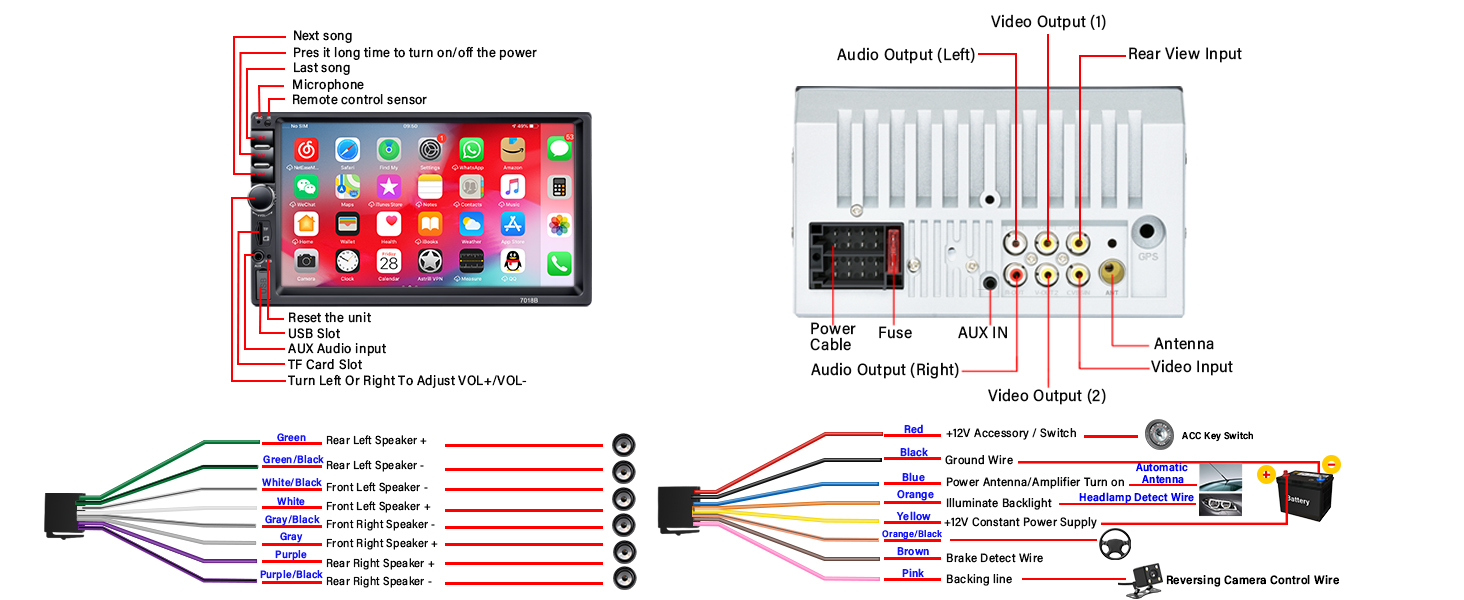
- 빨간색 선: Connect to +12V Ignition Switch (ACC).
- 검은색 와이어: Connect to Ground (GND).
- 노란색 와이어: Connect to +12V Constant Power Supply.
- 블루 와이어 : Connect to Power Antenna or Amplifier Turn On.
- 오렌지 와이어: Connect to Headlight Detection Line for backlight illumination.
- 갈색 와이어: Connect to Brake Control Line.
- 핑크 와이어: Connect to Parking Sensor Control Wires for reversing camera trigger.
- 스피커 전선: Connect according to the color codes for front and rear, left and right speakers (Green, Green/Black, White, White/Black, Gray, Gray/Black, Purple, Purple/Black).
5.3 후방 카메라 설치
포함된 HD 야간 투시 후방 카메라 view 카메라는 넓은 범위를 제공합니다 viewing angle and is fully waterproof. Connect it as shown in the diagram below for automatic display when reversing.

6. 사용 설명서
6.1 기본 작업
- 전원 켜기/끄기: Press and hold the power button on the front panel. A short press typically mutes/unmutes.
- 볼륨 조절: 전면 패널의 회전식 노브를 사용하여 볼륨을 조절하십시오.
- 재설정 : A small reset button is available on the front panel (refer to Figure 4.1) for system restarts if needed.
6.2 블루투스 연결
The stereo supports Bluetooth for hands-free calling and audio streaming.

- 휴대폰에서 블루투스를 활성화합니다.
- 검색 available devices on your phone and select "RB-7018B" (or similar name).
- 두 기기 모두에서 페어링이 완료되었는지 확인하십시오.
- 연결되면 무선으로 전화를 걸고 받을 수 있으며 오디오를 스트리밍할 수 있습니다.
6.3 미러링크 기능
Mirror Link allows you to display your smartphone's screen on the car stereo. Android phones support two-way connection, while iOS phones support one-way projection.

- Connect your smartphone to the stereo using a USB data cable.
- Follow the on-screen prompts on the stereo and your phone to establish the connection.
- 연결되면 휴대폰 화면이 스테레오에 표시됩니다.
6.4 FM 라디오
Access local radio stations and stay updated with news and music.

- Select the FM Radio application from the main menu.
- Use the "BAND" button to switch between FM bands.
- Use the search buttons to automatically scan for stations or manually tune to a frequency.
6.5 미디어 재생 (USB, TF 카드, AUX)
The stereo supports multiple media input options for playing audio and video files.

- USB: Insert a USB drive into the USB slot. The system will automatically detect and play compatible media files. Supports fast charging for mobile phones.
- TF 카드: Insert a TF (MicroSD) card into the TF card slot. The system will access media file카드에 저장됩니다.
- 보조: Connect an external audio device using a 3.5mm audio cable to the AUX input. Select AUX mode on the stereo to play audio from the connected device.
6.6 이퀄라이저(EQ) 설정
Customize your audio experience with the built-in equalizer settings.
- 오디오 메뉴에서 EQ 설정을 이용할 수 있습니다.
- Choose from preset equalizer modes or manually adjust frequency bands to suit your preferences.
6.7 스티어링 휠 컨트롤(SWC)
If your vehicle supports steering wheel controls, you can connect them to the stereo for convenient operation.

- Connect the SWC wires from your vehicle to the corresponding inputs on the stereo's wiring harness (refer to Figure 5.1).
- 스테레오 설정 메뉴에서 SWC 학습 기능을 사용하여 버튼을 프로그래밍하십시오.
7. 유지관리
- Clean the screen with a soft, lint-free cloth. Do not use abrasive cleaners or solvents.
- 장치에 먼지나 이물질이 없도록 하세요.
- 과열을 방지하려면 장치 주변에 적절한 환기가 이루어지도록 하십시오.
8. 문제 해결
| 문제 | 가능한 원인 | 해결책 |
|---|---|---|
| 전원이 없습니다 | 배선 오류; 퓨즈 단선; 전원 공급 부족. | Check all power connections (Red, Yellow, Black wires). Verify the fuse. Ensure 12V DC power supply. |
| 소리가 나지 않습니다 | 스피커선이 잘못 연결됨; 볼륨이 너무 낮음; 음소거 기능이 활성화됨. | Check speaker wiring. Increase volume. Deactivate mute. |
| 블루투스가 연결되지 않습니다 | 휴대폰/스테레오에서 블루투스가 활성화되어 있지 않음; 기기가 페어링 모드가 아님; 간섭 발생. | Ensure Bluetooth is active on both devices. Try restarting both devices. Move closer to the stereo. |
| Mirror Link issues (iPhone 16/17) | Compatibility challenges with newer iOS versions. | For iPhone 16 & 17 users experiencing issues, please contact customer support directly from your order page for an upgrade guide and assistance. |
| 후방 카메라 영상이 표시되지 않습니다 | Camera not powered; Video cable loose; Pink trigger wire not connected. | Check camera power and video connections. Ensure the pink trigger wire is correctly connected to the reversing lamp. |
9. 사양
| 특징 | 세부 사항 |
|---|---|
| 모델 번호 | RB-7018B |
| 화면 크기 | 7인치 HD 터치스크린 |
| 전원 공급 장치 | 12V 직류 |
| 연결성 | 블루투스, USB, AUX, TF 카드 |
| 특별 기능 | Bluetooth Hands-Free Calling, Mirror Link, FM Tuner, EQ Settings, Reversing Camera Support, USB Fast Charging |
| 오디오 출력 모드 | 스테레오 재생 |
| 서라운드 사운드 채널 구성 | 4.0 |
| 비디오 인코딩 지원 | RM, RMVB, AVI, MP4, MKV, 3GP |
| 제품 치수 | 3.94 x 2.56 x 3.94 인치 |
| 품목 무게 | 1.72파운드 |
10. 고객 지원
If you encounter any issues or have questions regarding your LSLYA RB-7018B Car Stereo, please contact our customer support team. For specific issues like those with iPhone 16 & 17 Mirror Link, reach out directly from your order page for specialized assistance and upgrade guides.
추가 지원이 필요하면 다음을 방문하세요. LSLYA Store on Amazon.


