제품 끝view
The GEREE Wireless WiFi Video Doorbell Camera (Model Q8) is designed to enhance your home security with advanced features such as human motion detection, two-way audio, and wide-angle video. This battery-powered device offers convenient monitoring and communication from anywhere via its dedicated mobile application.

Figure 1: GEREE Wireless WiFi Video Doorbell Camera with smartphone interface.
주요 특징:
- 양방향 오디오 : Communicate with visitors at your door from your smartphone, even when you are away. This feature allows for real-time conversations with couriers or guests.
- 즉시 알림: Receive immediate alerts on your phone via the Aiwit APP when motion is detected or the doorbell is pressed.
- 2.4G Stable WiFi Connectivity: Ensures reliable connection for video streaming and notifications. Note: This device supports 2.4GHz WiFi only, not 5GHz.
- 클라우드 스토리지: Provides 3 days of loop recording free cloud storage. Extended cloud services may be available for purchase within the app.
- Accurate Humanoid Detection: Configurable motion detection to specifically identify human movements, reducing false alarms from animals or vehicles. Sensitivity settings (High, Medium, Low) are available.
- IP65 방수: Designed to withstand various weather conditions, ensuring durability for outdoor installation.
- 충전식 배터리: Equipped with long-lasting lithium batteries for extended operation. Battery status can be monitored via the Aiwit APP.
- Multiple-User Sharing: Share access to the doorbell's live feed and recordings with up to 7 family members or friends.
- 야간 투시경: Provides clear video monitoring in low-light conditions and at night.
설치 가이드
Follow these steps for initial setup and installation of your GEREE Video Doorbell.
1. 초기 충전
Before first use, remove the insulation tape from the batteries and fully charge the doorbell. You can check the charging status in the Aiwit APP 일단 연결.

Figure 2: Charging the doorbell batteries.
2. 앱 다운로드 및 설치
검색 그리고 다운로드 아이윗 application from your device's app store (App Store for iOS or Google Play for Android).

Figure 3: Easy setup process: Download app, connect, and enjoy.
3. 와이파이에 연결
열기 Aiwit APP and follow the on-screen instructions to connect your doorbell camera to your 2.4GHz WiFi network. Ensure your WiFi signal strength is adequate for optimal performance (signal strength around -40 is stable; exceeding -60 indicates a very weak signal).
4. 물리적 설치
The package includes all necessary installation accessories. Mount the doorbell securely using the provided screws and wall anchors. Refer to the user manual included in the package for detailed installation diagrams.

Figure 4: Installation accessories and dimensions.
작동 지침
양방향 오디오 커뮤니케이션
When a visitor presses the doorbell or motion is detected, you will receive a notification on your smartphone. Open the Aiwit APP 에게 view the live feed and use the two-way talk button to communicate with the person at your door.
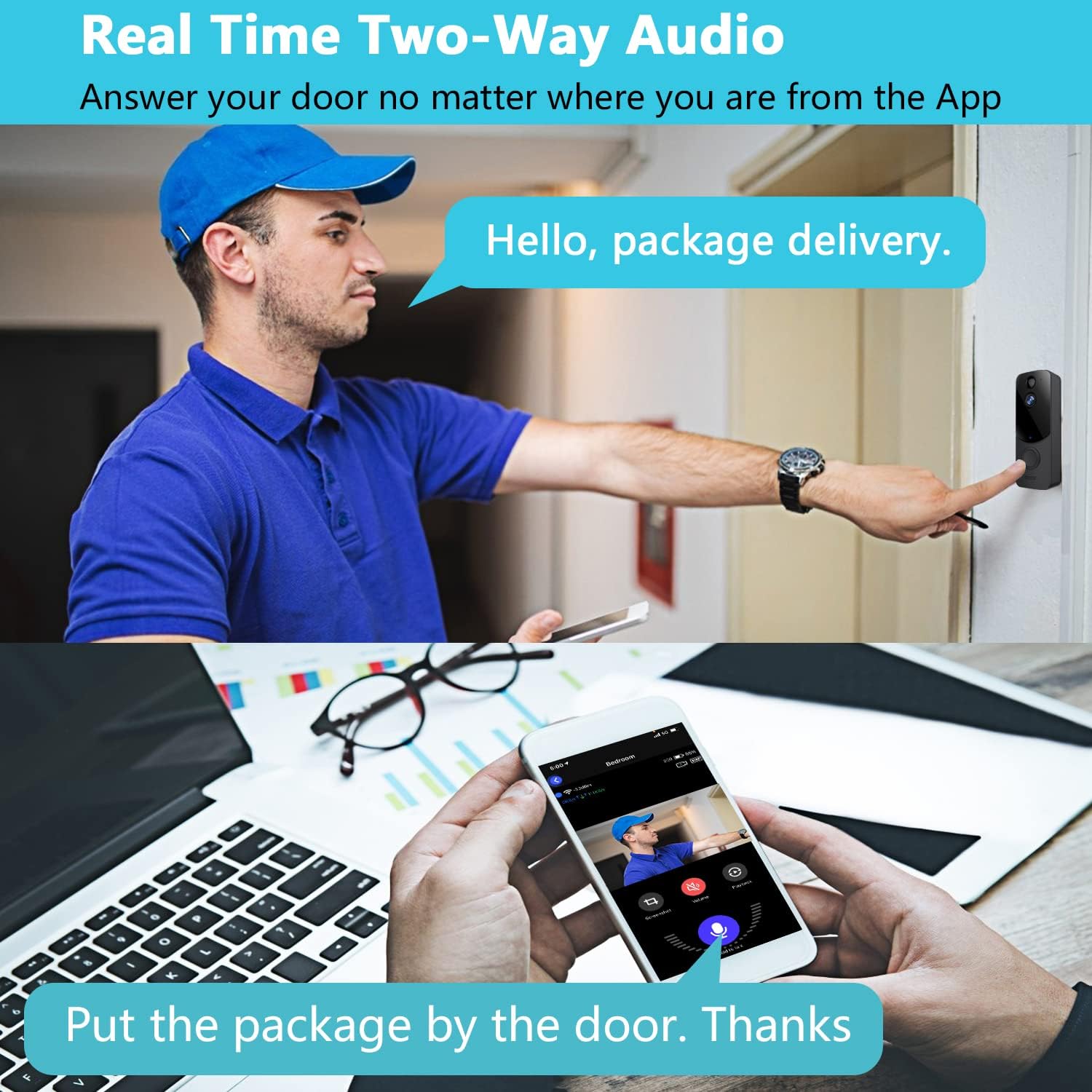
Figure 5: Real-time two-way audio in action.
동작 감지 설정
Configure the humanoid detection sensitivity within the Aiwit APP. You can choose between High, Medium, or Low settings to optimize detection and minimize unwanted alerts. For example, setting it to around 50 can reduce interruptions, while setting it to 1 will detect even cars.

Figure 6: Humanoid detection settings and alerts.
Cloud Storage Access
Recorded videos are automatically uploaded to the cloud. Access your video history through the Aiwit APP. The doorbell provides 3 days of loop recording. For longer storage, consider purchasing additional cloud services via the app.

Figure 7: Cloud storage interface and video timeline.
나이트 비전
The doorbell automatically switches to infrared night vision in low-light conditions, providing clear black-and-white video footage.

그림 8: 낮과 밤의 시야 비교.
다중 사용자 공유
To share access with family or friends, navigate to the sharing options within the Aiwit APP and invite other users. Up to 7 users can access the doorbell simultaneously.
유지
배터리 충전
The doorbell is powered by rechargeable lithium batteries. When the battery level is low, you will receive a notification via the Aiwit APP. Remove the doorbell from its mounting bracket and charge it using the provided USB cable. The charging status can be monitored in the app.
내후성
The GEREE doorbell is IP65 weatherproof, designed to withstand rain and snow. Periodically inspect the device for any debris or obstructions on the camera lens or motion sensor to ensure optimal performance.
문제 해결
- No Notifications on Phone: 확인하십시오 Aiwit APP is running in the background and that push notifications are enabled for the app in your phone's settings. If the app is closed, you may not receive video call reminders.
- Poor Video Quality or Disconnections: Check your WiFi signal strength. If the signal is weaker than -60, consider moving your WiFi router closer or using a WiFi extender to strengthen the signal to the doorbell.
- 배터리 수명이 짧음: Ensure the batteries are fully charged before initial use. High motion detection sensitivity or frequent live view access can drain the battery faster. Adjust motion detection settings to reduce unnecessary recordings.
- Doorbell Not Ringing Indoors: The video doorbell and indoor chime are sold separately. If you require an indoor chime, please ensure you have purchased and paired it according to its specific instructions.
- 허위 모션 경고: Adjust the humanoid detection sensitivity in the Aiwit APP to a lower setting (e.g., around 50) to prevent alerts from non-human movements like animals or passing vehicles.
명세서
| 특징 | 사양 |
|---|---|
| 모델명 | Q8 |
| 상표 | 지리 |
| 비디오 캡처 해상도 | 720p |
| View잉 각도 | 166도 |
| 무선 통신 기술 | Wi-Fi(2.4GHz만 해당) |
| 전원 | 배터리 구동(리튬 금속 배터리 2개 포함) |
| 재료 | 아크릴로니트릴 부타디엔 스티렌(ABS) |
| 품목 치수(L x W x H) | 13.5 x 5.6 x 3 센티미터 |
| 품목 무게 | 300g |
| 특별 기능 | Motion Sensor, Night Vision, Two-Way Audio |
| 설치 유형 | Screw In / Wall Mount |
| IP 등급 | IP65 비바람에 잘 견디는 |
보증 및 지원
The GEREE Wireless WiFi Video Doorbell Camera comes with a 1년 보증 from the date of purchase. For technical support, troubleshooting assistance, or warranty claims, please contact GEREE customer service through the contact information provided on the product packaging or the official GEREE website. Please have your model number (Q8) and purchase details ready when contacting support.


