1. 서론
This manual provides essential instructions for the safe and efficient operation of your Crosley CR6252A-YS Portfolio 3-Speed Bluetooth Turntable. Please read this manual thoroughly before using the product and retain it for future reference.
The Crosley Portfolio turntable is designed to play vinyl records at three speeds and features built-in speakers, Bluetooth connectivity for wireless audio streaming, and a moving magnetic cartridge for audio reproduction.

Figure 1.1: Crosley CR6252A-YS Portfolio Turntable (Open View)
2. 안전 지침
- 사용하기 전에 모든 지침을 읽으세요.
- 제품을 물이나 습기에 닿지 않는 곳에 보관하세요.
- 라디에이터, 난방 조절기, 스토브 또는 열을 발생시키는 기타 기기와 같은 열원 근처에 두지 마십시오.
- 마른 천으로만 닦으십시오.
- 제조사가 지정한 부속품/액세서리만 사용하세요.
- 번개 폭풍 시 또는 장기간 사용하지 않을 때는 기기의 플러그를 뽑아두세요.
- 모든 서비스는 자격을 갖춘 서비스 담당자에게 의뢰하십시오. 전원 코드나 플러그가 손상되었거나, 액체가 쏟아졌거나, 물체가 기기에 떨어졌거나, 기기가 비나 습기에 노출되었거나, 정상적으로 작동하지 않거나, 떨어졌을 때와 같이 기기가 어떤 식으로든 손상된 경우 서비스가 필요합니다.
3. 패키지 내용
아래 나열된 모든 품목이 패키지에 포함되어 있는지 확인하세요.
- Crosley CR6252A-YS Portfolio Turntable
- 전원 어댑터
- 사용 설명서 (본 문서)
4. 제품 특징 및 구성품
The Crosley CR6252A-YS Portfolio Turntable includes the following key features and components:
- 3단 속도 턴테이블: 33 1/3, 45, 78 RPM 레코드를 지원합니다.
- 내장형 블루투스 수신기: 호환되는 기기에서 무선 스트리밍을 지원합니다.
- 피치 조절 가능: Fine-tune record speed.
- Moving Magnetic Cartridge: Pre-mounted for optimal sound.
- 보조 입력: 외부 오디오 소스를 연결하세요.
- USB Enabled: For PC connection.
- 내장 스피커: 통합 오디오 출력.

Figure 4.1: Turntable Mechanism and Controls
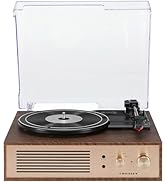
그림 4.2: 제어판 상세도

그림 4.3: 후면 패널 연결
5. 설정
5.1 초기 배치
Place the turntable on a flat, stable surface away from direct sunlight, heat sources, and excessive dust or vibrations.
5.2 전원 연결
- Connect the power adapter to the DC 12V input jack on the rear of the turntable.
- 전원 어댑터를 적합한 벽면 콘센트에 꽂으세요.
5.3 Turntable Preparation
- Carefully remove any protective packaging materials from the turntable platter and tonearm.
- 톤암이 거치대에서 잠금 해제되어 있는지 확인하십시오.
6. 사용 설명서
6.1 레코드 재생
- 켜다 켜짐/꺼짐 knob clockwise to power on the unit.
- Select the desired speed (33 1/3, 45, or 78 RPM) using the speed selector switch. Note: A 78 RPM stylus (not included) is required for 78 RPM records.
- Place a record on the turntable platter. If playing a 45 RPM single, place the 45 RPM adapter (if included) over the spindle.
- Lift the tonearm using the cueing lever and position it over the desired track on the record.
- 큐잉 레버를 사용하여 톤암을 천천히 레코드판 위로 내리십시오. 레코드판이 재생되기 시작합니다.
- 를 사용하여 볼륨을 조정합니다. 용량 손잡이.
- 사용하세요 정점 control knob to fine-tune the playback speed if necessary.
- To stop playing, lift the tonearm, return it to its rest, and turn the 켜짐/꺼짐 시계 반대 방향으로 손잡이.
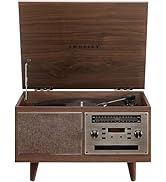
Figure 6.1: Stylus on Record
6.2 블루투스 작동
- 켜다 켜짐/꺼짐 knob clockwise to power on the unit.
- Slide the function switch to the 블루투스 position. The indicator light will flash, indicating pairing mode.
- Enable Bluetooth on your external device (e.g., smartphone, tablet) and search for "Crosley Portfolio".
- Select "Crosley Portfolio" from the list of available devices to pair. Once paired, the indicator light will stop flashing and remain solid.
- You can now stream audio wirelessly from your device to the turntable's built-in speakers.
- 를 사용하여 볼륨을 조정합니다. 용량 knob on the turntable and/or your external device.
6.3 보조 입력(AUX IN)
- 켜다 켜짐/꺼짐 knob clockwise to power on the unit.
- 외부 오디오 장치(예: MP3 플레이어, CD 플레이어)를 연결하세요. AUX IN 3.5mm 오디오 케이블(별도 구매)을 사용하여 포트에 연결할 수 있습니다.
- 턴테이블이 자동으로 AUX IN 모드로 전환됩니다.
- 를 사용하여 볼륨을 조정합니다. 용량 knob on the turntable and/or your external device.
6.4 USB 연결
The turntable features a PC-USB port for connecting to a computer. This allows for digital conversion of your vinyl records using appropriate software (not included). Refer to your chosen software's instructions for recording procedures.
7. 유지관리
7.1 턴테이블 청소
- 턴테이블을 청소하기 전에는 항상 전원 콘센트에서 플러그를 뽑으십시오.
- 부드럽고 마른 천으로 외부 표면을 닦으십시오. 연마성 세제나 용제를 사용하지 마십시오.
- 스타일러스 청소용으로 제작된 부드러운 브러시를 사용하여 스타일러스를 뒤쪽에서 앞쪽으로 부드럽게 닦아주세요.
7.2 스타일러스 교체
The stylus (needle) is a consumable part and will wear out over time. A worn stylus can damage your records and degrade sound quality. Replace the stylus after approximately 200-300 hours of playback. Consult your retailer or Crosley support for compatible replacement styli.
8. 문제 해결
| 문제 | 가능한 원인 | 해결책 |
|---|---|---|
| 전원이 없습니다 | 전원 어댑터가 연결되지 않았거나 콘센트에 결함이 있습니다. | 전원 어댑터가 안전하게 연결되어 있고 콘센트가 작동하는지 확인하세요. |
| 스피커에서 소리가 나지 않음 | Volume too low; function switch in wrong position; Bluetooth not paired. | Increase volume; ensure function switch is set to PHONO or Bluetooth is correctly paired. |
| 기록 건너뛰기 | Record is dirty or damaged; stylus is worn; turntable not level. | Clean record; replace stylus; ensure turntable is on a level surface. |
| 블루투스 기기가 페어링되지 않습니다 | Turntable not in pairing mode; device too far; device already paired to another unit. | Ensure turntable is in Bluetooth pairing mode; move device closer; disconnect from other Bluetooth devices. |
9. 사양
- 제품 크기: 12.4 x 15.28 x 6.5 인치
- 품목 무게: 13파운드
- 품목 모델 번호: CR6252A-YS
- 상표: 크로슬리
- 포함된 구성 요소: CR6252A-YS Portfolio Turntable
- 스타일: 빈tage
- 색상: Yellow Submarine
- 신호 형식: 비슷한 물건
- 전원: 코드식 전기
- 한국어: 710244246569
10. 보증 및 지원
For warranty information and technical support, please refer to the warranty card included with your product or visit the official Crosley web사이트. 보증 청구에 대비해 구매 증빙 자료로 구매 영수증을 보관하세요.
제조업체: 크로슬리
첫 이용 가능 날짜: 30년 2021월 XNUMX일


