1. 서론
This manual provides essential information for the safe and efficient use of your Samsung QM85R 85-inch 4K UHD LCD Display. Please read this manual thoroughly before operating the device and retain it for future reference. The Samsung QM85R is a commercial-grade display designed for continuous operation, featuring a 4K UHD resolution and integrated MagicINFO S6 and SSSP 6.0 for advanced content management.
2. 안전 정보
감전, 화재 또는 디스플레이 손상을 방지하기 위해 항상 다음 안전 수칙을 준수하십시오.
- 전원: Use only the specified power supply. Ensure the power cord is securely plugged into an appropriate outlet.
- 통풍: Do not block ventilation openings. Ensure adequate space around the display for proper airflow to prevent overheating.
- 액체 노출: Keep the display away from liquids. Do not expose it to rain or moisture.
- 청소: Disconnect the power cord before cleaning. Use a soft, dry cloth. Avoid using liquid or aerosol cleaners directly on the screen.
- 설치: If wall-mounting, ensure the wall mount is compatible with the display's weight and VESA standards. Professional installation is recommended for large displays.
- 서비스: 이 제품을 직접 수리하려고 하지 마십시오. 모든 서비스는 자격을 갖춘 서비스 담당자에게 문의하십시오.
3. 패키지 내용
Please check that the following items are included with your display. If any items are missing, contact your vendor.
- Samsung QM85R 85-inch 4K UHD LCD Display
- 전원 코드
- 배터리를 사용한 원격 제어
- 사용 설명서 (본 문서)
- 보증 카드(지역에 따라 다를 수 있음)
4. 설정
4.1 물리적 설치
The Samsung QM85R display can be installed using a compatible wall mount or a floor stand (sold separately). Due to its size and weight (approximately 140.4 pounds), professional installation is highly recommended.
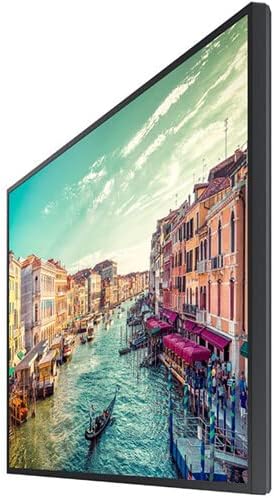
그림 1: 옆 view of the Samsung QM85R display. Note the slim design suitable for various mounting options.
4.2 연결 케이블
케이블을 연결하기 전에 디스플레이와 연결된 모든 장치의 전원이 꺼져 있는지 확인하십시오.
- 전원 연결: 전원 코드를 디스플레이의 전원 입력 단자에 연결한 다음 접지된 전기 콘센트에 연결합니다.
- 비디오 입력 : Connect your video source (e.g., PC, media player) to one of the display's HDMI or DisplayPort inputs using appropriate cables. The display supports 4K UHD (3840x2160) resolution.
- 네트워크 연결 : For MagicINFO S6 and SSSP 6.0 functionality, connect an Ethernet cable to the display's LAN port for network access.
- 기타 연결: Connect any other peripheral devices as required (e.g., USB devices, audio output).
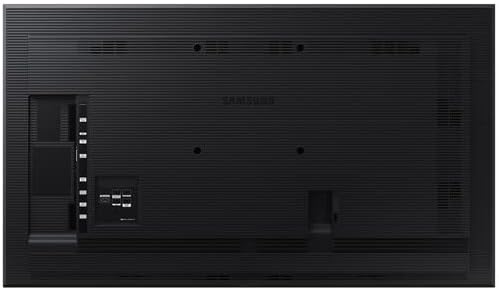
그림 2: 뒤쪽 view of the Samsung QM85R display, illustrating the location of power, video, and network ports.
4.3 초기 전원 켜기
After all connections are made, power on the display using the power button on the remote control or the display itself. Follow any on-screen prompts for initial setup, such as language selection and network configuration.
5. 운영
5.1 기본 컨트롤
Use the provided remote control to access the display's functions:
- 전원 버튼: 디스플레이를 켜거나 끕니다.
- 소스 버튼 : Cycles through available input sources (HDMI1, HDMI2, DisplayPort, etc.).
- 메뉴 버튼: OSD(화면 디스플레이) 메뉴를 엽니다.
- 탐색 버튼(위/아래/왼쪽/오른쪽): 메뉴 옵션을 탐색합니다.
- 입력 버튼: 메뉴에서 선택한 내용을 확인합니다.
5.2 디스플레이 설정
OSD 메뉴에 접근하여 다양한 디스플레이 설정을 조정하세요.
- 사진 모드: Select from preset modes (e.g., Standard, Dynamic, Custom) or adjust individual settings like brightness, contrast, sharpness, and color temperature.
- 해결: The display natively supports 3840x2160 (4K UHD) resolution. Ensure your source device is configured to output this resolution for optimal clarity.
- 새로 고침 빈도: The display operates at a 75Hz refresh rate, providing smooth motion for compatible content.
- 오디오: Adjust volume, mute, and select audio output options if external speakers are connected.
5.3 Smart Signage Platform (SSSP 6.0) and MagicINFO S6
The QM85R features Samsung's integrated Smart Signage Platform (SSSP 6.0) powered by MagicINFO S6. This allows for advanced content management, scheduling, and remote control capabilities. Refer to the dedicated MagicINFO S6 user guide for detailed instructions on utilizing these features.
6. 유지관리
6.1 디스플레이 청소
To maintain the display's appearance and performance:
- 화면: 부드럽고 보풀이 없는 천으로 화면을 부드럽게 닦으세요. 잘 지워지지 않는 얼룩은 가볍게 닦아주세요.ampen the cloth with water or a specialized screen cleaner, then wipe dry immediately. Do not spray liquids directly onto the screen.
- 몸: Wipe the display's frame and back panel with a soft, dry cloth.
- 피하다: Do not use abrasive cleaners, waxes, or solvents (e.g., alcohol, benzene, paint thinner) as they can damage the display surface.
6.2 환경 고려 사항
Ensure the display is operated within its specified temperature and humidity ranges to ensure longevity and optimal performance. Avoid direct sunlight exposure and extreme temperature fluctuations.
7. 문제 해결
화면 표시와 관련하여 문제가 발생할 경우, 고객 지원팀에 문의하기 전에 다음의 일반적인 문제 및 해결 방법을 참조하십시오.
| 문제 | 가능한 원인 | 해결책 |
|---|---|---|
| 전원이 없습니다 | 전원 코드가 분리되었습니다. 전원 콘센트 문제입니다. | 전원 코드 연결을 확인하세요. 다른 기기로 콘센트를 테스트해 보세요. |
| 신호 없음 | 잘못된 입력 소스가 선택되었습니다. 비디오 케이블이 분리되었습니다. | Press the 'Source' button on the remote to select the correct input. Ensure video cables are securely connected. |
| 화질이 나쁘다 | 해상도가 올바르지 않습니다. 디스플레이 설정이 잘못되었습니다. | Ensure source device outputs 3840x2160 resolution. Adjust picture settings (brightness, contrast) in the OSD menu. |
| 리모컨이 작동하지 않습니다 | 배터리 방전, 방해. | Replace batteries. Ensure no obstructions between remote and display's IR receiver. |
8. 사양
| 특징 | 사양 |
|---|---|
| 모델명 | QM85R |
| 화면 크기 | 85 인치 |
| 해결 | 3840 x 2160(4K UHD) |
| 새로 고침 빈도 | 75Hz |
| 명도 | 500니트 |
| 영업시간 | 24/7 |
| 내장된 기능 | MagicINFO S6, SSSP 6.0 |
| 제품 크기(LxWxH) | 82.52 x 49.02 x 10.51 인치 |
| 품목 무게 | 140.4파운드 |
| 색상 | 검은색 |
| 제조업체 | 삼성 |
9. 보증 및 지원
Your Samsung QM85R display is covered by a manufacturer's warranty. For specific warranty terms and conditions, please refer to the warranty card included with your product or visit the official Samsung web본 사이트는 기술 지원이 필요한 경우, 본 설명서에 나와 있는 내용 외의 문제 해결 또는 서비스 문의를 위해 삼성 고객 지원 센터로 연락해 주십시오.
온라인 지원: 방문하다 www.samsung.com/us/support/
전화 지원: 해당 지역의 삼성 고객 지원 연락처 정보를 참조하십시오.


