소개
제품 끝view
써드리엘리티(THIRDREALITY) 지그비 누수 감지 센서는 물 누수 및 물방울 떨어짐을 감지하여 가정 내 물 피해를 예방하는 데 도움을 주는 즉각적인 알림을 제공합니다. 120dB의 큰 경보음을 내며, 호환되는 지그비 허브에 연결하면 앱으로 알림을 받을 수 있습니다.

상자 안에 무엇이 들어있나요?
- 써드리엘리티 지그비 누수 감지기
- 고감도 부착 장치(누출 감지용)
- AAA 1.5V 알칼리 배터리 2개
- 드라이버

설정
배터리 설치
제공된 드라이버를 사용하여 센서 뒷면 덮개의 나사를 제거합니다. 극성을 확인하여 AAA 1.5V 알칼리 배터리 2개를 삽입합니다. 뒷면 덮개를 다시 닫고 나사를 조입니다.
고감도 물방울 감지 액세서리 부착
고감도 부착 장치는 향상된 누수 감지 기능을 제공하도록 설계되었습니다. 설치 방법:
- 센서 뒷면의 나사를 제거하세요.
- 부착물의 A 부분과 B 부분을 센서 베이스에 나사 구멍에 맞춰 조심스럽게 위치시키십시오. B 부분의 방향(왼쪽 또는 오른쪽)은 기능에 영향을 미치지 않습니다.
- 나사를 다시 끼우고 조여서 부착물을 고정하십시오.
- 이 액세서리를 사용하면 센서가 물방울 몇 개까지 감지하여 경보를 울릴 수 있습니다.

지그비 허브와 페어링하기
Zigbee 허브(예: SmartThings, Aeotec, Third Reality Hub, Home Assistant)의 전원이 켜져 있고 페어링 모드인지 확인하십시오. 새 Zigbee 장치를 추가하는 방법은 허브의 설명서를 참조하십시오. 센서는 전원이 켜지면 자동으로 페어링을 시도합니다. 페어링이 완료되면 허브 애플리케이션에 표시됩니다.
작업
놓기
센서를 물이 새기 쉬운 평평한 표면에 놓으십시오. 예를 들어 싱크대 아래(주방, 욕실), 세탁기나 식기세척기 근처, 지하실이나 다용도실, 온수기나 변기 옆 등이 있습니다. 센서(또는 누수 감지기) 바닥의 금속 접촉면이 누수가 발생할 수 있는 표면에 직접 닿도록 하십시오.
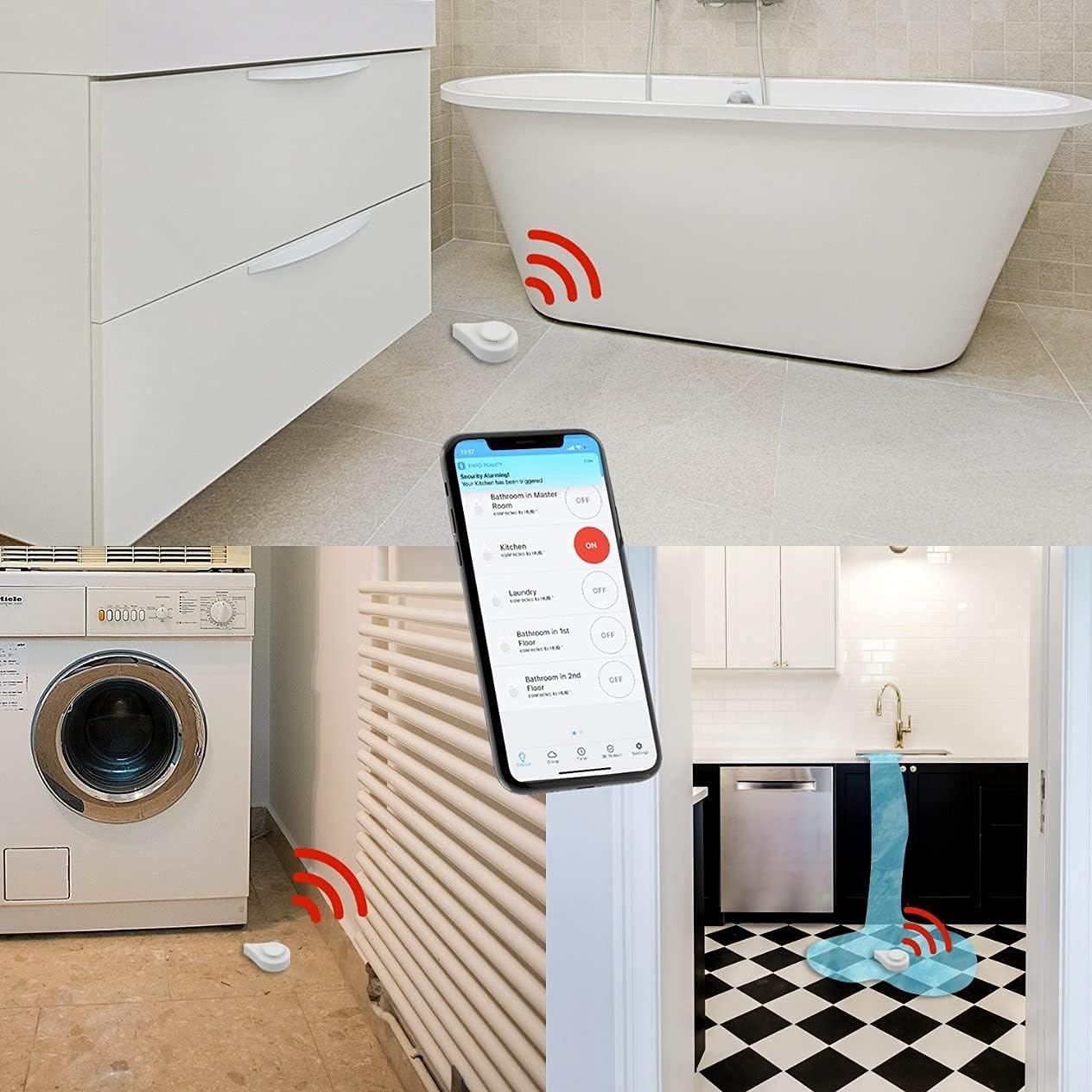
알람 기능
센서가 물을 감지하면 120dB의 큰 경보음이 울립니다. 호환되는 Zigbee 허브에 연결된 경우 앱으로 즉시 알림을 받고 경우에 따라 이메일 알림도 받을 수 있습니다. 경보는 Third Reality 앱 또는 연결된 스마트 홈 애플리케이션을 통해 활성화 또는 비활성화할 수 있습니다. 사이렌 타이머 또한 앱에서 조정할 수 있습니다.
앱 모니터링
Third Reality 앱은 센서의 실시간 상태 업데이트, 배터리 잔량 및 과거 데이터를 제공합니다.

유지
배터리 교체
이 센서는 AAA 1.5V 알칼리 배터리 2개를 사용하며, 최대 3년 동안 사용할 수 있습니다. 배터리 잔량이 부족하면 설정 섹션의 배터리 설치 단계를 따라 배터리를 교체하십시오.
청소
센서를 마른 천으로 깨끗이 닦아주세요. 기기를 물에 담그지 마세요.
문제 해결
센서 페어링 안 됨
- 센서가 지그비 허브의 범위 내에 있는지 확인하십시오.
- 허브가 페어링 모드인지 확인하십시오.
- 배터리가 올바르게 설치되고 충전되었는지 확인하십시오.
- 센서를 재설정해 보세요(허브 설명서에 재설정 절차가 나와 있으면 참조하거나 배터리를 다시 삽입하세요).
거짓 경보
- 센서 접점이 건조하고 깨끗한지 확인하십시오.
- 누수 감지 장치를 사용하는 경우, 장치가 잔류 습기나 높은 습도에 닿지 않도록 하여 감지 기능이 작동하지 않도록 하십시오.
앱 알림 없음
- 센서가 지그비 허브와 성공적으로 페어링되고 연결되었는지 확인하십시오.
- Third Reality 앱 또는 스마트 홈 애플리케이션에서 알림 설정을 확인하세요.
- 휴대전화에 인터넷 연결이 되어 있는지 확인하세요.
명세서
| 모델 번호 | P1WLSB1 |
|---|---|
| 전원 | AAA 1.5V 알칼리 배터리 2개 (포함) |
| 배터리 수명 | 최대 3년 |
| 알람 볼륨 | 120데시벨 |
| 연결성 | 지그비 |
| 제어 방법 | 앱, 터치 |
| 센서 기술 | 정전식 센서 |
| 제품 치수 | 3.19 x 2.17 x 1.14 인치 |
| 품목 무게 | 2.82 온스 |
| 색상 | 하얀색 |
| 설치 방법 | 바닥 장착형 |
보증 및 지원
보증 정보
자세한 보증 정보는 THIRDREALITY 공식 웹사이트를 방문하십시오. web대지: www.3reality.com/warranty.
고객 지원
문제가 발생하거나 질문이 있는 경우 THIRDREALITY 고객 지원팀에 문의하십시오.