소개
Thank you for choosing the AULA F2066-II USB Wired Keyboard. This manual provides essential information for setting up, operating, and maintaining your keyboard. Please read it carefully to ensure optimal performance and longevity of your device.
설치 지침
- 키보드 풀기: Carefully remove the AULA F2066-II keyboard from its packaging. Ensure all components are present.
- 컴퓨터에 연결: 컴퓨터 또는 노트북에서 사용 가능한 USB 포트를 찾으세요. 키보드의 USB 커넥터를 해당 USB 포트에 단단히 꽂으세요.
- 드라이버 설치: 키보드는 플러그 앤 플레이 방식입니다. 운영 체제(Windows, macOS, Linux)에서 필요한 드라이버를 자동으로 감지하여 설치합니다. 일반적으로 추가 소프트웨어 설치는 필요하지 않습니다.
- 테스트 기능: 텍스트 편집기 또는 텍스트 입력을 지원하는 애플리케이션을 열고 모든 키가 제대로 작동하는지 확인하기 위해 타이핑 테스트를 해보세요.

Image: The AULA F2066-II USB Wired Keyboard, showcasing its full layout and RGB backlighting. This image illustrates the keyboard's design and key arrangement.
작동 지침
The AULA F2066-II keyboard features a standard layout with additional multimedia functions. It supports both English and Arabic languages.
기본 사용법:
- 타자: 표준 텍스트 입력에는 영숫자 키를 사용하세요.
- 기능 키(F1-F12): 이 키들은 표준적인 기능을 수행합니다.
- 숫자 키패드: The dedicated numeric keypad on the right provides quick entry for numbers and calculations.
멀티미디어 키 조합:
This keyboard includes various multimedia functions accessible via the FN key combined with other keys. Refer to the table below for specific combinations.
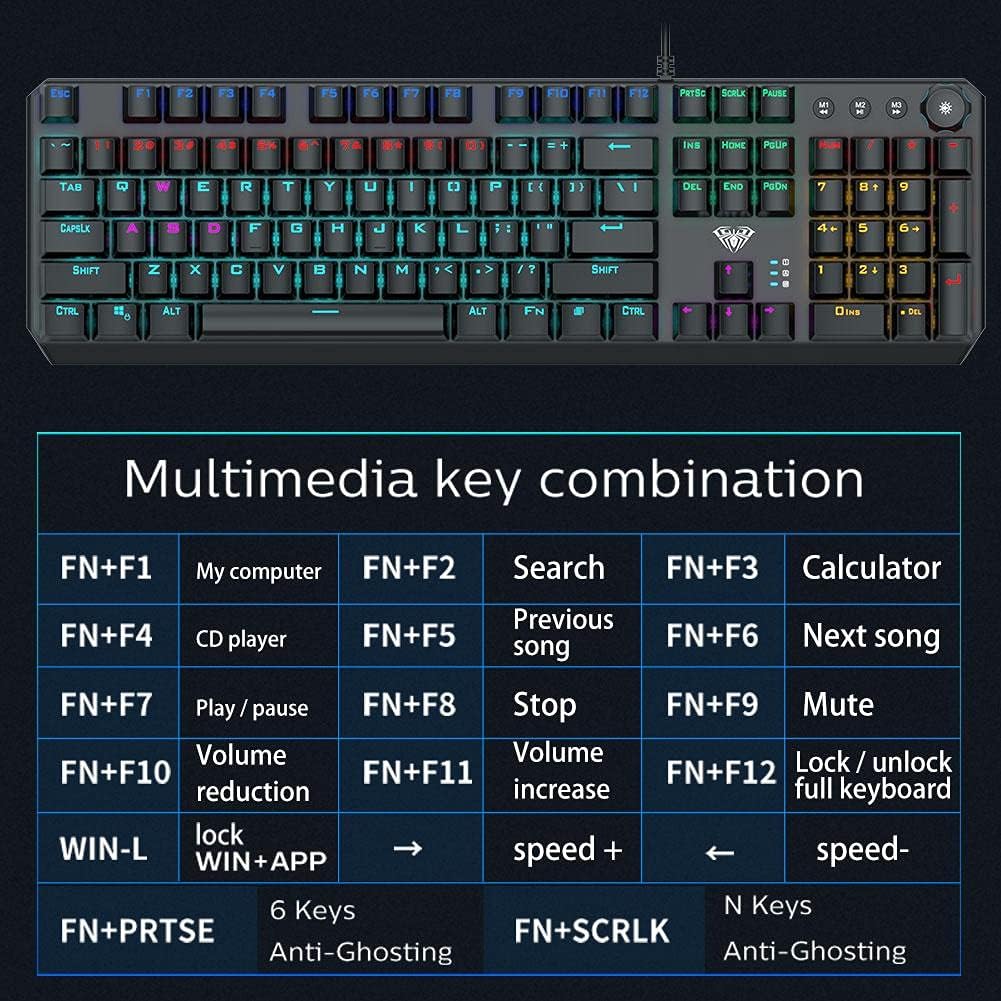
Image: A detailed table illustrating the multimedia key combinations available on the AULA F2066-II keyboard. This includes functions like volume control, media playback, and application shortcuts activated by pressing the FN key with specific function keys.
| 콤비네이션 | 기능 |
|---|---|
| FN + F1 | 내 컴퓨터 |
| FN + F2 | 검색 |
| FN + F3 | 계산자 |
| FN + F4 | CD 플레이어 |
| FN + F5 | 이전 노래 |
| FN + F6 | 다음 노래 |
| FN + F7 | 재생 / 일시 정지 |
| FN + F8 | 멈추다 |
| FN + F9 | 무음 |
| FN + F10 | 볼륨 감소 |
| FN + F11 | 볼륨 증가 |
| FN + F12 | 전체 키보드 잠금/잠금 해제 |
| WIN + L | Lock WIN + APP |
| FN + PRT SC | 6개 키 안티 고스팅 |
| FN + 스크롤 | N Keys Anti-Ghosting |
유지
Proper maintenance ensures the longevity and optimal performance of your AULA F2066-II keyboard.
- 청소: Regularly clean the keyboard with a soft, dry cloth. For deeper cleaning, use compressed air to remove dust and debris from between the keys. Avoid using harsh chemicals or abrasive materials.
- 유출: 액체를 쏟았을 경우 즉시 키보드를 컴퓨터에서 분리하십시오. 키보드를 뒤집어 액체를 빼내고 완전히 말린 후 다시 연결하십시오. 키보드가 젖은 상태에서는 절대 사용하지 마십시오.
- 저장: 장시간 사용하지 않을 경우 키보드를 직사광선과 극한의 온도를 피해 깨끗하고 건조한 곳에 보관하세요.
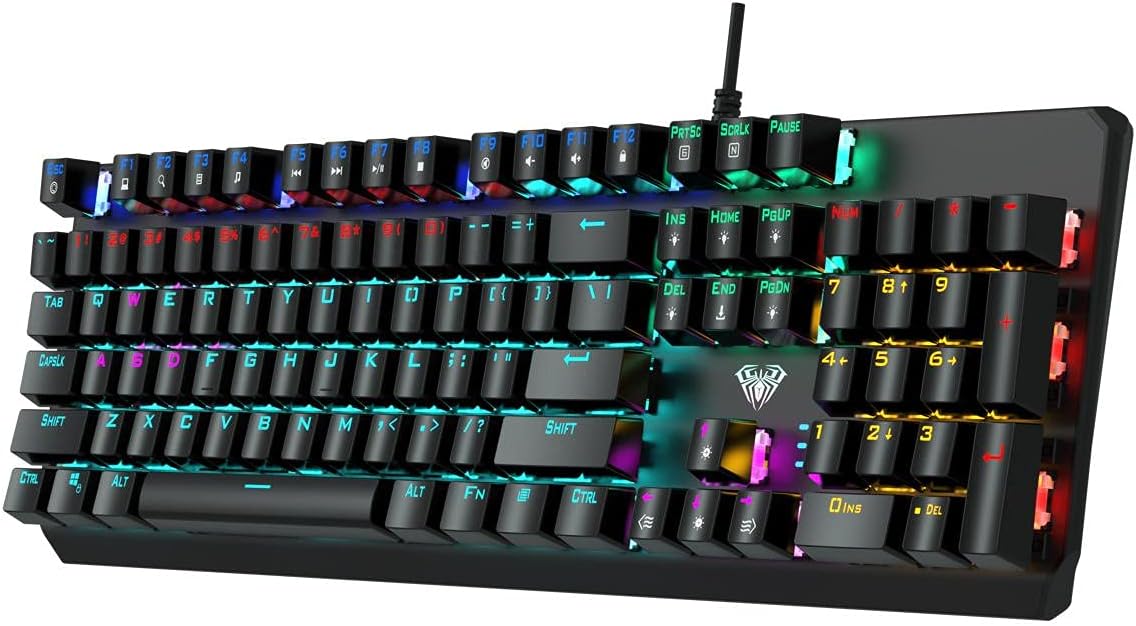
이미지: 위에서 아래로 view of the AULA F2066-II keyboard, highlighting the keycaps and their spacing. This perspective is useful for understanding how to clean between the keys.
문제 해결
If you encounter issues with your AULA F2066-II keyboard, refer to the following common solutions:
| 문제 | 해결책 |
|---|---|
| 키보드가 응답하지 않습니다. |
|
| 일부 키가 작동하지 않습니다. |
|
| Backlighting is not working. |
|
명세서
| 특징 | 세부 사항 |
|---|---|
| 상표 | 아울라 |
| 모델 번호 | F2066-II-Black-Panel |
| 연결 기술 | USB 유선 |
| 키보드 언어 | English & Arabic |
| 호환 장치 | PC, 노트북 |
| 색상 | 검은색 |
| 백라이트 색상 | Single Color (RGB effects are typically pre-set patterns, not customizable per key color) |
| 재료 | 플라스틱 |
| 치수(길이 x 너비 x 높이) | 49.7 x 40.7 x 5.3cm |
| 무게 | 960그램 |
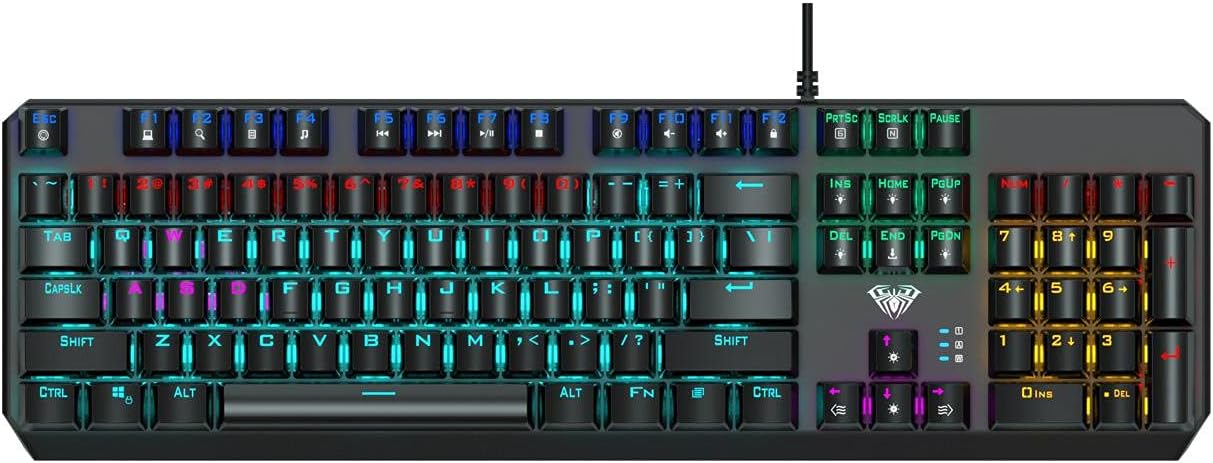
Image: The AULA F2066-II keyboard displayed alongside its retail packaging. This image provides a visual reference for the product and its box.
보증 및 지원
보증 정보 및 기술 지원에 대해서는 구매 시 동봉된 설명서를 참조하시거나 AULA 공식 웹사이트를 방문하십시오. web사이트. 보증 청구를 위해 구매 증빙 자료를 보관하세요.
온라인 리소스:
- AULA 공식 담당자 Web대지: www.aulagaming.com (Note: This is a generic placeholder URL as no specific support link was provided in the product data. Please verify the correct URL.)
- Product Support Page: Check the AULA website for a dedicated support page for model F2066-II.


