1. 서론
This manual provides essential information for setting up, operating, maintaining, and troubleshooting your HP EliteOne 800 G5 24-inch All-in-One Touchscreen PC. Please read this guide thoroughly before using your device to ensure proper functionality and longevity.

Figure 1: HP EliteOne 800 G5 All-in-One PC with included keyboard and mouse.
2. 패키지 내용
패키지에 모든 품목이 들어 있는지 확인하세요.
- HP EliteOne 800 G5 All-in-One PC
- HP USB 키보드
- HP USB Mouse
- 전원 코드
- 문서(이 매뉴얼, 안전 정보)
3. 제품 오버view
3.1 정면 View

그림 2: 전면 view of the HP EliteOne 800 G5, showing the 24-inch touchscreen display and integrated speakers.
- 23.8-inch FHD IPS WLED-backlit Touchscreen Display: Main interactive display area.
- 2 MP FHD Pop-up Web캠: Located at the top center, retracts when not in use.
- Integrated Dual Array Digital Microphone: For clear audio input during calls or recordings.
- Bang & Olufsen Speakers: Located below the screen for high-quality audio output.
3.2 측면 View (오른쪽)

그림 3: 오른쪽 view illustrating the optical disk drive and audio ports.
- Optical Disk Drive: CD/DVD 읽기 및 쓰기용.
- Disc drive eject button: To open the optical disk drive tray.
- Standard lock slot (10 mm): 보안 케이블용입니다.
- Universal Audio Jack with CTIA headset support: For connecting headsets with a microphone.
- 헤드폰 커넥터: 헤드폰 연결 용.
3.3 후면 View 및 포트
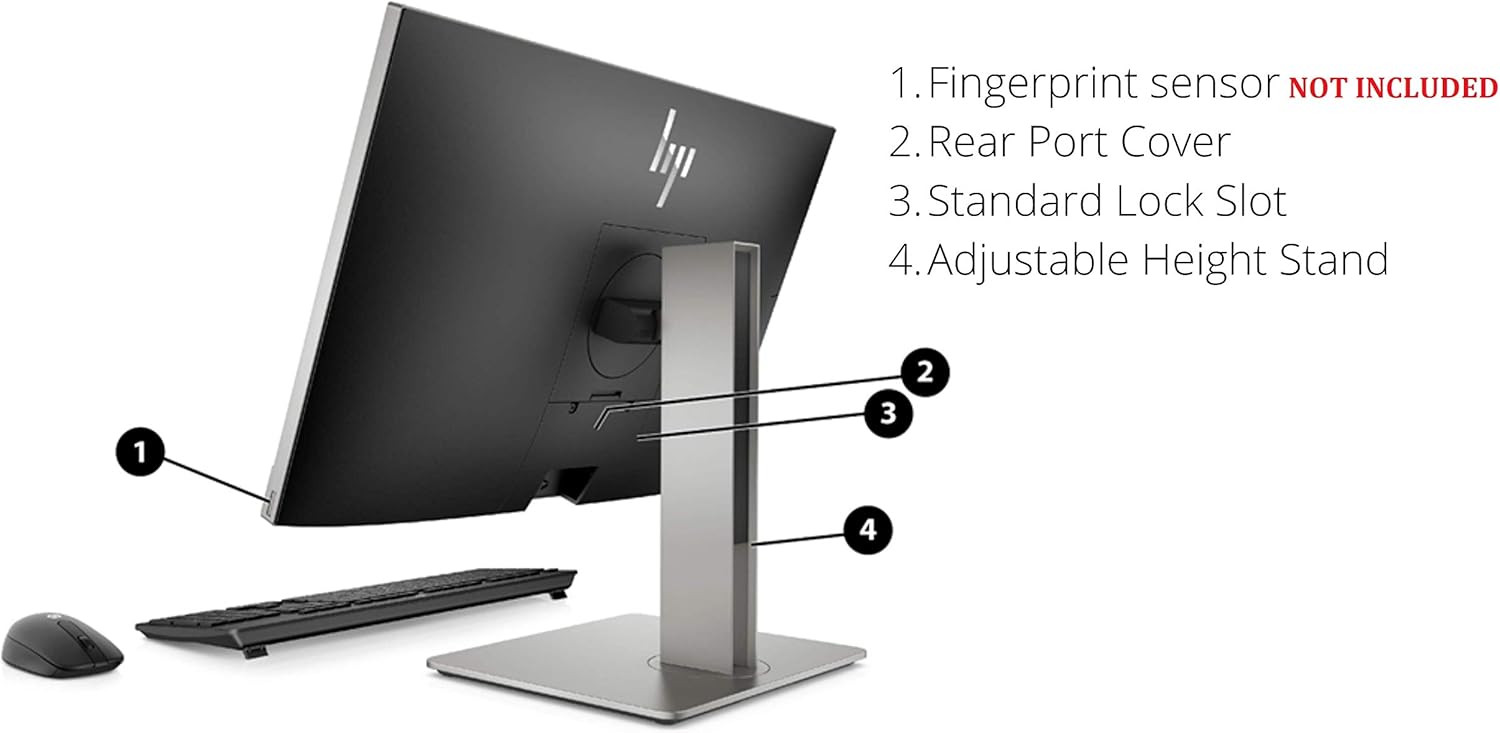
그림 4: 후면 상세도 view showing all available ports and connections.
- USB 3.1 Gen 2 Type-A port: High-speed USB connection.
- USB 3.1 Gen 2 Type-A port (charge support up to 5V/1.5A): High-speed USB with charging capability.
- Audio line-out connector: 외부 스피커 또는 오디오 시스템 연결용입니다.
- USB 3.1 Gen 1 Type-A ports (2): Standard USB connections.
- RJ-45 (network) jack: 유선 이더넷 연결용입니다.
- 전원 커넥터: 전원 코드를 연결합니다.
- USB 3.1 Gen 2 Type-A ports (2) wake capable: High-speed USB ports that can wake the system.
- Dual-Mode DisplayPort™ 1.2 (DP++): 외부 디스플레이를 연결하는 데 사용됩니다.
- HDMI 2.0a connector: 외부 디스플레이를 연결하는 데 사용됩니다.
- SD card reader 4.0 (NOT INCLUDED on all models): SD 메모리 카드를 읽기 위한 용도입니다.
- USB 3.1 Type-C™ Gen 2 port (charge support up to 5V/3A): Reversible USB-C port with charging capability.
- Dual-state power button: To power on/off or put the system to sleep.
- 확신하는 View Button (optional): Activates HP Sure View integrated privacy screen.

그림 5: 후면 view highlighting the adjustable height stand and other features.
- Fingerprint sensor (NOT INCLUDED on all models): 생체 인증을 위해서입니다.
- Rear Port Cover: Conceals and protects rear ports.
- Standard Lock Slot: 보안 케이블용입니다.
- 높이 조절 스탠드: Allows for ergonomic positioning of the display.
4. 설정
Follow these steps to set up your HP EliteOne 800 G5 PC:
- PC 압축 풀기: 포장에서 모든 구성 요소를 조심스럽게 제거합니다.
- PC 위치를 조정하세요: Place the All-in-One PC on a stable, flat surface. Ensure adequate ventilation around the device.
- 키보드와 마우스 연결: Plug the USB keyboard and mouse into any available USB Type-A ports on the rear of the PC.
- 전원 연결: Connect the power cord to the power connector on the rear of the PC, then plug the other end into a grounded electrical outlet.
- 네트워크에 연결(선택 사항): For a wired internet connection, connect an Ethernet cable from your router or modem to the RJ-45 (network) jack on the rear of the PC.
- 전원 켜기: Press the dual-state power button, located on the rear of the PC, to turn on the system.
- 초기 설정 : Follow the on-screen instructions to complete the Windows 10 Pro setup, including language, region, network connection (if not wired), and user account creation.
5. 사용 설명서
5.1 전원 관리
- 전원 켜기: Press the power button on the rear of the PC.
- 수면 모드 : Briefly press the power button or select 'Sleep' from the Windows Start menu.
- 종료: Windows 시작 메뉴에서 '시스템 종료'를 선택합니다.
- 다시 시작: Windows 시작 메뉴에서 '다시 시작'을 선택합니다.
5.2 터치스크린 사용
The 24-inch display supports multi-touch gestures. Common gestures include:
- 수도꼭지: 마우스 클릭과 동일합니다.
- 두 번 탭: 더블클릭과 동일한 동작입니다.
- 누르고 있으세요: 마우스 오른쪽 버튼을 클릭하는 것과 같습니다.
- 꼬집기/늘리기: 확대하거나 축소합니다.
- 강타: 콘텐츠를 스크롤하거나 탐색하세요.
5.3 Web캠 및 오디오
- Web캠: The 2 MP FHD pop-up webcam automatically extends when an application requires it (e.g., video calls). Gently push it down to retract when not in use for privacy.
- 마이크로폰: The integrated dual array digital microphone is active when the webcam is in use or when voice input is required.
- 스피커: The Bang & Olufsen speakers provide audio output. Volume can be adjusted via Windows settings or keyboard shortcuts.
5.4 Optical Disk Drive
To use the DVD+/-RW SM DL 9.5mm slim tray:
- Press the eject button on the right side of the PC.
- Place a CD or DVD onto the tray, ensuring it is seated correctly.
- Gently push the tray back into the PC until it clicks shut.
6. 유지관리
6.1 청소
- 화면: 부드럽고 털이 없는 천을 살짝 사용하세요.amp물이나 화면 세척액으로 닦아내세요. 화면에 직접 액체를 뿌리지 마세요.
- 섀시 : 부드럽고 마른 천으로 닦으십시오. 연마성 세제 사용은 피하십시오.
- 통풍: 과열을 방지하기 위해 통풍구에 먼지나 방해물이 없는지 확인하세요.
6.2 소프트웨어 업데이트
최적의 성능과 보안을 보장하려면 운영 체제와 드라이버를 정기적으로 업데이트하세요.
- Windows 업데이트: 이동하다 설정 > 업데이트 및 보안 > Windows 업데이트 업데이트를 확인하고 설치합니다.
- HP 지원 도우미: Use the pre-installed HP Support Assistant software to check for driver and firmware updates specific to your HP EliteOne PC.
7. 문제 해결
| 문제 | 가능한 원인 | 해결책 |
|---|---|---|
| PC 전원이 켜지지 않습니다 | 전원이 들어오지 않고 연결이 느슨함 | Check power cord connection to PC and outlet. Ensure outlet is functional. |
| 화면에 표시되지 않음 | PC in sleep mode, display settings issue | Press any key or move mouse to wake. If connected to external display, check display input source. |
| 터치스크린이 응답하지 않음 | 소프트웨어 오류, 화면 더러움 | Restart the PC. Clean the screen with a soft, lint-free cloth. |
| 스피커에서 소리가 나지 않습니다 | Volume muted, incorrect audio output device | Check volume levels in Windows. Ensure 'Speakers (Bang & Olufsen)' is selected as the default playback device. |
| Web카메라가 작동하지 않습니다 | Webcam retracted, privacy settings, driver issue | 보장하다 webcam is extended. Check Windows privacy settings for camera access. Update webcam drivers via HP Support Assistant. |
8. 사양
Key technical specifications for the HP EliteOne 800 G5 24-inch All-in-One PC:
| 특징 | 세부 사항 |
|---|---|
| 모델 번호 | 2D9S5UW#ABA |
| 표시하다 | 23.8" diagonal FHD IPS widescreen WLED-backlit touch screen (1920 x 1080) |
| 프로세서 | Intel Core i5-9500 (9M Cache, up to 4.40 GHz) |
| 제도법 | Intel UHD Graphics 630(통합) |
| 숫양 | 8GB DDR4-2666 SDRAM |
| 저장 | 256 GB M.2 2280 PCIe NVMe TLC SSD |
| 운영 체제 | 윈도우 10 프로 |
| Web캠 | 2 MP FHD pop-up web캠 |
| 오디오 | Bang & Olufsen Speakers, Integrated Dual Array Digital Microphone |
| 광학 드라이브 | DVD+/-RW SM DL 9.5mm slim tray |
| 포트(후면) | USB 3.1 Gen 2 Type-A (x3), USB 3.1 Gen 1 Type-A (x2), USB 3.1 Type-C Gen 2 (x1), DisplayPort 1.2 (x1), HDMI 2.0a (x1), RJ-45 (x1), Audio line-out (x1), Power connector (x1) |
| Ports (Side) | Universal Audio Jack (x1), Headphone connector (x1) |
| 치수(길이x너비x높이) | 18.4 x 7.1 x 21.2 인치 |
| 무게 | 19.24파운드 |
9. 보증 및 지원
Your HP EliteOne 800 G5 PC comes with a standard manufacturer's warranty. Please refer to the warranty card included in your package for specific terms and conditions, including coverage duration and service options.
기술 지원, 드라이버 다운로드 및 추가 제품 정보는 HP 공식 지원 웹사이트를 방문하십시오. web대지:
When contacting support, have your product model number (2D9S5UW#ABA) and serial number ready.