1. 서론
The FULAIM VL1 is a cost-effective UHF wireless microphone system designed for clear and reliable audio recording. This system is suitable for content creators, vloggers, and videographers using Android mobile phones, PCs, or laptops. It features simple plug-and-record operation, 16 selectable channels, and noise reduction technology to ensure high-quality sound capture.
2. 상자 안에 무엇이 들어있나요?
패키지에 모든 구성품이 들어 있는지 확인하세요.
- 1 x FULAIM VL1 Transmitter
- 1 x FULAIM VL1 Receiver (USB Type-C)
- 1 x 라발리에 마이크
- 1 x USB-C-USB-A 어댑터
- 1 x USB 충전 케이블
- 1 x 사용자 설명서

Image: Contents of the FULAIM VL1 Wireless Microphone System package, including transmitter, receiver, lavalier microphone, adapters, and cables.
3. 제품 오버view
The FULAIM VL1 system consists of a transmitter and a receiver, each with distinct features for optimal performance.
송신기 기능:
- 마이크 입력 포트
- 소음 감소 버튼
- 전원 버튼
- 디스플레이 화면
- 채널 선택 버튼
- 송신 안테나
- Charging input port (Micro USB)
- 작업 표시등
수신기 기능:
- Receiving antenna A
- 작동 표시등
- 연결 상태 표시기
- 기록 표시기
- Receiving antenna B
- USB Type-C connection plug
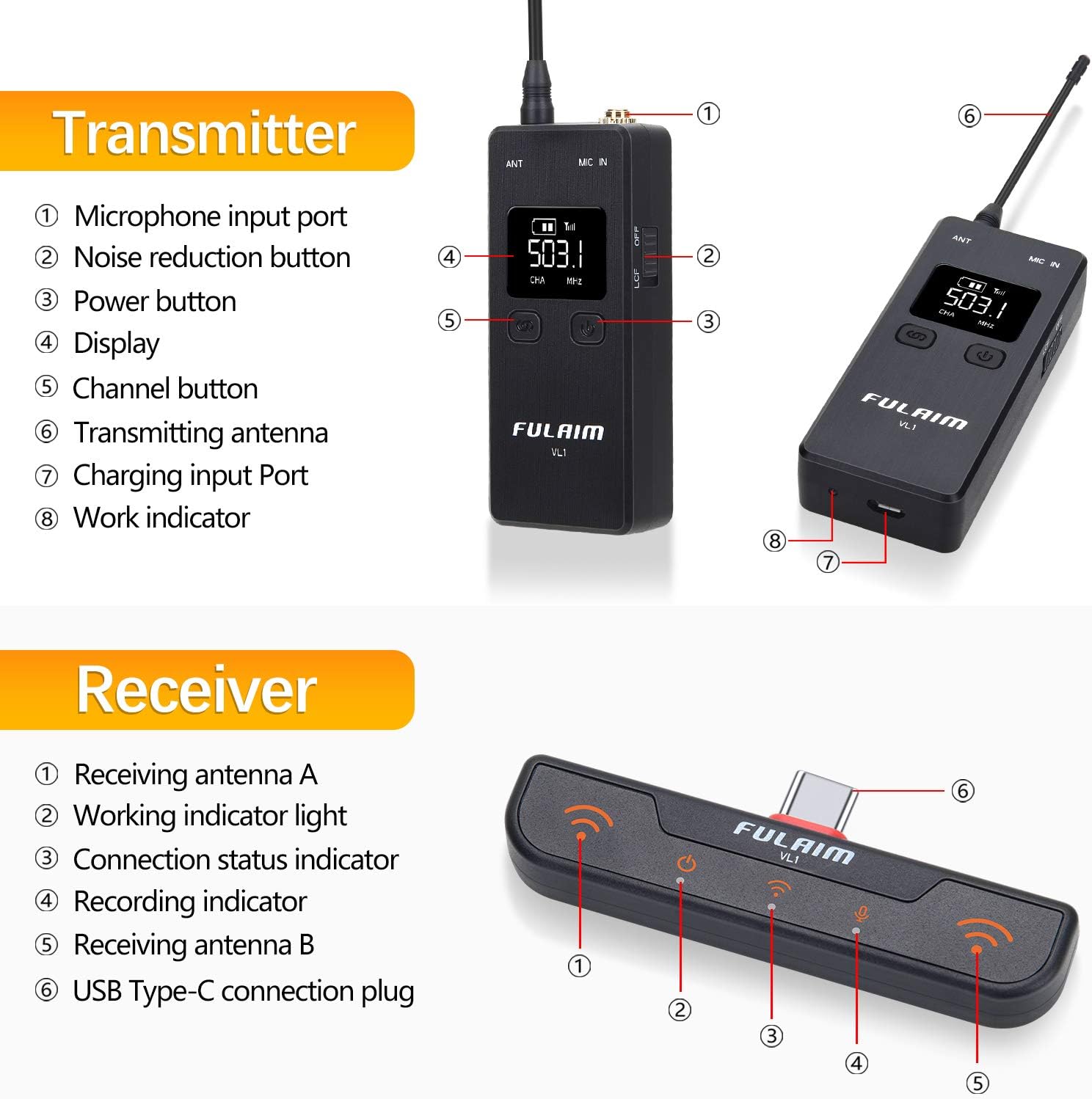
Image: Detailed diagram illustrating the various parts and controls of the FULAIM VL1 Transmitter and Receiver units.
4. 설정 가이드
4.1. 송신기 충전
Before initial use, fully charge the transmitter. Connect the provided USB charging cable to the Micro USB charging port on the transmitter and a USB power source. The internal lithium-ion polymer battery offers up to six hours of operation on a full charge.

Image: The FULAIM VL1 Transmitter being charged via a USB cable connected to a laptop. The receiver is shown connected to a smartphone.
4.2. Connecting to Android Mobile Phones
- Ensure your Android phone has a USB Type-C port.
- Plug the FULAIM VL1 receiver directly into the USB Type-C port of your smartphone. Ensure it is securely connected. You may need to remove your phone case for a proper fit.
- The receiver is powered directly by the phone and does not require separate charging.
- Turn on the FULAIM VL1 transmitter by pressing and holding the power button. The transmitter and receiver should automatically pair.
- Connect the lavalier microphone to the microphone input port on the transmitter.
- Open your recording application (e.g., camera app, voice recorder, or streaming app) and ensure the external microphone is selected as the audio input source in your phone's settings if necessary.

Image: Illustration showing the FULAIM VL1 receiver's compatibility with a range of USB-C Android smartphones from different brands.
4.3. PC/노트북 연결
- Use the provided USB-C to USB-A adapter. Connect the FULAIM VL1 receiver to the USB-C end of the adapter.
- Plug the USB-A end of the adapter into an available USB port on your PC or laptop.
- Turn on the FULAIM VL1 transmitter. The units should automatically pair.
- Connect the lavalier microphone to the microphone input port on the transmitter.
- On your computer, navigate to your sound settings (e.g., Windows Sound Settings or macOS System Preferences > Sound). Select the FULAIM VL1 as your default input device.
- Open your desired application (e.g., Zoom, OBS, Audacity) and confirm that the FULAIM VL1 is selected as the audio input.

Image: The FULAIM VL1 receiver connected to a laptop via a USB-C to USB-A adapter, demonstrating compatibility with PC and laptop systems.
4.4. Attaching the Lavalier Microphone
Clip the lavalier microphone to your clothing, approximately 6-8 inches (15-20 cm) below your chin, ensuring it is facing towards your mouth for optimal sound capture. Avoid placing it where it might rub against clothing or jewelry, which can cause unwanted noise.
5. 사용 설명서
5.1. 전원 켜기/끄기
To power on the transmitter, press and hold the power button until the display illuminates. To power off, press and hold the power button again until the display turns off. The receiver powers on automatically when connected to a device.
5.2. 채널 선택
The FULAIM VL1 system operates on 16 selectable UHF channels, organized into 4 groups with 4 channels each. If you experience interference, you can change the operating channel:
- On the transmitter, press the channel button (usually labeled 'CH' or similar) to cycle through available channels.
- The receiver will automatically synchronize with the transmitter's channel.
- Select a channel that provides clear audio without interference.
5.3. 소음 감소
The transmitter features a noise reduction function to minimize ambient background noise. To activate or deactivate this feature, press the dedicated noise reduction button on the transmitter. The display will indicate when noise reduction is active.

Image: A visual representation of audio waveforms before and after noise reduction, demonstrating the system's ability to clarify sound.
6. 유지관리
- 청소: Use a soft, dry cloth to clean the transmitter and receiver. Do not use liquid cleaners or solvents.
- 저장: 시스템은 직사광선과 극한의 온도를 피해 서늘하고 건조한 곳에 보관하세요.
- 배터리 관리 : For optimal battery life, avoid fully discharging the transmitter's battery frequently. If storing for extended periods, charge the battery to approximately 50% every few months.
- 안테나 : Handle the antennas with care to prevent bending or damage.
7. 문제 해결
| 문제 | 가능한 원인 | 해결책 |
|---|---|---|
| 소리가 나지 않거나 볼륨이 작음 |
|
|
| 간섭 또는 정적 소음 |
|
|
| Transmitter battery drains quickly |
|
|
| 기기에서 수신기를 인식하지 못했습니다. |
|
|
8. 사양
| 특징 | 사양 |
|---|---|
| 마이크 폼 팩터 | 라발리에 |
| 전원 | Battery Powered (Transmitter), USB-C (Receiver) |
| 채널 수 | 16(UHF) |
| 주파수 응답 | 최대 18kHz |
| 신호 대 잡음 비율 | 92데시벨 |
| 송신기 배터리 | 1 Lithium Polymer (included), 750mAh |
| Operating Time (Transmitter) | 최대 6-8시간 |
| 연결 기술 | USB |
| 커넥터 유형 | 3.5 mm Jack (for lavalier mic), USB Type-C (Receiver) |
| 호환 장치 | Laptop, Personal Computer, Smartphone (USB-C Android) |
| 극성 패턴 | 전방위 |
| 품목 무게 (송신기) | 8그램(0.282온스) |
| 모델 번호 | 1TX |
| 한국어: | 762409380212 |
9. 보증 및 지원
FULAIM products are designed for reliability and performance. This product is covered by a standard return policy. For specific warranty details, technical support, or service inquiries, please refer to the documentation included with your purchase or visit the official FULAIM store:


