1. 서론
This manual provides essential information for the installation, operation, and maintenance of your AMD Ryzen 7 5800X 8-core, 16-thread unlocked desktop processor. The AMD Ryzen 5000 Series processors are designed to deliver high performance for a wide range of computing tasks, from gaming to professional applications. Please read this manual thoroughly before proceeding with installation.
2. 제품 특징
- AMD's fastest 8 core processor for mainstream desktop, with 16 processing threads. OS Support-Windows 10 64-Bit Edition
- Can deliver elite 100+ FPS performance in the world's most popular games
- Cooler not included, high-performance cooler recommended
- 4.7 GHz Max Boost, unlocked for overclocking, 36 MB of cache, DDR-3200 support
- For the advanced Socket AM4 platform, can support PCIe 4.0 on X570 and B550 motherboards
3. 설정 및 설치
Proper installation is crucial for optimal performance and longevity of your processor. Always handle the processor by its edges to avoid touching the gold contacts or pins.
3.1. 설치 전 체크리스트
- 호환 가능한 마더보드: Ensure your motherboard has an AM4 socket and supports AMD Ryzen 5000 series processors. A BIOS update may be required for older motherboards. Refer to your motherboard manufacturer's website for compatibility and BIOS update instructions.
- CPU 쿨러: The AMD Ryzen 7 5800X does not include a stock cooler. A high-performance CPU cooler (air or liquid) is highly recommended to manage thermal output.
- 열전도 페이스트: If your cooler does not come with pre-applied thermal paste, ensure you have a high-quality thermal compound.
- 도구: Phillips head screwdriver, anti-static wrist strap (recommended).
3.2. 설치 단계
- 마더보드 준비: With the motherboard installed in your PC case (or on a test bench), locate the AM4 CPU socket. Lift the small metal lever on the side of the socket to open it.
- Unpack Processor: Carefully remove the AMD Ryzen 7 5800X processor from its packaging. Avoid touching the pins on the underside.
- 정렬 프로세서: Locate the small golden triangle or arrow on one corner of the processor. Align this with the corresponding triangle/arrow on the CPU socket on the motherboard. Gently lower the processor straight down into the socket. Do not force it. If it does not seat easily, re-check alignment.
- 보안 프로세서: Once the processor is fully seated, push the metal lever back down and under the retention tab to lock the processor into place.
- 열 페이스트 적용: If your CPU cooler does not have pre-applied thermal paste, apply a small pea-sized amount of thermal paste to the center of the CPU's integrated heat spreader (IHS).
- CPU 쿨러 설치: Follow the instructions provided with your specific CPU cooler to mount it securely onto the motherboard and CPU. Ensure proper contact between the cooler's base and the CPU's IHS.
- 쿨러 팬 연결: Connect the CPU cooler's fan cable(s) to the designated CPU_FAN header(s) on your motherboard.

Figure 1: AMD Ryzen 7 5800X Processor Retail Box (Front View)

Figure 2: AMD Ryzen 7 5800X Processor Retail Box (Rear View with Installation Note)

Figure 3: Close-up of the AMD Ryzen 7 5800X Processor Chip

그림 4: 상세 view of the AMD Ryzen 7 5800X Processor showing model number
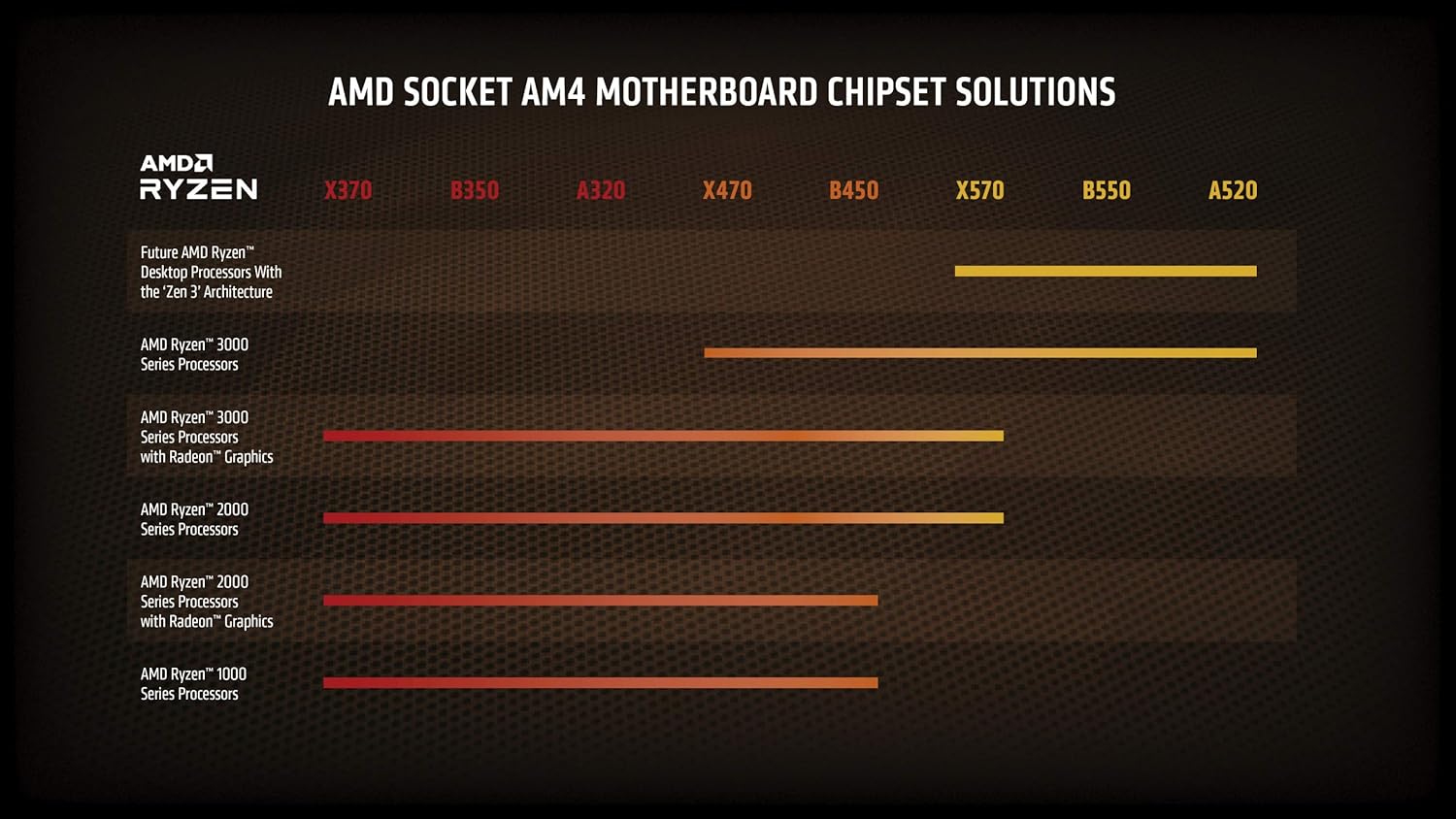
Figure 5: AMD Socket AM4 Motherboard Chipset Solutions Compatibility Chart
4. 운영 지침
Once installed, your AMD Ryzen 7 5800X processor will operate automatically with your system. For optimal performance and stability, consider the following:
- BIOS/UEFI 설정: Ensure your motherboard's BIOS/UEFI is updated to the latest version to fully support the processor and enable features like Precision Boost Overdrive (PBO) or XMP/DOCP for memory.
- 드라이버 설치: AMD 웹사이트에서 최신 칩셋 드라이버를 설치하세요. website for your motherboard's chipset. This ensures proper communication and performance.
- 냉각: Maintain adequate airflow within your PC case. Monitor CPU temperatures using system monitoring software to ensure they remain within safe operating limits, especially under heavy loads.
- 오버클러킹: The Ryzen 7 5800X is an unlocked processor, allowing for manual overclocking. However, overclocking should only be attempted by experienced users and requires careful monitoring of temperatures and stability. Incorrect overclocking can lead to system instability or damage.
5. 유지관리
Regular maintenance helps ensure the longevity and consistent performance of your system and processor.
- 먼지 제거: Periodically clean dust from your CPU cooler fins and case fans using compressed air. Dust accumulation can impede airflow and lead to higher temperatures.
- 열 페이스트 재도포: If you notice consistently high temperatures after extended use (several years), consider reapplying thermal paste. This involves carefully removing the CPU cooler, cleaning off old paste, and applying new paste.
- 소프트웨어 업데이트: Keep your operating system, motherboard BIOS/UEFI, and AMD chipset drivers updated to benefit from performance improvements and bug fixes.
6. 문제 해결
If you encounter issues with your AMD Ryzen 7 5800X processor, consider the following common troubleshooting steps:
6.1. System Not Booting / No Display
- 연결 확인: Ensure all power cables (24-pin ATX, 8-pin CPU) are securely connected to the motherboard and power supply. Verify the CPU cooler fan is connected to the CPU_FAN header.
- CPU 좌석 배치: Re-seat the CPU in its socket, ensuring it is properly aligned and the retention lever is locked.
- 숫양: Ensure RAM modules are correctly seated in their slots. Try booting with only one RAM stick.
- BIOS 업데이트: If you upgraded from an older CPU, your motherboard may require a BIOS update to support the Ryzen 5000 series. Refer to your motherboard manual for instructions on how to update the BIOS, often without a compatible CPU installed (e.g., BIOS Flashback).
6.2. 과열 문제
- 쿨러 설치: Verify the CPU cooler is properly installed and making good contact with the CPU. Ensure mounting pressure is even.
- 열전도 페이스트: 써멀 페이스트가 올바르고 충분히 도포되었는지 확인하십시오. 필요한 경우 다시 도포하십시오.
- 공기 흐름: Ensure your PC case has sufficient airflow with properly configured intake and exhaust fans. Clean any dust buildup.
- 팬 속도: Check CPU cooler fan speeds in BIOS/UEFI or monitoring software. Ensure they are responding to temperature changes.
6.3. Performance Issues / Instability
- 운전자: AMD 공식 웹사이트에서 최신 AMD 칩셋 드라이버를 설치하세요. web대지.
- BIOS 설정 : Reset BIOS to default settings. If overclocking, revert to stock speeds to check for stability.
- 전원 공급 장치: 전원 공급 장치(PSU)에 충분한 와트가 있는지 확인하십시오.tage and stable power delivery for your entire system, including the CPU and GPU.
- 운영 체제: 운영 체제가 최신 상태인지 확인하세요.
7. 사양
| 특징 | 사양 |
|---|---|
| 프로세서 | 4.7 GHz amd_ryzen_7 |
| 상표 | (주)에스디에이치디(주) |
| 시리즈 | AMD 라이젠 7 5800X |
| 품목 모델 번호 | AMD 라이젠 7 5800X |
| 품목 무게 | 2.8 온스 |
| 제품 치수 | 1.57 x 1.57 x 0.1 인치 |
| 품목 치수 LxWxH | 1.57 x 1.57 x 0.1 인치 |
| 색상 | 검은색 |
| 프로세서 브랜드 | (주)에스디에이치디(주) |
| 프로세서 수 | 8 |
| 컴퓨터 메모리 유형 | DIMM |
| 배터리 | 리튬 이온 배터리 1개 필요. |
| 제조업체 | (주)에스디에이치디(주) |
| 언어 | 영어 |
| ASIN | B0815XFSGK |
| 원산지 | 중국 |
| 첫 번째 이용 가능 날짜 | 5년 2020월 XNUMX일 |
| 고객 재views | 4.8 5점 만점에 4.8점 21,829개의 평가 5점 만점에 4.8점 |
| 베스트셀러 순위 | #5 in Computer CPU Processors |
| CPU 제조업체 | (주)에스디에이치디(주) |
| CPU 모델 | AMD 라이젠 7 |
| CPU 속도 | 4.7GHz |
| CPU 소켓 | 소켓 AM4 |
8. 보증 및 지원
Your AMD Ryzen 7 5800X processor is covered by a manufacturer's warranty. For specific warranty terms and conditions, please refer to the official AMD website or the documentation included with your purchase. For technical support, driver downloads, and additional resources, visit the official AMD support page.
AMD 지원 Web대지: www.amd.com/support


