1. 제품 오버view
The FULAIM MX11 is a professional-grade UHF wireless lavalier microphone system designed for high-quality audio recording with smartphones, DSLR cameras, and other compatible devices. It features a compact and portable design, real-time audio monitoring, and anti-interference capabilities, making it ideal for interviews, vlogging, video recording, and live broadcasts.

The system includes a receiver unit (RX) and a transmitter unit (TX), both equipped with essential controls and ports for seamless operation. The omnidirectional lavalier microphone captures clear audio, and the system's UHF technology ensures stable signal transmission over a significant range.
2. 상자 안에 무엇이 들어있나요?
포장을 개봉하신 후 다음 구성품이 모두 있는지 확인하십시오.
- 1 x FULAIM MX11 Receiver (RX)
- 1 x FULAIM MX11 Transmitter (TX)
- 1 x Omnidirectional Lavalier Microphone with clip and foam pop shield
- 1 x 미니 삼각대
- 1 x Phone Holder (integrated with receiver mount)
- 1 x 3.5mm TRS-TRRS Audio Cable (for smartphones)
- 1 x 3.5mm TRS-TRS Audio Cable (for cameras)
- 마이크로 USB 충전 케이블 2개
- 맞춤형 보관 케이스 1개
- 1 x 사용자 매뉴얼(이 문서)

3. 설정 가이드
Follow these steps to set up your FULAIM MX11 Wireless Lavalier Microphone System:
3.1 기기 충전
Both the receiver and transmitter units are powered by built-in Lithium-Ion batteries. Before first use, fully charge both units using the provided Micro USB cables and a standard 5V USB power adapter (not included).
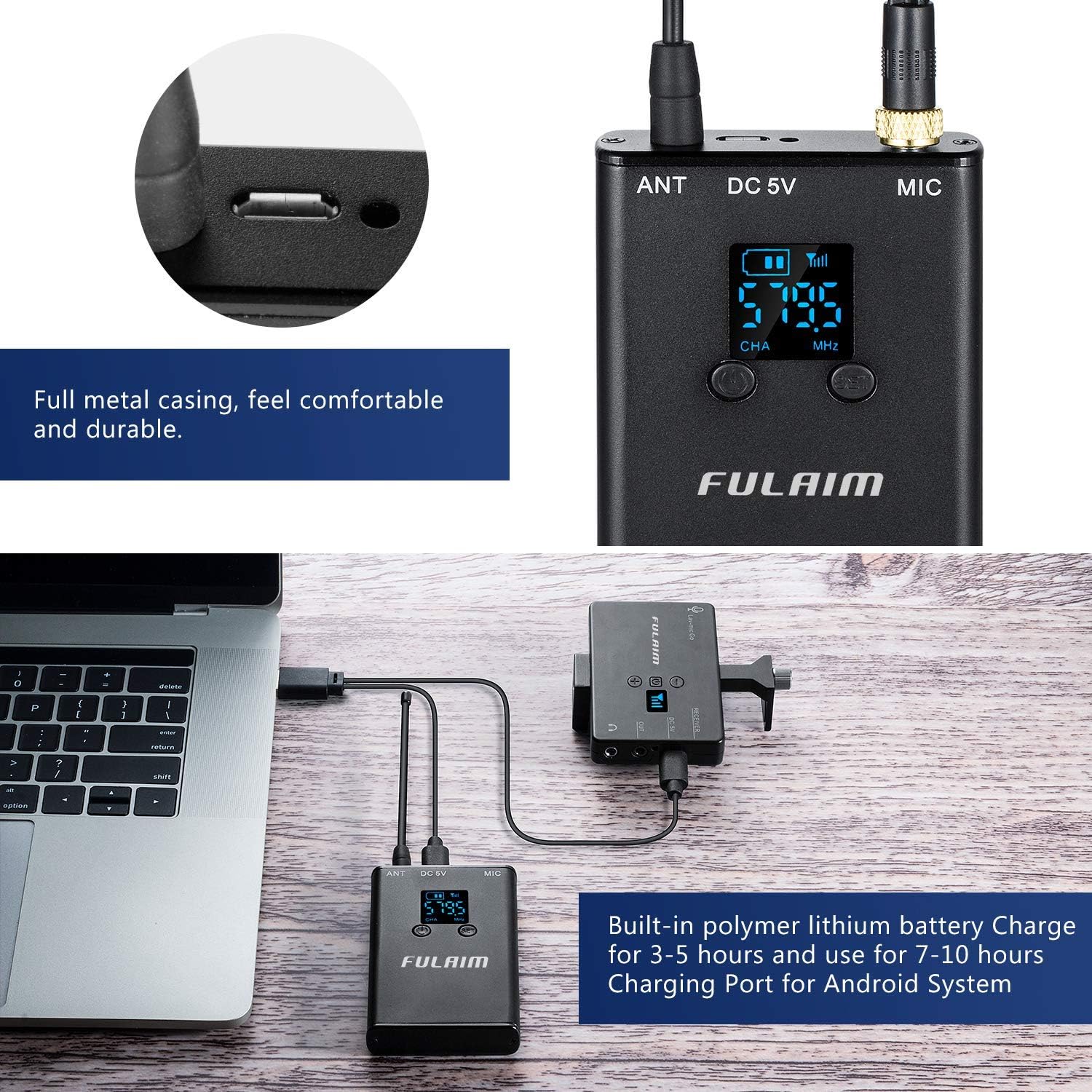
A full charge typically takes 3-5 hours and provides 7-10 hours of runtime.
3.2 Assembling the Receiver with Phone/Camera
- Install Phone/Camera: Secure your smartphone or DSLR camera into the phone holder/cold shoe mount on the receiver unit. Ensure it is firmly seated.
- 삼각대 부착 (선택 사항): Screw the mini tripod onto the 1/4" threaded hole at the bottom of the receiver unit for stable placement.
- 오디오 케이블 연결:
- For Smartphones: Use the 3.5mm TRS-TRRS audio cable. Plug the TRS end into the receiver's "OUT" jack and the TRRS end into your smartphone's 3.5mm audio jack. Note: For iPhone 7 or above, you may need an original Lightning to 3.5mm jack adapter (not included).
- For DSLR Cameras: Use the 3.5mm TRS-TRS audio cable. Plug one end into the receiver's "OUT" jack and the other end into your camera's microphone input jack.
- Connect Lavalier Microphone to Transmitter: Plug the lavalier microphone's 3.5mm jack into the "MIC" input socket on the transmitter unit. Ensure the connection is secure.
4. 사용 설명서
4.1 전원 켜기/끄기
- 전원을 켜려면: Press and hold the Power/CH Setting Button on both the receiver and transmitter until the LCD display lights up.
- 전원을 끄려면: Press and hold the Power/CH Setting Button on both units until the LCD display turns off.
The blue working indicator light on the receiver will illuminate when it successfully pairs with the transmitter.
4.2 페어링 및 채널 선택
The FULAIM MX11 system typically pairs automatically upon powering on. If pairing does not occur or if you experience interference, you can manually change the channel:
- Press the CH Setting Button on the transmitter to cycle through the available UHF channels. The receiver will automatically synchronize with the transmitter's selected channel.
- The system offers 20 selectable UHF channels (Frequency Range: 570-579.5MHz and 580-589.5MHz) to minimize interference.

4.3 볼륨 조절
Use the Volume "+" and "-" buttons on the receiver to adjust the audio output level to your recording device. Monitor the audio through headphones for optimal sound levels.
4.4 실시간 오디오 모니터링
The receiver unit features a 3.5mm real-time monitor headset jack. Plug in your headphones to monitor the audio being captured by the lavalier microphone in real-time. This allows you to detect any abnormalities in the audio signal and adjust settings as needed.

4.5 Wearing the Microphone and Transmitter
- Attach the lavalier microphone to your clothing, typically near the collar or lapel, using the integrated clip.
- The transmitter unit can be clipped to a belt, pocket, or waistband using its sturdy metal clip. Ensure the antenna is not obstructed for optimal signal transmission.
The foam pop shield on the lavalier microphone helps to soften vocal plosives and reduce wind noise, ensuring clearer audio recordings.

5. 유지관리
- 청소: Use a soft, dry cloth to clean the exterior of the receiver and transmitter units. Do not use liquid cleaners or solvents.
- 저장: When not in use, store the system in its customized storage case to protect it from dust, moisture, and physical damage.
- 배터리 관리 : To prolong battery life, avoid fully discharging the units frequently. Recharge them regularly, especially if storing for extended periods.
- 케이블 관리 : Handle all cables with care. Avoid sharp bends or excessive pulling to prevent internal wire damage.
6. 문제 해결
| 문제 | 가능한 원인 | 해결책 |
|---|---|---|
| 오디오 출력이 없습니다 |
|
|
| Poor audio quality / Interference |
|
|
| Low recording volume |
|
|
| 배터리 수명이 짧음 |
|
|

7. 사양
| 특징 | 세부 사항 |
|---|---|
| 모델 | MX11 |
| 상표 | 풀라임 |
| 마이크 폼 팩터 | 마이크 시스템 (라발리에) |
| 극성 패턴 | 전방위 |
| 연결 기술 | 무선(UHF) |
| 커넥터 유형 | 3.5 mm 잭 |
| 채널 수 | 20 |
| UHF 주파수 범위 | 570-579.5MHz, 580-589.5MHz (as per video) |
| 오디오 주파수 응답 | 0.03kHz - 18kHz |
| 신호 대 잡음비 (SNR) | 96데시벨 |
| 최대 작동 거리 | 196 feet (60 meters) in open outdoor areas |
| 전원 | 배터리 구동식 (내장 리튬 이온 배터리) |
| 충전 포트 | 마이크로 USB 5V |
| 배터리 런타임 | 최대 7-10시간 |
| 재료 | Metal (casing) |
| 호환 장치 | Camera, Smartphone (iOS & Android), PC, Tablets |
| 품목 무게 | 3.52온스(0.1킬로그램) |
| 작동 온도 | -20°C ~ +55°C |
| 보관 온도 | -20°C ~ +55°C |

8. 보증 및 지원
For warranty information, technical support, or service inquiries, please refer to the contact details provided on the FULAIM official web사이트 또는 제품 포장에 손상이 있을 수 있습니다. 보증 청구를 위해 구매 증빙 자료로 구매 영수증을 보관하세요.
You can also visit the FULAIM Store on Amazon for more product information and support: FULAIM Amazon Store.


