1. 서론
This manual provides detailed instructions for the safe and efficient operation of your SANSUI SMC-300BT Vacuum Tube Hybrid Amplifier CD Stereo System. Please read this manual thoroughly before using the product and retain it for future reference.

Figure 1.1: SANSUI SMC-300BT CD Stereo System. This image displays the main unit with its central display and control knobs, flanked by two matching speakers.
2. 제품 특징
The SANSUI SMC-300BT system integrates advanced audio technologies to deliver a superior listening experience:
- 잡종 Ampliifier 디자인: Features a vacuum tube in the pre-amplifier's first stage, generating even-order harmonic distortion for a rich, warm, and natural sound. The second stage incorporates a digital power amplifier for dynamic, delicate, and powerful audio reproduction.
- Advanced Speaker Cone Technology: Utilizes a unique "double papermaking method" inspired by traditional Japanese paper. The speaker cone surface uses "Mitsumata" Japanese paper for clear mid-high frequencies, while the reverse side employs highly elastic pulp material for rich low frequencies.
- 다중 재생 옵션: Supports CD, CD-R, CD-RW, CD-DA, MP3, and WMA formats.
- 무선 연결 : Built-in Bluetooth for seamless streaming from compatible devices.
- FM 튜너 : Integrated FM tuner (76-108MHz) for radio reception.
- USB 재생 : USB port for playing audio files USB 저장 장치에서.
- 외부 오디오 입력: Two auxiliary input systems for connecting external audio sources.
- 출력 전력: 60 watts total audio output.
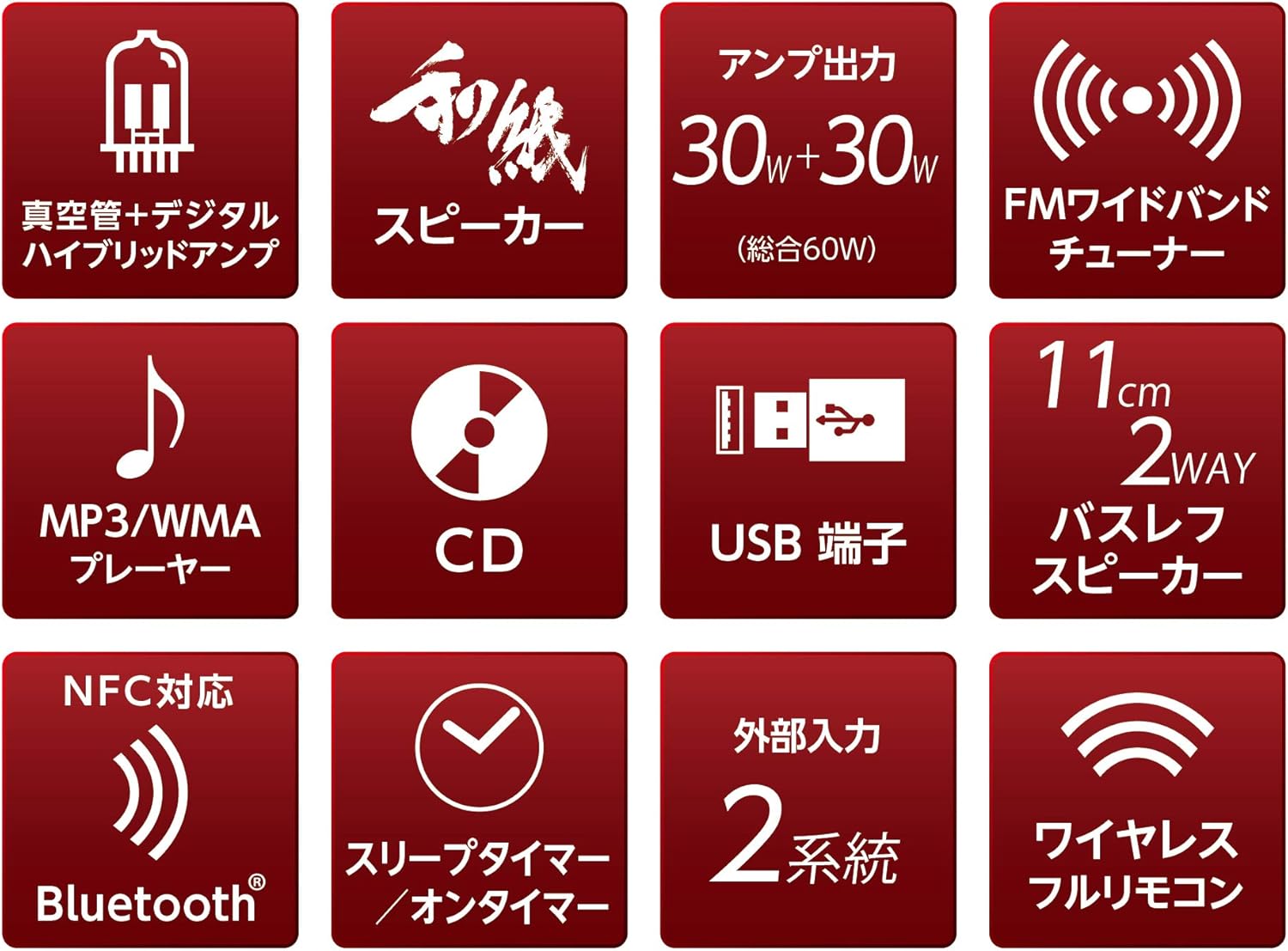
Figure 2.1: Feature icons illustrating the system's capabilities including vacuum tube hybrid amp, W-RPM speakers, 60W output, FM tuner, MP3/WMA player, CD, USB, Bluetooth, sleep/on timer, and external inputs.
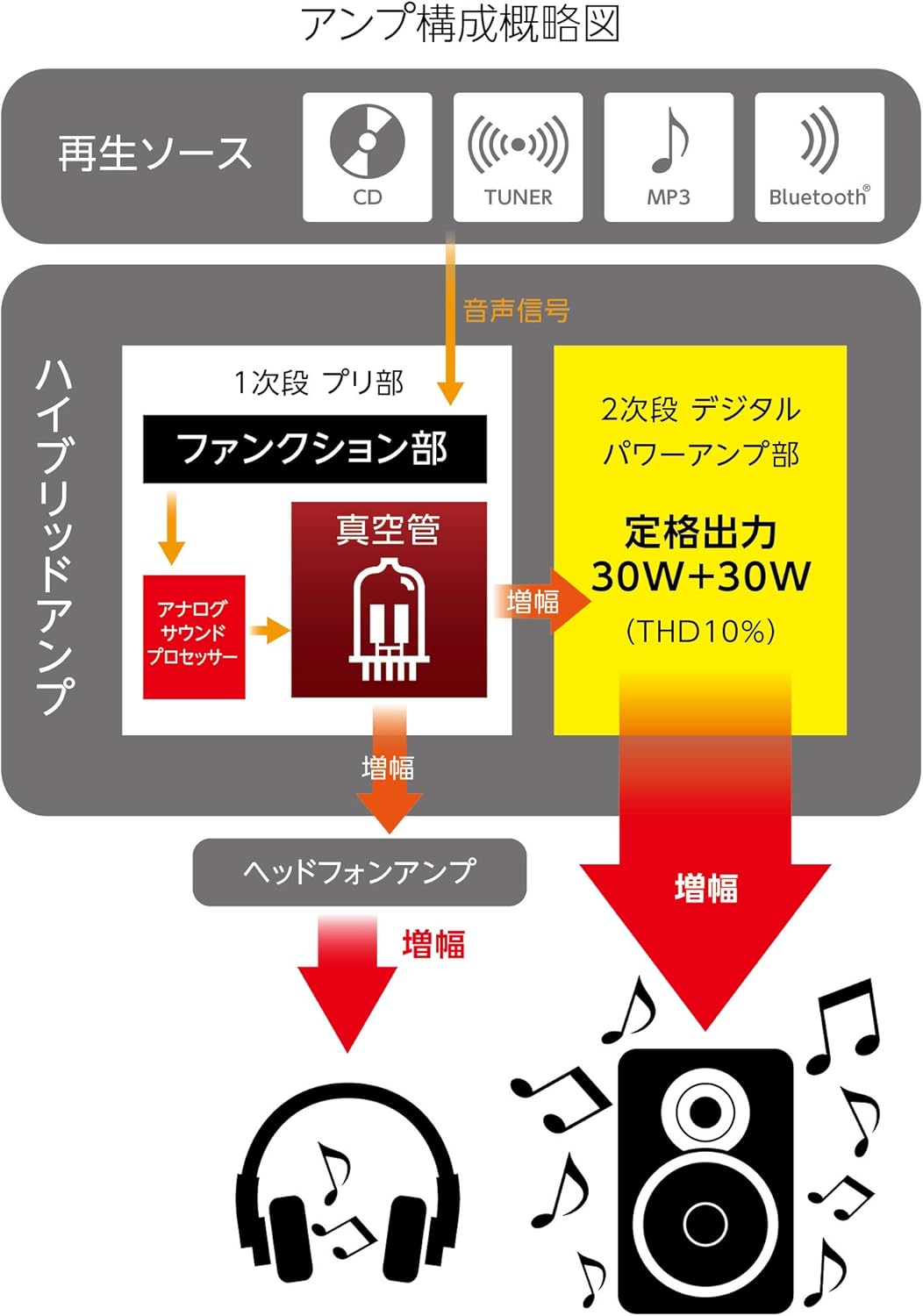
그림 2.2: Amplifier Block Diagram. This diagram shows the signal flow from playback sources (CD, Tuner, MP3, Bluetooth) through the 1st stag전자 사전amplifier with vacuum tubes and analog sound processor, then to the 2nd stage digital power amplifier (30W+30W), and also to the headphone amp리퍼.
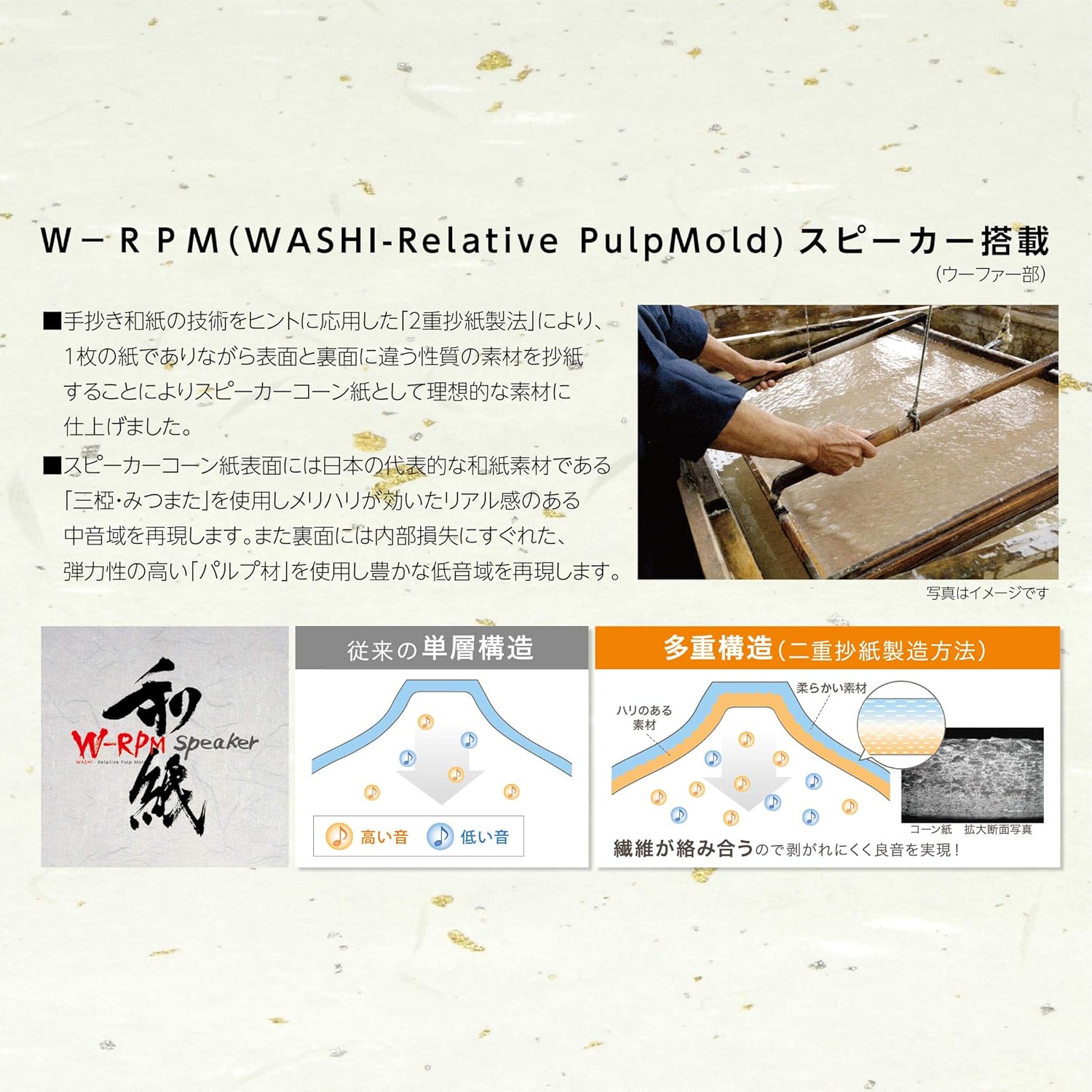
Figure 2.3: W-RPM (WASHI-Relative PulpMold) Speaker Technology. This image illustrates the double papermaking method for speaker cones, showing how different materials are used on the front (Mitsumata for mid-highs) and back (elastic pulp for lows) to achieve optimal sound reproduction, contrasting it with conventional single-layer structures.
3. 구성 요소 및 제어
3.1 패키지 내용
패키지에 모든 품목이 들어 있는지 확인하세요.
- Main Unit (Amplifier/CD Player)
- 스피커(x2)
- 원격 제어
- 전원 코드
- FM 안테나
- 사용자 설명서
3.2 전면 패널 컨트롤
The front panel provides access to essential functions:

Figure 3.1: Front Panel Controls. This close-up shows the central display indicating "NO DISC", the vacuum tubes glowing, and control buttons for Audio In, Power, Play/Pause, Skip, Bass, and Treble, along with Source and Volume knobs.
- SOURCE Knob: Selects the input source (CD, Tuner, Bluetooth, USB, Audio In).
- 볼륨 노브: 전체 볼륨 레벨을 조정합니다.
- AUDIO IN Button: Selects the external audio input.
- 전원 버튼: 장치를 켜거나 끕니다.
- 재생/일시정지 버튼: Controls CD playback.
- SKIP Buttons (◀◀ / ▶▶): Skips tracks on CD or tunes radio stations.
- 베이스 버튼: 저음 레벨을 조절합니다.
- TREBLE Button: 고음 레벨을 조절합니다.
- 표시하다: Shows current status, track information, or radio frequency.
3.3 후면 패널 연결
The rear panel houses all necessary connection ports:
- 스피커 터미널 : 왼쪽과 오른쪽 스피커를 연결합니다.
- FM 안테나 입력: 제공된 FM 안테나를 연결하세요.
- 오디오 입력(AUX IN): Connect external audio devices using RCA cables.
- 전원 입력: AC 전원코드를 연결합니다.
4. 설정
4.1 풀기
Carefully remove all components from the packaging. Retain the packaging materials for potential future transport or service.
4.2 스피커 연결
- Connect the speaker wires from the left speaker to the LEFT speaker terminals on the main unit. Ensure correct polarity (+ to + and - to -).
- Connect the speaker wires from the right speaker to the RIGHT speaker terminals on the main unit. Ensure correct polarity.
4.3 FM 안테나 연결
Connect the supplied FM antenna to the FM antenna input on the rear panel. Extend the antenna for optimal reception.
4.4 전원 연결
Connect the AC power cord to the power input on the rear panel of the main unit, then plug the other end into a wall outlet.
5. 사용 설명서
5.1 기본 작업
- 를 누르세요 힘 button to turn on the unit. Allow approximately 10 seconds for the vacuum tubes to warm up before sound is produced.
- 회전하다 원천 knob to select your desired input source (CD, Tuner, Bluetooth, USB, Audio In).
- 를 사용하여 볼륨을 조정합니다. 용량 손잡이.
5.2 CD 재생
- Select "CD" as the source using the 원천 손잡이.
- Insert a CD into the disc tray.
- 를 누르세요 재생/일시정지 버튼을 눌러 재생을 시작합니다.
- 사용하세요 건너뛰다 트랙 간 이동을 위한 버튼(◀◀ / ▶▶)입니다.
5.3 FM Tuner Operation
- Select "TUNER" as the source using the 원천 손잡이.
- 사용하세요 건너뛰다 buttons (◀◀ / ▶▶) to manually tune to radio stations or perform an auto-scan (refer to remote control instructions for auto-scan).
5.4 블루투스 페어링 및 재생
- Select "Bluetooth" as the source using the 원천 knob. The display will indicate pairing mode.
- On your Bluetooth-enabled device, search for available devices and select "SMC-300BT".
- Once paired, you can play audio from your device through the stereo system.
5.5 USB 재생
- Insert a USB storage device containing MP3/WMA fileUSB 포트에 s.
- Select "USB" as the source using the 원천 손잡이.
- 시스템이 호환되는 오디오를 자동으로 재생하기 시작합니다. fileNS. 사용 재생/일시정지 그리고 건너뛰다 재생을 제어하는 버튼.
5.6 External Audio Input
- Connect your external audio device (e.g., smartphone, media player) to the 오디오 입력 port on the front panel or the AUX IN ports on the rear panel.
- Select "Audio In" as the source using the 오디오 입력 버튼 또는 원천 손잡이.
- 연결된 외부 장치에서 재생을 제어합니다.
6. 유지관리
6.1 청소
- 청소하기 전에 항상 전원 코드를 분리하십시오.
- Use a soft, dry cloth to wipe the exterior surfaces of the main unit and speakers.
- Do not use liquid cleaners, abrasive pads, or chemical solvents, as these may damage the finish.
6.2 보관
장기간 보관할 경우, 전원을 분리하고 직사광선과 극한의 온도를 피해 서늘하고 건조한 곳에 보관하세요.
7. 문제 해결
일반적인 문제와 해결 방법은 아래 표를 참조하세요.
| 문제 | 가능한 원인 | 해결책 |
|---|---|---|
| 전원이 없습니다 | 전원 코드가 연결되지 않았습니다. 전원 콘센트에 결함이 있습니다. | 전원 코드가 제대로 꽂혀 있는지 확인하십시오. 다른 콘센트에 꽂아 보십시오. |
| 소리가 나지 않습니다 | Volume too low; Incorrect source selected; Speaker wires loose; Vacuum tubes not warmed up | Increase volume; Select correct source; Check speaker connections; Wait 10 seconds after power on. |
| CD가 재생되지 않습니다 | Disc inserted incorrectly; Disc scratched/dirty; Incorrect format | Insert disc correctly; Clean or replace disc; Ensure disc is CD-DA, MP3, or WMA. |
| 블루투스가 연결되지 않습니다 | Unit not in pairing mode; Device too far; Device already paired with another unit | Select Bluetooth source to enter pairing mode; Move device closer; Disconnect from other devices. |
| FM 수신 불량 | Antenna not extended; Interference | Extend and reposition the FM antenna; Move unit away from other electronic devices. |
이러한 해결 방법을 시도한 후에도 문제가 지속되면 고객 지원팀에 문의하세요.
8. 사양
Technical specifications for the SANSUI SMC-300BT:
| 특징 | 사양 |
|---|---|
| 상표 | 산스이 |
| 모델 번호 | SMC-300BT |
| 색상 | 갈색 |
| 오디오 출력 | 60와트(총) |
| 튜너 유형 | FM(76~108MHz) |
| 지원되는 오디오 형식 | CD, CD-R, CD-RW, CD-DA, MP3, WMA |
| 연결성 | Bluetooth, USB, 2x External Audio Input |
| 스피커 유형 | 스테레오 재생 |
| 전원 | 코드식 전기 |
| 제품 치수(W x D x H) | 57cm x 25cm x 25cm |
| 품목 무게 | 7kg |
| 벽걸이 호환 | 예 |
| 배터리 포함/필수 | 아니요 |
9. 보증 및 지원
9.1 보증 정보
This product is covered by a manufacturer's warranty. Please refer to the warranty card included in your package for specific terms, conditions, and duration. Keep your proof of purchase for warranty claims.
9.2 고객 지원
For technical assistance, service, or inquiries regarding your SANSUI SMC-300BT, please contact your local SANSUI authorized dealer or customer service center. Contact details can typically be found on the SANSUI official web사이트나 보증 카드에 적혀 있습니다.


